
In this article
If your website gets inbound interest, you have one job: turn that interest into a conversation before the visitor closes the tab. The tools that do that work fall into four camps: click-to-call, callback widget, live chat, and the newer AI voice-first widget. Same goal, very different conversion rates.
Quick answer: Click-to-call, callback widgets, and live chat all try to convert website visitors, but they win in different situations. Click-to-call is best on mobile when the visitor is ready to dial now; a callback widget is best for capturing warm leads who can’t talk right that second; live chat is best for FAQ deflection and self-serve support. The highest-converting option for the buying moment is an AI voice-first widget, which combines instant calling, 24/7 callbacks, and 50+ languages so no high-intent visitor slips away. The reason speed matters this much: according to Harvard Business Review research, companies that reach a web lead within an hour are nearly 7× more likely to qualify it than those that wait even an hour longer.
This is a buyer’s guide. No fluff, no unsupported numbers, no fake testimonials. Just where each tool wins, where each tool leaks leads, and how to pick. Talk to TalkWithLead’s AI voice agent yourself if you want to feel the difference before you read on.
TL;DR — which one converts more, in 60 seconds
- Click-to-call wins when the visitor is already on mobile and already ready to call. Loses everyone else.
- Callback widget wins when the visitor will accept a phone call but not initiate one. Loses visitors who want answers now.
- Live chat wins for self-serve product questions, FAQ deflection, and visitors who prefer typing. Loses high-intent buyers who want to talk.
- AI voice-first widget (TalkWithLead) removes the “type into a box” or “wait for a callback” friction that stalls the other formats. The AI voice agent picks up immediately, in the visitor’s language, in a voice that actually sounds human. Hear it live.
The four tools, plain English
1. Click-to-call
A button on your site that, when clicked from a mobile device, opens the phone dialer with your number. Cheap, simple. On desktop it does almost nothing — most desktops aren’t set up to make calls. And the visitor still has to do the call: dial, wait through your IVR, leave a voicemail if you’re busy.
2. Callback widget
A widget that asks the visitor for a phone number and triggers a callback in seconds. Better than click-to-call on desktop. Better than live chat for high-intent buyers. Still has one assumption: that a human on your team is free to take the call right now.
3. Live chat
A chat window that lets the visitor type questions and get typed answers. Excellent for self-service product questions, FAQ deflection, and account lookups. Terrible at high-intent service inquiries because the visitor has to read prompts, type, wait, read, type. Most chat funnels see the same drop-off pattern: the prospect starts typing, then realizes they’d rather just talk to someone, then closes the tab.
4. AI voice-first widget (TalkWithLead)
A widget that lets the visitor click once and immediately have a real spoken conversation with an AI voice agent — no form, no typing, no waiting. It sounds human. It handles 50+ languages out of the box. It qualifies the lead, books the next step, and also covers unlimited long-distance, so a prospect anywhere in the world can call you without thinking about the cost. If a human takes over, the AI hands off cleanly. If no human is available, the AI books the callback in a calendar slot the visitor confirms on the spot.
That last difference is why the AI voice-first widget is the format that keeps high-intent visitors moving: it removes the “next step” friction that loses them in the other formats.
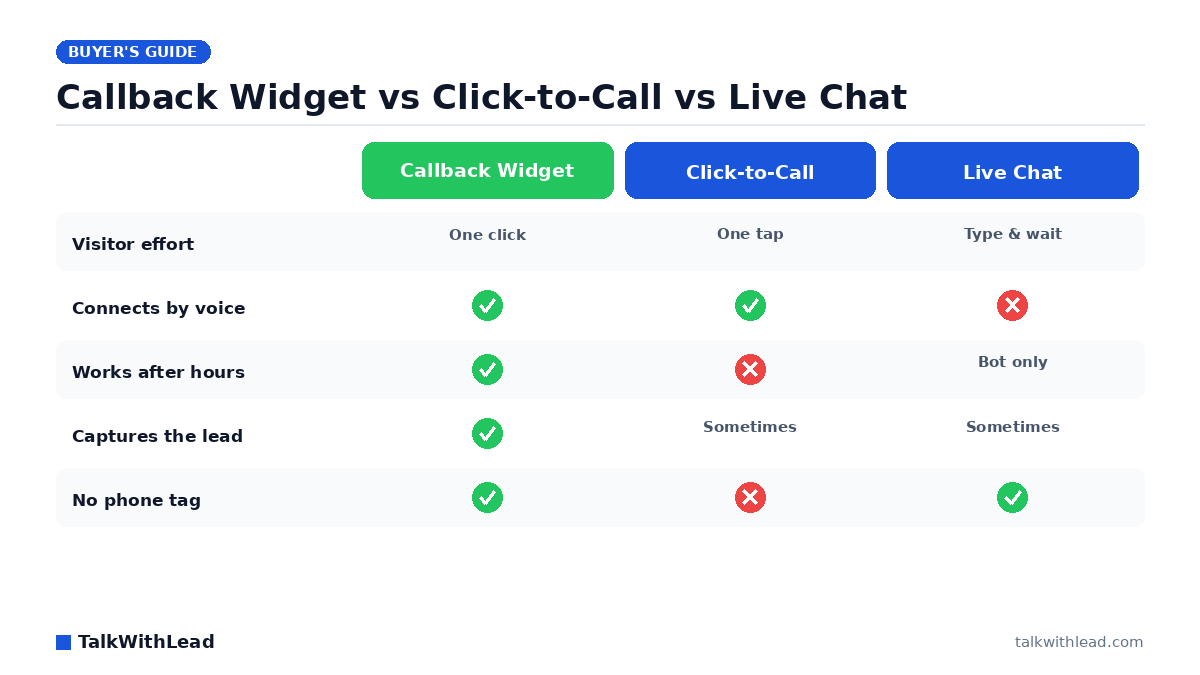
Side-by-side comparison
| Dimension | Click-to-call | Callback widget | Live chat | AI voice-first (TalkWithLead) |
|---|---|---|---|---|
| Visitor effort | Click + dial + listen to ring | Click + type phone number | Click + read + type each turn | Click + talk |
| Works on desktop | Poor | Yes | Yes | Yes |
| First response time | Depends on you picking up | Seconds to minutes | Seconds (bot) or minutes (human) | Instant — AI picks up immediately |
| Works after hours | No (your phone is closed) | Only if you have on-call coverage | Only if staffed; otherwise a bot | Yes — AI voice agent + scheduled callback |
| Multilingual | Depends on your team | Depends on your team | Translation plugins; clunky | 50+ languages, native |
| Long-distance cost to visitor | Visitor pays | You pay (small) | None (typed) | None — unlimited long-distance covered |
| Best for | Mobile + simple call routing | Visitors who’ll accept a callback | FAQ deflection + self-serve | High-intent conversion at the moment of interest |
| Hands off to a human | It IS the human | Yes, when a human is free | Yes, when a human is free | Yes — AI qualifies first, then routes |
Once you see the table side by side, the question stops being “which legacy tool?” and starts being “do I want the upgrade or not?” If you’d like to compare the AI voice-first option against your current setup on your own pricing page, start a free TalkWithLead trial and run it in production.
Where each one wins
Click-to-call wins on a mobile checkout
If your buyer is already on a phone and already decided they want to call, a tap-to-dial button on a “contact” page is the right answer. It’s a finisher, not a converter.
Callback widget wins for warm leads who are at work
A prospect researching at their desk who doesn’t want to make a call right now will happily request a callback for “in the next 15 minutes.” It’s faster than a form and friendlier than an inbound IVR. Speed still wins the race, though: Velocify research analyzing 3.5 million leads found that calling a lead within one minute makes them 391% more likely to convert — which is exactly why an instant, automated callback beats a human getting to it 15 minutes later.
Live chat wins for SaaS support and FAQ deflection
If your top use case is “does the product integrate with X?” or “where do I find my invoice?”, a chat box is great. A buyer in research mode with a typing-friendly question will take the chat. They’ll close the tab if they’re trying to book a tour or get an emergency tech out.
AI voice-first widget wins the high-intent conversion moment
This is the moment that decides quarterly numbers. A visitor on a real-estate listing page at 9 PM Saturday. A homeowner with a leaking water heater on a Sunday. A buyer on your pricing page who clicked “talk to sales” expecting an answer in the next 60 seconds. In every one of those cases, the AI voice-first widget converts more leads because it removes the part where the visitor has to wait or work for the conversation.
Where each one loses leads
- Click-to-call loses everyone on desktop, everyone with anxiety about phone IVRs, and every after-hours visitor.
- Callback widget loses the visitor who wants an answer in the next minute, not in the next 15.
- Live chat loses the visitor who came to talk, not to type. It also loses non-English speakers stuck with weak translation widgets and international visitors who would have been on the phone with a competitor before your live chat agent typed “Hi there, how can I help?”.
- AI voice-first widget loses very little — it can still hand off to a human for nuanced sales conversations, and the AI agent answers the simple cases on its own.
The AI-voice-first upgrade
If you’ve been running click-to-call, a callback widget, or live chat on your site and you’ve watched the conversion rate plateau, the upgrade you’re looking for isn’t a new chat skin. It’s a different category. TalkWithLead’s widget answers the visitor’s first question in seconds, in their language, in a voice that doesn’t sound like a robot. A human-sounding voice keeps the conversation feeling natural — far less friction than typing into a bot.
For the cases that need a human, the AI hands off cleanly with all the context already captured. For the cases that don’t, the AI books the next step and you don’t pay anybody to take a 30-second qualifying call.
By industry — quick fits
- Real estate: AI voice-first widget on every listing page. The Saturday-tour moment is the entire game. (See our deep dive on speed-to-lead.)
- Home services: AI voice-first on the homepage and the booking page. Sunday emergency calls go to whichever shop’s widget picks up first.
- Mortgage: AI voice-first on rate pages. Rate-shoppers compare three lenders in one sitting and close with whoever calls back fastest.
- SaaS sales pages: live chat for self-serve product questions; AI voice-first on the demo-request and pricing pages.
- Local businesses: AI voice-first widget — multilingual is a huge win in any city with a real immigrant population, and unlimited long-distance opens you up to traveling customers.
- Lawyers, dentists, clinics: AI voice-first works here too, with extra care for compliance and recording disclosure. Talk to your own counsel before turning recording on; don’t let any AI conversation drift into giving legal, medical, or financial advice.
For a primer on why one channel beats the other for serious buyers, see our companion piece AI Voice Agent vs Chatbot: Which One Books More Calls?
Cost vs revenue (representative example)
Numbers are illustrative — not a verified customer result. Picture a service business with 300 inbound web/phone leads per month and an 8% close rate at $1,500 average ticket. That’s about 24 closed jobs and $36,000 in revenue.
Now imagine the AI voice-first widget catches even 25% more of the inbound moments — visitors who would have bounced from a chat box, abandoned a callback queue, or never tried calling from another country because of the toll. A 25% lift on those 24 closed jobs is 6 extra jobs at $1,500, or $9,000 a month — over $100,000 a year. We can’t promise that lift for any specific business and we won’t pretend to. But the framing is honest: an AI voice agent that catches conversations the legacy widgets miss almost always pays for itself before quarter-end.
Want the cost side before the revenue side? See TalkWithLead pricing. Then run the math.
How to decide in 10 minutes
- What is the highest-value conversion on your site — phone call, demo booked, or chat-resolved support ticket?
- Where does most of your inbound interest land — mobile, desktop, or both?
- What share of your prospects are international or speak a primary language other than English?
- What happens to your inbound inquiries between 5 PM and 9 AM, on weekends, and during peak call volume?
- Which feels more like a real conversation to your buyer — typing, leaving a number for a callback, dialing your IVR, or being answered by a voice in seconds?
If your honest answers say “phone call / both / yes / it leaks / a voice in seconds,” the AI voice-first widget is the move.
The bottom line: which tool to pick
Best for: Use click-to-call for mobile “ready to dial” moments, a callback widget to capture warm leads who are busy, and live chat for support and FAQ deflection. For the highest-intent conversion moment — and to cover nights, weekends, languages, and international leads in one tool — an AI voice-first widget is the best fit.
Not the best fit for: An AI voice-first widget is more than you need for a pure low-traffic FAQ page; plain live chat or click-to-call may suffice there. Most sites can run more than one of these together.
One line: Click-to-call = mobile dial-now; callback widget = warm-lead capture; live chat = support; AI voice-first = win the high-intent conversion. Start a free TalkWithLead signup to test the voice-first option in your own pipeline.
FAQ
Is a callback widget better than live chat?
For high-intent service buyers, yes — they prefer a phone call to typing. For self-serve product questions, live chat is fine. An AI voice-first widget covers both cases.
Can I run more than one of these on my site?
Yes. Many TalkWithLead customers keep a typed chat for product-page questions and use the AI voice-first widget on conversion pages (demo request, pricing, contact, key landing pages). The two are complementary.
What if my prospect speaks a different language?
The AI voice agent handles 50+ languages out of the box. It detects the prospect’s preferred language and answers in it — without you needing to staff a multilingual team.
What about international leads and toll costs?
TalkWithLead covers unlimited long-distance, so a prospect calling from anywhere in the world doesn’t worry about toll. Removing that “do I want to pay long-distance” moment removes the abandonment that legacy click-to-call setups suffer.
Does the AI voice sound robotic?
Modern AI voice is extremely human-sounding. TalkWithLead’s voice was tuned to feel like a person, handle interruptions, and switch languages cleanly. Try the Live Demo and judge for yourself.
How fast can a callback actually happen?
With TalkWithLead, typically within seconds of the visitor clicking the widget. If the AI voice option is enabled, the conversation starts immediately — no callback wait at all.
What’s the simplest place to start?
Install the AI voice-first widget on your two highest-conversion pages — usually your homepage and your demo/pricing page. Watch what happens to your booked-call rate over the next two weeks. Free signup is here.
Which converts better, a callback widget or click-to-call?
It depends on the visitor. Click-to-call wins when someone is on mobile and ready to dial immediately; a callback widget wins for desktop or busy visitors who want you to call them. An AI voice-first widget covers both moments plus after-hours, which is why it tends to capture more total leads.
Do I have to choose just one of these tools?
No. Many sites run more than one — for example click-to-call on mobile plus an AI voice-first widget for the high-intent buying moment. The goal is to never leave a ready-to-talk visitor without an instant path to a conversation.
What happens to leads that come in after business hours?
With staffed live chat or a manual callback, after-hours leads usually wait until morning — by which point many have contacted a competitor. An AI voice-first widget answers and calls back automatically 24/7, so nights and weekends stop being a dead zone.
Where can I see TalkWithLead in action?
The Live Demo page lets you talk to the AI voice agent right now. For a guided walkthrough, the same page books a 15-minute call. Pricing is here if you want the cost first.
Let’s Turn More Website Visitors Into Sales Conversations
TalkWithLead is the AI voice-first lead-conversion platform behind hundreds of high-intent business websites. See it on your own number in a 15-minute live demo, or spin one up free and have it running before lunch.