
In this article
- What does an AI receptionist actually do for a law firm?
- Best AI receptionist for law firms: the options compared
- Why speed decides which firm signs the case
- How much does an AI receptionist cost for a law firm?
- Why chatbots and forms lose legal intake
- How to evaluate an AI receptionist for your firm in one week
- Where an AI receptionist fits alongside your existing staff
- FAQ
A prospective client with a car accident, a DUI, or a termination letter does not fill out a form and wait. They call three firms in ten minutes and hire whoever picks up. That single behavior is why choosing an ai receptionist for law firms best for client intake is now a caseload decision, not an office-admin decision.
Short answer: the best AI receptionist for law firm client intake is one that answers by voice within seconds of a website visit or missed call, works nights and weekends, qualifies the matter type and conflicts basics, and books the consult on the calendar. AI voice agents like TalkWithLead do this; chatbots, contact forms, and per-minute answering services either delay the conversation or price it by the minute.
What does an AI receptionist actually do for a law firm?
An AI receptionist answers the phone or the website the moment a prospective client shows intent. It greets them, asks what happened, captures name, number, jurisdiction, and matter type, screens out the obvious non-fits, and either books a consult or hands a warm caller to an attorney. The good ones sound like a person, not a phone tree — they interrupt gracefully, handle a rambling story, and repeat a phone number back correctly.
For intake specifically, three jobs matter more than everything else on the feature list: answer fast, keep the person talking, and get the appointment on the calendar. A tool that logs a transcript but loses the caller has failed intake, no matter how clean the dashboard looks. That is the lens used to compare every option below, and it is the same lens applied in our broader look at law firm intake automation and after-hours cases.
Best AI receptionist for law firms: the options compared
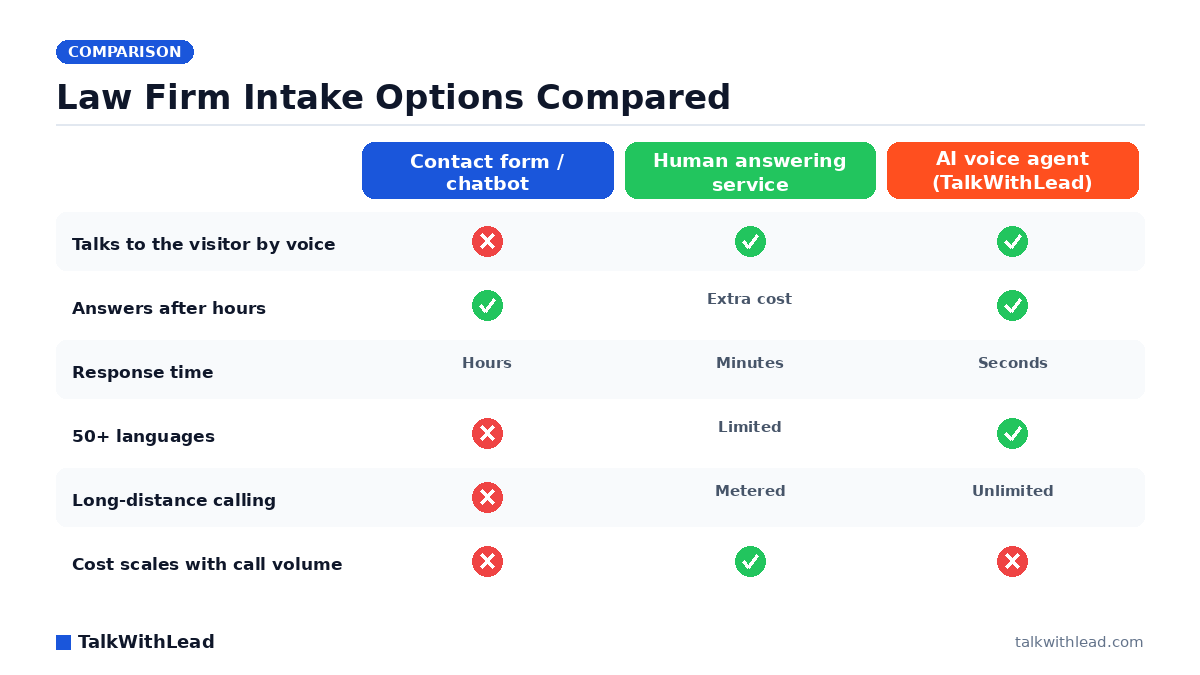
Four categories compete for legal intake budget: AI voice agents, human virtual receptionist services, website chatbots, and plain contact forms. They are not variations of the same product — they behave completely differently at 9pm on a Saturday.
| Option | Channel | Typical response time | After-hours | Languages | Pricing model | Best intake use |
|---|---|---|---|---|---|---|
| AI voice agent (TalkWithLead) | Voice, from the website + instant callback | Seconds | Always on | 50+ | Flat subscription, unlimited long distance | Website visitors and missed calls that must become phone conversations now |
| Human virtual receptionist (Smith.ai-style) | Voice, forwarded calls | Minutes | Often a paid add-on | Usually English + Spanish | Per minute or per call | Firms wanting a human voice and willing to meter cost |
| Website chatbot | Text | Instant text, slow human handoff | Bot only | Varies | Seat or conversation based | Simple FAQ deflection, not urgent matters |
| Contact form | Text, one direction | Whenever staff reads it | None | One | Free | Low-urgency inquiries and document requests |
| In-house receptionist | Voice | Seconds while staffed | No | One or two | Salary | Business-hours reception plus firm operations |
Best for: small and mid-size firms — personal injury, family, criminal defense, immigration, employment — whose website already gets traffic and whose intake gap is nights, weekends, overflow, and non-English callers.
Not the right fit if: your practice is appellate, transactional, or referral-driven with a handful of inbound inquiries a month that a paralegal already answers on the first ring. Automating five calls a month does not pay for itself, and you would be buying coverage you do not need.
Why speed decides which firm signs the case
Legal intake is a race, and the finish line is early. The MIT Lead Response Management study found you are about 21× more likely to qualify a lead contacted within 5 minutes than one contacted at 30 minutes. That gap is brutal for firms whose intake process is “the form emails the office manager, who calls back Monday.”
The phone side is no kinder. According to a 411 Locals study of 85 small businesses across 58 industries, only 37.8% of incoming calls were answered by a live person — meaning roughly 6 out of 10 calls went unattended. Apply that pattern to a firm running paid search for “car accident lawyer near me” and you are paying for clicks whose calls nobody picks up.
An AI voice agent attacks both numbers at once. The visitor never leaves your site to dial: they tap the widget, and a human-sounding voice is talking to them before the tab closes. If they do call and nobody is free, an instant callback fires within seconds. Our deeper breakdown of how fast you should call a new lead covers the response curve in detail.
How much does an AI receptionist cost for a law firm?
Legal intake coverage generally lands in one of three cost shapes: salary (an in-house receptionist, the highest fixed cost), metered (human answering services billing per minute or per call, which punishes a good marketing month), and flat subscription (AI voice agents, where a busy week costs the same as a quiet one). TalkWithLead sits in the third bucket, and long-distance calling is unlimited, so an out-of-state caller does not add a line item. Current tiers are on the pricing page.
Illustrative ROI math — assumptions stated, not a customer result. Imagine a firm that gets 120 inbound website and phone inquiries a month and, between after-hours gaps and overflow, never connects with 30 of them. Assume a conservative 8% of connected consults sign, and assume an average matter value of $4,000. Recovering even half of those 30 missed conversations — 15 conversations, at 8%, is roughly 1.2 signed matters — is about $4,800 a month in new fee revenue in this example. Against a flat monthly subscription, one signed matter typically covers a year of coverage. Plug your own numbers into the free missed-call revenue calculator instead of trusting anyone’s averages, including ours.
If you want the full cost-vs-value argument for legal specifically, we wrote it up separately in is an AI receptionist worth it for a law firm.
Why chatbots and forms lose legal intake
Chat looks like the safe modern choice. It is also the slowest possible channel for someone who was rear-ended two hours ago. Text intake asks an anxious person to type their story on a phone screen, one thumb at a time, while a bot asks for their email address. Picture a site where most visitors never make it past the third question — that is the realistic failure mode, and it is invisible in your analytics because a bounce looks identical to a lost case.
Voice does the opposite. People explain a legal problem far faster than they type it, and the emotional register of a real conversation is what actually converts a scared caller into a booked consult. A voice agent also picks up the details a form field never asks for: date of the incident, whether police were involved, whether they have already spoken with an insurer. If you are weighing the two side by side, the numbers-first version of that argument lives in AI voice agent vs chatbot conversion rate.
The other quiet loser is the multilingual caller. Immigration, personal injury, and employment practices field a steady stream of Spanish-speaking prospects, and a bot with a translate widget is not the same as an agent that answers in Spanish immediately. TalkWithLead handles 50+ languages out of the box, which means a 10pm call from a Spanish-speaking family does not become a message someone returns two days later.
How to evaluate an AI receptionist for your firm in one week
Do not buy on a feature grid. Test the thing your clients will actually experience.
- Call it yourself, twice. Once calmly, once talking over it mid-sentence. If it cannot handle an interruption, it cannot handle an intake call.
- Test at 11pm on a Sunday. After-hours is where the case volume hides, and it is the exact window your competitors leave uncovered.
- Test a second language. Have someone call in Spanish and see whether the conversation continues or collapses into a callback promise.
- Check the handoff. Does a qualified caller reach an attorney or a calendar, or just a transcript in an inbox?
- Confirm the cost shape. Ask what a month with triple the calls costs. Metered services answer that question very differently than flat ones.
- Verify what it will and will not say. An intake agent gathers facts and books consults; it must not give legal advice or quote outcomes.
The fastest way to run that test on TalkWithLead is the live demo — you talk to the agent yourself and judge whether it sounds like someone you would let answer for your firm.
Where an AI receptionist fits alongside your existing staff
The best-performing setup we see described by firms is not replacement, it is coverage. The in-house receptionist owns business hours, walk-ins, and the relationships. The AI voice agent owns everything else: 6pm to 9am, weekends, holidays, overflow when two lines ring at once, and every website visitor who would otherwise have read the practice-areas page and left silently.
That division has a second benefit. Your staff stops spending mornings on voicemail triage and starts the day with booked consults already on the calendar. Firms comparing this against a traditional per-minute service usually start with our Smith.ai alternative for law firms breakdown, and solo practitioners should read virtual receptionist for solo attorneys, which covers the one-lawyer case directly.
If the math above matches your firm, the next step is small: put the widget on your site, point it at your intake criteria, and watch a week of after-hours traffic turn into phone conversations. You can start free and have voice intake answering tonight, or try the live demo first and hear it before you commit.
FAQ
What is the best AI receptionist for law firms for client intake?
For website-driven intake, the best fit is an AI voice agent that answers by voice in seconds directly from your site, works 24/7, speaks the caller’s language, and books consults — TalkWithLead is built for exactly that pattern. If your intake is almost entirely forwarded phone calls and you specifically want a human on the line, a per-minute virtual receptionist service is the alternative, at a cost that rises with your call volume.
Can an AI receptionist handle legal client intake without giving legal advice?
Yes, when it is scoped correctly. An intake agent should collect facts — name, contact number, jurisdiction, matter type, date of incident, whether other counsel is involved — and book the consult. It should never assess a case’s merits, estimate damages, or answer a legal question. Set those boundaries in the agent’s instructions before you go live and test them deliberately.
Will clients know they are talking to an AI?
Modern voice agents sound remarkably human, and callers routinely complete a full intake conversation without friction. The honest practice is to be upfront: have the agent identify itself as the firm’s automated intake assistant and offer to connect a person. In legal specifically, transparency protects you and rarely costs the conversation.
How fast should a law firm respond to a new website lead?
Within minutes, ideally seconds. The MIT lead-response research cited above puts a 5-minute contact at roughly 21× the qualification odds of a 30-minute contact, and legal prospects shop several firms in a single sitting. An instant callback triggered from the website is the only mechanism that reliably hits that window overnight and on weekends.
Does an AI receptionist work for Spanish-speaking clients?
It should. TalkWithLead’s voice agent handles 50+ languages, so a Spanish-speaking caller gets a real conversation immediately rather than a callback promise. For firms in immigration, personal injury, and employment, that single capability often accounts for a meaningful share of the intake an English-only setup was quietly losing.
How much does AI intake cost compared with hiring a receptionist?
An in-house receptionist is a full salary plus benefits and covers roughly a third of the week. A per-minute answering service costs more in your busiest months, which are exactly the months you want more coverage. A flat AI subscription costs the same whether you take 50 calls or 500, and TalkWithLead includes unlimited long-distance calling. Current tiers are on the pricing page.
Let’s Turn More Website Visitors Into Sales Conversations
TalkWithLead is the AI voice-first lead-conversion platform behind hundreds of high-intent business websites. See it on your own number in a 15-minute live demo, or spin one up free and have it running before lunch.