TalkWithLead
AI Voice-First Lead Conversion

AI Voice Agents That Turn Website Visitors Into Real Conversations

TalkWithLead is the AI voice-first widget that picks up the phone the moment a visitor lands on your site. Multilingual, extremely human-sounding, with unlimited long-distance calling so prospects anywhere can call you back. More calls. More leads. More closed deals.

Extremely human-sounding voice 50+ languages out of the box Unlimited long-distance calling Instant callback widget

Tag: law firm intake

  • AI Voice-First Lead Conversion for Law Firms

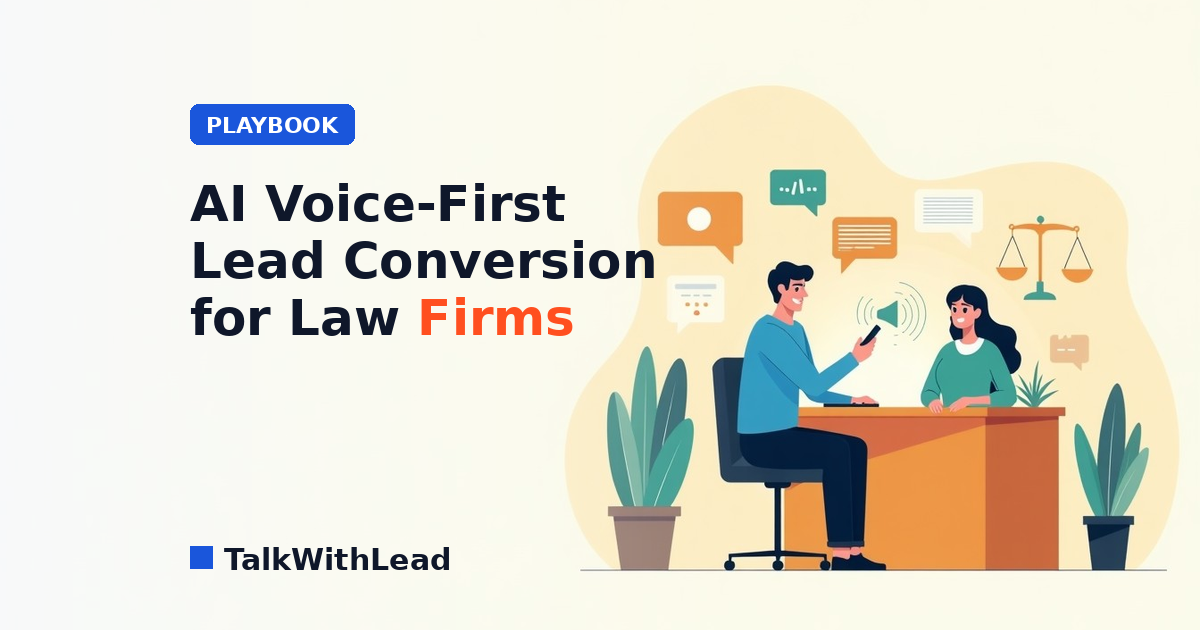
    AI Voice-First Lead Conversion for Law Firms

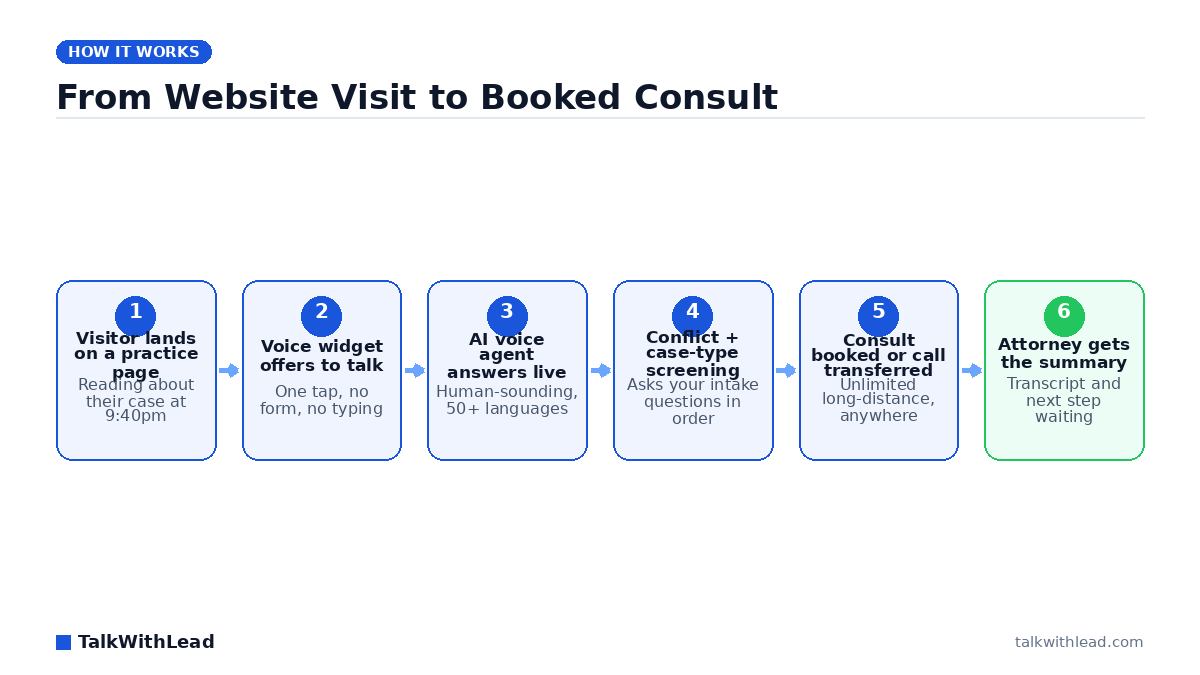
    From Website Visit to Booked Consult — TalkWithLead original infographic (flow diagram).
    From Website Visit to Booked Consult

    A person who just got rear-ended does not fill out a contact form and wait. They open three law firm websites, and they retain whichever one actually picks up. If your site answers with a text box and a promise to respond within one business day, you already lost that case.

    AI voice-first lead conversion for law firms means the website itself starts a real phone conversation instead of collecting a form. A human-sounding AI voice agent answers the visitor within seconds, screens the matter using your intake script, speaks 50+ languages, and either books the consult or connects the caller straight to an attorney over unlimited long-distance calling. The result is a live intake call rather than a lead sitting in an inbox overnight.

    Why legal intake breaks at exactly the wrong moment

    Most firms have decent traffic and terrible capture. The receptionist is at lunch, in a deposition prep, or gone at 5:01. Meanwhile the highest-value legal searches — accident, arrest, eviction, custody emergency — happen at night and on weekends, because that is when bad things happen to people.

    The gap is not marketing spend. It is answering. According to a 411 Locals study of 85 small businesses across 58 industries, only 37.8% of incoming calls were answered by a live person — meaning roughly 6 out of 10 calls went unattended. Apply that pattern to a personal injury practice and the leak is not a rounding error; it is the case list.

    Voicemail makes it worse. A prospective client who reaches a recording rarely leaves a message. They go back to the search results and click the next firm.

    How does AI voice-first lead conversion work for a law firm website?

    A voice widget sits on your practice-area pages. When a visitor taps it, an AI voice agent answers immediately and talks — no typing, no queue, no “an agent will be with you shortly.” It introduces the firm, asks what happened, and walks the caller through the same qualifying questions your intake coordinator would ask: date of incident, jurisdiction, injuries, insurance, opposing party, prior counsel.

    From there it does one of three things: book a consult on the calendar, transfer the call live to whoever is on rotation, or trigger an instant callback if the caller wants a moment. Every conversation lands as a transcript and summary so an attorney reads the matter in thirty seconds instead of re-interviewing the client. You can hear the difference in tone on the live demo — the voice is the whole product, so it is worth listening to before deciding.

    The mechanics of what makes voice convert are broken down further in AI Voice Agents for Law Firms Websites and in Law Firm Intake Automation for Lawyers.

    Voice agent vs chatbot vs contact form vs answering service

    Firms usually have one of four things on the site. They are not equivalent.

    CapabilityContact formWebsite chatbotHuman answering serviceAI voice agent
    Response timeHours to a dayInstant, in textRing queueSeconds, in voice
    Answers at 2amNoYesSometimesYes
    Actually a phone conversationNoNoYesYes
    Follows your intake script every timeNoPartlyVaries by repYes
    Languages coveredOneText onlyLimited50+ spoken
    Long-distance / out-of-state callerN/AN/AMeteredUnlimited
    Scales at 11pm FridayN/AYesCostlyYes

    Best for: firms that already get meaningful website traffic and know they are missing calls after hours, during hearings, or in a second language.

    Not the right fit if: your intake volume is tiny and a single paralegal answers every call within one ring — then the gain is marginal, and you should fix marketing before intake.

    What does the missed-case math actually look like?

    Here is an illustrative example, not a client result. Say a firm gets 600 website visitors a month and 90 of them tap to talk. Assume half arrive outside staffed hours, so 45 conversations currently die in voicemail or a form. Now assume a conservative signing rate of 12% on those conversations — that would be roughly 5 or 6 cases a month never opened. Put your own average case value against that number and the intake gap stops being an operations detail.

    Run your own version with the free missed-call revenue calculator, which uses your inputs rather than ours. On cost framing: an AI voice agent is priced as a flat monthly subscription rather than per-minute or per-lead, which is the opposite of how most answering services bill — see current tiers on the pricing page. Firms comparing the two models will also want AI Receptionist vs Human Answering Service Cost.

    Speed is the whole game in legal intake

    Response time is the single lever with the most evidence behind it. The MIT Lead Response Management study found you’re about 21× more likely to qualify a lead contacted within 5 minutes than one contacted at 30 minutes. Legal is a harsher version of that curve, because a claimant with a fresh injury is calling several firms in one sitting.

    A voice-first widget collapses that window to zero. There is no form submission, no CRM routing delay, no callback queue. The visitor is talking while they are still on the page reading about your practice area — which is the moment their intent is highest and their comparison shopping has not started yet.

    Multilingual intake is a case-volume decision, not a nicety

    A Spanish-speaking construction worker with a workplace injury is a serious matter, and most firms lose that call at hello. Same with Mandarin, Punjabi, Tagalog, Haitian Creole. Hiring bilingual intake staff for every language your market speaks is not realistic. An AI voice agent that handles 50+ languages simply answers in whatever the caller speaks, screens the matter, and hands your attorney a summary in English.

    Unlimited long-distance matters for the same structural reason. Mass tort, class action, and multi-state practices get calls from everywhere, and metered per-minute answering costs quietly discourage the long screening conversations that surface the best cases.

    Rolling it out without disrupting the firm

    Start narrow and measure. A practical sequence:

    • After-hours only first. Let staff keep daytime calls; point evenings, weekends, and holidays at the voice agent. This is where the leaked value already sits.
    • Load your real intake script. Conflict-check questions, case-type disqualifiers, statute-of-limitations screening, jurisdiction. The agent should ask what your best intake coordinator asks.
    • Set clear escalation. Certain triggers — a caller in custody, an imminent filing deadline — should transfer to a human immediately rather than book a Tuesday consult.
    • Read the transcripts weekly. They are the cheapest client-research you will ever get, and they tell you which practice pages attract the wrong matters.
    • Then expand to daytime overflow. Second and third simultaneous callers stop hitting hold music.

    Nothing here requires replacing your case management system or retraining staff on new software. The widget goes on the site, the calls route where you say, and the intake team stops losing the ones that arrive at 10pm. You can put it on a practice-area page and watch the first week of transcripts by starting a free signup, or listen to the agent first on the live demo.

    FAQ

    What is AI voice-first lead conversion for law firms?

    It is an intake approach where the firm’s website starts a live phone conversation with a visitor instead of collecting a contact form. An AI voice agent answers in seconds, screens the matter with the firm’s own intake questions, and books a consult or transfers the caller to an attorney.

    Can an AI voice agent handle legal client intake properly?

    For first-touch screening, yes — it asks case type, date of incident, jurisdiction, injuries, and conflict-check questions consistently every time. It is a qualification and scheduling layer, not a substitute for legal advice; attorneys still evaluate the matter and give counsel.

    Will callers know they are talking to an AI?

    The voice is designed to sound natural rather than robotic, and the agent identifies itself as the firm’s virtual intake assistant. Most callers care far more that someone answered at all than about which side of the line is automated.

    How is this different from a website chatbot?

    A chatbot collects typed text and usually ends with “someone will reach out.” A voice agent produces the actual phone conversation the caller wanted. For a fuller side-by-side, see AI Voice Agent vs Chatbot: Which One Books More Calls?

    Does it work for Spanish-speaking or out-of-state callers?

    Yes. The agent handles 50+ spoken languages and includes unlimited long-distance calling, so a Spanish-speaking claimant or an out-of-state inquiry gets a full screening conversation instead of a language barrier or a metered-minute cutoff.

    How much does an AI voice agent cost for a small firm?

    It is billed as a flat monthly subscription rather than per minute or per lead, which makes the cost predictable regardless of call volume. Current tiers are listed on the pricing page, and you can estimate the offsetting value with the missed-call revenue calculator.
  • AI Voice Agents for Law Firms Websites: Win More Cases

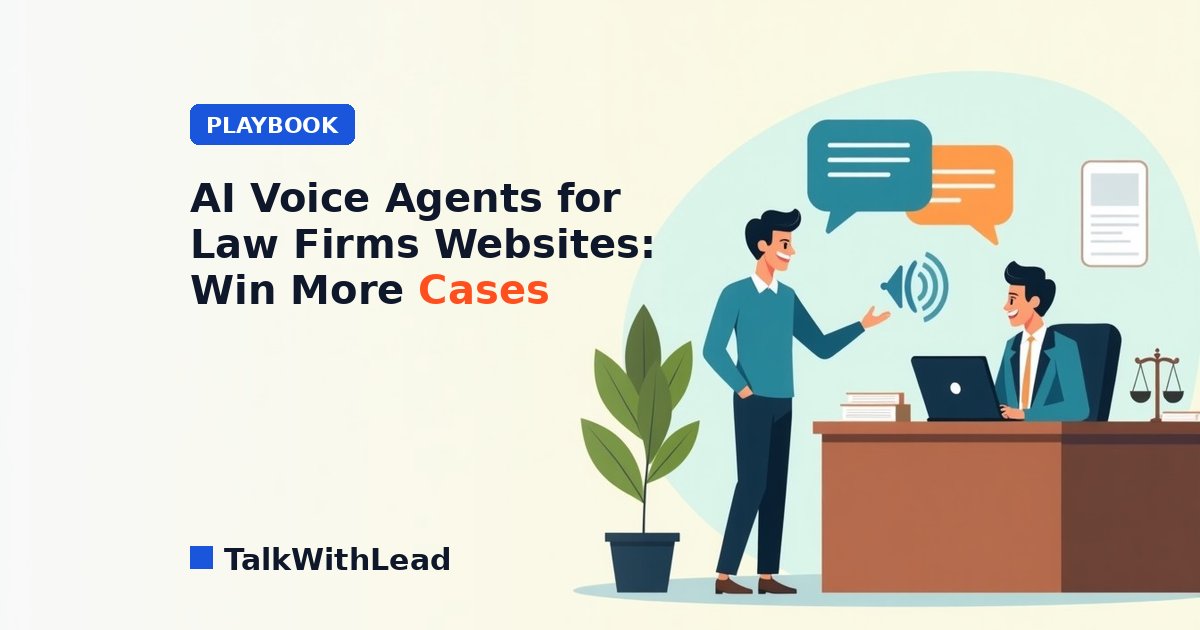
    AI Voice Agents for Law Firms Websites: Win More Cases

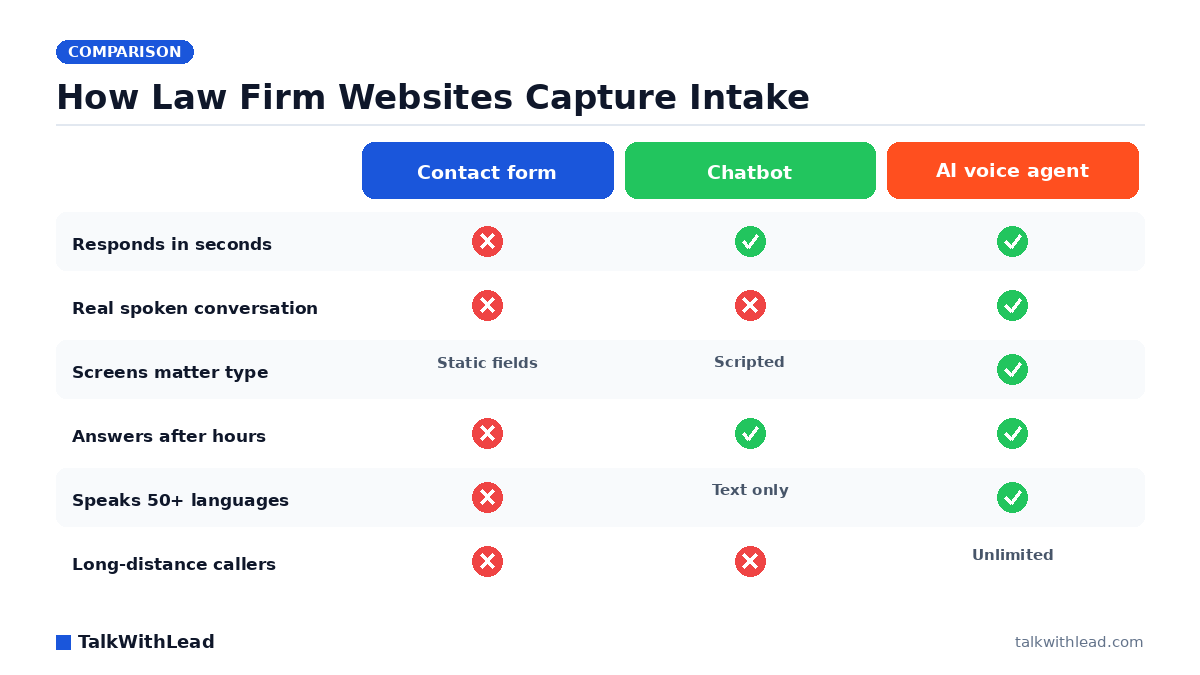
    How Law Firm Websites Capture Intake — TalkWithLead original infographic (comparison diagram).
    How Law Firm Websites Capture Intake

    A person who just got rear-ended, fired, or served with papers does not want to fill out a form. They want to talk to someone right now — and if your website makes them type and wait, they will call the firm three results down the page. That is the exact gap AI voice agents for law firms websites close.

    TL;DR: An AI voice agent on a law firm website answers a visitor by voice within seconds, asks the intake questions a paralegal would ask, screens the matter type and jurisdiction, and either books the consultation or connects the caller to an attorney. It runs after hours, speaks 50+ languages, and places unlimited long-distance calls — so no qualified case is lost to a voicemail box.

    Why law firm websites leak cases

    Most legal sites are built to look credible, not to start conversations. The visitor gets a phone number that rings a front desk between 9 and 5, a contact form that promises a reply “within one business day,” and maybe a chat widget staffed by an offshore typist. Every one of those is a delay, and legal intent does not wait.

    Legal buyers shop in parallel. Picture a personal injury search where a visitor opens four firm websites in four tabs and calls whichever one answers first — that is the ordinary behavior of someone in distress, not an edge case. Research popularized by InsideSales / Dr. James Oldroyd found that roughly 35-50% of sales go to the company that responds first. In legal intake, “responds first” means picks up the phone.

    The other leak is the phone itself. According to a 411 Locals study of 85 small businesses across 58 industries, only 37.8% of incoming calls were answered by a live person — meaning roughly 6 out of 10 calls went unattended. A small firm with two attorneys in depositions all afternoon is exactly the business that study describes.

    What is an AI voice agent on a law firm website?

    It is a widget that sits on every page and, when a visitor taps it, starts a real spoken conversation with an extremely human-sounding AI voice. The visitor talks. The agent listens, answers, and asks the next question. No download, no phone tag, no typing on a cracked phone screen in a hospital parking lot.

    For a law firm, the agent is scripted around intake rather than sales chatter. A practical flow looks like this:

    • Greet and identify the matter — car accident, divorce, employment dispute, immigration, estate.
    • Screen the basics — where the incident happened, roughly when, whether another firm is already involved.
    • Flag urgency — statute deadlines, an arrest, a court date this week.
    • Book or transfer — put a consultation on the calendar, or ring the on-call attorney immediately for a high-value matter.
    • Hand off clean notes — the attorney opens the consult already knowing the story.

    You can hear that flow rather than imagine it — the Live Demo lets you talk to the agent the same way a prospective client would.

    AI voice agent vs chatbot vs answering service for legal intake

    Firms usually compare three options. They are not equivalent.

    DimensionContact formChatbot / live chatHuman answering serviceAI voice agent
    Response timeHours to a daySeconds, by textRings out, then queueSeconds, by voice
    InteractionFieldsTypingPhone callPhone conversation
    After-hours coverCollects onlyUsually scriptedOften premium-pricedAlways on
    Legal-specific screeningStatic questionsShallowDepends on operatorTrained on your intake script
    LanguagesOneText translationLimited bilingual staff50+ spoken
    Out-of-state callersN/AN/AMetered minutesUnlimited long distance
    Cost behaviorLow, low yieldPer seatPer minute / per callFlat subscription

    Best for: solo and small-to-midsize firms that get real website traffic, cannot staff a receptionist past 5pm, and lose consults to whoever answers first.

    Not the right fit if: your practice is referral-only with almost no web traffic, or your matters require privileged, attorney-only first contact from the very first sentence — in that case use voice purely to route and schedule, not to screen.

    If you want the head-to-head on cost specifically, we broke it down in AI Receptionist vs Human Answering Service Cost and Is an AI Receptionist Worth It for a Law Firm?.

    How much is a missed intake call actually worth?

    Legal is unforgiving math because one signed case can outweigh a year of software cost. Here is a labeled illustration, not a claim about any real firm.

    Illustrative ROI example. Assume a firm’s website produces 120 inbound intake attempts a month. Assume half arrive outside staffed hours or while the line is busy — that is 60 unanswered attempts. Say even a small slice of those, imagine roughly one in twelve, was a viable matter, and the firm signs half of the viable ones: that is roughly 2 to 3 signed cases a month never reaching an attorney. At an assumed average case value of $3,000, that is $6,000 to $9,000 of monthly fee revenue leaving through an unanswered phone. Every number in that paragraph is an assumption you should replace with your own.

    Run your own version with the free missed-call revenue calculator — it takes your call volume and case value and shows the gap. The plain framing: an AI voice agent is a flat monthly subscription rather than a per-minute bill, so the cost does not spike in the month your marketing works. Current tiers are on the pricing page.

    Speed to lead is the whole game in legal intake

    Intake speed is not a nice-to-have metric. According to Harvard Business Review research, companies that reach a web lead within an hour are nearly 7× more likely to qualify it than those that wait even an hour longer. A firm that returns Friday-evening form submissions on Monday morning is not competing on that curve at all.

    An AI voice agent collapses the gap to zero because there is no gap — the visitor is already on the site, already motivated, and the conversation starts on the spot instead of being scheduled. The deeper mechanics of that timing advantage are in Speed to Lead: How Fast Should You Call a New Lead?

    Instant callback matters too. Some visitors will not tap a widget but will leave a number. The agent calls them back within seconds rather than adding them to a list someone works through tomorrow.

    Languages and long distance: the cases most firms quietly refuse

    Immigration, personal injury, employment, and family law all draw callers whose first language is not English. Today those calls often end with “can you call back when Maria is in?” — and the caller does not call back. A voice agent that speaks 50+ languages takes that same call in Spanish, Mandarin, Punjabi, Portuguese, or Tagalog, screens it properly, and hands the attorney a summary in English.

    Unlimited long-distance calling covers the other version of the same loss: an out-of-state family member calling about a relative’s accident, or a prospective client who moved. The firm can talk to them without watching a per-minute meter. Our team wrote about the same pattern in other verticals in AI Voice Agent vs Chatbot for Local Businesses.

    How to roll it out without disrupting the firm

    Deployment is a website change, not a practice-management migration. A sane sequence:

    1. Write the intake script you already use. Whatever your paralegal asks in the first three minutes becomes the agent’s script.
    2. Define what the agent must never do. No fee quotes, no legal advice, no opinion on the merits — screen and schedule only.
    3. Set routing rules. High-urgency matter types ring an attorney immediately; everything else books a consult slot.
    4. Install the widget site-wide, with extra prominence on practice-area and “contact” pages where intent peaks.
    5. Review transcripts weekly for the first month and tighten questions that produced vague answers.

    Most firms are live the same week. You can start on the free signup, or talk to the agent first through the Live Demo and decide from there. If you want the intake-automation view rather than the widget view, see Law Firm Intake Automation for Lawyers.

    FAQ

    What is an AI voice agent for a law firm website?

    It is a widget on the firm’s site that starts a spoken conversation with a visitor in seconds. The AI voice screens the matter, captures contact details and case basics, and either books a consultation or transfers the caller to an attorney — 24 hours a day.

    Can an AI voice agent replace my legal receptionist?

    It replaces the unanswered calls, not the person. Most firms keep their receptionist for daytime relationship work and let the agent cover evenings, weekends, lunch hours, and overflow when every line is busy — the windows where intake usually disappears.

    Is it ethical for an AI to handle legal intake?

    Screening and scheduling are administrative tasks that non-attorney staff already perform. The safeguard is scope: configure the agent to identify itself, collect facts, and book time with a lawyer, and explicitly bar it from giving legal advice, evaluating the merits, or quoting fees. Confirm the wording against your jurisdiction’s advertising and unauthorized-practice rules.

    How much does an AI voice agent cost for a small firm?

    TalkWithLead is a flat monthly subscription with unlimited long-distance calling rather than a per-minute answering-service bill, so the cost stays predictable as call volume grows. Current tiers are listed on the pricing page.

    Will it work for Spanish-speaking clients?

    Yes. The agent handles conversations in 50+ languages, so a Spanish-speaking caller gets a full intake conversation instead of a callback promise, and the attorney receives the summary in English.

    How is this different from the chatbot already on my site?

    A chatbot asks a stressed person to type. A voice agent lets them talk, which surfaces detail a text box never captures — tone, urgency, the part of the story they would not have typed. Voice conversations also convert into booked consults because the prospect is already, functionally, on the phone with your firm.

  • Best AI Receptionist for Law Firms: Client Intake (2026)

    Best AI Receptionist for Law Firms: Client Intake (2026)

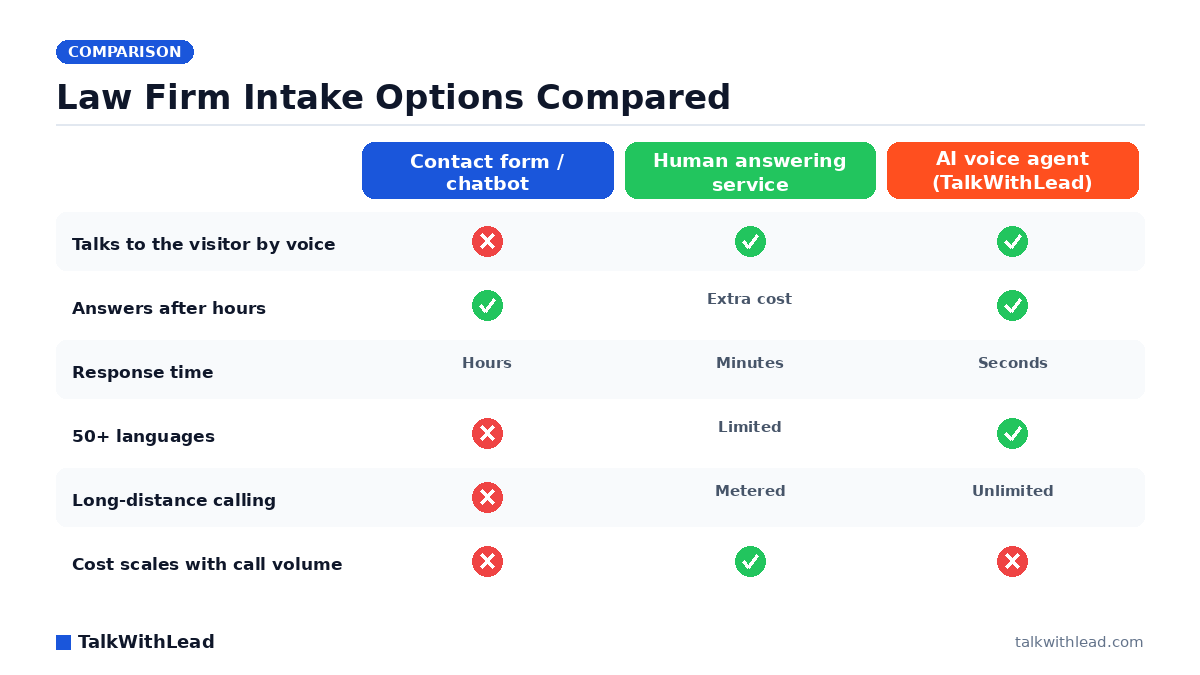
    Law Firm Intake Options Compared — TalkWithLead original infographic (comparison diagram).
    Law Firm Intake Options Compared

    A prospective client with a car accident, a DUI, or a termination letter does not fill out a form and wait. They call three firms in ten minutes and hire whoever picks up. That single behavior is why choosing an ai receptionist for law firms best for client intake is now a caseload decision, not an office-admin decision.

    Short answer: the best AI receptionist for law firm client intake is one that answers by voice within seconds of a website visit or missed call, works nights and weekends, qualifies the matter type and conflicts basics, and books the consult on the calendar. AI voice agents like TalkWithLead do this; chatbots, contact forms, and per-minute answering services either delay the conversation or price it by the minute.

    What does an AI receptionist actually do for a law firm?

    An AI receptionist answers the phone or the website the moment a prospective client shows intent. It greets them, asks what happened, captures name, number, jurisdiction, and matter type, screens out the obvious non-fits, and either books a consult or hands a warm caller to an attorney. The good ones sound like a person, not a phone tree — they interrupt gracefully, handle a rambling story, and repeat a phone number back correctly.

    For intake specifically, three jobs matter more than everything else on the feature list: answer fast, keep the person talking, and get the appointment on the calendar. A tool that logs a transcript but loses the caller has failed intake, no matter how clean the dashboard looks. That is the lens used to compare every option below, and it is the same lens applied in our broader look at law firm intake automation and after-hours cases.

    Best AI receptionist for law firms: the options compared

    Four categories compete for legal intake budget: AI voice agents, human virtual receptionist services, website chatbots, and plain contact forms. They are not variations of the same product — they behave completely differently at 9pm on a Saturday.

    OptionChannelTypical response timeAfter-hoursLanguagesPricing modelBest intake use
    AI voice agent (TalkWithLead)Voice, from the website + instant callbackSecondsAlways on50+Flat subscription, unlimited long distanceWebsite visitors and missed calls that must become phone conversations now
    Human virtual receptionist (Smith.ai-style)Voice, forwarded callsMinutesOften a paid add-onUsually English + SpanishPer minute or per callFirms wanting a human voice and willing to meter cost
    Website chatbotTextInstant text, slow human handoffBot onlyVariesSeat or conversation basedSimple FAQ deflection, not urgent matters
    Contact formText, one directionWhenever staff reads itNoneOneFreeLow-urgency inquiries and document requests
    In-house receptionistVoiceSeconds while staffedNoOne or twoSalaryBusiness-hours reception plus firm operations

    Best for: small and mid-size firms — personal injury, family, criminal defense, immigration, employment — whose website already gets traffic and whose intake gap is nights, weekends, overflow, and non-English callers.

    Not the right fit if: your practice is appellate, transactional, or referral-driven with a handful of inbound inquiries a month that a paralegal already answers on the first ring. Automating five calls a month does not pay for itself, and you would be buying coverage you do not need.

    Why speed decides which firm signs the case

    Legal intake is a race, and the finish line is early. The MIT Lead Response Management study found you are about 21× more likely to qualify a lead contacted within 5 minutes than one contacted at 30 minutes. That gap is brutal for firms whose intake process is “the form emails the office manager, who calls back Monday.”

    The phone side is no kinder. According to a 411 Locals study of 85 small businesses across 58 industries, only 37.8% of incoming calls were answered by a live person — meaning roughly 6 out of 10 calls went unattended. Apply that pattern to a firm running paid search for “car accident lawyer near me” and you are paying for clicks whose calls nobody picks up.

    An AI voice agent attacks both numbers at once. The visitor never leaves your site to dial: they tap the widget, and a human-sounding voice is talking to them before the tab closes. If they do call and nobody is free, an instant callback fires within seconds. Our deeper breakdown of how fast you should call a new lead covers the response curve in detail.

    How much does an AI receptionist cost for a law firm?

    Legal intake coverage generally lands in one of three cost shapes: salary (an in-house receptionist, the highest fixed cost), metered (human answering services billing per minute or per call, which punishes a good marketing month), and flat subscription (AI voice agents, where a busy week costs the same as a quiet one). TalkWithLead sits in the third bucket, and long-distance calling is unlimited, so an out-of-state caller does not add a line item. Current tiers are on the pricing page.

    Illustrative ROI math — assumptions stated, not a customer result. Imagine a firm that gets 120 inbound website and phone inquiries a month and, between after-hours gaps and overflow, never connects with 30 of them. Assume a conservative 8% of connected consults sign, and assume an average matter value of $4,000. Recovering even half of those 30 missed conversations — 15 conversations, at 8%, is roughly 1.2 signed matters — is about $4,800 a month in new fee revenue in this example. Against a flat monthly subscription, one signed matter typically covers a year of coverage. Plug your own numbers into the free missed-call revenue calculator instead of trusting anyone’s averages, including ours.

    If you want the full cost-vs-value argument for legal specifically, we wrote it up separately in is an AI receptionist worth it for a law firm.

    Why chatbots and forms lose legal intake

    Chat looks like the safe modern choice. It is also the slowest possible channel for someone who was rear-ended two hours ago. Text intake asks an anxious person to type their story on a phone screen, one thumb at a time, while a bot asks for their email address. Picture a site where most visitors never make it past the third question — that is the realistic failure mode, and it is invisible in your analytics because a bounce looks identical to a lost case.

    Voice does the opposite. People explain a legal problem far faster than they type it, and the emotional register of a real conversation is what actually converts a scared caller into a booked consult. A voice agent also picks up the details a form field never asks for: date of the incident, whether police were involved, whether they have already spoken with an insurer. If you are weighing the two side by side, the numbers-first version of that argument lives in AI voice agent vs chatbot conversion rate.

    The other quiet loser is the multilingual caller. Immigration, personal injury, and employment practices field a steady stream of Spanish-speaking prospects, and a bot with a translate widget is not the same as an agent that answers in Spanish immediately. TalkWithLead handles 50+ languages out of the box, which means a 10pm call from a Spanish-speaking family does not become a message someone returns two days later.

    How to evaluate an AI receptionist for your firm in one week

    Do not buy on a feature grid. Test the thing your clients will actually experience.

    • Call it yourself, twice. Once calmly, once talking over it mid-sentence. If it cannot handle an interruption, it cannot handle an intake call.
    • Test at 11pm on a Sunday. After-hours is where the case volume hides, and it is the exact window your competitors leave uncovered.
    • Test a second language. Have someone call in Spanish and see whether the conversation continues or collapses into a callback promise.
    • Check the handoff. Does a qualified caller reach an attorney or a calendar, or just a transcript in an inbox?
    • Confirm the cost shape. Ask what a month with triple the calls costs. Metered services answer that question very differently than flat ones.
    • Verify what it will and will not say. An intake agent gathers facts and books consults; it must not give legal advice or quote outcomes.

    The fastest way to run that test on TalkWithLead is the live demo — you talk to the agent yourself and judge whether it sounds like someone you would let answer for your firm.

    Where an AI receptionist fits alongside your existing staff

    The best-performing setup we see described by firms is not replacement, it is coverage. The in-house receptionist owns business hours, walk-ins, and the relationships. The AI voice agent owns everything else: 6pm to 9am, weekends, holidays, overflow when two lines ring at once, and every website visitor who would otherwise have read the practice-areas page and left silently.

    That division has a second benefit. Your staff stops spending mornings on voicemail triage and starts the day with booked consults already on the calendar. Firms comparing this against a traditional per-minute service usually start with our Smith.ai alternative for law firms breakdown, and solo practitioners should read virtual receptionist for solo attorneys, which covers the one-lawyer case directly.

    If the math above matches your firm, the next step is small: put the widget on your site, point it at your intake criteria, and watch a week of after-hours traffic turn into phone conversations. You can start free and have voice intake answering tonight, or try the live demo first and hear it before you commit.

    FAQ

    What is the best AI receptionist for law firms for client intake?

    For website-driven intake, the best fit is an AI voice agent that answers by voice in seconds directly from your site, works 24/7, speaks the caller’s language, and books consults — TalkWithLead is built for exactly that pattern. If your intake is almost entirely forwarded phone calls and you specifically want a human on the line, a per-minute virtual receptionist service is the alternative, at a cost that rises with your call volume.

    Can an AI receptionist handle legal client intake without giving legal advice?

    Yes, when it is scoped correctly. An intake agent should collect facts — name, contact number, jurisdiction, matter type, date of incident, whether other counsel is involved — and book the consult. It should never assess a case’s merits, estimate damages, or answer a legal question. Set those boundaries in the agent’s instructions before you go live and test them deliberately.

    Will clients know they are talking to an AI?

    Modern voice agents sound remarkably human, and callers routinely complete a full intake conversation without friction. The honest practice is to be upfront: have the agent identify itself as the firm’s automated intake assistant and offer to connect a person. In legal specifically, transparency protects you and rarely costs the conversation.

    How fast should a law firm respond to a new website lead?

    Within minutes, ideally seconds. The MIT lead-response research cited above puts a 5-minute contact at roughly 21× the qualification odds of a 30-minute contact, and legal prospects shop several firms in a single sitting. An instant callback triggered from the website is the only mechanism that reliably hits that window overnight and on weekends.

    Does an AI receptionist work for Spanish-speaking clients?

    It should. TalkWithLead’s voice agent handles 50+ languages, so a Spanish-speaking caller gets a real conversation immediately rather than a callback promise. For firms in immigration, personal injury, and employment, that single capability often accounts for a meaningful share of the intake an English-only setup was quietly losing.

    How much does AI intake cost compared with hiring a receptionist?

    An in-house receptionist is a full salary plus benefits and covers roughly a third of the week. A per-minute answering service costs more in your busiest months, which are exactly the months you want more coverage. A flat AI subscription costs the same whether you take 50 calls or 500, and TalkWithLead includes unlimited long-distance calling. Current tiers are on the pricing page.

  • Virtual Receptionist for Solo Attorneys: Book Intake 24/7

    Virtual Receptionist for Solo Attorneys: Book Intake 24/7

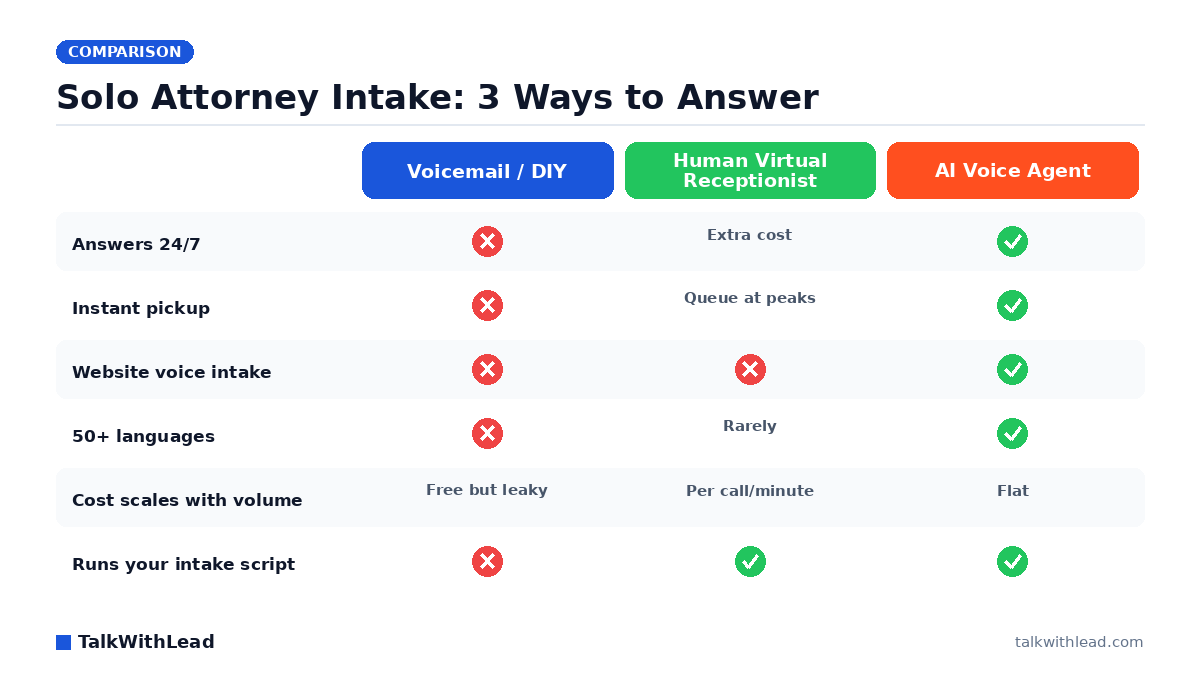
    Solo Attorney Intake: 3 Ways to Answer — TalkWithLead original infographic (comparison diagram).
    Solo Attorney Intake: 3 Ways to Answer

    Why Solo Attorneys Lose Cases Before the First Conversation

    You can’t take a deposition and answer the phone at the same time. That single fact is why a virtual receptionist for solo attorneys intake has become table stakes: the client you spent real marketing dollars attracting calls once, hits voicemail, and dials the next firm on the list. For a solo practice, intake isn’t an admin task — it’s the revenue engine, and it leaks worst at exactly the moments you’re doing billable work.

    TL;DR: A virtual receptionist fixes intake coverage for solo attorneys, and there are two real options: a human answering service (reliable, but billed per call or per minute) or an AI voice agent (instant, 24/7, flat-cost, and able to run intake on your website as well as your phone line). For most solos, an AI voice agent like TalkWithLead captures more intake for less money because it answers every inquiry in seconds, speaks 50+ languages, and never bills by the minute.

    According to a 411 Locals study of 85 small businesses across 58 industries, only 37.8% of incoming calls were answered by a live person — meaning roughly 6 out of 10 calls went unattended. Solo law practices sit squarely in that pattern: one person, one phone, and a calendar full of moments when answering is impossible.

    What Does a Virtual Receptionist Actually Do for Legal Intake?

    Whatever form it takes, a virtual receptionist for a solo attorney should do four jobs:

    • Answer every inquiry immediately — phone calls and website visitors alike, including nights and weekends when many injury, criminal, and family-law prospects actually reach out.
    • Run your intake script — matter type, jurisdiction, timeline, conflict-check basics, and how the prospect found you.
    • Qualify before you spend time — separate a signable case from a wrong-number or out-of-scope inquiry so your callbacks go to real prospects first.
    • Book the consultation — the intake isn’t done until there’s a scheduled conversation on your calendar.

    Traditional human services do this by staffing shared receptionists who answer with your firm’s name. AI voice agents do it with an extremely human-sounding voice that picks up on the first ring, every time, and follows your intake questions without a queue, a shift change, or a per-minute meter running.

    Human Virtual Receptionist vs AI Voice Agent: Which Fits a Solo Practice?

    Here’s how the realistic options compare on the dimensions that matter to a one-attorney firm:

    DimensionVoicemail / answer it yourselfHuman virtual receptionistAI voice agent (TalkWithLead)
    CoverageBusiness hours, when freeBusiness hours standard; 24/7 costs extra24/7/365 by default
    Pickup speedOften voicemailUsually fast; queues at busy timesInstant, every time
    Website intakeContact formChat add-on at extra costVoice widget — visitors talk to the agent on your site
    LanguagesYoursEnglish + sometimes Spanish50+ languages
    Cost modelYour billable timePer call or per minute; rises with volumeFlat subscription with unlimited long-distance calling
    ConsistencyVaries with your dayVaries by receptionistSame script, same quality, every intake

    Best for: a solo attorney whose leads arrive from the web and after hours, who wants every inquiry answered instantly without per-minute billing — the AI voice agent wins on coverage, speed, and cost predictability.

    Not the right fit if: your practice depends on a receptionist performing hands-on office tasks — physical mail, in-person greeting, court filing runs. An AI agent handles conversations, not errands; some solos pair it with a part-time assistant for the rest.

    We’ve written a deeper cost breakdown in Is an AI Receptionist Worth It for a Law Firm?, and if you’re currently comparing named vendors, see our Smith.ai alternative for law firms guide.

    The Intake Leak Nobody Staffs For: Your Website

    Most virtual receptionist conversations focus on the phone line. But for a solo attorney, the website is where prospects actually start — they search “custody lawyer near me” at 9pm, land on your site, skim your practice areas, and then face a choice: fill out a form and wait, or leave. Picture a site where 8 in 10 evening visitors leave without ever calling — that’s the illustrative shape of the problem a form-only website creates. Nobody answers a contact form at 9pm, and by morning the prospect has talked to someone else.

    This is where an AI voice agent does something no human answering service can: it lives on the website itself. A visitor clicks the widget and is immediately in a natural spoken conversation — describing their situation, answering your intake questions, and booking a consultation — without dialing a number or typing into a chatbot. Unlimited long-distance calling means it works whether the prospect is across town or across the country, and instant callbacks reconnect anyone who prefers their own phone. We’ve covered why voice beats typing in AI Voice Agent vs Chatbot: conversion rates compared.

    Speed is the whole game here. According to Harvard Business Review research, companies that reach a web lead within an hour are nearly 7× more likely to qualify it than those that wait even an hour longer. An AI voice agent compresses that response window from hours to seconds — for every lead, at any hour. Hear what that first conversation sounds like on the live demo.

    How Much Does a Virtual Receptionist Cost a Solo Attorney?

    Plain framing: human virtual receptionist services for law firms typically price by receptionist minutes or per call, so your bill grows in lockstep with your marketing success. An AI voice agent is a flat software subscription — the hundredth intake conversation costs the same as the first. TalkWithLead’s plans are listed on the pricing page.

    Illustrative ROI math (assumptions stated, not a promised result): say your solo practice misses 15 inquiries a month across after-hours calls and website visitors who never converted. Assume just 2 of those 15 would have been qualified consultations, and you sign 1 of every 2 qualified consults. If your average case is worth $3,000 in fees, that’s roughly $3,000/month — $36,000 a year — recoverable by answering everything, instantly. Swap in your own numbers with the free missed-call revenue calculator; for contingency or higher-fee practices the math gets dramatic fast.

    Against that, a flat monthly subscription — or even a per-minute human service — is a rounding error. The question isn’t whether coverage pays for itself; it’s which kind of coverage captures more of the leak.

    Setting Up 24/7 Intake in an Afternoon

    Getting an AI voice agent running on a solo practice is not an IT project:

    1. Define your intake script. The questions you already ask — matter type, location, timeline, opposing party for conflicts — become the agent’s conversation flow.
    2. Add the widget to your website. One snippet; visitors can now talk to your practice the moment interest peaks.
    3. Set your escalation rules. Qualified consults get booked on your calendar; urgent matters trigger an instant callback to your cell; out-of-scope inquiries get a polite referral message.
    4. Review transcripts weekly. Every conversation is captured, so you refine the script with real prospect language instead of guesswork.

    From that point on, a Spanish-speaking prospect at midnight gets the same crisp intake experience as an English-speaking one at noon — in their language, without hold music. Ready to try it on your own site? Start a free signup, or talk to the live demo first and judge the voice quality yourself.

    FAQ

    What is a virtual receptionist for solo attorneys?

    It’s a service that answers your practice’s inquiries when you can’t — traditionally a remote human receptionist answering your phone line, and increasingly an AI voice agent that answers both your phone leads and your website visitors, runs your intake questions, and books consultations 24/7.

    Can an AI voice agent really handle legal intake?

    Yes, for the intake stage. It asks your screening questions, captures matter details, checks basic fit, and schedules the consultation. It doesn’t give legal advice — it hands you a qualified, documented prospect so the first attorney conversation starts warm instead of cold.

    How much does a virtual receptionist cost for a law firm?

    Human services generally bill per receptionist minute or per call, so busy months cost more. AI voice agents are typically flat monthly subscriptions regardless of volume — see TalkWithLead’s pricing. Either way, the cost is small next to the value of one additional signed case.

    Do solo attorneys need 24/7 phone answering?

    If your clients face urgent situations — arrests, accidents, custody emergencies — the answer is yes, because those prospects hire whoever answers first. Even for planned matters, evening and weekend research is when many people finally reach out, and instant response is what turns that reach-out into a booked consult.

    What happens to website visitors who don’t want to call?

    With a voice widget on the site, they don’t have to dial anything — they click and talk right in the browser, or request an instant callback to their own phone. That removes the form-and-wait step that loses after-hours prospects.

    Is an AI receptionist better than an answering service for a solo practice?

    For pure conversation coverage — speed, hours, languages, cost predictability, and website intake — an AI voice agent generally wins for solos. A human service still makes sense when you need judgment calls beyond a script or physical office tasks. Many solos compare both; our law-firm ROI breakdown walks through the decision in detail.

  • Is an AI Receptionist Worth It for a Law Firm?

    Is an AI Receptionist Worth It for a Law Firm?

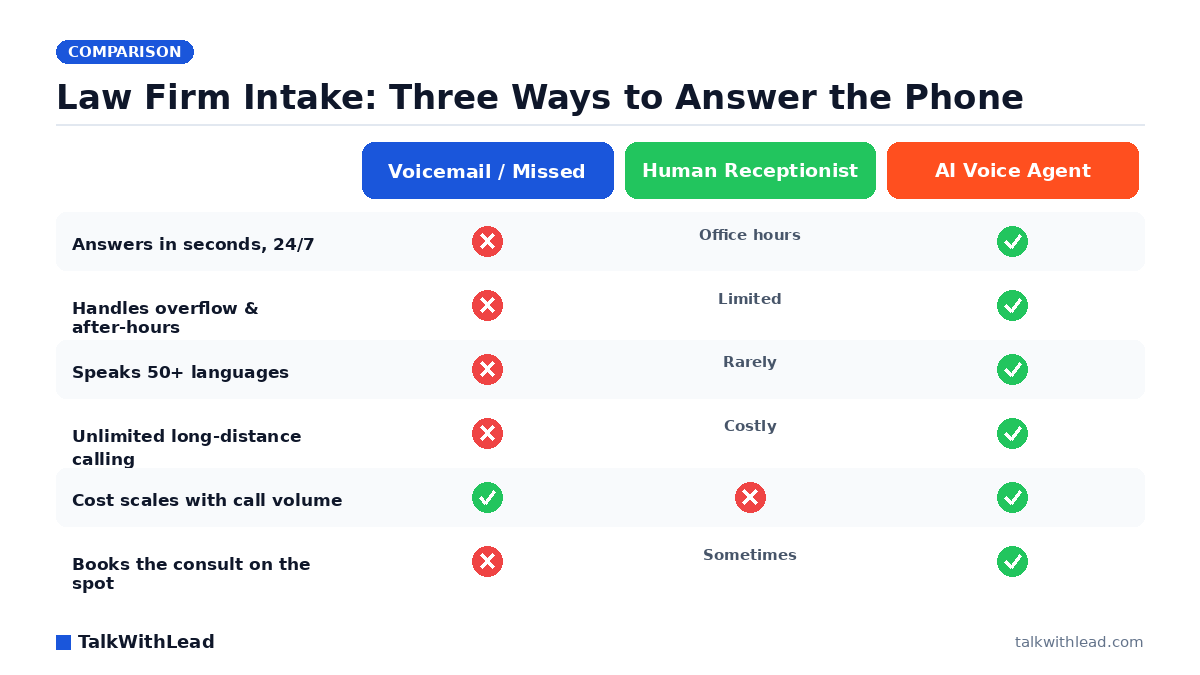
    Law Firm Intake: Three Ways to Answer the Phone — TalkWithLead original infographic (comparison diagram).
    Law Firm Intake: Three Ways to Answer the Phone

    A prospect with a $15,000 matter calls your firm at 7:40 p.m., gets voicemail, hangs up, and dials the next firm on the list. That is the real question behind “is an AI receptionist worth it for a law firm” — not whether the technology is impressive, but whether it stops calls like that one from walking out the door.

    TL;DR: For most small and mid-size firms, an AI receptionist is worth it when call volume is high enough that calls slip to voicemail after hours or during overflow. An AI voice agent answers every call in seconds, qualifies the caller, and books the consult — so if it captures even one or two extra signed matters a month, it pays for itself many times over. It is not worth it if you take only a handful of high-touch clients a year and answer every call yourself.

    What does an AI receptionist actually do for a law firm?

    An AI receptionist is a human-sounding AI voice agent that picks up the phone — or the call-back request on your website — and has a real conversation with the caller. It greets them, asks the intake questions you would ask, captures name, contact, matter type, and urgency, and either books a consultation or routes a genuine emergency to a live attorney.

    The difference from a chatbot or a web form is the channel. A form makes an injured or anxious prospect type. A chatbot makes them wait and click. A voice agent turns a website visitor into a phone conversation immediately, the way people actually want to reach a lawyer. If you want to see how those channels compare on conversion, our breakdown of AI voice agent vs chatbot conversion rate lays out the gap.

    It also runs 24/7. The phone gets answered on a Saturday, at midnight, and during the lunch hour when your front desk is slammed. According to Ada, 59% of consumers prefer instant, 24/7 AI service over waiting for a human — as long as the AI can actually handle the request. Intake qualification is exactly the kind of request it can handle.

    Is an AI receptionist worth it for a law firm? Run the ROI math

    The honest way to answer “worth it” is to put a number on the calls you miss. Here is an illustrative example — plug in your own figures, not these.

    Say your firm gets 200 inbound calls a month and, between after-hours, lunch, and overflow, 25% of them hit voicemail. That is 50 missed calls. Now assume a conservative slice convert: imagine even 1 in 10 of those missed callers was a real prospect who would have signed. That is 5 lost matters a month. If your average signed matter is worth $3,000 in fees, that is $15,000 of revenue leaking every single month.

    Against that, an AI voice agent typically costs a fraction of one paralegal’s hourly rate and a small fraction of a single signed case. The arithmetic usually is not close. If the tool recovers even one of those five matters, it has already paid for a year of itself. To pressure-test your own numbers, run them through the free missed-call revenue calculator before you commit to anything.

    Pricing for AI voice receptionists generally lands in the low-hundreds-per-month range for a small firm, scaling with call volume — far below the cost of a full-time receptionist and without the gaps a single human leaves on nights, weekends, and sick days. You can see TalkWithLead’s tiers on the pricing page.

    How does an AI receptionist book more consultations than voicemail?

    Speed is the whole game in legal intake. A prospect who reaches a person — or a voice that behaves like one — in the first minute is dramatically more likely to book than one who leaves a message and waits for a callback. The longer the gap, the colder the lead, and the more likely they have already called a competitor. Our piece on speed-to-lead and the first 60 seconds digs into why that window matters so much.

    An AI voice agent closes that gap three ways:

    • It never goes to voicemail. Every call and every website call-back request is answered on the first ring, day or night.
    • It qualifies instead of just collecting. The agent asks the right intake questions, screens out matters you do not take, and flags the urgent ones — so attorneys spend time on real opportunities.
    • It books on the spot. Instead of “someone will call you back,” the caller leaves with a scheduled consultation, which is the moment a lead becomes a client.

    This is the same logic behind missed-call automation for websites: capture the lead before they call the next firm, because the next firm is one tap away.

    Where an AI receptionist beats a human (and where it does not)

    A great human receptionist is warm, judgment-rich, and irreplaceable for complex, sensitive conversations. But one person cannot answer three calls at once, work 24 hours, or speak fluent Spanish, Mandarin, and Portuguese on demand. An AI voice agent handles intake in 50+ languages and offers unlimited long-distance calling, so a prospect anywhere can reach your firm without a toll barrier or a language wall.

    The realistic model for most firms is not “AI instead of people” — it is AI catching everything your team cannot: overflow, after-hours, weekends, and second-language callers. For a deeper side-by-side, see AI voice agent vs human receptionist, and if you are weighing a service like Smith.ai, our Smith.ai alternative for law firms comparison covers the intake-specific tradeoffs.

    DimensionVoicemail / MissedHuman ReceptionistAI Voice Agent
    Response timeHours or neverOffice hours onlySeconds, 24/7
    Simultaneous callsNoneOne at a timeMany at once
    LanguagesNoneUsually one50+
    Long-distance reachN/ACostlyUnlimited
    Monthly cost$0 (but lost revenue)Full salary + benefitsLow-hundreds, scales
    Books consult on callNoSometimesYes

    Best for: small and mid-size firms with steady call volume that lose intake calls to after-hours, lunch, overflow, or non-English speakers, and want every prospect booked instead of buried in voicemail.

    Not the right fit if: you handle only a few hand-selected, high-touch matters a year, answer every call personally, or require a licensed attorney to give legal advice on the very first contact.

    What to look for before you buy an AI receptionist

    The technology is moving fast — Gartner predicts agentic AI will autonomously resolve 80% of common customer service issues without human intervention by 2029, cutting operational costs by 30%. For a law firm, that future is only worth buying into if the tool fits how you actually intake clients. Check these before you sign up:

    • Does it sound human? A robotic voice gets hung up on. Test it yourself on a live call.
    • Can it book and route? Capturing a name is table stakes; scheduling the consult and escalating emergencies is what drives ROI.
    • Does it cover your callers’ languages and locations? 50+ languages and unlimited long-distance widen the client pool you can serve.
    • How fast does it answer the website visitor? Instant call-backs turn browsers into booked calls — compare the options in callback widget vs click-to-call vs live chat.

    The fastest way to judge worth is to hear it work on your own intake script. Try a live demo, then start capturing missed calls with a free signup and measure the booked consults against the math above.

    FAQ

    Is an AI receptionist worth it for a small law firm?

    For most small firms, yes — if you are losing calls to voicemail after hours, during lunch, or when the office is busy. The break-even is low: recover one or two signed matters a month and the tool pays for itself many times over. Run your own missed-call math first so the decision is a number, not a guess.

    How much does an AI receptionist cost for a law firm?

    AI voice receptionists generally run in the low hundreds of dollars per month for a small firm, scaling with call volume — far less than a full-time human receptionist’s salary and benefits. See current tiers on the pricing page and compare against the revenue you lose to missed calls.

    Can an AI receptionist replace my human front desk?

    For most firms it complements rather than replaces. A human handles warm, complex, in-office conversations; the AI voice agent catches everything one person cannot — overflow, nights, weekends, and second-language callers — so no intake call goes unanswered.

    Can an AI receptionist handle clients who do not speak English?

    Yes. A capable AI voice agent handles intake in 50+ languages and offers unlimited long-distance calling, so prospects in other languages or regions can reach your firm without a toll or language barrier — widening the pool of clients you can serve.

    Will an AI receptionist give legal advice to callers?

    No, and it should not. Its job is intake and scheduling: qualifying the matter, capturing details, booking the consultation, and escalating genuine emergencies to an attorney. Legal advice stays with your licensed lawyers.

    How do I know if an AI receptionist is right for my firm?

    Estimate your monthly missed-call volume, the share that are real prospects, and your average matter value. If the recovered revenue clearly exceeds the monthly cost, it is worth it. The free missed-call revenue calculator makes that estimate in a couple of minutes.

  • Smith.ai Alternative for Law Firms: Book More Consults

    Smith.ai Alternative for Law Firms: Book More Consults

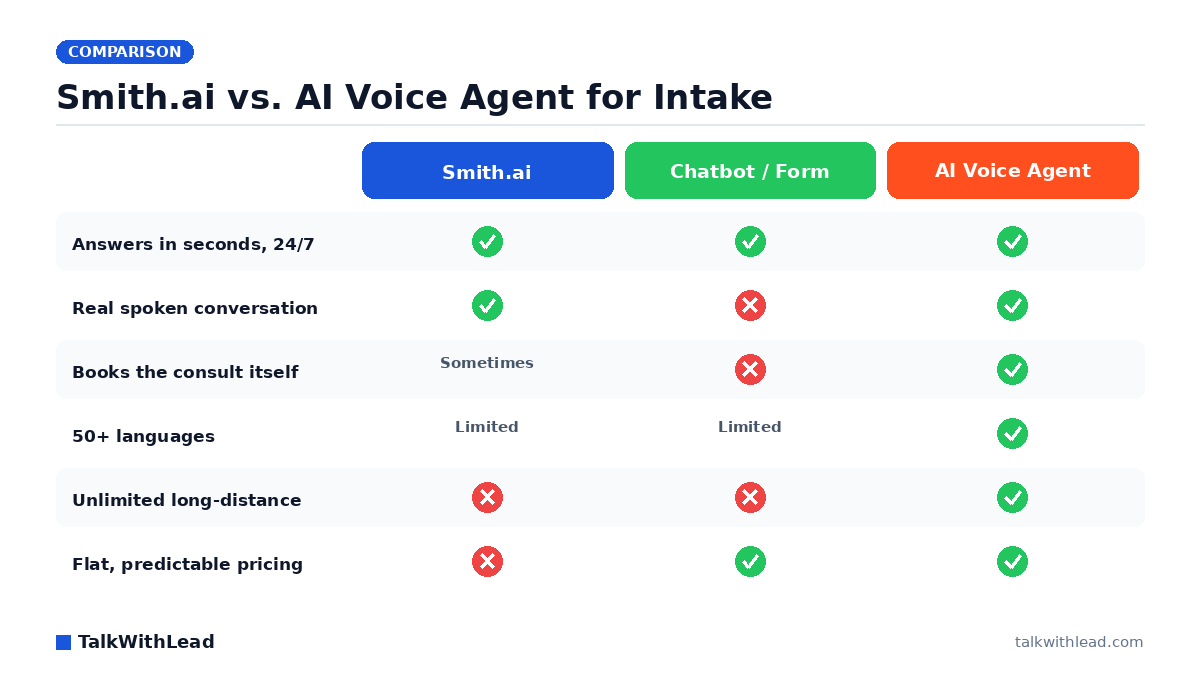
    Smith.ai vs. AI Voice Agent for Intake — TalkWithLead original infographic (comparison diagram).
    Smith.ai vs. AI Voice Agent for Intake

    A prospective client lands on your firm’s site at 9 p.m. with a DUI and a court date. They will not fill out a contact form and wait two days for a callback. They want to talk to someone now, and if your site can’t deliver that, the next firm in the search results will.

    That gap is exactly why so many practices shop for a Smith.ai alternative for law firms website intake. Smith.ai built a strong human-receptionist service, but human teams cost more per minute as call volume climbs, can queue callers at peak hours, and still hand most after-hours visitors to a form. The faster-growing option is an AI voice agent that picks up instantly, talks like a person, and books the consult on the spot.

    TL;DR: The best Smith.ai alternative for law firm intake is a human-sounding AI voice agent that answers your website visitors in seconds, every hour of every day, qualifies the matter, and books the consultation directly into your calendar. It converts better than chatbots or forms because people would rather speak than type their legal problem, and it bills at a flat rate instead of per minute.

    Why law firms outgrow a receptionist-only intake service

    Smith.ai and similar virtual-receptionist services solved a real problem: someone friendly answers the phone so attorneys can practice law. But three pressures push growing firms to look further.

    • Cost scales with conversation. Per-minute or per-call pricing means your bill rises right when intake volume rises. A busy month becomes an expensive month.
    • Peak-hour queues. Human teams handle a finite number of simultaneous callers. A marketing push, a local news story, or a Monday-morning rush can leave callers waiting.
    • Website visitors still get a form. Most receptionist services answer the phone but route web traffic to a chatbot or a contact form, which is the slowest path back to a real conversation.

    Speed is the whole game in legal intake. According to Harvard Business Review research, companies that reach a web lead within an hour are nearly 7× more likely to qualify it than those that wait even an hour longer. For a law firm, an hour is an eternity; the visitor has already called two competitors. Our deeper look at why the first 60 seconds win most deals walks through exactly how that window closes.

    What is the best Smith.ai alternative for law firm website intake?

    The strongest alternative is an AI voice agent that lives on your website and turns a click into a phone conversation in seconds. Instead of a chatbot that makes a stressed visitor type out their situation, the agent speaks, listens, and responds in a natural, human-sounding voice.

    Here is what a voice-first intake agent does that a receptionist queue or a form cannot:

    • Answers instantly, 24/7. No hold music, no “our office is closed,” no overnight gap. Every visitor gets a live conversation.
    • Speaks 50+ languages. A Spanish-speaking family with an immigration question gets answered in their own language without a transfer.
    • Offers instant callbacks. If a visitor would rather you call their phone, the agent connects the call immediately.
    • Includes unlimited long-distance calling, so a client across the country reaches you without anyone watching a meter.
    • Qualifies and books. It asks your intake questions, screens out matters you don’t take, and drops the qualified consult straight onto the calendar.

    Voice matters because of how people behave under stress. A Five9 study of 4,000 US and UK consumers found that 75% of people prefer talking to a real human over the phone for support. A human-sounding AI voice agent meets that preference at machine scale, while a chatbot fights it. We compared the conversion gap directly in AI voice agent vs. chatbot: which one books more calls?

    Want to hear it first? Try a live demo and judge the voice quality yourself before you change anything.

    Smith.ai vs. chatbot vs. AI voice agent: a side-by-side look

    Each option has a place. The question is which one books the most consults from your existing website traffic.

    Intake dimensionSmith.ai (human receptionist)Chatbot / web formAI voice agent
    Response timeFast when staffedInstant textInstant voice
    Real spoken conversationYesNoYes
    24/7 without queueLimited at peakYesYes
    Books the consult itselfSometimesRarelyYes
    LanguagesLimitedLimited50+
    Long-distance callingMeteredN/AUnlimited
    Pricing modelPer minute / per callFlat / cheapFlat

    The chatbot is cheap but loses the visitor who won’t type. The receptionist service is excellent on the phone but costly to scale and often leaves web traffic on a form. The AI voice agent combines instant text-speed availability with the conversion power of an actual conversation. For the broader comparison, see AI voice agent vs. chatbot conversion rate and live chat vs. chatbot, plus the AI voice upgrade.

    How much intake are you losing? Run the math

    Picture a firm whose website gets 200 visitors a week from paid search and referrals. Say even 1 in 20 of those visitors is a qualified case that arrives outside office hours or during a phone queue, and the visitor leaves without ever reaching a human. That’s roughly 10 lost conversations a week, or more than 500 a year, walking straight to a competitor.

    Now assume a single signed matter is worth a few thousand dollars in fees. Recovering even a handful of those lost conversations each month covers the cost of the intake system many times over. That is the ROI an always-on voice agent is built to capture. You can model your own numbers with the free missed-call revenue calculator using your real traffic and average case value.

    This is also why missed-call automation for websites matters so much for firms: every unanswered after-hours inquiry is a case you paid to attract and then let slip.

    Honest verdict: is an AI voice agent right for your firm?

    Best for: growing practices that get steady website traffic, run paid search, take after-hours or weekend inquiries, serve multilingual communities, or feel their per-minute receptionist bill climbing as volume grows.

    An AI voice agent isn’t a fit for everyone. A Five9 survey of 4,000 consumers found that 56% are frequently frustrated by AI customer-service chatbots, so voice quality is non-negotiable; a robotic agent will hurt you. The point of a modern voice agent is that it sounds genuinely human, which is why a live demo should come before any decision.

    Not the right fit if: your firm prefers a named human receptionist who knows every regular caller by name, your inquiry volume is low enough that a queue never forms, and predictable scaling cost is not a concern. In that case, a traditional service may serve you well.

    Pricing is straightforward and flat rather than metered; you can review the plans on the pricing page. When the math points to recovering lost consults, you can start with a free signup and have the agent live on your site quickly.

    How to switch without disrupting intake

    Moving off a receptionist-only setup is lower-risk than most firms expect because you can run the voice agent alongside your current process first.

    1. Test the voice. Book a live demo and confirm it sounds human enough to represent your firm.
    2. Script your intake. Feed it your screening questions, the matter types you accept, and your scheduling rules.
    3. Add the widget. Place it on your highest-traffic pages first: practice-area pages and the contact page.
    4. Measure. Watch consults booked, after-hours captures, and answered-versus-missed conversations against your old baseline.

    The same speed-to-lead logic that wins legal clients wins in other appointment-driven fields. Our speed-to-lead playbook for real estate shows the instant-callback pattern in action, and it maps cleanly onto consult booking.

    FAQ

    What is the best Smith.ai alternative for law firm website intake?

    For most growing firms, the best alternative is an AI voice agent that answers website visitors instantly with a human-sounding voice, qualifies the matter, and books the consult directly. It combines the conversion power of a real phone conversation with 24/7 availability and flat pricing, instead of routing web traffic to a form or a metered receptionist queue.

    Is an AI voice agent cheaper than a virtual receptionist service?

    It depends on volume. Receptionist services typically bill per minute or per call, so costs rise as intake grows. An AI voice agent uses flat, predictable pricing, which usually wins as call volume increases. Run your own numbers with the missed-call revenue calculator and compare against your current monthly bill.

    Can an AI voice agent actually book consultations on its own?

    Yes. A properly configured agent runs your intake script, screens out matters you don’t accept, and books qualified consultations onto your calendar without an attorney lifting a finger. It can also offer an instant callback if the visitor prefers you to call their phone.

    Will it sound robotic to my prospective clients?

    Modern AI voice agents are built to sound genuinely human, which is the entire reason they convert. Because many consumers distrust clunky chatbots, voice quality is the thing to test first; book a live demo and listen before you decide.

    Does it handle non-English-speaking callers?

    Yes. A voice-first agent can speak 50+ languages, so a Spanish-speaking or other non-English visitor is answered in their own language without a transfer or a callback delay, which is a major advantage for firms serving diverse communities.

    How fast can it be live on my website?

    After a free signup, you script your intake questions and drop the widget onto your site, typically your practice-area and contact pages first. Most firms can run it alongside their existing intake within a short setup window and measure the lift before fully switching over.

Your next lead is on your site right now — ready to talk.

TalkWithLead’s AI voice agent picks up in seconds, qualifies the lead in their language, and books the call before the prospect can open a competitor’s tab. Forms are slow. Chatbots make people type. Voice closes.

Just curious about plans? See pricing →
This is the TalkWithLead Widget. Click to see how it will work on your website!