TalkWithLead
AI Voice-First Lead Conversion

AI Voice Agents That Turn Website Visitors Into Real Conversations

TalkWithLead is the AI voice-first widget that picks up the phone the moment a visitor lands on your site. Multilingual, extremely human-sounding, with unlimited long-distance calling so prospects anywhere can call you back. More calls. More leads. More closed deals.

Extremely human-sounding voice 50+ languages out of the box Unlimited long-distance calling Instant callback widget

Tag: speed to lead

  • AI Voice Agent vs Chatbot for Local Businesses

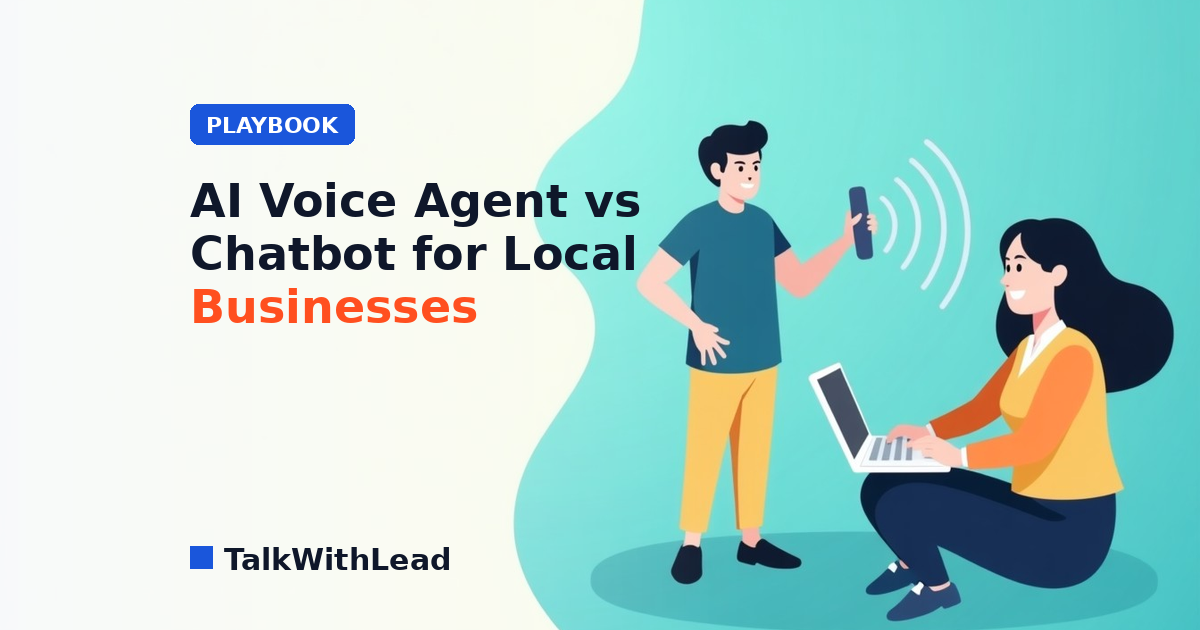
    AI Voice Agent vs Chatbot for Local Businesses

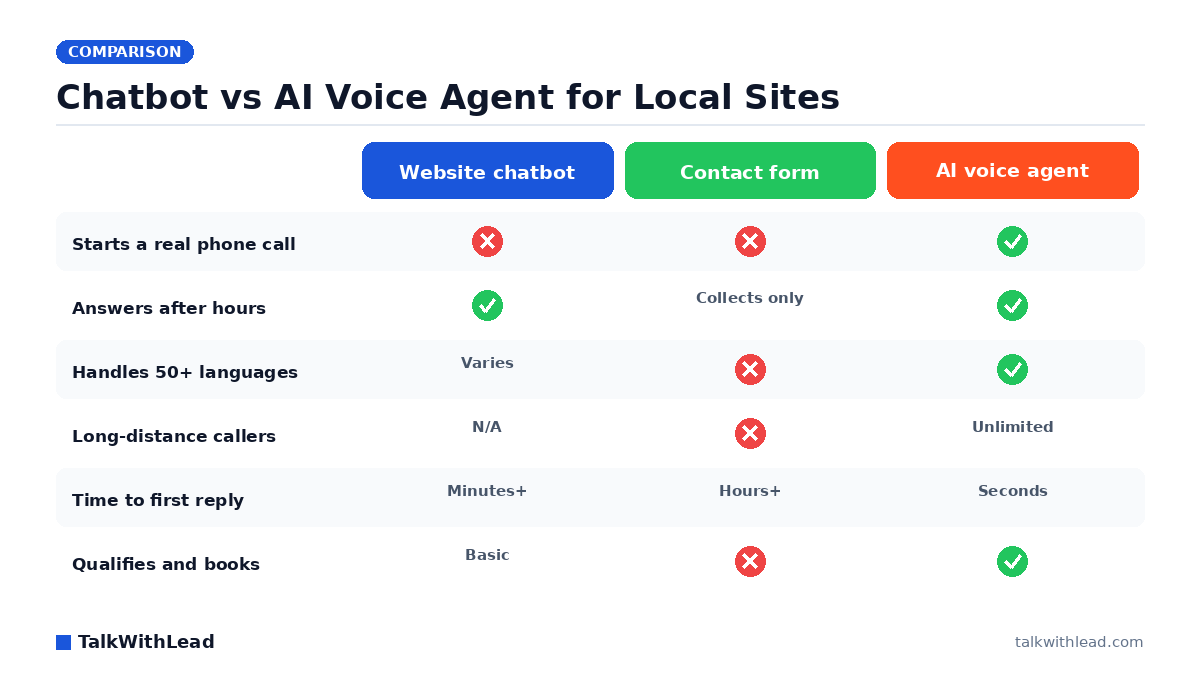
    Chatbot vs AI Voice Agent for Local Sites — TalkWithLead original infographic (comparison diagram).
    Chatbot vs AI Voice Agent for Local Sites

    A plumber’s website gets a visitor at 8:40pm with a leaking water heater. The chatbot asks for a name and email. The visitor closes the tab and calls the next company on Google. That is the whole argument in one scene.

    TL;DR: For most local businesses, an AI voice agent beats a chatbot because local buying decisions are urgent and conversational. A chatbot captures text and hands you a lead to call back later; an AI voice agent talks to the visitor immediately, answers questions in a human-sounding voice, and connects them to your business as a live phone conversation. Chatbots still earn their keep for order status and repeat-customer FAQs.

    What is the difference between an AI voice agent and a chatbot?

    A chatbot is a text interface. The visitor types, waits, reads, types again. Even a good one is a slow-motion version of a conversation, and every extra turn is another chance for the person to give up. A form is worse — it is a chatbot with no replies at all.

    An AI voice agent is a voice interface that lives on your site. The visitor clicks, speaks, and hears an extremely human-sounding voice answer back. It asks what they need, handles the qualifying questions a receptionist would ask, and turns the session into a real phone conversation — including an instant callback to their phone if they would rather talk that way. No typing, no queue, no “we’ll get back to you within one business day.”

    The distinction matters most for local service businesses, where the buyer usually has a problem right now: a burst pipe, a cracked tooth, an accident, a listing they want to see this weekend.

    Which one books more calls for a local business?

    Speed decides it. According to Harvard Business Review research, companies that reach a web lead within an hour are nearly 7× more likely to qualify it than those that wait even an hour longer. A chatbot transcript sitting in an inbox until morning is exactly the delay that research describes.

    The gap widens because most local businesses cannot answer the phone reliably in the first place. According to a 411 Locals study of 85 small businesses across 58 industries, only 37.8% of incoming calls were answered by a live person — meaning roughly 6 out of 10 calls went unattended. If the phone already leaks that badly, adding a text widget does not plug the hole. Answering the conversation instantly does.

    DimensionWebsite chatbotContact formAI voice agent
    Interaction modeTyped textOne-way submissionSpoken conversation
    Time to first human-quality answerMinutes to hoursHours to next business daySeconds
    After-hours coverageYes, text onlyCollects onlyYes, full conversation
    LanguagesVaries by vendorNone50+ languages
    Out-of-area callersNot applicableNot applicableUnlimited long-distance calling
    Qualifies and books an appointmentBasic scripted flowsNoYes, conversationally
    Best useFAQ and order statusLow-urgency inquiriesNew high-value leads

    Want to see the voice side before you commit to anything? Take the Live Demo and talk to the agent the way a customer would. It takes about two minutes, and it settles the argument faster than any comparison chart.

    How much revenue does the slower option actually cost?

    Here is an illustrative model — your numbers will differ, and the assumptions are stated on purpose. Say a local contractor’s site gets 900 visitors a month and 40 of them start some kind of contact. Assume the chatbot captures 40 typed inquiries but only half get a reply before the person hires someone else, and assume an average job value of $600 with a 25% close rate on reached leads.

    • 20 leads reached × 25% close × $600 = $3,000 booked
    • The other 20 go cold: $3,000 in assumed lost revenue that month

    Now assume voice recovers even half of the cold half — 10 extra conversations, same close rate. That is roughly $1,500 a month recovered under these assumed rates, from traffic already on the site. Plug your own numbers into the free missed-call revenue calculator instead of trusting our example. Cost framing is simple: an AI voice agent generally lands well below the monthly cost of a part-time receptionist, and you can check the current tiers on the pricing page.

    What about customers who do not speak English — or do not live nearby?

    Two silent leaks hit local businesses harder than owners expect. The first is language. A roofing company in a mixed-language neighbourhood loses every caller who is not confident in English, and a chatbot in one language does nothing to fix that. A voice agent that handles 50+ languages picks up those conversations in the caller’s own words — the same pattern covered in bilingual Spanish answering for contractors.

    The second is distance. Out-of-area buyers — a family relocating, an adult child arranging care for a parent, an investor buying a property two provinces away — often will not pay to call, and will not wait on a form. Unlimited long-distance calling removes that friction entirely, which is why voice, languages, and long distance work as a set rather than as separate features.

    When is a chatbot still the right call?

    Chatbots are not useless. They are just aimed at the wrong moment for most local lead generation. Keep the chatbot when the job is deflection rather than conversion:

    • Order and appointment status for existing customers who just want a quick lookup.
    • Repetitive policy questions — hours, service area, parking, what to bring to a first visit.
    • Silent environments, where the visitor genuinely cannot speak: an open-plan office, a hospital waiting room, a late-night browse next to a sleeping baby.
    • High-volume, low-value traffic where a human callback would not pay for itself.

    The strongest setup for most local sites is both, aimed correctly: voice as the primary path for new business, text as the fallback for logistics. If you want the deeper head-to-head on conversion behaviour, read AI voice agent vs chatbot conversion rate.

    Honest verdict

    Best for: local service businesses — contractors, clinics, law firms, real estate agents, med spas, home services — where a single new customer is worth hundreds or thousands of dollars, the buyer is usually in a hurry, and nobody can watch the phone all day.

    Not the right fit if: your visitors are mostly existing customers checking order status, your average order value is small enough that a live conversation costs more than it returns, or your audience genuinely prefers async text (some support-heavy software products fit here). In those cases a well-built chatbot is the cheaper, correct tool.

    How to switch without breaking what already works

    You do not have to rip anything out. Add the voice agent to the pages where high-intent visitors land — service pages, pricing, contact — and leave the chatbot on support and account pages. Watch which one produces booked conversations over two or three weeks and reallocate from there. Local businesses that have already run this play tend to follow the pattern described in this chatbot alternative guide.

    Three things worth setting up on day one: an instant-callback option so hesitant visitors can be called back on their own phone, after-hours coverage so evening and weekend traffic is not wasted, and a short qualifying script so the agent captures the details your team actually needs before the call is handed over.

    If the goal is more calls, more qualified leads, and more sales conversations from traffic you are already paying for, start with the Live Demo, then create your free account and put the voice agent on your busiest page this week.

    FAQ

    Is an AI voice agent better than a chatbot for a small local business?

    For generating new business, yes in most cases. Local buyers usually have an urgent problem and want to talk to someone now, and a voice agent starts that conversation in seconds instead of collecting text you answer later. A chatbot remains useful for status checks and repeat FAQs.

    Does an AI voice agent replace my receptionist?

    It covers the hours and overflow your receptionist cannot — evenings, weekends, lunch breaks, and the moments when everyone is already on a call. Most businesses run both, with the agent catching what would otherwise ring out.

    Will website visitors actually talk to an AI voice agent?

    Many will, because the agent sounds human and answers instantly, which is what they wanted from the phone in the first place. For visitors who cannot speak right then, an instant callback lets them pick the moment instead of abandoning the site.

    What languages can an AI voice agent handle?

    TalkWithLead’s agent converses in 50+ languages, so a caller who is more comfortable in Spanish, French, Punjabi, or Mandarin gets the same quality of conversation as an English speaker without you hiring for each language.

    How much does an AI voice agent cost compared to a chatbot?

    Chatbots are often cheaper per month, but they are priced against a different outcome — deflected questions, not booked jobs. The honest comparison is cost per booked conversation, and current plans are listed on the pricing page.

    Can I keep my chatbot and add a voice agent?

    Yes, and that is usually the smartest first move. Put voice on high-intent pages, leave the chatbot on support and account pages, and compare booked conversations from each over a few weeks before changing anything else.
  • AI Voice in Hindi for Real Estate: Stop Losing Leads

    AI Voice in Hindi for Real Estate: Stop Losing Leads

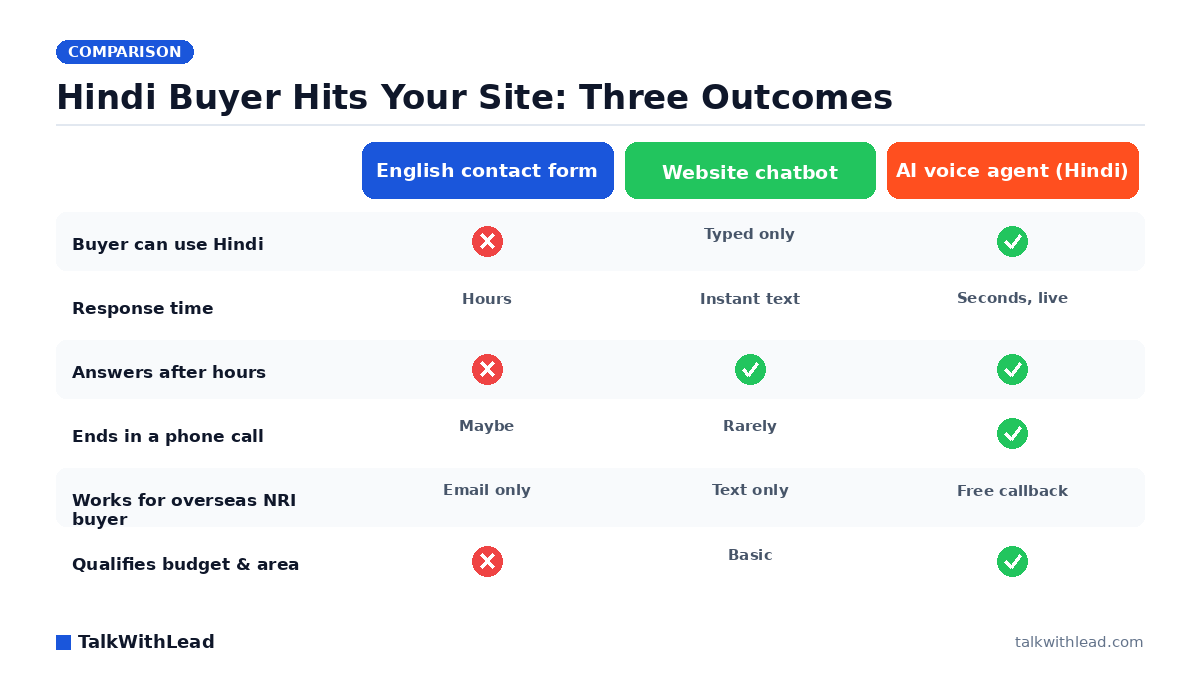
    Hindi Buyer Hits Your Site: Three Outcomes — TalkWithLead original infographic (comparison diagram).
    Hindi Buyer Hits Your Site: Three Outcomes

    Why Hindi-speaking buyers disappear from English-only real estate sites

    A family scrolling your listings at 10pm speaks Hindi at home. Your site speaks English, your form is in English, and the callback promise says “within one business day.” They close the tab and open the next agent’s site. That is the whole leak, and ai voice in hindi for real estate is how you plug it.

    TL;DR: An AI voice agent that speaks Hindi answers your website visitor by phone within seconds, in the language they actually think in, at any hour. Instead of a form fill you review tomorrow, you get a live conversation that captures budget, area, and timeline — and books the showing before a competing agent returns the call.

    Why Hindi-speaking buyers disappear from English-only real estate sites

    Property is an emotional, high-figure decision. People negotiate it in their first language. A buyer who is perfectly functional in English at work will still hesitate to describe a family budget, a joint purchase with parents, or a loan situation in a second language — especially in writing, where every sentence feels permanent and judged.

    So they do the quiet thing. They read your listings, they do not fill the form, and they leave no trace in your CRM. You never see that lead in a report, because a lead that never identifies itself is invisible. Imagine a site where eight in ten visitors browse and vanish without a single call — the visitors you never hear from are not “low intent,” they are un-served.

    The gap widens for NRI buyers. Someone shopping for a flat in Pune from Dubai or Mississauga is dealing with a time zone offset, an international dialing cost, and a form that promises a callback during your office hours. Every one of those is a reason to give up.

    How does an AI voice agent in Hindi actually work on a real estate website?

    A small widget sits on your listing pages. The visitor taps it, enters a number or asks for a call, and an extremely human-sounding AI voice agent calls them — usually within seconds. TalkWithLead’s agent handles the conversation in 50+ languages, so the same widget that greets a Hindi speaker in Hindi greets the next visitor in English, Punjabi, Gujarati, or Tamil without you configuring three separate funnels.

    The conversation is not a menu tree. The agent asks what the buyer is looking for, which area, roughly what budget, whether they are financing, and when they want to see the place. It reads back what it heard, confirms a showing window, and pushes the qualified details to you. Unlimited long-distance calling means the buyer in Dubai pays nothing to talk to you, and you are not making an international call at 2am to catch them.

    Two things make this different from every callback promise you have made before: it happens instantly, and it happens at 11pm on a Sunday. You can hear the agent handle a live conversation yourself on the TalkWithLead live demo — it takes about a minute and it answers the “does it sound robotic” question better than any paragraph can.

    Hindi voice vs. chatbot vs. contact form: what each one actually gets you

    Agents usually already have a chatbot or a form. The honest comparison is not “voice good, text bad” — it is that each channel produces a different kind of lead.

    DimensionContact formWebsite chatbotAI voice agent (Hindi)
    Buyer’s effortType name, email, phone, messageType answers, in English usuallyTalk normally in Hindi
    Speed of first human-feeling contactHours to next business dayInstant text, no voiceSeconds, live on the phone
    Works after hours and weekendsCollects onlyYes, text onlyYes, full conversation
    Handles a Hindi speaker naturallyNoTyped Hindi at bestNative spoken Hindi
    Overseas / NRI buyerEmail tag, timezone lagText lagUnlimited long-distance callback
    Typical outcomeA row in a spreadsheetAn email addressA booked showing

    Chat is fine for “is parking included.” It is weak for “my parents are co-signing, we need possession before Diwali, and we can stretch to a certain number if the floor is higher.” That conversation happens out loud or it does not happen. If you are weighing the two channels more broadly, we broke it down in Live Chat Alternative for Real Estate Agents, and the same language logic applies to other markets — see AI Voice in French: Capturing Real Estate Leads You Lose.

    Why speed decides who gets the Hindi-speaking buyer

    Language removes the friction. Speed decides the winner. The MIT Lead Response Management study found you’re about 21× more likely to qualify a lead contacted within 5 minutes than one contacted at 30 minutes.

    Now stack the phone problem on top. According to a 411 Locals study of 85 small businesses across 58 industries, only 37.8% of incoming calls were answered by a live person — meaning roughly 6 out of 10 calls went unattended. An agent is showing a property, driving, or asleep. That is not a discipline problem; it is a coverage problem, and software fixes coverage problems better than willpower does.

    The deeper mechanics of response timing are in Speed to Lead Real Estate: Book More Showings if you want the full argument.

    What is a missed Hindi-speaking lead worth? An illustrative ROI example

    Numbers make this concrete. The following is an illustrative example with stated assumptions, not a customer result — swap in your own figures.

    • Assume your site gets 1,200 visitors a month and 300 of them are more comfortable in Hindi.
    • Assume only 3% of that Hindi-comfortable group currently fills your English form — that’s 9 inquiries, and 291 people you never met.
    • Assume a Hindi-speaking voice agent converts even 5% of the remaining 291 into a live conversation — about 14 extra qualified callers a month.
    • Assume a 5% close rate on those callers, at an average commission of $6,000.

    That’s roughly 0.7 additional closings a month in this scenario — call it $4,200 in monthly commission from conversations that previously did not exist. Against a tool that costs a fraction of one commission, the payback question stops being interesting after the first deal. Run your own version with the free missed-call revenue calculator, and check current tiers on the TalkWithLead pricing page.

    Best for: agents, brokerages, and developers whose website traffic includes a meaningful share of Hindi-speaking or NRI buyers, and who cannot staff a bilingual receptionist across evenings, weekends, and overseas time zones.

    Not the right fit if: your inquiry volume is a handful a month and you personally answer every call within minutes — at that size, a voice agent is convenience, not revenue recovery.

    Setting it up without breaking what already works

    Keep your existing form. It costs nothing to leave it and it catches the people who prefer typing. Add the voice layer on top and let the buyer pick.

    A practical rollout looks like this:

    1. Install the widget site-wide, then confirm it appears on individual listing pages — that’s where intent peaks.
    2. Feed the agent your real inventory language: neighbourhoods, project names, possession timelines, price bands, financing partners.
    3. Set the qualification questions you would ask on a first call. Budget, area, buy-or-invest, timeline, financing status.
    4. Decide the handoff. Hot buyer with a firm timeline gets transferred or SMS-alerted to you immediately; everyone else lands in your CRM with a transcript.
    5. Read the transcripts for two weeks. They are the cheapest market research you will ever get — you will find out exactly which objections kill your listings.

    The three capabilities that decide whether any of this converts — voice quality, language coverage, and long-distance reach — are covered in The Three Things an AI Voice Agent Needs to Convert. When you’re ready to run it against your own traffic, start a free TalkWithLead signup and point it at your busiest listing page first.

    FAQ

    Can an AI voice agent really hold a natural conversation in Hindi?

    Yes — the agent speaks conversational Hindi rather than reading a translated script, and it handles the Hindi-English code-switching most urban Indian buyers use naturally. The fastest way to judge it is to hear it: run the live demo and speak to it the way a buyer would.

    What happens if the buyer switches to English mid-call?

    The agent follows. Because it supports 50+ languages in the same conversation layer, a buyer who starts in Hindi and drops into English for the numbers gets one continuous conversation rather than a restart.

    Will this work for NRI buyers calling from outside India?

    That’s one of the strongest use cases. Unlimited long-distance calling means the agent calls the buyer wherever they are at no cost to them, and because it runs around the clock, a buyer in Toronto or Dubai never has to match your office hours.

    How is this different from the chatbot already on my site?

    A chatbot collects text; a voice agent creates a phone conversation. For a property decision, spoken dialogue surfaces budget, urgency, and objections that nobody types into a chat window — and it ends in a booked showing rather than an email address.

    Do I lose control of my leads?

    No. You set the qualification questions, you receive the transcript and the contact details, and you decide which calls transfer straight to your phone. The agent is the first responder, not the closer.

    How much does an AI voice agent for real estate cost?

    Pricing is a monthly subscription tier rather than a per-minute answering-service bill, so cost stays predictable as volume grows. Current tiers are listed on the pricing page, and the missed-call revenue calculator will tell you how many recovered conversations it takes to pay for itself with your own numbers.

  • AI Voice in French: Capture Real Estate Leads You Lose

    AI Voice in French: Capture Real Estate Leads You Lose

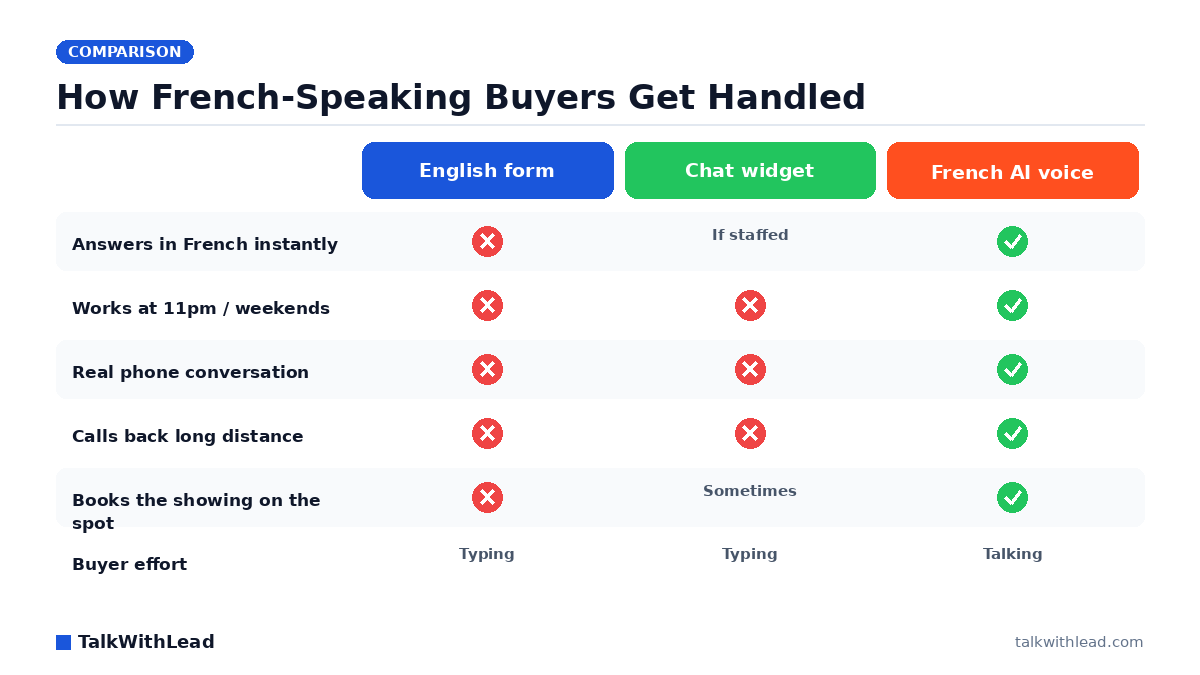
    How French-Speaking Buyers Get Handled — TalkWithLead original infographic (comparison diagram).
    How French-Speaking Buyers Get Handled

    A francophone buyer opens your listing page at 9:40pm, reads three lines of English, and closes the tab. No form. No call. Nothing in your CRM. That lead did not go cold — it never got warm, because nobody on your site spoke their language at the moment they were ready to talk.

    TL;DR: AI voice in French real estate means a human-sounding AI voice agent on your website greets a French-speaking visitor in French, holds a real spoken conversation, answers questions about the listing, and books a showing or calls them back instantly — 24/7, in 50+ languages, including long-distance. It converts visitors you currently lose to language friction and slow follow-up.

    Why French-speaking buyers vanish from English-only real estate sites

    Language friction is quiet. A buyer who cannot comfortably read your intake form does not complain, does not email, and does not call an English voicemail greeting. They go back to the search results and click the next agent. You never see the loss because there is no record of it.

    The pattern shows up wherever a market is genuinely bilingual: Montreal and the rest of Quebec, Ottawa-Gatineau, New Brunswick, francophone communities across Ontario and Manitoba, plus French buyers purchasing abroad — Florida, Morocco, the Caribbean. Picture a listing page that draws 400 visits a month and say a quarter of that traffic is more comfortable in French. That is 100 people a month deciding, in about four seconds, whether your business is for them.

    Adding a translated page helps discovery. It does not solve the conversation. The buyer still has to type into a form and wait for a callback that may arrive tomorrow, in English, from someone who mispronounces their name.

    How does an AI voice agent handle a French-speaking website visitor?

    The visitor clicks a call button on your listing page. Within seconds a natural-sounding AI voice agent picks up — in French, without a menu tree, without “press 1 for service en français.” It asks what they are looking for, which neighbourhood, what timeline, whether they are pre-approved. It answers the obvious questions about the property. Then it books the showing directly into your calendar or triggers an instant callback so the buyer is on the phone with your team while the listing is still open on their screen.

    Three things make that work in practice:

    • Voice, not typing. A buyer asking about a condo’s balcony, the school catchment, and whether the seller will move the closing date will say all of that in one breath. They will not type it.
    • 50+ languages on the same widget. You are not choosing between English and French. Spanish, Portuguese, Mandarin and Arabic buyers get the same treatment on the same page.
    • Unlimited long-distance calling. An overseas buyer looking at a Canadian property is not going to pay international rates to ask a question. The callback goes out from your side.

    The fastest way to judge tone and pacing is to hear it yourself — try the live demo and ask it a listing question the way a real buyer would.

    Why speed matters more than polish in real estate

    Property buyers shop in parallel. They open five agents’ pages in five tabs. Whoever gets into a real conversation first usually gets the showing, and the showing usually decides the relationship.

    The MIT Lead Response Management study found you’re about 21× more likely to qualify a lead contacted within 5 minutes than one contacted at 30 minutes. And according to Harvard Business Review research, companies that reach a web lead within an hour are nearly 7× more likely to qualify it than those that wait even an hour longer.

    Now layer language on top of that clock. If the francophone lead has to wait for the one bilingual person on your team to be free, your five-minute window is gone before anyone dials. An AI voice agent removes both delays at once — the language wait and the staffing wait. For a deeper look at the timing side alone, see Speed to Lead Real Estate: Book More Showings.

    French AI voice vs. the alternatives on your listing page

    CapabilityEnglish contact formBilingual live chatFrench AI voice agent
    Responds in French immediatelyNoOnly when a French-speaking agent is onlineYes, every time
    Available nights and weekendsCollects onlyUsually noYes, 24/7
    Format of the conversationTyped, one-wayTyped, back-and-forthSpoken, real-time
    Handles overseas buyersNo callingNo callingUnlimited long-distance callback
    Books a showing without youNoSometimesYes
    Effort asked of the buyerHighMediumLow

    Best for: agents, teams and brokerages with meaningful French-speaking or multilingual traffic who lose leads after hours and cannot staff a bilingual desk around the clock.

    Not the right fit if: your entire market speaks one language, your call volume is low enough that you personally answer every inquiry within minutes, or your leads come from referrals rather than your website.

    If you are weighing voice against a chat widget more broadly, Live Chat Alternative for Real Estate Agents breaks down where each one actually converts.

    What is this worth? A labeled ROI example

    This is an illustrative scenario, not a customer result. Assume a brokerage site gets 1,200 sessions a month and say roughly 300 of those visitors would rather speak French. Suppose 6% of French-speaking visitors will engage with a voice agent that greets them in their language — that is 18 conversations a month that previously produced silence. Say 1 in 4 of those becomes a booked showing: 4 or 5 extra showings. If one closes every couple of months at an average commission you can plug in yourself, the arithmetic tends to settle quickly.

    Run your own numbers instead of trusting mine — the free missed-call revenue calculator takes about a minute. Then compare that figure against TalkWithLead pricing, which sits in the ordinary monthly-software range rather than the per-hour range of a staffed bilingual answering desk.

    How to roll it out on a real estate site without breaking anything

    Start narrow and measure. The rollout that works looks like this:

    1. Put the widget on listing pages first. That is where intent is highest and where language friction costs the most.
    2. Write the French qualification script the way you actually speak. Neighbourhood, budget range, pre-approval status, timeline, best time to view.
    3. Decide the handoff rule. Some teams want every qualified francophone buyer transferred live; others prefer the agent to book the slot and send the brief.
    4. Turn on instant callback for after-hours. A 10pm inquiry that gets a call at 10:01pm feels like service, not automation.
    5. Track one number: booked showings per 100 French-speaking sessions. Chat transcripts and “engagements” are vanity; a calendar entry is not.

    The same three ingredients apply in every vertical — voice, languages, and long-distance reach — real estate just punishes their absence faster because listings move.

    If your francophone traffic is already there and going quiet, the setup is short: start free, drop the widget on your listing template, and let the next 9:40pm visitor hear a voice that speaks their language. Prefer to hear it before committing? The live demo takes two minutes.

    FAQ

    Can an AI voice agent really hold a natural conversation in French?

    Yes. The voice is designed to sound human rather than robotic, and it handles interruptions, follow-up questions and clarifications the way a person would. Most buyers treat it as a phone call, not a menu system.

    The practical test is whether it can answer a specific listing question and then book a time. That is what to check during a demo.

    What happens if a French-speaking buyer asks something the agent can’t answer?

    It escalates. The agent takes the question, captures contact details and the context, and either transfers the caller to your team or schedules an instant callback so a human closes the loop with the full conversation already summarized.

    Does it work for languages other than French?

    It covers 50+ languages on the same widget, so a Spanish-speaking buyer and a Mandarin-speaking buyer get the same instant treatment as a francophone one. You do not have to build a separate site or hire per language.

    Will this replace my bilingual assistant?

    It usually replaces the hours nobody covers — evenings, weekends, showings, vacations — rather than the person. Your assistant stops fielding “what’s the square footage” and starts working pre-qualified buyers who already have a showing booked.

    Can it call international buyers looking at properties here?

    Yes. Unlimited long-distance calling means the callback goes out from your side, so a buyer in France or Morocco pays nothing to have a conversation about a property in Canada.

    How fast can I get this live on my listing pages?

    Adding the widget is a snippet on your site template, so most agents are live the same day. The longer part is deciding your qualification questions and handoff rules, which is worth an hour of thought.

  • AI Voice in French: Capturing Real Estate Leads You Lose

    AI Voice in French: Capturing Real Estate Leads You Lose

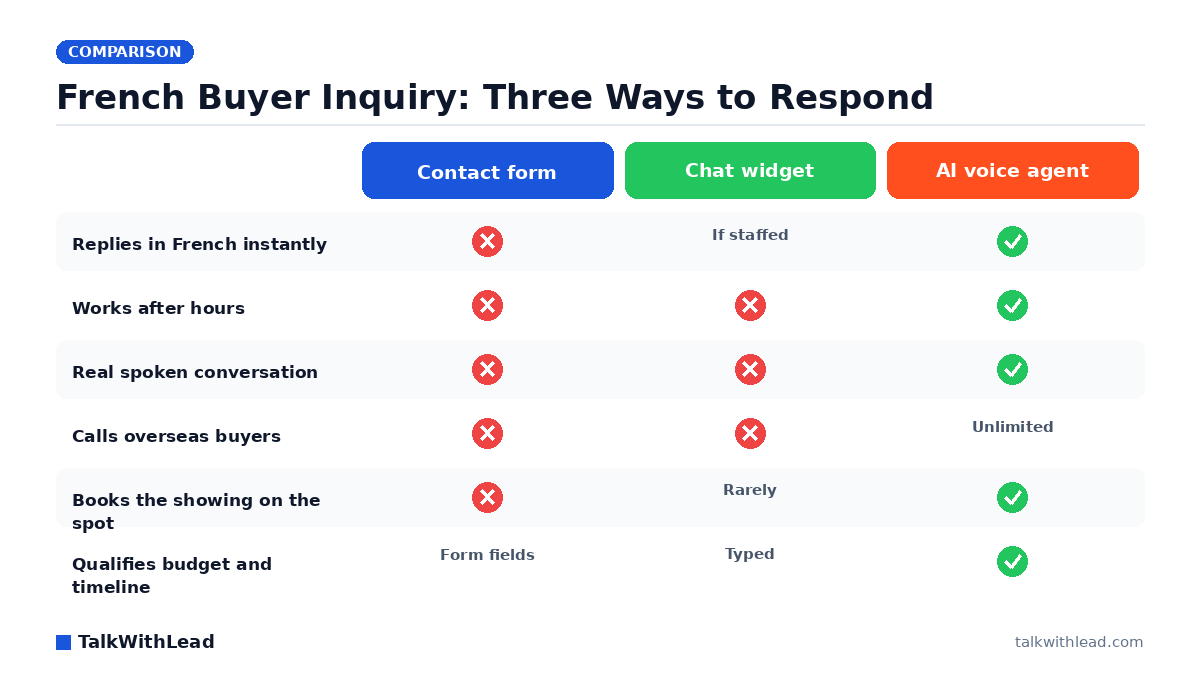
    French Buyer Inquiry: Three Ways to Respond — TalkWithLead original infographic (comparison diagram).
    French Buyer Inquiry: Three Ways to Respond

    A French-speaking buyer finds your listing at 9pm, reads three lines of English, and closes the tab. You never see that visitor in your CRM, because nothing was ever submitted. AI voice in French closes that hole: the visitor clicks once, a human-sounding voice agent greets them in their own language, and the conversation starts while they are still looking at the property.

    TL;DR: An AI voice agent on a real estate website answers French-speaking visitors by phone in seconds, in French, at any hour. It qualifies the buyer’s budget, timeline, and neighbourhood, then books the showing or routes the call to the agent. That replaces the English contact form that French buyers silently abandon, and it works across 50+ languages on the same widget.

    Why French-speaking buyers disappear from your funnel

    Real estate is a language-of-comfort purchase. A buyer will scroll English listing photos happily, then stop cold at the moment they have to explain their financing situation, their closing timeline, or a question about the condo fees. Typing that in a second language is work. Closing the tab is not.

    Your analytics will not show this as a problem. It shows traffic, time on page, and a low form-fill rate — the same signature as any underperforming listing page. The lost French inquiry leaves no fingerprint. Picture a Montreal or Ottawa listing where a meaningful slice of monthly visitors prefer French, and say even a small share of them were ready to book a viewing that week. Those are showings that quietly went to the brokerage whose site spoke their language.

    The fix is not translating the page. Translated pages help discovery; they still end at the same silent form. The fix is making the conversation available in French, immediately.

    How does AI voice in French actually work on a listing page?

    A visitor lands on a property page and sees a callback widget. They tap it, enter a number or accept a browser call, and within seconds an AI voice agent is speaking — in French, with natural pacing and interruption handling, not a menu tree. The agent asks the questions a good buyer’s agent asks: which property, are you pre-approved, what’s your timeline, do you want to see it this weekend.

    Three things make that work in practice:

    • Language detection and 50+ language coverage. The same widget that answers in French answers a Spanish-speaking investor and an English relocation buyer, without you staffing three desks.
    • Unlimited long-distance calling. Overseas and out-of-province French buyers — a real segment for Quebec, Florida, and European second-home markets — reach you without a toll charge or a WhatsApp negotiation.
    • Instant callbacks. If the buyer prefers, the widget rings them back in seconds rather than queueing an email.

    You can hear the agent handle a live conversation yourself on the TalkWithLead live demo before you decide anything about your site.

    Voice versus chat versus form for a bilingual market

    Every real estate site already has a lead-capture layer. The question is which one survives contact with a buyer who is not typing in their first language.

    CapabilityContact formChat widgetAI voice agent
    Responds in French immediatelyNo — reply comes later, often in EnglishOnly if a French-speaking rep is onlineYes, in seconds
    Available after hours and weekendsCollects onlyBot fallback, no bookingYes, 24/7
    Effort for the buyerHigh — typing in a second languageMedium — still typingLow — they just talk
    Handles overseas callersEmail onlyEmail onlyUnlimited long-distance calling
    Qualifies budget and timelineFixed fieldsDepends on the repConversational, adapts
    Books a showing in the same sessionNoRarelyYes

    Best for: agents and brokerages in bilingual or immigrant-heavy markets — Montreal, Ottawa, New Brunswick, South Florida, Paris-adjacent resort towns — who are already getting listing traffic but few inbound calls.

    Not the right fit if: your market is monolingual English and your inbound volume is small enough that you personally answer every call within a minute. Then the language layer buys you nothing you don’t already have.

    For the general voice-versus-chat trade-off outside the language question, see our breakdown of live chat alternatives for real estate agents.

    Speed is the real reason this converts

    Language removes the friction. Speed is what wins the deal. According to Harvard Business Review research, companies that reach a web lead within an hour are nearly 7× more likely to qualify it than those that wait even an hour longer. In residential real estate that hour is generous — a serious buyer inquires on three listings the same evening.

    Here is illustrative ROI math, with the assumptions stated plainly. Say a listing page draws 400 visitors a month and roughly a quarter of them prefer French. Assume the current English-only form converts 1% of that French segment, and assume an instant French voice conversation converts 4% instead. That moves the group from about one inquiry a month to about four. At an assumed 25% showing-to-offer rate and an assumed $9,000 average commission, the difference is roughly one extra closed transaction per quarter. Those rates are assumptions for illustration, not measured results — plug your own numbers into the speed-to-lead ROI calculator and see what the gap is worth in your market.

    The same arithmetic applies to missed phone calls. A 411 Locals study of 85 small businesses across 58 industries found only 37.8% of incoming calls were answered by a live person — meaning roughly 6 out of 10 calls went unattended. An agent showing a property cannot also answer the phone. The voice agent can.

    What the agent should say to a French-speaking buyer

    Configuration matters more than the technology. A voice agent that opens with a generic greeting wastes the advantage. Give it the listing context and a short qualification path:

    1. Greet in the visitor’s language and name the property. “Bonjour — vous regardez le condo sur Rue Saint-Denis?” beats “How can I help you today?”
    2. Ask timeline before budget. Buyers answer “when” honestly and “how much” defensively.
    3. Offer two concrete showing windows. Open-ended scheduling loses the moment.
    4. Capture the callback number and confirm it back. Numbers get misheard in any language; confirmation is cheap insurance.
    5. Hand off warm. The agent should text the human a two-line summary before the buyer hangs up.

    Brokerages running this alongside their existing intake often pair it with a speed-to-lead callback widget on every listing page, so the buyer never has to hunt for the phone number.

    Rolling it out without disrupting your current process

    This is a widget, not a CRM migration. The practical sequence: install on your highest-traffic listing pages first, set French and English as the primary languages, route qualified calls to the listing agent’s mobile, and let after-hours calls run fully autonomous with a morning summary. Give it two weeks before you judge it — you need enough evening and weekend traffic for the pattern to show.

    Watch three numbers: conversations started, showings booked, and after-hours share. If the after-hours share is meaningful, that is capacity you previously had no way to serve. Plans and per-market costs are listed on the TalkWithLead pricing page, and you can put it on a single listing page today with a free signup to see whether your French traffic actually picks up the phone. If you want the broader vertical view first, our guide to the best AI voice agent for real estate agents covers the non-language criteria.

    FAQ

    Does the AI voice agent actually sound natural in French?

    Yes — the agent uses a human-sounding synthetic voice with natural pacing, and it handles interruptions rather than reading a script to the end. It is not an IVR menu, and callers speak to it the way they would speak to a receptionist.

    What happens if a visitor starts in French and switches to English?

    The agent follows the caller. Language handling is conversational across 50+ languages, so a bilingual buyer who drifts between French and English mid-sentence is handled without a restart or a transfer.

    Can a French-speaking buyer overseas call without paying long distance?

    Yes. Unlimited long-distance calling is included, so a buyer in France, Belgium, or Morocco looking at a North American property can have the conversation at no cost to them.

    Will this replace my human agent on the call?

    No — it handles first contact and qualification, then hands off. The typical setup routes a qualified, motivated buyer straight to the listing agent’s phone, and only runs fully autonomous when nobody is available.

    How is this different from adding a French chatbot to my site?

    A chatbot still asks the buyer to type in a second language and rarely books anything. Voice removes the typing entirely and finishes the job — qualification and a scheduled showing — inside one conversation. The voice-versus-chatbot comparison goes deeper on the mechanics.

    How long does it take to get AI voice in French running on my listings?

    Installation is a script on your site, so most agents are live the same day. Configuring the property context, qualification questions, and routing rules is the part worth spending an hour on.

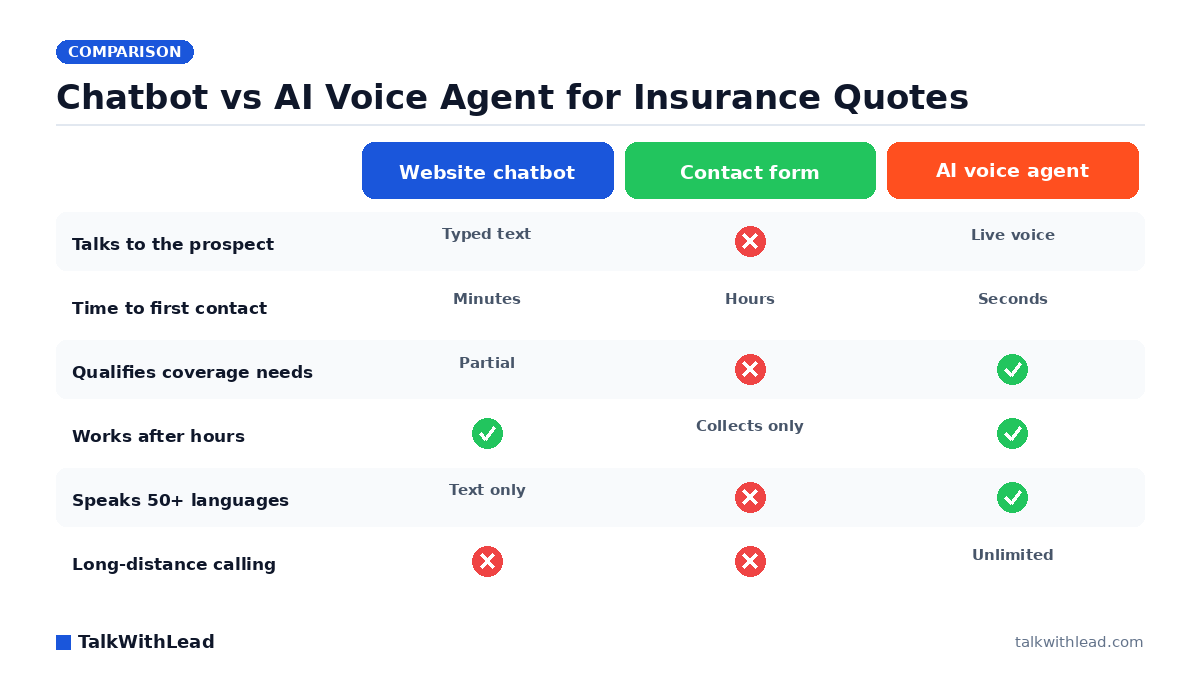
  • AI Voice Agent vs Chatbot for Insurance Brokers

    AI Voice Agent vs Chatbot for Insurance Brokers

    Chatbot vs AI Voice Agent for Insurance Quotes — TalkWithLead original infographic (comparison diagram).
    Chatbot vs AI Voice Agent for Insurance Quotes

    An insurance shopper lands on your quote page at 8:40 p.m., types three questions into your chat widget, gets a canned answer about “a licensed agent will follow up,” and closes the tab. By morning they have quotes from two other brokers. The choice between an AI voice agent vs chatbot for insurance brokers is really a choice between talking to that person now or emailing them tomorrow.

    Short answer: a chatbot is better at answering policy questions in text; an AI voice agent is better at converting a quote-page visitor into a bound policy. Insurance is a comparison purchase with a short shopping window, so the broker who gets the prospect on the phone first usually wins. Most brokers should run voice as the primary conversion path and keep chat for support-style questions.

    Why insurance leads punish slow follow-up harder than most industries

    Insurance shopping is a session, not a journey. Someone whose renewal notice just arrived opens four or five tabs, requests quotes from each, and takes the first real conversation that happens. Nobody sits patiently waiting for the third broker’s callback on Thursday.

    The research backs the intuition. According to Harvard Business Review research, companies that reach a web lead within an hour are nearly 7× more likely to qualify it than those that wait even an hour longer. For a broker, “qualify” means finding out whether this is a $600 auto policy or a $9,000 commercial package before a competitor does.

    A chatbot does not shorten that window. It parks the lead in a CRM and waits for a human producer to notice. An AI voice agent removes the wait entirely: the visitor clicks, the phone rings, and a human-sounding voice is asking about their current carrier before they have finished reading your homepage. If you want the general version of this argument, we covered it in Speed to Lead: How Fast Should You Call a New Lead?.

    What is the actual difference between an AI voice agent and a chatbot?

    A chatbot is a text interface. It matches what the visitor types against a set of intents or a language model, replies in the chat window, and — at best — captures a name, email, and phone number for someone else to act on later. Everything it accomplishes happens through typing.

    An AI voice agent is a phone conversation that starts from your website. The visitor asks for a call, the agent dials them (or takes an inbound call), and they speak. TalkWithLead’s agent sounds human enough that prospects treat it like an after-hours staffer, handles 50+ languages, offers unlimited long-distance calling so an out-of-state or overseas prospect can talk without a toll charge, and can fire an instant callback the moment someone shows intent on a quote page.

    The practical gap shows up in qualification depth. Ask a prospect to type their current carrier, renewal date, coverage limits, prior claims, vehicle year, and property details and they abandon halfway. Ask the same questions out loud and it takes about ninety seconds.

    DimensionWebsite chatbotStatic quote formAI voice agent
    Contact mediumTyped textSubmitted fieldsLive phone conversation
    Typical time to first human-grade contactMinutes to hoursHours to next business daySeconds
    Depth of qualification capturedName, email, rough intentWhatever fields survive abandonmentCarrier, renewal date, coverage, claims history
    After-hours coverageAnswers, cannot closeCollects onlyAnswers, qualifies, books the producer
    Language coverageText translation, often narrowUsually English-only50+ spoken languages
    Long-distance / out-of-state prospectsN/AN/AUnlimited long-distance calling
    Best atPolicy FAQs, claims status, document lookupLow-cost lead captureConverting quote-page traffic into bound policies

    You can hear the difference faster than you can read about it — the live demo lets you run an insurance-style intake conversation against the agent yourself.

    Which one books more insurance quote calls?

    Voice, for the traffic that matters. Chat wins on volume of interactions; voice wins on volume of conversations with a licensed producer, and only the second one writes policies.

    Consider an illustrative broker site — the numbers below are assumptions for the sake of the math, not measured results. Say the site gets 1,200 visitors a month and 4% start a quote, which is 48 people. Imagine a chat widget captures contact details from 15 of them and a producer reaches 6 by phone over the following days. Now say a voice agent instead puts 20 of those 48 into an immediate call, qualifies 14, and books 9 with a producer. Same traffic, roughly 50% more real conversations — and the conversations happened while the prospect still had your tab open.

    Run your own version of that math with the free speed-to-lead ROI calculator, using your own quote-start rate and average commission per policy. If you would rather size the downside first, the missed-call revenue calculator covers the calls your office already drops.

    What about the calls your agency misses after 5 p.m.?

    Renewal panic is an evening event. So is a fender-bender, a mortgage closing that needs proof of homeowners coverage by morning, and a contractor discovering their certificate expired. Those prospects call, hit voicemail, and dial the next broker.

    A 411 Locals study of 85 small businesses across 58 industries found only 37.8% of incoming calls were answered by a live person — meaning roughly 6 out of 10 calls went unattended. An agency with three producers and no evening staff sits squarely in that pattern.

    An AI voice agent covers the gap without a night shift. It answers, confirms what the caller needs, collects policy details, checks whether the situation is urgent, and either books a morning slot with the right producer or escalates immediately. A chatbot can post office hours; it cannot take an intake. Brokers who want the answering-service framing will find the cost side in AI Receptionist vs Human Answering Service Cost, and the staffing comparison in AI Voice Agent vs Human Receptionist.

    Language coverage is a quiet revenue leak in insurance

    Personal lines skew heavily toward households where English is a second language — new arrivals buying their first auto policy, families insuring a first home, small business owners covering a first storefront. Those buyers overwhelmingly prefer to discuss deductibles and exclusions out loud, in their own language, because the stakes are financial and the vocabulary is technical.

    A translated chat widget handles the words but not the reassurance. A voice agent that speaks 50+ languages does both, and unlimited long-distance calling means a prospect calling from another state or country is not weighing the cost of the call against the value of the quote. For most brokerages this is not a niche — it is a segment competitors are silently handing over.

    Should you drop the chatbot entirely?

    No. Keep it, demote it. A chatbot is genuinely good at the jobs voice handles awkwardly: pulling up a policy document, checking claim status, explaining what an umbrella policy covers, linking a certificate of insurance. Those are reference tasks, and text is the better medium for reference.

    The sensible setup for a broker is voice as the primary path on quote and landing pages, chat as a secondary support surface on service pages and the client portal. Route intent to voice, route lookup to text. We laid out the general version of this split in Chatbot Alternative for Small Business.

    Best for: independent brokers and agencies whose quote pages already get traffic, who lose deals to whoever calls back first, and who have no evening or weekend phone coverage.

    Not the right fit if: your business is almost entirely renewals of existing books with no inbound web traffic, or you are a captive agent whose carrier controls the website and forbids third-party widgets. In those cases the voice agent has nothing to convert.

    What does it cost to add an AI voice agent to a broker website?

    Pricing for this category generally runs from a low monthly subscription for a single-location agency up to per-seat or per-minute plans for multi-office brokerages; current TalkWithLead tiers are on the pricing page.

    Here is a labeled ROI example with stated assumptions. Assume a monthly platform cost of $200. Assume your average bound personal-lines policy earns $180 in first-year commission, and your average small commercial account earns $900. If the agent produces just two extra bound personal policies a month, the tool has roughly covered itself. If it produces one extra commercial account in a quarter, the math stops being close. Your own numbers will differ — the point is that the break-even for a broker sits at a very small number of additional conversations, because insurance commissions recur.

    Installation is a snippet, not a project. You can start free, drop the widget on your quote page, and watch whether visitors who would have typed at a bot start talking to a producer instead. Then compare the two side by side using AI Voice Agent vs Chatbot Conversion Rate.

    FAQ

    Is an AI voice agent better than a chatbot for an insurance brokerage?

    For converting quote-page visitors, yes. Insurance buyers compare several brokers in one sitting, and a voice agent reaches them within seconds while a chatbot hands off to a producer who calls later. For policy-document lookups and claims-status questions, a chatbot is the better tool.

    Most brokerages get the best result running both: voice on quote and landing pages, chat on service and portal pages.

    Can an AI voice agent actually qualify an insurance lead?

    It can capture the fields a producer needs to price and prioritize: coverage type, current carrier, renewal date, prior claims, and vehicle or property basics. Spoken answers take about ninety seconds where the same questions in a form cause abandonment.

    Binding, underwriting judgment, and advice stay with your licensed producers. The agent’s job is to make sure the producer is talking to a warm, pre-qualified prospect instead of chasing a stale email address.

    Will prospects realize they are talking to an AI?

    The voice is close enough to human that most callers treat it as an after-hours staff member, and it can identify itself when your compliance policy requires it. What prospects notice more is that someone picked up at 9 p.m. instead of nobody.

    How fast should an insurance broker respond to a web quote request?

    Within minutes, and preferably within seconds while the prospect is still on the page. The MIT Lead Response Management study found you’re about 21× more likely to qualify a lead contacted within 5 minutes than one contacted at 30 minutes — a gap that matters enormously when the shopper has four other tabs open.

    Does it work for commercial lines, not just personal auto and home?

    Yes, and the economics are stronger there. Commercial prospects are harder to reach by email and their accounts carry far higher commission, so a single extra booked conversation covers a lot of subscription cost. The agent qualifies on business type, payroll or revenue band, existing coverage, and renewal timing, then routes to the right producer.

    Can it handle Spanish-speaking and out-of-state prospects?

    It speaks 50+ languages, so a Spanish-speaking household discusses deductibles in Spanish rather than fighting a translated text widget. Unlimited long-distance calling means a prospect in another state or country can have the conversation without worrying about the cost of the call.

  • SaaS Demo Request Conversion for SaaS Pricing Pages

    SaaS Demo Request Conversion for SaaS Pricing Pages

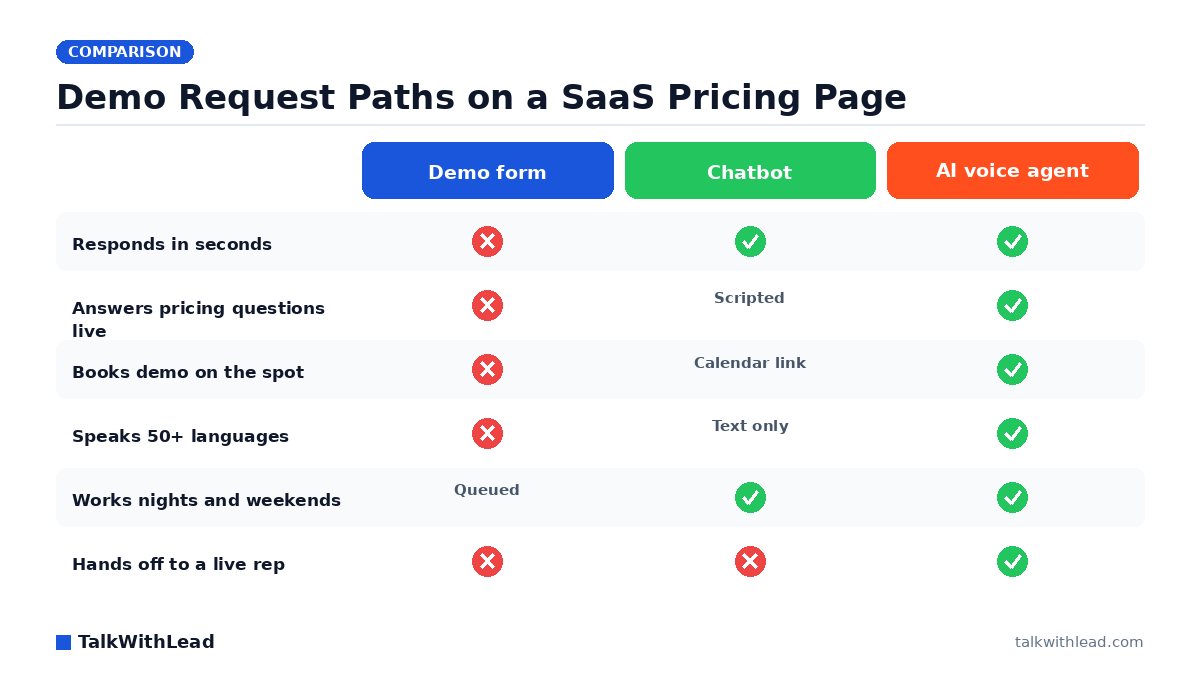
    Demo Request Paths on a SaaS Pricing Page — TalkWithLead original infographic (comparison diagram).
    Demo Request Paths on a SaaS Pricing Page

    Your pricing page is the most valuable real estate you own. Someone scrolling your tiers has already read the homepage, sized up a competitor, and started doing mental math on seats. Then they hit a “Request a demo” form, type their work email, and wait — and saas demo request conversion quietly dies in a queue.

    TL;DR: SaaS demo request conversion improves most when a pricing-page visitor can start a real conversation immediately instead of submitting a form and waiting. An AI voice agent picks up in seconds, answers pricing and fit questions in plain language, qualifies the buyer, and books the demo on the calendar before that visitor opens a competitor’s tab.

    Why do so few pricing-page visitors request a demo?

    Not because your product is unclear. Because the only action you offer is a delay. A demo form is a promise that someone will get back to them — later, on your schedule, after they have already asked three vendors the same question.

    Buyers on a pricing page have specific, blocking questions: does this scale past 50 seats, is SSO in the mid tier, what happens to our data on cancel. A form cannot answer any of them. A chatbot answers about half, badly, then drops a calendar link. Meanwhile the deal is being decided by whoever picks up first — research popularized by InsideSales / Dr. James Oldroyd found that roughly 35-50% of sales go to the company that responds first.

    Picture a SaaS site with 2,000 pricing-page sessions a month and 40 demo requests. Say even 1 in 10 of the visitors who left without acting would have talked to a human if one had been available in that moment — that is 196 conversations you never had, from traffic you already paid for.

    What actually moves saas demo request conversion?

    Three things, in order of impact:

    • Time to first human-quality response. Minutes, not hours. Harvard Business Review research found companies that reach a web lead within an hour are nearly 7× more likely to qualify it than those that wait even an hour longer.
    • Answering the blocking question. A buyer who cannot confirm fit will not book time with a rep. Resolve the objection and the demo request becomes obvious.
    • Removing the scheduling gap. Every step between “I’m interested” and “it’s on my calendar” leaks buyers.

    Voice collapses all three into one motion. The visitor clicks, an extremely human-sounding AI voice agent answers on the spot, handles the pricing question, confirms company size and use case, and drops the demo straight onto an AE’s calendar. No inbox round-trip. You can hear how that sounds on the TalkWithLead live demo.

    Form vs chatbot vs AI voice agent on a pricing page

    DimensionDemo request formWebsite chatbotAI voice agent
    Response timeHours to next business dayInstant, text onlySeconds, live conversation
    Handles pricing objectionsNoScripted answers onlyYes, conversationally
    Qualifies the buyerFields onlyBasic branchingNatural back-and-forth
    Books the demoRep does it laterCalendar link handoffBooks on the call
    Non-English buyersForm language onlyTranslated text50+ spoken languages
    International callersN/AN/AUnlimited long-distance
    After hoursQueuedAnswers, rarely booksAnswers and books

    Best for: SaaS teams with real pricing-page traffic, a sales-assisted motion, and an AE calendar that has open slots being wasted on no-shows and slow follow-up.

    Not the right fit if: you are pure self-serve with no demo motion at all, or your ACV is low enough that a phone conversation costs more than the account is worth.

    How fast should you respond to a demo request?

    Inside five minutes, and ideally inside five seconds. The MIT Lead Response Management study found you’re about 21× more likely to qualify a lead contacted within 5 minutes than one contacted at 30 minutes. Most SaaS teams cannot staff that window — someone is in a demo, it is 7pm in Berlin, it is Saturday.

    That is the gap an AI voice agent fills. It never queues. It answers the 2am pricing question from Singapore in the caller’s own language, and it stays on the line long enough to book. The same speed logic that drives how fast you should call a new lead applies with more force on a pricing page, because intent is at its peak right there.

    A labeled ROI example for a mid-market SaaS

    This is an illustrative model, not a customer result. Assume:

    • 2,000 pricing-page sessions per month
    • 2% currently request a demo → 40 requests
    • 30% of requests become held demos → 12 demos
    • 20% of held demos close → 2.4 new accounts
    • Assumed ACV: $9,000

    Now assume instant voice capture lifts demo requests from 2% to 3.2% and, because the AI qualifies and books live, held-demo rate rises from 30% to 45%. That is 64 requests, 28 held demos, 5.6 closes — roughly $28,800 in additional new ACV per month under those stated assumptions. Change any input and the math changes; the point is that the lever is the first sixty seconds, not the sales deck. Run your own numbers with the free speed-to-lead ROI calculator.

    Cost framing, plainly: an AI voice layer on a SaaS site typically lands well under the fully-loaded cost of a single SDR shift, and it covers every hour of the week. See current tiers on the TalkWithLead pricing page.

    How to wire voice into your pricing page without breaking the funnel

    Keep the form. Add a faster path beside it.

    1. Put the voice widget on pricing, feature, and comparison pages first — the pages where intent is highest, not the blog.
    2. Give the agent your real pricing logic. Tiers, seat minimums, what is gated, what is negotiable. Vague answers kill trust faster than silence.
    3. Define the qualification bar. Company size, use case, timeline. Above the bar, transfer live to an AE; below it, book a group demo or route to self-serve.
    4. Enable instant callback for visitors who would rather not talk in an open office — they enter a number, the agent calls back in seconds.
    5. Measure demo requests per pricing-page session and held-demo rate. Raw form fills will understate the lift because voice conversations do not create form fills.

    Teams switching away from text-first tools usually recognize the pattern described in our AI voice agent vs chatbot conversion comparison, and the same widget mechanics covered in callback widget vs click-to-call vs live chat apply directly to a SaaS pricing page.

    What about buyers who are not ready to talk?

    Some are not, and forcing them wastes both sides’ time. A good voice layer offers the conversation, accepts a no, and captures a callback time instead. The visitor picks the moment; the agent calls then. You lose nothing and you learn who is browsing versus buying.

    The trap is the opposite failure — assuming nobody wants to talk because nobody ever could. Most SaaS sites have never offered a real-time voice option, so “our buyers prefer async” is usually an untested assumption about a button that does not exist. Test it for a month on the pricing page. Start free and point it at your highest-intent page.

    FAQ

    What is a good demo request conversion rate for a SaaS pricing page?

    It varies widely by ACV and traffic quality, so treat any single benchmark carefully. The more useful measure is your own trend: demo requests divided by pricing-page sessions, tracked monthly, alongside the percentage of those requests that turn into demos actually held.

    Will an AI voice agent annoy enterprise buyers?

    Not when it is honest and useful. The agent sounds human, answers the pricing question directly, and hands off to a real AE when the deal warrants it. Buyers dislike being stalled far more than they dislike being helped quickly.

    Can an AI voice agent qualify leads before booking a demo?

    Yes. You set the qualification criteria — company size, use case, budget range, timeline — and the agent works them into a natural conversation, then books only the buyers who clear the bar. Everyone else gets a self-serve trial or a group session.

    How does this work for international SaaS traffic?

    The agent speaks 50+ languages and unlimited long-distance calling is included, so a prospect in São Paulo or Warsaw gets the same instant conversation as one in Chicago. No regional phone numbers to provision, no time-zone staffing plan.

    Does adding voice mean removing our demo form?

    No. Keep the form for buyers who prefer async. Voice runs beside it as the fast path, which is why raw form-fill counts alone will understate the impact — track total booked demos instead.

    How long does it take to set up on a pricing page?

    It is a script tag plus the pricing and qualification rules you feed the agent. Most teams point it at the pricing page first, watch a week of transcripts, tighten the answers, then expand to feature and comparison pages. You can hear the agent yourself on the live demo.

  • How to Add a Callback Widget to WordPress for General Sites

    How to Add a Callback Widget to WordPress for General Sites

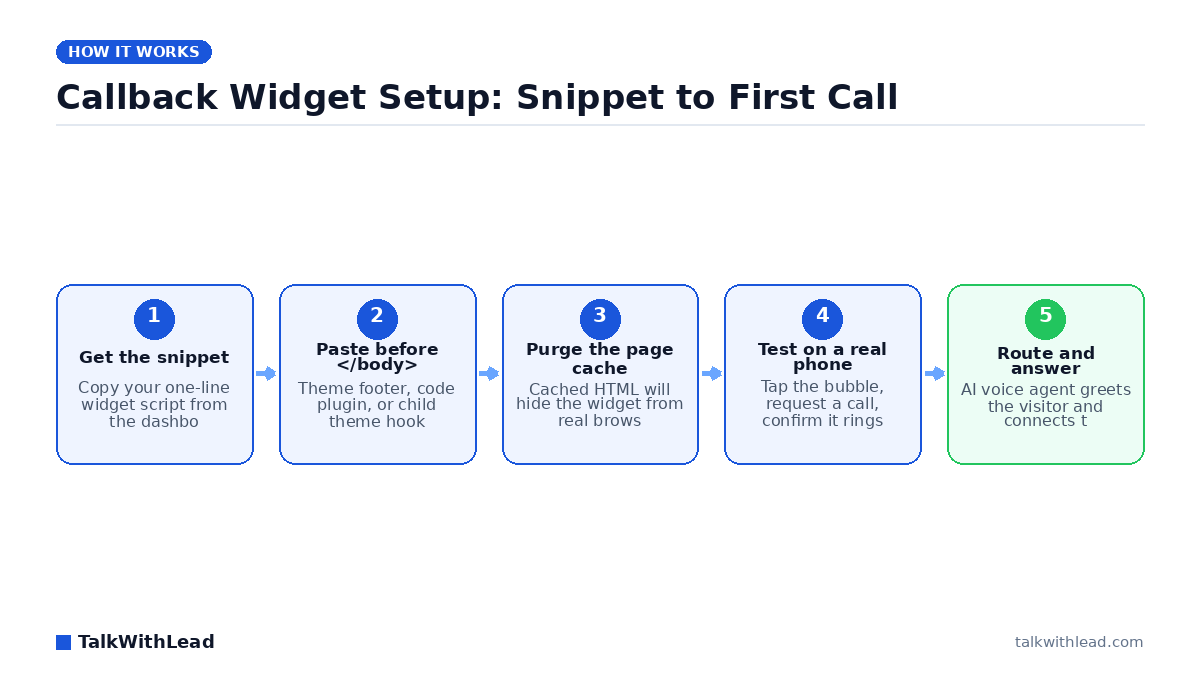
    Callback Widget Setup: Snippet to First Call — TalkWithLead original infographic (flow diagram).
    Callback Widget Setup: Snippet to First Call

    Adding a callback widget to WordPress is a ten-minute job, and it is probably the highest-leverage ten minutes you will spend on your site this quarter. Most WordPress sites already earn traffic they never convert — visitors read a page, hesitate, and leave without ever picking up the phone. A callback widget closes that gap by turning a click into a live phone conversation.

    TL;DR: To add a callback widget to WordPress, copy the widget’s JavaScript snippet from your provider, paste it immediately before the closing </body> tag using your theme’s footer hook or a code-insertion plugin, purge your page cache, then test the widget on a real mobile browser. With TalkWithLead, the widget also answers — an AI voice agent talks to the visitor and places the call within seconds.

    What a callback widget actually does on a WordPress site

    A callback widget is a small floating element — usually a bubble in a bottom corner — that offers the visitor a phone conversation instead of a form. The visitor taps it, gives a number or asks to talk, and the system connects the call. No inbox. No “we’ll get back to you within one business day.”

    That distinction matters more than the install itself. A widget that just queues a phone number in a CRM is a contact form wearing a different costume. The version that earns its place on your site is the one that starts the conversation while the visitor is still on the page, still comparing you against two other tabs. If you are still weighing formats, our breakdown of callback widget vs click-to-call vs live chat lays out where each one wins.

    How do I add a callback widget to WordPress in 10 minutes?

    Here is the whole sequence. Nothing here requires a developer, and every step is reversible.

    1. Create the account and grab the snippet. Sign up, add your site domain, and copy the one-line script the dashboard gives you. Start with the free signup if you do not have a snippet yet. (~3 minutes)
    2. Decide where the code goes. Three safe options, in order of preference: a code-insertion plugin (WPCode, Insert Headers and Footers), your theme’s built-in “Footer scripts” field, or a child theme’s wp_footer hook. Never edit a parent theme’s footer.php directly — the next theme update erases it. (~1 minute)
    3. Paste it before the closing body tag. The footer position keeps the script out of your render path, so it will not slow your Largest Contentful Paint. (~1 minute)
    4. Purge every cache layer. This is the step people skip and then file a support ticket about. Clear your WordPress page cache plugin, your host’s server cache, and your CDN. Cached HTML was generated before the snippet existed, so real browsers keep getting the old version even though the code is saved. (~2 minutes)
    5. Test on a real phone. Open the site on your own mobile browser — not just a desktop window resized narrow. Tap the widget, request a callback, and confirm your phone actually rings. (~3 minutes)

    If the widget does not appear after a purge, open your browser console and look for a Content Security Policy error or a script blocked by an optimization plugin. “Defer all JavaScript” and “Delay JS until interaction” settings in caching plugins are the two most common culprits. Add the widget domain to the exclusion list and it renders.

    Plugin or code snippet: which install method should you use?

    Both work. Pick based on how much control you need over where the widget appears.

    DimensionCode snippet in footerCode-insertion plugin
    Setup time~2 minutes~5 minutes
    Survives theme updatesOnly via child themeYes
    Page-level show/hide rulesManual codeBuilt-in conditions
    Extra plugin to maintainNoneOne more
    Best forSitewide widgetLanding pages only

    Default to the snippet. Reach for the plugin when you want the widget on service pages but not on checkout, or when a non-technical teammate needs to toggle it without touching theme files.

    Why an answering widget beats a message-taking widget

    Installing the widget is the easy part. What decides whether it produces revenue is what happens in the sixty seconds after someone uses it.

    According to Harvard Business Review research, companies that reach a web lead within an hour are nearly 7× more likely to qualify it than those that wait even an hour longer. A callback widget that emails you a phone number does not deliver that hour — it delivers whenever you next check your inbox. On a Saturday afternoon, that could be Monday.

    TalkWithLead closes the loop on the widget’s own side. An extremely human-sounding AI voice agent picks up the request, greets the visitor by voice, asks what they need, and places the call immediately. It handles the conversation in 50+ languages, so a Spanish-speaking visitor is not stuck reading English form labels. Unlimited long-distance calling means a prospect three time zones away costs you nothing extra to reach. You can hear it running on a live site through the Live Demo.

    Best for: WordPress site owners who get real traffic, sell something worth a phone conversation, and cannot staff a live answering desk every hour their site is open.

    Not the right fit if: your product sells entirely self-serve at a low price point and a phone call would only add friction to the checkout.

    How much is a slow callback costing you?

    Run the arithmetic on your own numbers rather than trusting a generic benchmark. Here is an illustrative example, with every assumption stated:

    • Assume 2,000 monthly visitors to your service pages.
    • Assume 2% tap a callback widget — 40 requests a month.
    • Say even 1 in 4 of those requests goes unanswered until the next business day: 10 lost conversations.
    • Assume a 20% close rate and a $1,500 average job value: roughly $3,000 a month walking to a competitor.

    Those inputs are placeholders — swap in yours. The free missed-call revenue calculator does the math with your traffic, close rate, and ticket size. Compare the output against published pricing and the decision usually makes itself. For a deeper look at why the first minute carries so much weight, read how fast you should call a new lead.

    Five settings to configure before you call it done

    A default install works. A configured install converts. Spend ten more minutes here:

    • Trigger timing. Show the widget after a short scroll or dwell rather than the instant the page paints. An overlay that lands before the visitor reads your headline gets dismissed on reflex.
    • Mobile placement. Check that the bubble does not cover your primary call-to-action button on a 375px-wide screen. Most callback requests arrive from phones.
    • Business hours and after-hours behavior. Decide explicitly what happens at 11pm. An AI voice agent answering beats a form that promises a reply.
    • Language handling. If your traffic is mixed, confirm the agent switches languages on its own instead of forcing a menu choice.
    • Analytics events. Fire a GA4 event on widget open and on completed callback so you can measure the widget instead of guessing about it.

    Chatbots and contact forms remain the slow alternative here: they collect text, hand you a transcript, and leave the actual selling for later. Voice skips that queue. If you want the side-by-side, see AI voice agent vs chatbot conversion rate.

    Verify the install like a professional

    Before you move on, confirm four things from a clean browser session with cache disabled: the widget renders on your homepage and on a deep service page; tapping it produces an actual ring on your phone; PageSpeed Insights shows no meaningful regression in your Largest Contentful Paint; and your analytics records the open event.

    If all four pass, you are done. The widget will keep working while you sleep, and every visitor who wants to talk gets a conversation instead of a confirmation message. Start the free signup, paste one line of code, and watch what happens when your website starts answering back.

    FAQ

    How do I add a callback widget to WordPress without a plugin?

    Copy your provider’s JavaScript snippet and paste it into your theme’s footer scripts field, or add it to a child theme using the wp_footer action hook. Then purge your page cache and CDN so browsers receive the updated HTML. No plugin is required for a sitewide widget.

    Will a callback widget slow down my WordPress site?

    Not meaningfully, if it loads asynchronously in the footer. The script runs after your page content renders, so it should not affect Largest Contentful Paint. Verify with PageSpeed Insights before and after installing, and exclude the widget domain from any “delay JavaScript” setting that would break it.

    Why is my callback widget not showing up after I installed it?

    Nine times out of ten it is caching. Purge your WordPress cache plugin, your host’s server cache, and your CDN. If it still does not appear, check the browser console for a blocked script — optimization plugins that defer or delay JavaScript are the usual cause, and adding the widget domain to their exclusion list fixes it.

    Can a callback widget talk to visitors in other languages?

    With TalkWithLead, yes. The AI voice agent handles conversations in 50+ languages and adapts to the caller rather than making them pick from a menu. That matters on sites drawing multilingual traffic, where an English-only form quietly filters out qualified buyers.

    Is a callback widget better than live chat for a WordPress site?

    For anything sold through a conversation, usually yes. Chat requires typing, produces a transcript instead of a relationship, and stalls when nobody is staffing it. A callback widget backed by an AI voice agent gets the visitor on the phone in seconds, at any hour, which is where deals actually close.

    What does a callback widget cost?

    Most callback tools price as a flat monthly subscription rather than per-minute, and TalkWithLead includes unlimited long-distance calling so international prospects do not create surprise charges. Current tiers are listed on the pricing page; run your own numbers through the missed-call calculator to see what the widget needs to recover to pay for itself.

  • Best AI Voice Agent for Real Estate Agents (2026)

    Best AI Voice Agent for Real Estate Agents (2026)

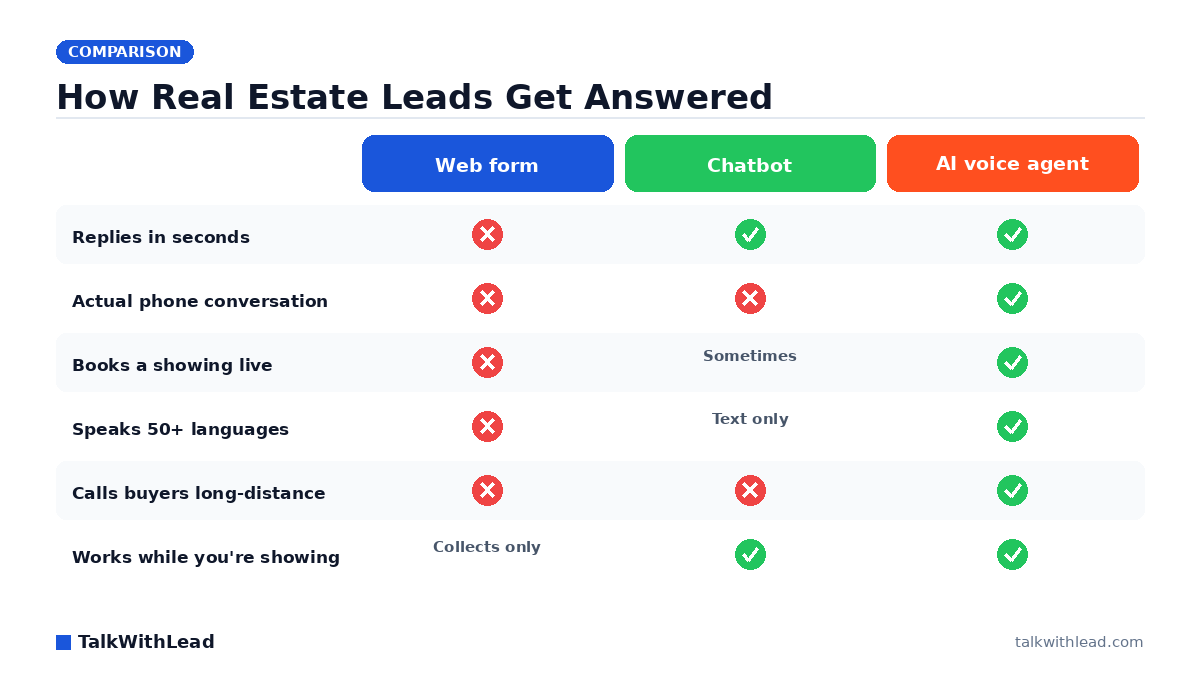
    How Real Estate Leads Get Answered — TalkWithLead original infographic (comparison diagram).
    How Real Estate Leads Get Answered

    A buyer finds your listing at 8:40pm, fills out your contact form, and waits. You see it at 10:15pm, after the second showing and the dinner you rescheduled twice. By then they’ve already talked to someone else on the phone. That’s the whole problem the best AI voice agent for real estate agents is built to solve: picking up the conversation the second a buyer raises their hand on your website.

    TL;DR: The best AI voice agent for real estate agents is the one that turns a website visitor into a live phone call within seconds, qualifies budget and timeline, and books the showing straight into your calendar. Prioritize instant callback speed, real spoken conversation over chat, multilingual coverage for relocation buyers, and unlimited long-distance calling. TalkWithLead is our pick for website-sourced leads; the alternatives below fit different situations.

    Why real estate is the worst possible business for slow lead response

    Real estate leads shop in parallel. A buyer inquiring on a listing is almost never inquiring on only that listing, and the agent who gets them on the phone first is the agent who frames the search, sets the budget expectation, and books the tour. Everyone else becomes the second opinion.

    The research is blunt about this. According to Harvard Business Review research, companies that reach a web lead within an hour are nearly 7× more likely to qualify it than those that wait even an hour longer. The MIT Lead Response Management study tightened it further: you’re about 21× more likely to qualify a lead contacted within 5 minutes than one contacted at 30 minutes.

    Agents don’t lose on effort. They lose on scheduling. You cannot be on a listing appointment, at an inspection, and on the phone with a new web lead at the same time — so the lead waits, and waiting is the loss. That gap is exactly what an AI voice agent covers. For the underlying math on response windows, see our breakdown of speed to lead in real estate.

    What actually separates a good real estate AI voice agent from a bad one

    Most “AI receptionist” products were designed for inbound phone calls to a business number. Real estate leads mostly arrive somewhere else — on your IDX site, your listing pages, your landing pages — and never dial anything. Judge every option on these five dimensions:

    • Website-triggered callback. Does it start a phone conversation from a page visit, or does it only answer a ringing phone? For agents, the website is where the lead is.
    • Voice quality. A buyer hangs up on a robot. The agent has to sound human enough that the conversation actually continues past ten seconds.
    • Showing capture. Qualifying is table stakes. Booking a time is the outcome you’re paying for.
    • Language coverage. Relocation, investor, and international buyers are the highest-value leads most agents silently discard because nobody could hold the conversation.
    • Calling reach and cost. Out-of-state and overseas buyers are normal in real estate. Per-minute long-distance charges quietly punish you for talking to your best prospects.

    Want to hear what the voice side sounds like before comparing spec sheets? Take the live demo — it takes about a minute and it settles the “does this sound like a robot” question faster than any feature table.

    Best AI voice agent for real estate agents: top 6 compared

    Six categories of tool compete for this job, and they are genuinely different products. Here’s how they line up on what matters to an agent working website leads.

    OptionPrimary strengthAnswers website leadsBooks showingsLanguage coverageBest fit
    TalkWithLeadInstant voice callback from your siteYes — built for itYes, live on the call50+ languagesAgents whose leads come from a website or IDX pages
    Human answering serviceReal people, nuancePhone line onlyYes, if trainedUsually English + SpanishTeams wanting humans and willing to pay per minute
    AI phone receptionist toolsAnswers your business numberNo — inbound calls onlyVariesVariesBrokerages with a busy main line
    Website chatbotCheap, always onText onlyRarelyText translationSites wanting FAQ deflection, not booked tours
    CRM auto-dialer / ISA add-onWorks your existing databaseAfter form submit, delayedSometimesLimitedTeams with a large aged lead database
    Voice AI dev platformsTotal customizationOnly if you build itOnly if you build itConfigurableBrokerages with in-house engineers

    Best for: Solo agents and small teams whose leads arrive on a website or listing page and who lose deals to response time rather than to lead volume.

    Not the right fit if: Your business is almost entirely referral and repeat, your phone rings maybe twice a week, and you already answer every one of those calls personally — automation solves a problem you don’t have.

    1. TalkWithLead — best for converting website visitors into phone calls

    TalkWithLead sits on your site as a widget. A visitor who’s interested talks to a human-sounding AI voice agent right there, or requests an instant callback and the phone rings within seconds. The agent handles the conversation in 50+ languages and unlimited long-distance calling means an out-of-state relocation buyer costs you nothing extra to talk to. It qualifies, it captures, and it hands you a live conversation instead of a form entry. Start free and put it on a single listing page first.

    2. Human answering services — best when nuance beats speed

    Trained humans handle emotional conversations well, which matters on the listing side. The tradeoffs are cost structure and coverage: per-minute billing, hold queues at peak hours, and a script that is only as good as the last training update. They also answer a phone line, so a website lead who never dials stays unanswered.

    3. AI phone receptionists — best for a busy brokerage main line

    These are strong at what they were built for: nobody misses an inbound call again. Worth having if your office number rings constantly. But they don’t touch the visitor sitting on your listing page at 11pm who was never going to dial in the first place. Compare the category in our general AI voice agent buyer’s guide.

    4. Website chatbots — cheapest, and it shows

    A chatbot collects a name and an email. It rarely books anything, and buyers treat it like a help desk. If you’re weighing this specifically, we’ve laid out the conversion difference in live chat alternatives for real estate agents.

    5. CRM dialers and ISA add-ons — best for an aged database

    If you have thousands of old leads, a dialer campaign is a legitimate play. For fresh website inquiries the sequencing is usually too slow — form submits, waits for a batch, then dials. Minutes matter and batches lose them.

    6. Voice AI developer platforms — best if you have engineers

    Maximum control, maximum build time. You are assembling telephony, prompts, calendar integrations, and failure handling yourself. Great for a brokerage with a dev team. Rough for an agent who wants leads answered this week.

    How much does an AI voice agent cost a real estate agent?

    Plainly: most website-focused AI voice tools land in the low hundreds per month, human answering services bill per minute and get expensive at volume, and developer platforms bill per usage plus your engineering time. See current TalkWithLead pricing for exact numbers.

    The math that actually decides it is commission math. Illustrative ROI example — assumed figures, not measured results: say your site gets 400 visitors a month and 30 of them show real buying intent. Assume you currently reach 12 of those 30 in time to matter, and assume faster response lifts that to 18. That’s 6 extra live conversations a month. If even 1 of those 6 becomes a closed transaction over a year at a $9,000 commission, the tool pays for itself many times over. Swap in your own average commission and conversion rate — the shape of the answer rarely changes. You can run your own numbers with the free speed-to-lead ROI calculator.

    The cost most agents ignore is the unanswered call. A 411 Locals study of 85 small businesses across 58 industries found only 37.8% of incoming calls were answered by a live person — meaning roughly 6 out of 10 calls went unattended. For an agent showing property all day, that ratio is not surprising. It’s just invisible until you price it.

    How to roll one out without breaking your pipeline

    Start narrow. Put the voice agent on your highest-traffic listing pages and your home valuation landing page, not the entire site, and listen to the first week of recordings yourself. You will find two or three questions the agent should ask that you never wrote down — school districts, financing status, whether they’ve toured with another agent.

    Then decide the handoff rule. Most agents route qualified buyers straight to their cell during working hours and let the AI book the showing after hours. Write down what “qualified” means before launch, or every lead becomes an interruption and you’ll turn it off inside a month.

    Finally, measure one number: booked showings from website leads, this month versus last. Not chat sessions, not form fills. Showings. If that number doesn’t move in 30 days, the problem is your routing or your pages, not the tool. Ready to test it on a page of your own? Try the live demo, then sign up free and start with one listing.

    FAQ

    What is the best AI voice agent for real estate agents in 2026?

    For agents whose leads come from a website, IDX search, or listing landing pages, TalkWithLead is the strongest fit because it converts an on-page visitor into a live phone conversation in seconds and handles it in 50+ languages. If your leads arrive mainly by phone to a brokerage main line, an AI phone receptionist is the better shape of tool.

    Can an AI voice agent actually book a property showing?

    Yes. A capable voice agent qualifies the buyer on the call — timeline, financing status, area — and books an available slot before hanging up, then passes you the recording and details. The point is that the booking happens during the conversation, not in a follow-up email the buyer never opens.

    Will buyers hang up when they realize it’s AI?

    Some will, and it’s worth being honest about that. In practice, the voice quality is the deciding variable: buyers stay on when it sounds human and conversational, and drop instantly when it sounds like a phone tree. Test the voice yourself before you commit, and always give the caller a fast path to a real agent.

    Is an AI voice agent better than a chatbot for real estate leads?

    For booking showings, yes. Chat collects contact details; voice creates a conversation where you can handle objections, gauge seriousness, and lock a time. We compare the two directly in our post on AI voice agents vs chatbots.

    How does this help with relocation and international buyers?

    Two ways. Support for 50+ languages means a buyer relocating from abroad gets a real conversation instead of a language barrier, and unlimited long-distance calling means you aren’t paying per minute to talk to your highest-value out-of-area prospects.

    How fast should I really call a new real estate lead?

    Within five minutes if you can, and seconds if you can automate it. The MIT lead response research shows qualification odds falling sharply between the 5-minute and 30-minute marks, which is why an automated instant callback usually outperforms a diligent agent who returns calls between appointments.

  • Speed to Lead Mortgage: Why First-to-Call Wins the Loan

    Speed to Lead Mortgage: Why First-to-Call Wins the Loan

    A borrower fills out your rate quote form at 9:40 on a Tuesday night. They also filled out three other lenders’ forms in the same eleven minutes. Whoever calls first gets to define what a good rate looks like, and everybody after that is arguing with a number the borrower already trusts.

    TL;DR: Speed to lead in mortgage means calling a web inquiry within minutes, not hours, because rate shoppers submit to several lenders at once and anchor on the first human who explains the loan. The MIT Lead Response Management study found you’re about 21× more likely to qualify a lead contacted within 5 minutes than one contacted at 30 minutes. An AI voice agent closes that gap around the clock.

    Why speed to lead matters more in mortgage than almost anywhere else

    Most industries compete on features. Mortgage competes on a number the borrower can compare in fifteen seconds across four tabs. That makes the sequencing of conversations the whole game. The first loan officer to actually talk with a borrower gets to explain why the rate on the screen is not the rate they will close at, why points change the math, and why an origination fee comparison is more useful than an APR screenshot.

    By the time your third-place callback lands, the borrower has a mental model. They also have a name they like. You are no longer selling a loan; you are trying to dislodge somebody.

    The research popularized by InsideSales and Dr. James Oldroyd found that roughly 35-50% of sales go to the company that responds first. In a category where the product is close to interchangeable, that share is the entire competitive advantage.

    How fast should a mortgage lender respond to a web lead?

    Under five minutes, every hour your site is open for business. That is not an aspirational target, it is the window where a borrower is still sitting at the laptop with the tab open and the calculator running. At 30 minutes they have made dinner. At two hours they are asleep. At 9am tomorrow, another lender has already had the conversation.

    Run the math on your own funnel instead of taking the number on faith. Say your site produces 200 inquiries a month and your team reaches 60 of them the same day. Say even one in eight of the 140 you missed would have funded at an assumed $4,200 in revenue per closed loan. That is roughly 17 loans and about $73,000 a month walking to a competitor, on an illustrative set of assumptions you can swap for your own. The free speed-to-lead ROI calculator will run it with your numbers.

    Our broader breakdown of the response-time curve lives in Speed to Lead: How Fast Should You Call a New Lead?, and the real-estate version of the same problem is covered in Speed to Lead Real Estate.

    Why your current setup is slow (and it is not your loan officers’ fault)

    Nobody on a mortgage team is sitting around refusing to call people. The delay is structural:

    • Business hours. Borrowers shop rates at night and on weekends, precisely when your LOs are not at a desk.
    • Routing lag. The form hits the CRM, the CRM assigns, the assignment emails, the LO checks email between appointments. Twenty minutes gone before a phone rings.
    • Underwriting-hour blackouts. Your best originator is on a call about a file in clear-to-close. The new lead waits.
    • Chatbots that collect instead of convert. A widget that captures a name and promises a callback has moved the borrower one inch and added a delay.

    Live chat has the same ceiling. A typing session cannot establish trust about a six-figure debt, and it cannot answer “what would my payment actually be at 6.1 with 10% down?” the way a voice can. We walk through that ceiling in detail in AI Voice Agent vs Chatbot Conversion Rate.

    What an AI voice agent does differently for a mortgage site

    TalkWithLead puts a human-sounding AI voice agent on your site. A visitor asks for a callback, or submits the rate form, and the agent is on the phone with them in seconds. It speaks 50+ languages, calls long distance without a meter running, and never has a night off. Your loan officer gets a borrower who is already talking, already qualified on loan type, purchase or refi, ballpark amount, and timeline.

    What the agent does on that first call:

    1. Confirms the borrower is a real person with a real timeline, not a rate-table tourist.
    2. Captures loan purpose, property type, rough credit band, and down payment.
    3. Answers the process questions that make borrowers stall (documents needed, how long pre-approval takes).
    4. Books the loan officer conversation, or transfers live when an LO is available.

    The borrower experiences a lender who picked up. That is the entire perception you are buying. Try the live demo and listen to how it handles an interruption, because that is where scripted systems fall apart and this one does not.

    Callback speed by channel: what each option actually delivers

    A comparison of the response paths a mortgage site can offer, on the dimensions that decide whether a borrower stays with you.

    CapabilityWeb form + CRMLive chat / chatbotAI voice agent
    Typical first contactHours to next dayMinutes, in textUnder a minute, by phone
    Works at 11pm SundayNoBot onlyYes
    Qualifies loan type and amountForm fields onlyPartialConversational
    Handles Spanish and other languagesNoRarely50+ languages
    Long-distance borrowerCallback costN/AUnlimited calling
    Warm transfer to a loan officerNoNoYes

    Best for: mortgage brokers and lender teams whose site produces steady inquiry volume and whose loan officers cannot answer nights, weekends, and mid-appointment.

    Not the right fit if: your leads come almost entirely from realtor referrals and warm introductions, where nobody is comparison-shopping four lenders in one sitting. Speed helps there, but it is not the deciding factor.

    The multilingual borrower nobody is calling back

    Plenty of mortgage markets have large Spanish-speaking buyer populations, and most lender phone trees are English-first with a human handoff that only exists during business hours. A borrower who calls, hears English, and hangs up never shows up in your lead report as a loss. They show up as nothing.

    An AI voice agent that handles 50+ languages picks up that call, holds the conversation in the borrower’s language, and books the appointment. The parallel case for trades is laid out in Bilingual Spanish AI Answering Service for Contractors, and the mechanics translate directly to lending.

    How to install speed to lead as an operating habit

    Speed is a metric or it is a slogan. Make it the former:

    • Measure time-to-first-dial per loan officer, weekly, posted where the team sees it. Averages hide the 4-hour outliers that cost you files.
    • Set an after-hours default. Every inquiry outside business hours goes to the voice agent, no exceptions, no “I’ll get it in the morning.”
    • Score the handoff, not just the dial. A 90-second callback that leaves a voicemail is not a contact. Track conversations started.
    • Audit missed calls monthly. Inbound calls that ring out are the same leak in a different pipe. The missed-call revenue calculator quantifies it.

    Pricing for the voice agent sits in flat monthly plans rather than per-minute answering-service billing, which matters when a single funded loan covers the year. Check the pricing page against what one lost borrower a month costs you, then start free and put the agent on your rate-quote page first. That is the page where the race actually starts.

    FAQ

    What is speed to lead in mortgage lending?

    Speed to lead is the elapsed time between a borrower submitting a web inquiry and a person from your team actually speaking with them. In mortgage it carries extra weight because rate shoppers submit to several lenders in one session, so first contact usually decides who frames the rate conversation.

    How fast should a loan officer call a new mortgage lead?

    Within five minutes while the borrower is still at the computer. MIT lead response research found roughly 21× better qualification odds at 5 minutes versus 30 minutes. Past an hour you are competing against a lender the borrower has already spoken with.

    Can an AI voice agent talk to mortgage borrowers without breaking compliance?

    The agent handles the top of the conversation: confirming intent, loan purpose, timeline, and property type, then booking or transferring to a licensed loan officer. Rate quotes, terms, and anything requiring licensure stay with your LO. Configure the scope to match your compliance policy before you go live.

    Is an AI voice agent better than a call center for mortgage leads?

    For instant first response, yes. A call center has staffing gaps, ramp time, and per-minute costs that make 24/7 coverage expensive. The voice agent answers every inquiry in seconds at a flat cost. Many lenders run both, with the agent taking after-hours and overflow.

    What happens if the borrower asks something the AI cannot answer?

    It says so and moves the borrower toward a human, either transferring live or booking a specific time with the loan officer. That beats the alternative, which is a form confirmation page and silence until morning.

    Will borrowers be annoyed by a callback that fast?

    They requested a quote sixty seconds earlier. Speed reads as competence in lending, the same way a fast underwriting turn does. The annoyance comes from the lender who calls three days later during a work meeting.

  • Speed to Lead: How Fast Should You Call a New Lead?

    Speed to Lead: How Fast Should You Call a New Lead?

    How Fast Should You Call a New Lead?

    A new lead is a countdown, not a to-do item. If you are asking about speed to lead — how fast should you call a new lead before it goes cold — the honest, sourced answer is minutes, not hours, and the businesses that internalize that win a disproportionate share of deals.

    TL;DR: Call a new lead within 5 minutes. The MIT Lead Response Management study found you’re about 21× more likely to qualify a lead contacted within 5 minutes than one contacted at 30 minutes. Better still, answer while the lead is still on your website — an AI voice agent can turn that visit into a live phone conversation in seconds, which makes the 5-minute rule a floor rather than a target.

    The 5-Minute Rule, With Real Sources

    The 5-minute rule isn’t sales-floor folklore. It comes from measured lead response data. The MIT Lead Response Management study found you’re about 21× more likely to qualify a lead contacted within 5 minutes than one contacted at 30 minutes. Twenty-five minutes of delay — the length of one internal meeting — collapses your odds.

    Zoom out and the picture holds. According to Harvard Business Review research, companies that reach a web lead within an hour are nearly 7× more likely to qualify it than those that wait even an hour longer. And research popularized by InsideSales / Dr. James Oldroyd found that roughly 35-50% of sales go to the company that responds first. First responder wins — not the cheapest, not always even the best. First.

    So the answer to “how fast should you call a new lead?” has three tiers:

    • Ideal: while the lead is still on your website — seconds, not minutes.
    • Good: within 5 minutes, per the MIT data.
    • Acceptable ceiling: within the first hour, and even that already costs you deals against a faster competitor.

    Why Leads Go Cold So Fast

    The decay isn’t mysterious. A lead who fills out your form or lands on your pricing page is in a short, intense window of intent. They have the problem open in front of them, budget on their mind, and — this is the part that stings — three of your competitors’ tabs open next to yours.

    Three things happen as minutes pass. First, the lead keeps shopping: whoever picks up the phone first frames the conversation and sets the benchmark everyone else gets compared to. Second, attention moves on. The homeowner with a leaking water heater, the attorney’s prospective client, the marketer comparing tools — they all return to their day, and your callback becomes an interruption instead of an answer. Third, memory fades. A call five minutes after a form fill is a continuation of a thought. A call the next morning is a cold call from a company they vaguely remember.

    This is why the first 60 seconds win most deals: you are not just racing your competitors, you are racing the lead’s own attention span.

    What Slow Response Actually Costs (Illustrative Math)

    Put numbers on it — clearly labeled as an illustrative example, with the assumptions stated so you can swap in your own. Say your website generates 100 leads a month, your average customer is worth $2,000, and you currently reach leads in a few hours on average. Suppose fast response would let you close 15 of those 100, while slow response closes 8 — a conservative gap given the qualification multipliers above. That’s 7 extra customers a month, or $14,000 in monthly revenue riding on nothing but response time. Same leads, same ad spend, same sales pitch. The only variable is the clock.

    Run your own numbers in the free speed-to-lead ROI calculator — it lets you set your own lead volume, close rates, and deal size instead of trusting anyone else’s assumptions. And if part of your problem is calls that never get answered at all, the missed-call revenue calculator covers that side of the leak.

    Why Most Teams Can’t Hit 5 Minutes Manually

    Almost every business owner agrees with the 5-minute rule in principle. Almost none hit it consistently. The reasons are structural, not motivational:

    • Leads arrive when you’re busy. Your best salespeople are on calls, in the field, or in meetings precisely because they’re good. The form fill lands in an inbox and waits.
    • Leads arrive when you’re closed. Evenings, weekends, holidays. A lead who fills out a form Saturday at 9 p.m. and hears from you Monday at 10 a.m. was contacted 37 hours later — the MIT data doesn’t even have a flattering bucket for that.
    • Handoffs add lag. Form → CRM → notification → assignment → dial. Each hop adds minutes, and any broken link adds days.
    • Time zones and language. If prospects reach you from other regions or in other languages, “call them back fast” quietly becomes “call them back tomorrow, in English, and hope.”

    Hiring your way out is expensive and still leaves nights and weekends uncovered. Forms don’t fix it — a form is literally a device for postponing the conversation. And text chatbots convert poorly for exactly this reason: they keep the lead typing instead of talking. (More on that comparison in AI voice agent vs chatbot conversion rate.)

    The Faster Answer: Talk to Leads While They’re Still on Your Site

    Here is the strategic reframe: the 5-minute rule assumes the lead leaves and you chase them. The stronger play is to never let the gap open. If a visitor can start a real phone conversation the moment their interest peaks, your speed to lead is measured in seconds, and the MIT curve works entirely in your favor.

    That’s what TalkWithLead is built to do. An extremely human-sounding AI voice agent lives on your website and talks with visitors the way your best rep would — asking qualifying questions, answering objections, and booking the next step. It speaks 50+ languages, so the prospect in Madrid or São Paulo gets the same instant conversation as the one down the street. Unlimited long-distance calling means geography never becomes an excuse for delay. And for visitors who’d rather hear their phone ring, instant callbacks connect them in moments instead of adding them to a queue.

    The practical effect: at 2 a.m. on a Sunday, your response time is still seconds. No form to abandon, no chatbot to out-type, no “we’ll get back to you within one business day.” The visitor talks, the AI qualifies, and you wake up to booked conversations instead of stale leads. You can hear exactly how human it sounds in a two-minute live demo — talking to it is far more convincing than reading about it.

    How to Build a 5-Minute (or 5-Second) Response System

    Whatever tools you choose, the playbook looks like this:

    1. Measure your real response time first. Pull your last 20 leads and calculate the honest gap between arrival and first human contact — including the ones that came in after hours. Most owners are shocked.
    2. Answer at the source. Put a voice-first conversation option on the pages where intent peaks: pricing, service pages, contact. The best response time is the one where the lead never has to wait for a call at all.
    3. Automate the first touch, not the whole relationship. Let an AI voice agent handle the instant answer and qualification; route qualified, ready-to-buy prospects to your team. Speed wins the conversation — your people still close it.
    4. Cover the calls you currently miss. Response speed and answer rate are the same problem wearing two hats; missed-call automation closes the other half of the leak.
    5. Track it weekly. Response time is a metric like any other. What gets measured gets faster.

    Getting started doesn’t require a project plan. You can sign up free, add the widget to your site, and have an AI voice agent answering leads the same day. Plans are straightforward — see pricing — and cost dramatically less than the illustrative $14,000-a-month leak above, let alone another sales hire.

    Best for: businesses whose leads arrive through a website and convert best over a phone conversation — local services, law firms, clinics, real estate, agencies, and B2B teams tired of chasing stale form fills.

    Not the right fit if: your sales cycle has no phone component at all (pure self-serve e-commerce checkout) or your lead volume is so low that you personally answer every inquiry within minutes already.

    FAQ

    How fast should you call a new lead?

    Within 5 minutes. The MIT Lead Response Management study found you’re about 21× more likely to qualify a lead contacted within 5 minutes than one contacted at 30 minutes. Faster is better still — a conversation that starts while the lead is on your website beats any callback.

    What is the 5-minute rule in sales?

    The 5-minute rule says a new inbound lead should get a first response within five minutes of raising their hand. It’s grounded in lead-response research showing qualification odds fall steeply as minutes pass, with a dramatic drop between the 5-minute and 30-minute marks.

    Does speed to lead really matter that much?

    Yes, and it’s one of the few sales levers with published evidence behind it. Harvard Business Review research found companies responding within an hour were nearly 7× more likely to qualify a web lead than slower responders, and research popularized by InsideSales found roughly 35-50% of sales go to the first responder.

    How can I respond to leads in under 5 minutes after hours?

    Automate the first conversation. An AI voice agent on your website answers instantly at any hour, in 50+ languages, qualifies the visitor, and offers an instant callback or books the next step — so a Saturday-night lead gets a real conversation instead of a Monday-morning voicemail.

    Is an AI voice agent better than a chatbot for lead response?

    For phone-driven businesses, generally yes. A chatbot keeps a high-intent visitor typing into a text box; a voice agent moves them into the medium where deals actually close — a live conversation. Voice also removes the friction of forms and hold queues entirely.

    What’s a good average lead response time for a small business?

    Aim for under 5 minutes during business hours and treat anything over an hour as a leak. If after-hours leads currently wait until the next business day, fixing that gap usually delivers the single biggest improvement, because those leads face the longest delays today.

Your next lead is on your site right now — ready to talk.

TalkWithLead’s AI voice agent picks up in seconds, qualifies the lead in their language, and books the call before the prospect can open a competitor’s tab. Forms are slow. Chatbots make people type. Voice closes.

Just curious about plans? See pricing →
This is the TalkWithLead Widget. Click to see how it will work on your website!