TalkWithLead
AI Voice-First Lead Conversion

AI Voice Agents That Turn Website Visitors Into Real Conversations

TalkWithLead is the AI voice-first widget that picks up the phone the moment a visitor lands on your site. Multilingual, extremely human-sounding, with unlimited long-distance calling so prospects anywhere can call you back. More calls. More leads. More closed deals.

Extremely human-sounding voice 50+ languages out of the box Unlimited long-distance calling Instant callback widget

Author: TalkWithLead Editorial Team

  • 6 Best Goodcall Alternatives for Small Business (2026)

    6 Best Goodcall Alternatives for Small Business (2026)

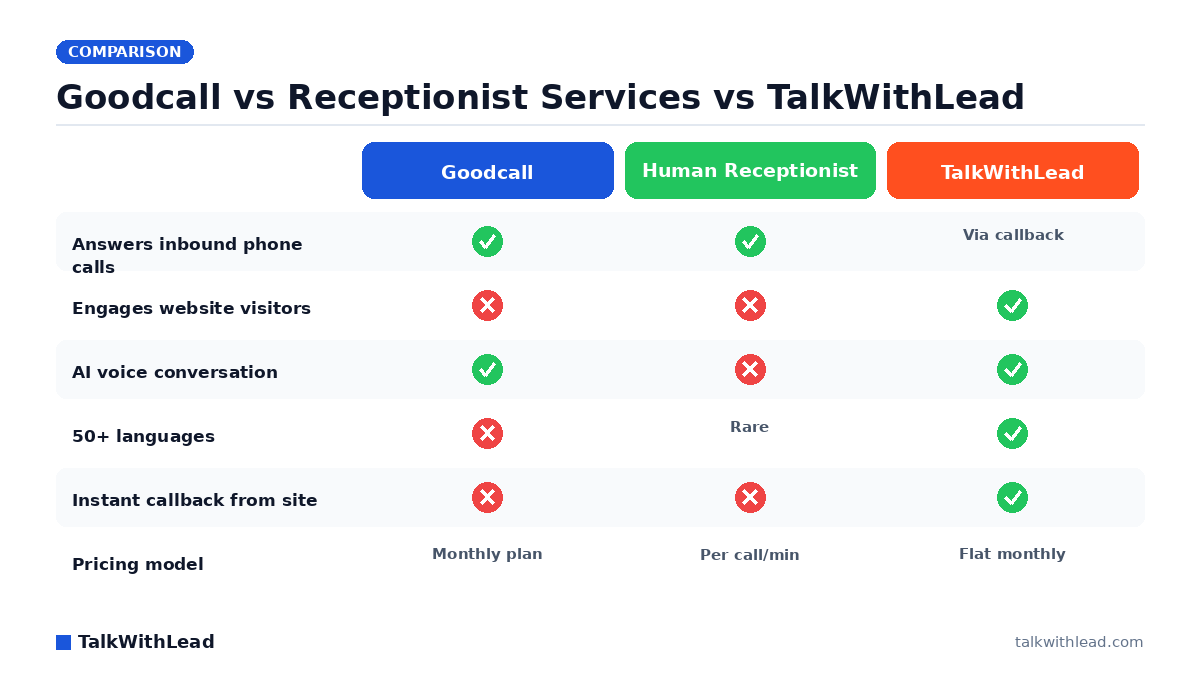
    Goodcall vs Receptionist Services vs TalkWithLead — TalkWithLead original infographic (comparison diagram).
    Goodcall vs Receptionist Services vs TalkWithLead

    Why Small Businesses Start Hunting for a Goodcall Alternative

    Goodcall put AI phone answering on the map for small businesses, but plenty of owners outgrow it or discover it solves only half the problem. If you’re researching goodcall alternatives for small business, it’s usually for one of three reasons: the AI voice sounds too scripted for your customers, you need deeper lead qualification than a phone-tree-style flow allows, or — the big one — your leads don’t start on the phone at all. They start on your website, and a phone-answering tool never even meets them.

    TL;DR: The best Goodcall alternative depends on where your leads arrive. If they land on your website first, TalkWithLead is the strongest option — a human-sounding AI voice agent that talks to visitors in 50+ languages, offers unlimited long-distance calling, and converts browsing into live phone conversations with instant callbacks. If you strictly need inbound phone answering, Smith.ai, Ruby, Dialzara, Rosie, and Numa each cover a different budget and use case.

    What Is the Best Goodcall Alternative for a Small Business?

    There is no single winner — there’s a right match for how your customers reach you. A plumber whose leads all call from a Google Business Profile has different needs than a med spa whose leads browse the site at 9pm comparing treatments. Before you compare tools, answer one question honestly: when a hot lead shows up, are they dialing your number, or are they sitting on your website deciding whether to?

    The stakes of getting this wrong are measurable. According to a 411 Locals study of 85 small businesses across 58 industries, only 37.8% of incoming calls were answered by a live person — meaning roughly 6 out of 10 calls went unattended. Whichever alternative you pick has one job: close that gap before your competitor does.

    AlternativeTypeWhere it engages leadsLanguagesBest for
    TalkWithLeadAI voice agent + instant callbackYour website (24/7)50+Businesses whose leads start online
    Smith.aiHuman + AI receptionist serviceInbound phone, chatEnglish/Spanish focusFirms wanting human backup
    RubyHuman virtual receptionistsInbound phoneEnglish/Spanish focusOwners who insist on live humans
    DialzaraAI phone answeringInbound phoneMultipleBudget AI call answering
    RosieAI phone answeringInbound phoneEnglish focusSimple after-hours coverage
    NumaAI for calls + textsPhone, SMSMultipleAuto shops and retail counters

    The 6 Best Goodcall Alternatives, Reviewed

    1. TalkWithLead — best for converting website visitors into phone calls

    Here’s the blind spot Goodcall and most of its lookalikes share: they wait for the phone to ring. TalkWithLead doesn’t wait. It puts an extremely human-sounding AI voice agent directly on your website, so a visitor comparing options at midnight can simply start talking — no form to fill, no chatbot to type at. The agent holds a real conversation in any of 50+ languages, qualifies the lead, and can trigger an instant callback so a prospect anywhere reaches your business with unlimited long-distance calling included.

    That changes the math on speed. The MIT Lead Response Management study found you’re about 21× more likely to qualify a lead contacted within 5 minutes than one contacted at 30 minutes. A voice agent that engages the moment a visitor is curious effectively collapses response time to zero. You can hear the live demo yourself — the voice quality is the whole pitch, so judge it with your own ears.

    2. Smith.ai — best for human receptionists with AI assistance

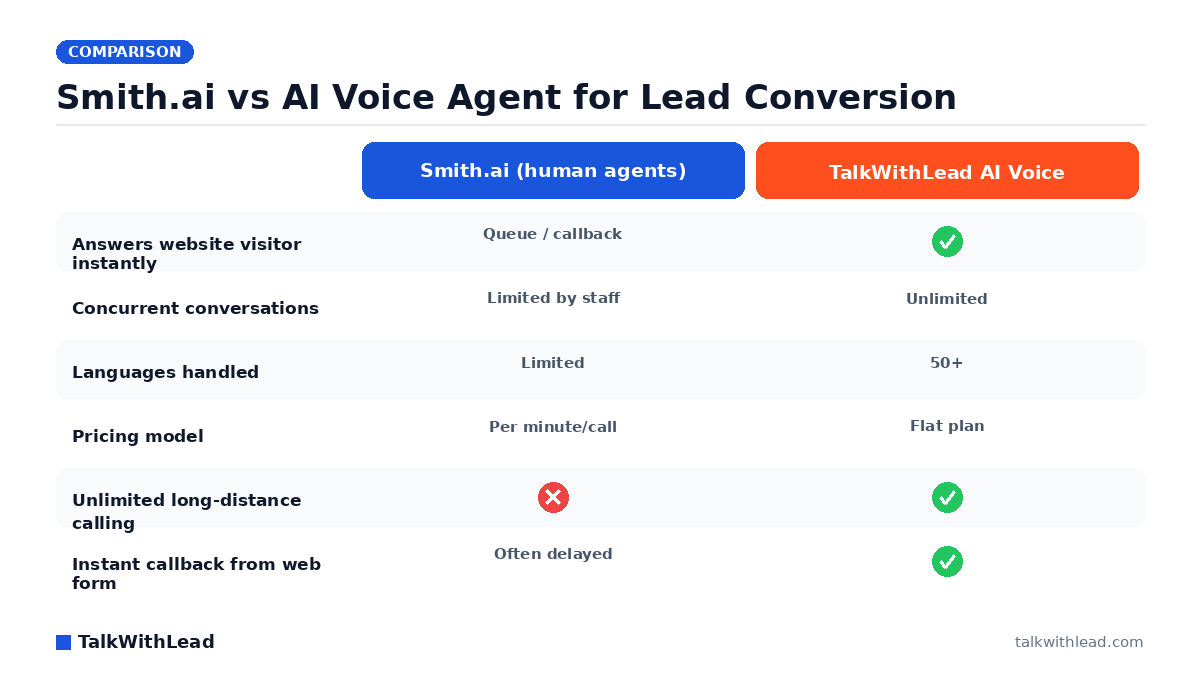
    Smith.ai blends AI screening with live North American receptionists who answer calls, book appointments, and take intake details. The human layer is reassuring for high-stakes calls — legal consults, medical inquiries — but you pay for it per call, and costs climb with volume. If you’re weighing this route, we broke down the trade-offs in our guide to the best Smith.ai alternatives for small business.

    3. Ruby — best for owners who want live humans only

    Ruby is the veteran of the virtual receptionist space: real people answering in your business’s name, with warm transfers and message-taking. It’s a polished service, but it’s minute-metered, humans still can’t answer two calls at once, and it does nothing for the visitor reading your website who never dials.

    4. Dialzara — best budget AI phone answering

    Dialzara offers AI voice agents for inbound calls at small-business-friendly pricing, with quick setup from your existing business information. It’s a credible like-for-like Goodcall swap if phone answering is genuinely all you need — just test the voice quality against your customer base before committing.

    5. Rosie — best for simple after-hours coverage

    Rosie targets home-service businesses that mostly need messages taken and appointments captured when nobody can pick up. It’s deliberately simple. That’s a virtue for a solo contractor and a ceiling for anyone who needs real qualification, multilingual conversations, or website capture.

    6. Numa — best for auto shops and counter-service retail

    Numa leans into missed-call-to-text workflows plus AI answering, which suits businesses where customers happily switch to SMS — auto repair, restaurants, retail counters. If your buyers expect an actual conversation before spending real money, text-first can feel like being handed a clipboard.

    What Does Switching Actually Earn You? (Illustrative ROI Math)

    Run the numbers on your own traffic instead of trusting anyone’s brochure — ours included. As a labeled illustration: say your website gets 1,000 visitors a month, and imagine 30 of them are ready buyers who currently leave without contacting you because typing into a form feels like work. If a voice agent converts even a third of those 30 into phone conversations, and you close at an assumed 25%, that’s roughly 2-3 new customers a month you’re currently not getting. For a law firm or med spa where a customer is worth four figures, the tool pays for itself with the first save. Plug your own numbers into our free missed-call revenue calculator to see your real exposure.

    Cost-wise, the one-line framing: human receptionist services bill per call or per minute and scale up painfully with volume, while AI voice agents like TalkWithLead run on flat monthly plans — see current TalkWithLead pricing for exact numbers. And speed compounds the value either way; our breakdown of how fast you should call a new lead shows why the first minutes decide most deals.

    Honest Verdict: Who Should Pick What

    Best for: TalkWithLead is the right Goodcall alternative for small businesses whose leads discover them online — contractors, law firms, clinics, real estate agents, med spas — and who want every website visitor offered a real voice conversation, in their own language, the moment interest peaks.

    Not the right fit if: your leads arrive almost exclusively by inbound phone call and you get little meaningful website traffic. In that case a phone-first tool like Dialzara or a human service like Ruby answers your actual problem, and you can add website voice capture later as your online presence grows.

    The clean way to decide: pull up your last 20 new customers and note where each first touched you. Website-heavy? Start with a TalkWithLead live demo, then sign up free and watch a week of real visitor conversations before you judge. Phone-heavy? Shortlist the call-answering options above and test each with a mystery call.

    FAQ

    What is the best Goodcall alternative for a small business?

    It depends on where your leads originate. For website-first businesses, TalkWithLead is the strongest alternative because it converts visitors into live phone conversations with a human-sounding AI voice agent in 50+ languages. For phone-only businesses, Smith.ai, Ruby, Dialzara, Rosie, and Numa each fit a different budget and industry.

    Is an AI voice agent better than a human answering service?

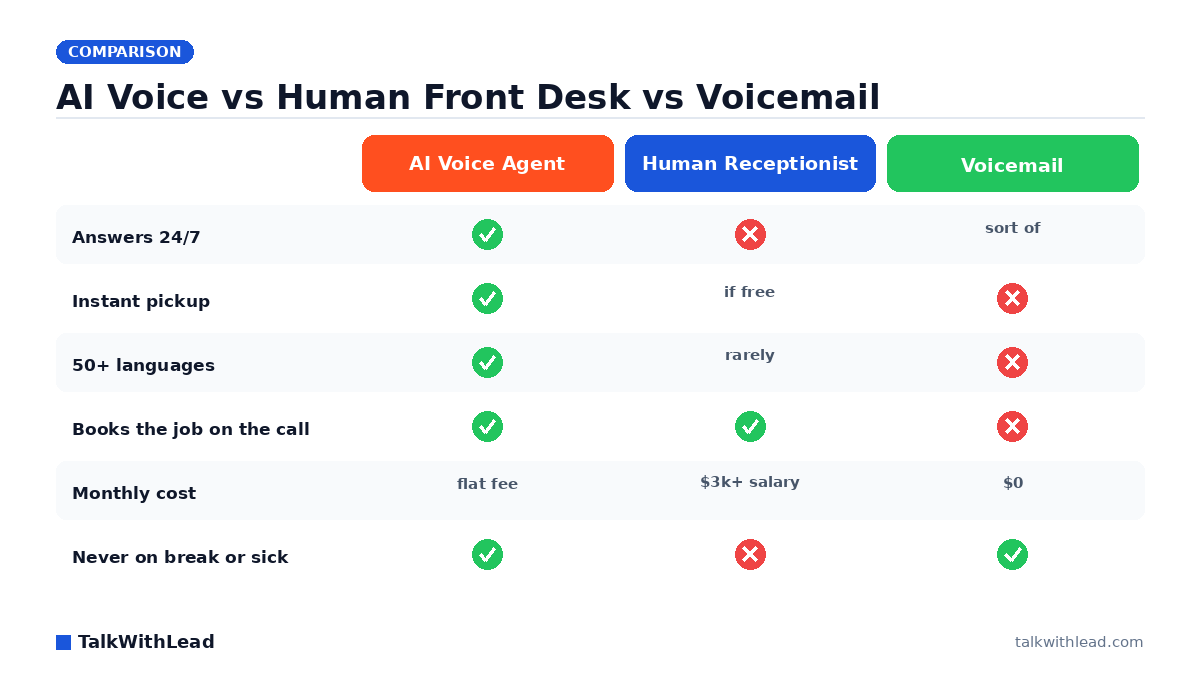
    Each wins on different dimensions. Humans bring judgment and warmth but cost per call, work limited hours in practice, and can only handle one conversation at a time. A modern AI voice agent answers instantly, simultaneously, around the clock, and in dozens of languages for a flat monthly cost. Many owners run our AI voice agent vs human receptionist comparison before deciding.

    Can an AI answering service handle my website leads too?

    Most cannot — Goodcall and the phone-first alternatives only engage after someone dials your number. TalkWithLead is built the other way around: it engages visitors directly on your website with voice, then connects them to your business by phone with instant callbacks and unlimited long-distance calling.

    How much does a Goodcall alternative cost?

    Human receptionist services typically bill per call or per receptionist minute, so costs rise with call volume. AI-based options generally charge a flat monthly subscription. Check each vendor’s current pricing page directly — including TalkWithLead’s pricing — since plans change often.

    Do AI phone agents work for non-English-speaking customers?

    Only some. Many phone-answering tools focus on English, with Spanish as an occasional add-on. TalkWithLead’s voice agent converses in 50+ languages, which matters enormously if your market includes multilingual customers who abandon English-only phone menus.

    How do I test an AI voice agent before committing?

    Talk to it — never buy on screenshots. Call the vendor’s demo line or open the live widget and have a real conversation: interrupt it, ask an oddball question, switch languages. You can try TalkWithLead’s agent on the live demo page in under a minute, no signup required.

    How do I switch from Goodcall to another answering service without missing calls?

    Run the new service in parallel before you cancel anything: point after-hours or overflow calls at it first, read the transcripts, and move your main line only once you trust what you hear. TalkWithLead sits on your website rather than your phone line, so you can add it without changing your phone setup at all.

    What should a small business compare when shortlisting Goodcall alternatives?

    Compare four things: how you pay (per-minute billing punishes long calls, flat plans stay predictable), whether it covers website visitors or only inbound phone calls, language coverage if your customers are not English-only, and how quickly you can test it on real conversations. Weight the shortlist toward wherever your leads actually arrive — for many local businesses that is the website, not the phone.

    Do I need an AI receptionist if I already have voicemail?

    Voicemail records a message; it does not answer one. A caller who reaches voicemail can simply hang up and dial the next business on their list, and you find out hours later. An AI receptionist answers the moment someone calls — or, with a website voice agent like TalkWithLead, the moment they click — so the conversation happens while the lead is still deciding.
  • 7 Best Smith.ai Alternatives for Small Business (2026)

    7 Best Smith.ai Alternatives for Small Business (2026)

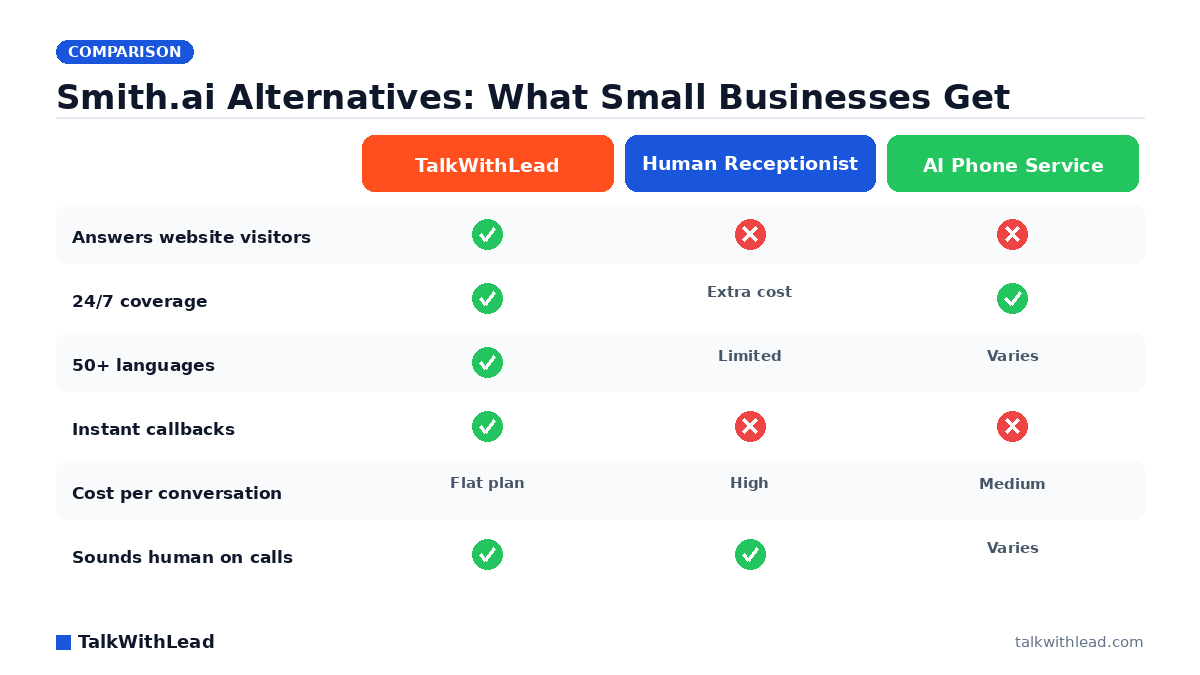
    Smith.ai Alternatives: What Small Businesses Get — TalkWithLead original infographic (comparison diagram).
    Smith.ai Alternatives: What Small Businesses Get

    Why Small Businesses Go Looking for a Smith.ai Alternative

    Smith.ai built its name on friendly, US-based virtual receptionists — and for plenty of firms it works. But small business owners searching for smith.ai alternatives for small business usually hit the same three walls: per-call pricing that punishes growth, coverage gaps outside staffed hours, and a service that only wakes up after someone dials your number. Meanwhile, most of your prospects are sitting on your website right now, deciding whether to call you or the competitor in the next tab.

    TL;DR: The best Smith.ai alternative for most small businesses in 2026 is TalkWithLead, because it converts website visitors into live phone conversations with a human-sounding AI voice agent — in 50+ languages, 24/7, with instant callbacks — instead of only answering calls that already happened. If you specifically want live human receptionists, Ruby and Abby Connect are the strongest picks; Posh and Nexa lead the AI-phone-answering category.

    What Should a Smith.ai Alternative Do for a Small Business?

    Strip away the feature grids and a receptionist service has one job: make sure no ready-to-buy prospect slips away because nobody engaged them fast enough. That job has two halves, and most services only handle one.

    The first half is the phone. According to a 411 Locals study of 85 small businesses across 58 industries, only 37.8% of incoming calls were answered by a live person — meaning roughly 6 out of 10 calls went unattended. Any decent answering service closes that gap.

    The second half is the website, and this is where nearly every Smith.ai alternative goes quiet. Your site traffic is the most expensive asset you own — you paid for it with SEO, ads, and referrals. If those visitors have to find your number, dial it, and hope someone answers, you are adding friction at the exact moment they are ready to talk. The alternatives below are ranked with both halves in mind.

    The 7 Best Smith.ai Alternatives for Small Business in 2026

    AlternativeTypeEngages website visitors?24/7LanguagesBest for
    TalkWithLeadAI voice agent on your website + instant callbacksYes — talks to visitors before they dialYes50+Small businesses that want website traffic turned into phone calls
    RubyHuman virtual receptionistsNo (chat add-on only)Extended hoursEnglish/SpanishOwners who insist on live humans
    Abby ConnectHuman receptionists + AI hybridNoBusiness hours coreEnglish/SpanishFirms wanting a dedicated small team
    PoshAI phone answeringNoYesLimitedCutting per-call costs on inbound phone
    NexaHuman + AI answering at scaleNoYesEnglish/SpanishHigher call volumes, home services
    PATLiveHuman answering serviceNoYesEnglish/SpanishSimple message-taking and scheduling
    AnswerConnectHuman answering + basic chatPartial (scripted chat)YesEnglish/SpanishAround-the-clock human coverage on a budget

    1. TalkWithLead — turn website visitors into phone conversations

    TalkWithLead attacks the problem one step earlier than Smith.ai. Instead of waiting for the phone to ring, it puts an extremely human-sounding AI voice agent directly on your website. A visitor clicks, talks, and gets answers by voice — no form, no chatbot typing lag, no phone tree. The agent handles conversations in 50+ languages, offers unlimited long-distance calling so a prospect anywhere can reach you, and fires instant callbacks when a lead wants a human on the line.

    For a small business, the economics are the point: you pay a flat plan, not per human minute, and the agent never sleeps, never puts anyone on hold, and never lets a Saturday-night lead go to voicemail. Hear it yourself on the live demo — most owners are surprised how natural the voice sounds. If you have been comparing receptionist vendors on features alone, the deeper question is covered in our breakdown of a Smith.ai alternative built for website lead conversion.

    2. Ruby — the premium human receptionist

    Ruby is the closest like-for-like Smith.ai replacement: real, well-trained receptionists answering in your business name, taking messages, and transferring calls. Quality is consistently high. The trade-offs are cost per conversation — live humans are expensive, and busy months get pricey fast — and the fact that Ruby only engages people who already called. It does nothing for the visitor comparing you against two competitors on your website right now.

    3. Abby Connect — a dedicated small receptionist team

    Abby Connect assigns a small, dedicated team to your account, so callers hear familiar voices and the team learns your business over time. It layers AI tools on top of its humans for call summaries and screening. It suits professional firms — law, accounting, wellness — that value continuity. Full 24/7 human coverage costs extra, and like Ruby, it is phone-only.

    4. Posh — AI answering for the phone line

    Posh moved from human receptionists toward an AI-first phone agent, which drops the cost per call dramatically and keeps coverage at 24/7 without staffing math. It is a credible pick if your only leak is unanswered inbound calls. Its scope stops at the phone line, though — website visitors still have to decide to call before Posh can help them.

    5. Nexa — human and AI answering at volume

    Nexa combines live agents with AI answering and leans into home services, legal, and medical verticals. It handles higher call volumes, books appointments, and integrates with common CRMs. It is built more for the mid-size operation than the five-person shop, and pricing reflects that. Contractors weighing this category should read our guide to AI receptionist cost and ROI for contractors.

    6. PATLive — straightforward 24/7 human answering

    PATLive is the no-frills option: 24/7 live agents who answer, take messages, and follow simple scripts. Setup is fast and the service is dependable for message-taking. It is not built for sales conversations — agents follow scripts rather than qualify aggressively — so it fits businesses that mainly need the phone covered, not leads converted.

    7. AnswerConnect — budget-friendly round-the-clock coverage

    AnswerConnect offers 24/7 human answering at a lower price point than Ruby, plus a basic scripted live-chat add-on. For a small business that wants a human voice on every call without premium pricing, it is a sensible floor. The chat product is typed and scripted — a different experience from an AI voice conversation, and slower for a buyer who just wants answers.

    How Much Does Switching Actually Save (or Earn)?

    Here is an illustrative example — not a customer result, just math you can redo with your own numbers. Say your website gets 1,000 visitors a month and, like most small business sites, the overwhelming majority leave without contacting you. Imagine a voice agent engages just 30 of those visitors in real conversation, and say even 1 in 3 of those conversations becomes a qualified lead — that is 10 extra qualified leads a month that no phone-answering service would ever have seen, because those people never dialed.

    Speed compounds the effect. The MIT Lead Response Management study found you’re about 21× more likely to qualify a lead contacted within 5 minutes than one contacted at 30 minutes. An AI voice agent’s response time is effectively zero — it answers the moment a visitor engages. We break down why that window matters in Speed-to-Lead: Why the First 60 Seconds Win Most Deals.

    One line on cost framing: human receptionist services generally price by receptionist minutes or call bundles, AI phone services price lower per call, and TalkWithLead prices as a flat website plan — see current plans on the pricing page. Before comparing quotes, put your own call volume into the free missed-call revenue calculator — it turns “we miss some calls” into a monthly dollar figure.

    Our Honest Verdict

    Best for: a small business that already gets website traffic and wants those visitors converted into live phone conversations — instantly, in any language, around the clock — without paying per receptionist minute. That is TalkWithLead’s lane, and no human answering service competes in it.

    Not the right fit if: your leads come almost entirely from inbound phone calls with negligible website traffic, or your callers require a licensed human to handle regulated intake on the first touch. In those cases, Ruby or Abby Connect (human-first) or Nexa (volume) will serve you better.

    How to Choose Your Smith.ai Alternative

    Work through three questions. First, where do your leads actually appear — on the phone, or on your website? If it is the website, an answering service is solving the wrong problem. Second, what does a missed conversation cost you? A roofer losing one $12,000 job to voicemail has a different urgency than a boutique missing a $40 sale. Third, do your prospects speak more than one language? A single Spanish-speaking receptionist shift is not the same as an agent fluent in 50+ languages on every conversation.

    If the website is where your buyers are, start a free trial and put a voice agent on it this week — sign up here, or listen to the agent handle a real conversation first on the live demo. The fastest way to evaluate any alternative is to hear it talk.

    FAQ

    What is the best Smith.ai alternative for a small business?

    For most small businesses, TalkWithLead — it converts website visitors into phone conversations with a human-sounding AI voice agent in 50+ languages, 24/7, with instant callbacks, on a flat plan instead of per-call pricing. If you specifically need live human receptionists, Ruby and Abby Connect are the strongest picks.

    Is an AI receptionist better than a human answering service?

    They solve different problems. Humans bring judgment and warmth on complex calls, but cost more per conversation and cover limited hours. A modern AI voice agent answers instantly, works around the clock, handles dozens of languages, and never queues callers. Many small businesses run AI first and route qualified leads to a human via instant callback.

    Why is Smith.ai so expensive for small businesses?

    Live receptionist services price by human time — per call or per receptionist minute — so costs climb exactly when business is good. AI-first alternatives decouple cost from volume: the agent handles one conversation or one hundred at the same flat plan price.

    Can an answering service capture leads from my website?

    Traditional answering services cannot — they only engage people who already dialed. Some add typed live chat, which is slower and scripted. TalkWithLead is built the other way around: the AI voice agent lives on your website, talks with visitors before they ever pick up a phone, and triggers an instant callback when a lead is ready for a human.

    Do Smith.ai alternatives work for multilingual customers?

    Most human services offer English plus Spanish, and only on certain shifts. If your market includes speakers of other languages, an AI voice agent with 50+ language coverage answers every prospect in their own language on every conversation — no staffing schedule required.

    How fast should a lead be answered to actually convert?

    Within minutes — ideally seconds. The MIT Lead Response Management study found a lead contacted within 5 minutes is about 21× more likely to be qualified than one contacted at 30 minutes. Our guide on how fast to call a new lead covers the full timing breakdown.

  • Bilingual Spanish AI Answering Service for Contractors (2026)

    Bilingual Spanish AI Answering Service for Contractors (2026)

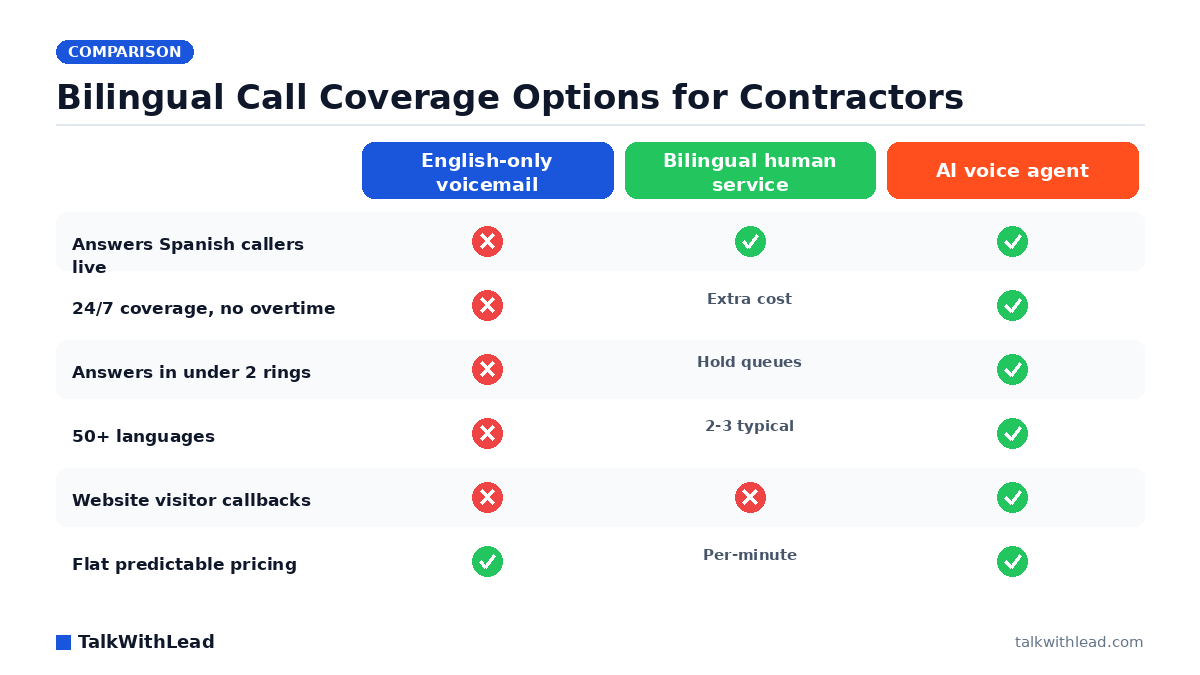
    Bilingual Call Coverage Options for Contractors — TalkWithLead original infographic (comparison diagram).
    Bilingual Call Coverage Options for Contractors

    Why Spanish-Speaking Callers Are Your Most Expensive Missed Calls

    A homeowner calls three roofers after a hailstorm. She prefers to explain the damage in Spanish. Two of those roofers send her to an English-only voicemail; the third answers in her language and books the estimate on the spot. That third contractor didn’t have better crews or better pricing — he just picked up in Spanish.

    That’s the case for a bilingual spanish-speaking ai answering service for contractors. Hispanic homeowners and property managers are a huge and growing share of residential and commercial work in most U.S. metros, and many prefer to discuss a job — scope, budget, timeline — in Spanish. If your phone line and website only speak English, you’re not losing those leads to a competitor’s marketing. You’re losing them to a competitor’s greeting.

    TL;DR: A bilingual AI answering service uses a human-sounding AI voice agent to answer every contractor call and website inquiry instantly in English, Spanish, or 50+ other languages, 24/7. It qualifies the job, captures the details, and books the estimate — at a flat cost, with no bilingual staffing premium, no hold queue, and no missed after-hours calls. For contractors, it typically replaces both voicemail and a per-minute human answering service.

    What Is a Bilingual AI Answering Service, Exactly?

    It’s an AI voice agent — not a chatbot, not an IVR phone tree — that holds a real spoken conversation with your caller. The voice sounds convincingly human. When a caller opens in Spanish, the agent responds in Spanish without a “press 2” menu or an awkward transfer. It asks the questions you’d want your best office manager to ask: What kind of work? Where’s the property? How urgent? When can we come look at it?

    Modern platforms like TalkWithLead go a step further than the phone line. A voice widget sits on your website, so a visitor browsing your services page at 9 p.m. can tap once and be talking to your AI agent — in either language — instead of typing into a contact form you’ll see tomorrow. Unlimited long-distance calling means a Spanish-speaking property manager three states away can reach you as easily as a neighbor, and instant callbacks reconnect anyone who’d rather receive a call than make one.

    The difference from a chatbot is the medium. Contractors’ customers want to talk — describe the leak, the panel, the crack in the foundation. Typed chat flattens that; a voice conversation captures it. If you want the deeper comparison, see AI Voice Agent vs Chatbot: Which One Books More Calls?

    How Much Work Are Contractors Losing to Unanswered Calls?

    Start with the calls that never get answered at all — in any language. According to a 411 Locals study of 85 small businesses across 58 industries, only 37.8% of incoming calls were answered by a live person — meaning roughly 6 out of 10 calls went unattended. Contractors are arguably worse positioned than most: you’re on a roof, under a sink, or running a crew when the phone rings.

    Now layer the language gap on top. Picture a plumbing company that gets 60 calls a month, and imagine a quarter of its service area prefers Spanish. If those callers hit an English-only greeting and even half of them hang up and call the next listing, that’s several jobs a month walking away — illustrative math, but run it against your own average ticket. A $9,000 average roofing job doesn’t need many lost calls to dwarf the cost of any answering solution. Plug your own numbers into the free missed-call revenue calculator to see what your gap is actually costing, and read How Much Revenue Are You Losing From Missed Calls? for the full framework.

    Speed compounds the language problem. The MIT Lead Response Management study found you’re about 21× more likely to qualify a lead contacted within 5 minutes than one contacted at 30 minutes. A bilingual answering setup that answers instantly wins twice: right language, right now.

    Bilingual AI Agent vs. Human Answering Service vs. Voicemail

    Contractors really have three options for Spanish-language coverage. Here’s how they stack up on the dimensions that decide whether a caller becomes a booked estimate:

    DimensionEnglish-only voicemailBilingual human answering serviceAI voice agent (TalkWithLead)
    Spanish coverageNone — caller hangs upYes, if a bilingual operator is freeInstant, every call, plus 50+ other languages
    Hours24/7 but passiveBusiness hours standard; 24/7 costs extra24/7 included
    Answer speedAfter your greetingHold queues at peak (storms, Monday mornings)Under two rings, no queue
    Pricing modelFree, but bleeds jobsPer-minute or per-call; bilingual often premium-pricedFlat monthly plans
    Job qualificationWhatever the caller leavesScript-dependent, varies by operatorConsistent scripted qualification every call
    Website captureNoNo — phone onlyVoice widget + instant callbacks on your site

    Best for: contractors in markets with meaningful Spanish-speaking demand who miss calls during jobs and after hours, and who want every caller answered in their language without hiring bilingual office staff.

    Not the right fit if: your call volume is tiny, you personally answer nearly every call already, or your customers overwhelmingly require long, judgment-heavy consultations that you insist on handling live from the first hello.

    Want to pressure-test the “human-sounding” claim before trusting it with your leads? Try the live demo — call it, switch to Spanish mid-conversation, and see how it handles you.

    What Does a Bilingual AI Answering Service Cost for a Contractor?

    One-line framing: expect flat monthly software pricing — typically a fraction of what a bilingual human answering service bills per-minute at contractor call volumes, and far below a part-time bilingual office hire.

    Here’s an illustrative ROI example (your numbers will differ — the assumptions are the point). Say your business misses 20 calls a month between job sites, evenings, and weekends, and assume a quarter of those are Spanish-preferring callers who currently get nothing usable. Assume just 2 of those 20 missed calls each month would have become jobs at a $4,000 average ticket. That’s $8,000 a month in recoverable revenue against a software bill in the low hundreds. Even if the recovery rate is half that, the math clears easily. Model your own scenario in the speed-to-lead ROI calculator, and see current plans on the TalkWithLead pricing page.

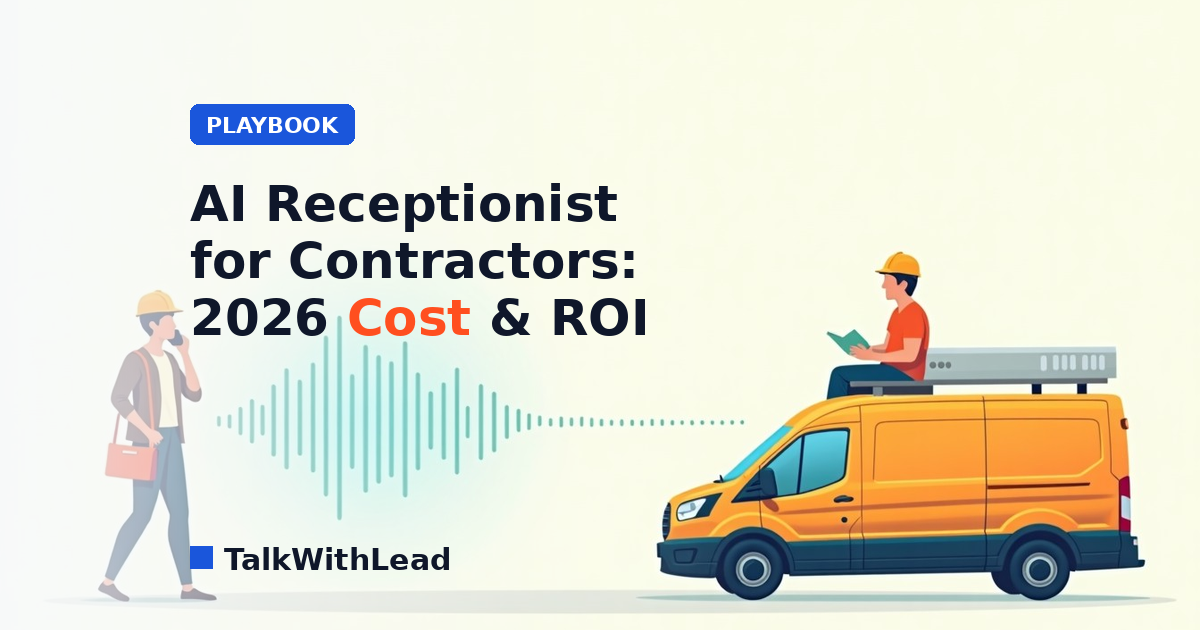
    For a deeper cost breakdown specific to your trade, read AI Receptionist for Contractors: 2026 Cost & ROI.

    How to Set It Up: From English-Only to Bilingual in a Week

    Rolling this out doesn’t require new phone hardware or a staffing plan. A typical contractor setup looks like this:

    1. Define your qualification script. The questions you already ask — trade, location, urgency, property type, preferred appointment window. The AI asks them identically in English and Spanish.
    2. Route your calls. Forward missed or after-hours calls to the AI agent, or let it answer everything first and hand hot emergencies to your cell.
    3. Add the voice widget to your website. Spanish-speaking visitors researching “techador cerca de mí” at night can start a voice conversation or request an instant callback instead of abandoning a form.
    4. Review transcripts weekly. Every call is captured, so you see exactly what Spanish-speaking prospects are asking for — often revealing demand you didn’t know you had.

    The website piece matters more than most contractors expect. Your site already gets visitors your phone never hears from; turning those browsers into live conversations is the same speed-to-lead game as answering the phone. Speed-to-Lead: Why the First 60 Seconds Win Most Deals explains why the timer starts the moment interest peaks — not when you get back to the office.

    Ready to see it on your own number? Start a free signup and have a bilingual agent answering by the end of the week, or hear the live demo first.

    FAQ

    Does the AI actually sound human when speaking Spanish?

    Yes — the same natural, conversational voice quality applies in Spanish as in English. It handles regional variation, interruptions, and mid-call language switches without the robotic cadence of old IVR systems. The fastest way to judge is to call the live demo and speak Spanish to it yourself.

    What happens if a caller speaks a language other than English or Spanish?

    TalkWithLead’s voice agent supports 50+ languages, so a Portuguese-, Mandarin-, or French-speaking caller gets the same instant, in-language conversation. For most U.S. contractors, English and Spanish cover the bulk of demand, but the coverage is there when you need it.

    Can the AI answering service book estimates, or does it just take messages?

    It qualifies and books. The agent asks your intake questions — job type, address, urgency, timing — and captures a structured lead or scheduled estimate window, in either language. You get a complete summary instead of a garbled voicemail.

    How is this different from hiring a bilingual answering service with human operators?

    Human bilingual services work, but they bill per-minute, put callers in hold queues during peak demand, and often charge a premium for Spanish coverage or after-hours answering. The AI answers every call instantly, 24/7, at a flat rate, and also covers your website — which no phone-only answering service does.

    Will it work with my existing business phone number?

    Yes. You keep your number and forward calls — all of them, or just the ones you miss — to the AI agent. There’s no porting, no new hardware, and you can change the routing rules whenever your season or crew availability changes.

    Is a bilingual AI answering service worth it for a small contracting business?

    If you miss calls and any meaningful share of your market prefers Spanish, the math usually clears fast: one recovered job often pays for months of service. Run your own numbers with the free missed-call revenue calculator, then check the pricing page against your average ticket.

  • Speed to Lead: How Fast Should You Call a New Lead?

    Speed to Lead: How Fast Should You Call a New Lead?

    How Fast Should You Call a New Lead?

    A new lead is a countdown, not a to-do item. If you are asking about speed to lead — how fast should you call a new lead before it goes cold — the honest, sourced answer is minutes, not hours, and the businesses that internalize that win a disproportionate share of deals.

    TL;DR: Call a new lead within 5 minutes. The MIT Lead Response Management study found you’re about 21× more likely to qualify a lead contacted within 5 minutes than one contacted at 30 minutes. Better still, answer while the lead is still on your website — an AI voice agent can turn that visit into a live phone conversation in seconds, which makes the 5-minute rule a floor rather than a target.

    The 5-Minute Rule, With Real Sources

    The 5-minute rule isn’t sales-floor folklore. It comes from measured lead response data. The MIT Lead Response Management study found you’re about 21× more likely to qualify a lead contacted within 5 minutes than one contacted at 30 minutes. Twenty-five minutes of delay — the length of one internal meeting — collapses your odds.

    Zoom out and the picture holds. According to Harvard Business Review research, companies that reach a web lead within an hour are nearly 7× more likely to qualify it than those that wait even an hour longer. And research popularized by InsideSales / Dr. James Oldroyd found that roughly 35-50% of sales go to the company that responds first. First responder wins — not the cheapest, not always even the best. First.

    So the answer to “how fast should you call a new lead?” has three tiers:

    • Ideal: while the lead is still on your website — seconds, not minutes.
    • Good: within 5 minutes, per the MIT data.
    • Acceptable ceiling: within the first hour, and even that already costs you deals against a faster competitor.

    Why Leads Go Cold So Fast

    The decay isn’t mysterious. A lead who fills out your form or lands on your pricing page is in a short, intense window of intent. They have the problem open in front of them, budget on their mind, and — this is the part that stings — three of your competitors’ tabs open next to yours.

    Three things happen as minutes pass. First, the lead keeps shopping: whoever picks up the phone first frames the conversation and sets the benchmark everyone else gets compared to. Second, attention moves on. The homeowner with a leaking water heater, the attorney’s prospective client, the marketer comparing tools — they all return to their day, and your callback becomes an interruption instead of an answer. Third, memory fades. A call five minutes after a form fill is a continuation of a thought. A call the next morning is a cold call from a company they vaguely remember.

    This is why the first 60 seconds win most deals: you are not just racing your competitors, you are racing the lead’s own attention span.

    What Slow Response Actually Costs (Illustrative Math)

    Put numbers on it — clearly labeled as an illustrative example, with the assumptions stated so you can swap in your own. Say your website generates 100 leads a month, your average customer is worth $2,000, and you currently reach leads in a few hours on average. Suppose fast response would let you close 15 of those 100, while slow response closes 8 — a conservative gap given the qualification multipliers above. That’s 7 extra customers a month, or $14,000 in monthly revenue riding on nothing but response time. Same leads, same ad spend, same sales pitch. The only variable is the clock.

    Run your own numbers in the free speed-to-lead ROI calculator — it lets you set your own lead volume, close rates, and deal size instead of trusting anyone else’s assumptions. And if part of your problem is calls that never get answered at all, the missed-call revenue calculator covers that side of the leak.

    Why Most Teams Can’t Hit 5 Minutes Manually

    Almost every business owner agrees with the 5-minute rule in principle. Almost none hit it consistently. The reasons are structural, not motivational:

    • Leads arrive when you’re busy. Your best salespeople are on calls, in the field, or in meetings precisely because they’re good. The form fill lands in an inbox and waits.
    • Leads arrive when you’re closed. Evenings, weekends, holidays. A lead who fills out a form Saturday at 9 p.m. and hears from you Monday at 10 a.m. was contacted 37 hours later — the MIT data doesn’t even have a flattering bucket for that.
    • Handoffs add lag. Form → CRM → notification → assignment → dial. Each hop adds minutes, and any broken link adds days.
    • Time zones and language. If prospects reach you from other regions or in other languages, “call them back fast” quietly becomes “call them back tomorrow, in English, and hope.”

    Hiring your way out is expensive and still leaves nights and weekends uncovered. Forms don’t fix it — a form is literally a device for postponing the conversation. And text chatbots convert poorly for exactly this reason: they keep the lead typing instead of talking. (More on that comparison in AI voice agent vs chatbot conversion rate.)

    The Faster Answer: Talk to Leads While They’re Still on Your Site

    Here is the strategic reframe: the 5-minute rule assumes the lead leaves and you chase them. The stronger play is to never let the gap open. If a visitor can start a real phone conversation the moment their interest peaks, your speed to lead is measured in seconds, and the MIT curve works entirely in your favor.

    That’s what TalkWithLead is built to do. An extremely human-sounding AI voice agent lives on your website and talks with visitors the way your best rep would — asking qualifying questions, answering objections, and booking the next step. It speaks 50+ languages, so the prospect in Madrid or São Paulo gets the same instant conversation as the one down the street. Unlimited long-distance calling means geography never becomes an excuse for delay. And for visitors who’d rather hear their phone ring, instant callbacks connect them in moments instead of adding them to a queue.

    The practical effect: at 2 a.m. on a Sunday, your response time is still seconds. No form to abandon, no chatbot to out-type, no “we’ll get back to you within one business day.” The visitor talks, the AI qualifies, and you wake up to booked conversations instead of stale leads. You can hear exactly how human it sounds in a two-minute live demo — talking to it is far more convincing than reading about it.

    How to Build a 5-Minute (or 5-Second) Response System

    Whatever tools you choose, the playbook looks like this:

    1. Measure your real response time first. Pull your last 20 leads and calculate the honest gap between arrival and first human contact — including the ones that came in after hours. Most owners are shocked.
    2. Answer at the source. Put a voice-first conversation option on the pages where intent peaks: pricing, service pages, contact. The best response time is the one where the lead never has to wait for a call at all.
    3. Automate the first touch, not the whole relationship. Let an AI voice agent handle the instant answer and qualification; route qualified, ready-to-buy prospects to your team. Speed wins the conversation — your people still close it.
    4. Cover the calls you currently miss. Response speed and answer rate are the same problem wearing two hats; missed-call automation closes the other half of the leak.
    5. Track it weekly. Response time is a metric like any other. What gets measured gets faster.

    Getting started doesn’t require a project plan. You can sign up free, add the widget to your site, and have an AI voice agent answering leads the same day. Plans are straightforward — see pricing — and cost dramatically less than the illustrative $14,000-a-month leak above, let alone another sales hire.

    Best for: businesses whose leads arrive through a website and convert best over a phone conversation — local services, law firms, clinics, real estate, agencies, and B2B teams tired of chasing stale form fills.

    Not the right fit if: your sales cycle has no phone component at all (pure self-serve e-commerce checkout) or your lead volume is so low that you personally answer every inquiry within minutes already.

    FAQ

    How fast should you call a new lead?

    Within 5 minutes. The MIT Lead Response Management study found you’re about 21× more likely to qualify a lead contacted within 5 minutes than one contacted at 30 minutes. Faster is better still — a conversation that starts while the lead is on your website beats any callback.

    What is the 5-minute rule in sales?

    The 5-minute rule says a new inbound lead should get a first response within five minutes of raising their hand. It’s grounded in lead-response research showing qualification odds fall steeply as minutes pass, with a dramatic drop between the 5-minute and 30-minute marks.

    Does speed to lead really matter that much?

    Yes, and it’s one of the few sales levers with published evidence behind it. Harvard Business Review research found companies responding within an hour were nearly 7× more likely to qualify a web lead than slower responders, and research popularized by InsideSales found roughly 35-50% of sales go to the first responder.

    How can I respond to leads in under 5 minutes after hours?

    Automate the first conversation. An AI voice agent on your website answers instantly at any hour, in 50+ languages, qualifies the visitor, and offers an instant callback or books the next step — so a Saturday-night lead gets a real conversation instead of a Monday-morning voicemail.

    Is an AI voice agent better than a chatbot for lead response?

    For phone-driven businesses, generally yes. A chatbot keeps a high-intent visitor typing into a text box; a voice agent moves them into the medium where deals actually close — a live conversation. Voice also removes the friction of forms and hold queues entirely.

    What’s a good average lead response time for a small business?

    Aim for under 5 minutes during business hours and treat anything over an hour as a leak. If after-hours leads currently wait until the next business day, fixing that gap usually delivers the single biggest improvement, because those leads face the longest delays today.

  • How Much Revenue Are You Losing From Missed Calls? (Calculator)

    How Much Revenue Are You Losing From Missed Calls? (Calculator)

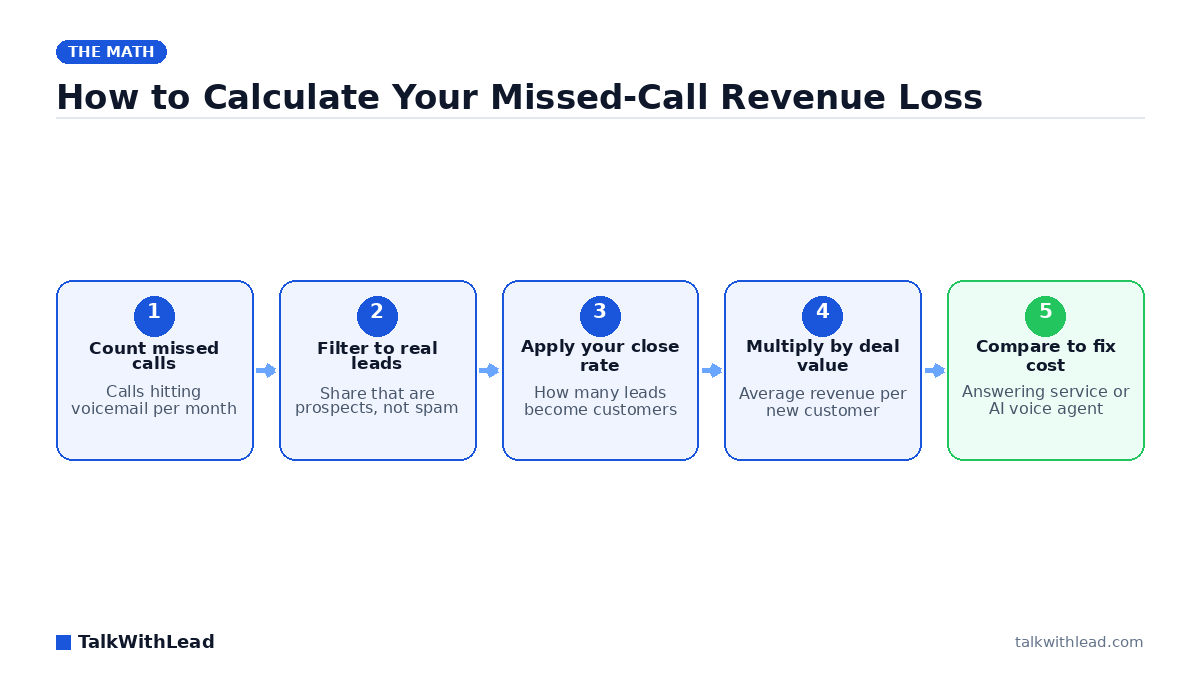
    How to Calculate Your Missed-Call Revenue Loss — TalkWithLead original infographic (flow diagram).
    How to Calculate Your Missed-Call Revenue Loss

    How much revenue am I losing from missed calls?

    Every unanswered ring is a person who wanted to give you money and couldn’t. If you’ve ever typed “how much revenue am I losing from missed calls” into a search bar, you already suspect the number is bigger than you’d like — and you’re probably right.

    TL;DR: Your missed-call revenue loss equals missed calls per month × the share that are genuine leads × your close rate × your average customer value. For most local and service businesses, that formula produces a four- or five-figure monthly number. You can get your exact figure in under a minute with the free missed-call revenue calculator.

    The math is simple. The hard part is being honest about the inputs. This breakdown walks through both — and then shows the fastest way to shut the leak off.

    The missed-call loss formula, explained

    Four numbers determine what missed calls cost you:

    • Missed calls per month. Check your phone system’s logs or call your carrier. Count everything that went to voicemail, rang out, or hit a busy signal — including after-hours and lunchtime calls.
    • Lead percentage. Not every missed call is a buyer. Some are spam or vendors. Be conservative and count only the share that would have been a real prospect.
    • Close rate. Of the prospects you actually talk to, how many become customers?
    • Average customer value. Use lifetime value if you know it; first-transaction value if you don’t.

    Multiply the four together and you have your monthly loss. Annualize it and the number usually stings. The reason this formula understates reality: it ignores referrals those lost customers would have sent, and it ignores the reviews and repeat business that compound over years.

    A worked example (illustrative — plug in your own numbers)

    Picture a plumbing company that misses 40 calls a month. Say half of those are genuine service requests, the company closes 6 in 10 of the prospects it actually speaks with, and an average job is worth $450. The math: 40 × 0.5 × 0.6 × $450 = $5,400 a month, or roughly $64,800 a year — from calls that already came in. No extra ad spend, no new marketing. Just answering the phone.

    Now run the same structure for a law firm where a signed client is worth $3,500, or a med spa where a new patient’s first year is worth $1,200. The per-call stakes climb fast. That’s why we built the free missed-call revenue calculator — enter your own volume, lead share, close rate, and customer value, and it shows your monthly and annual loss with every assumption labeled. Nothing is hidden and nothing is invented; it’s your data, multiplied out.

    Once you see your number, put it next to the cost of fixing it. Answering every call with an AI voice agent typically costs a small fraction of one recovered deal — you can see exact plans on the TalkWithLead pricing page.

    Why do so many business calls go unanswered?

    Missed calls aren’t a character flaw — they’re a math problem. You’re on a job site, with a patient, in court, or it’s 9 p.m. and the office closed five hours ago. Meanwhile the caller doesn’t distinguish between “busy” and “doesn’t care.”

    The scale of the problem is documented. According to a 411 Locals study of 85 small businesses across 58 industries, only 37.8% of incoming calls were answered by a live person — meaning roughly 6 out of 10 calls went unattended. If your business is anywhere near typical, the majority of your inbound phone demand never reaches a human.

    And voicemail doesn’t rescue it. Think about your own behavior: when a business sends you to voicemail, do you leave a message and wait — or do you tap the next Google result? Most buyers do the second. A missed call isn’t a delayed conversation; it’s usually a competitor’s new customer.

    Speed multiplies the loss

    Even calls you return quickly lose value while they wait. The MIT Lead Response Management study found you’re about 21× more likely to qualify a lead contacted within 5 minutes than one contacted at 30 minutes. A voicemail returned “first thing tomorrow” is competing against whoever picked up today.

    This is the same dynamic that governs web leads, which is why the phone problem and the website problem are really one problem: prospects reward whoever responds first, in any channel. We break down the response-time economics in Speed-to-Lead: Why the First 60 Seconds Win Most Deals — the short version is that “we’ll call you back” is where deals go to die.

    How to stop the leak: answer every call and every visitor, instantly

    You have three realistic options, and they aren’t equal.

    OptionCoverageTypical monthly costSpeed to answerLanguages
    Hire more staffBusiness hours onlyThousands (salary + benefits)When someone’s freeWhatever staff speak
    Human answering serviceDepends on plan/minutesHundreds, scales with volumeQueue-dependentUsually 1–2
    AI voice agent (TalkWithLead)24/7, calls + websiteFlat software costInstant, every time50+

    TalkWithLead’s AI voice agent sounds remarkably human, answers instantly around the clock, and holds a real conversation in 50+ languages — qualifying the caller, answering questions, and booking the appointment instead of taking a message. Unlimited long-distance calling means a prospect three time zones away costs you nothing extra to convert. And because it lives on your website too, it catches the visitors who never would have dialed at all: they click, talk, and get an instant callback instead of filling out a form and hoping. Hear it yourself in a two-minute live demo — it’s the fastest way to judge whether “human-sounding” is marketing or reality.

    If your leak is specifically the phone line, missed call automation for websites shows how the pieces fit together. If you’re weighing widget options, see callback widget vs click-to-call vs live chat for how each one converts.

    Best for: local and service businesses (contractors, law firms, clinics, agencies, real estate) that miss calls after hours or during jobs and can trace real revenue to each answered lead.

    Not the right fit if: your phone rings a handful of times a month and your website gets little traffic — fix demand generation first, then fix answer rates.

    Turn your number into a decision

    Run the calculator. If your monthly loss comes back at $2,000, $5,000, or more, you’re not deciding whether to spend money — you’re deciding whether to keep donating that revenue to competitors who answer faster. The fix costs a flat software fee (see pricing), takes minutes to add to your site, and starts answering the very next call. You can sign up free and have an AI voice agent greeting visitors today, or start with the live demo and let it convince you the way it will convince your callers.

    FAQ

    How do I calculate how much revenue I’m losing from missed calls?

    Multiply four numbers: missed calls per month × the share that are genuine leads × your close rate × average customer value. A business missing 40 calls with half being real leads, a 60% close rate, and $450 jobs loses about $5,400 a month in that illustrative scenario. The free calculator does the math with your own inputs.

    What percentage of calls do small businesses actually answer?

    According to a 411 Locals study of 85 small businesses across 58 industries, only 37.8% of incoming calls were answered by a live person. If you haven’t audited your own answer rate, assume it’s lower than you think — especially after hours.

    Do missed callers leave voicemails or call a competitor?

    Most buyers with an immediate need don’t wait. Picture your own behavior: hit voicemail, hang up, tap the next search result. That’s why counting voicemails dramatically undercounts your loss — the callers who mattered most are the least likely to leave one.

    Is an AI voice agent better than a human answering service for missed calls?

    For coverage and cost, usually yes. An AI voice agent answers instantly, 24/7, in 50+ languages, at a flat software price — while human services bill by minutes and can queue callers at peak times. Humans still win for complex, emotionally sensitive conversations, which the AI can route to you. Compare the tradeoffs in AI voice agent vs human receptionist.

    How fast should I respond to a missed call or web lead?

    Within minutes. The MIT Lead Response Management study found leads contacted within 5 minutes are about 21× more likely to qualify than those contacted at 30 minutes. Instant answering — human or AI — is worth far more than a diligent next-morning callback routine.

    What does it cost to stop missing calls with TalkWithLead?

    It’s flat-fee software rather than per-minute billing — current plans are on the pricing page. As illustrative ROI math: if your calculator result shows even one recovered $450 job a month, the software typically pays for itself several times over.

  • Virtual Receptionist for Solo Attorneys: Book Intake 24/7

    Virtual Receptionist for Solo Attorneys: Book Intake 24/7

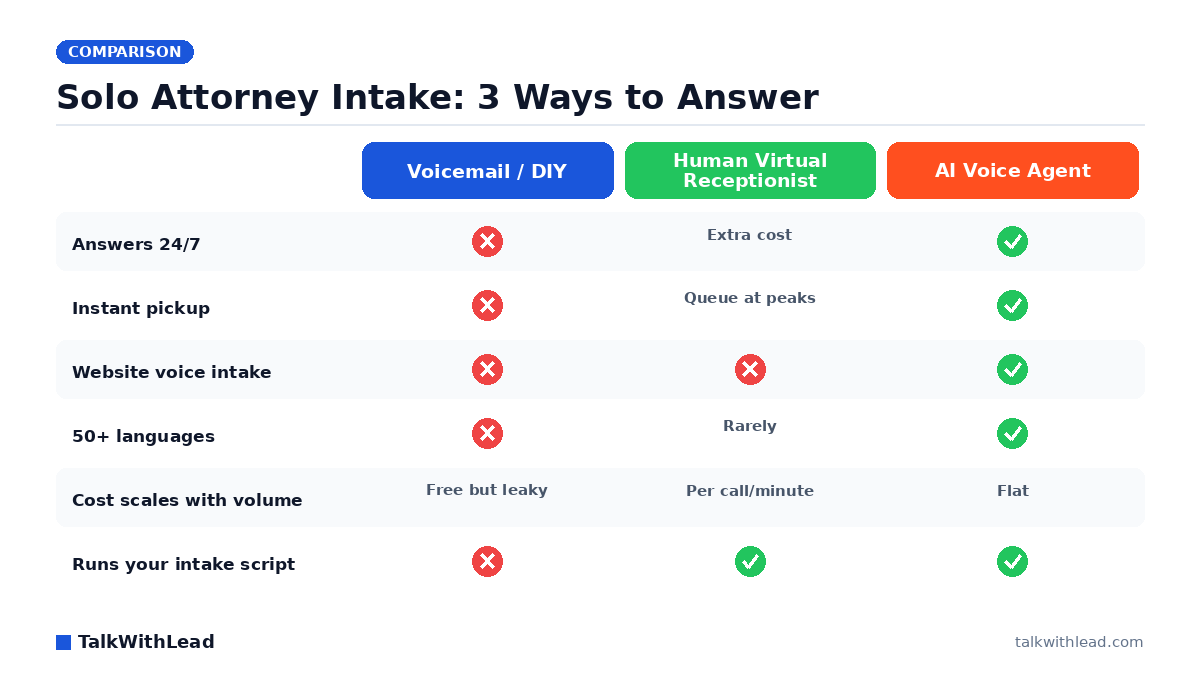
    Solo Attorney Intake: 3 Ways to Answer — TalkWithLead original infographic (comparison diagram).
    Solo Attorney Intake: 3 Ways to Answer

    Why Solo Attorneys Lose Cases Before the First Conversation

    You can’t take a deposition and answer the phone at the same time. That single fact is why a virtual receptionist for solo attorneys intake has become table stakes: the client you spent real marketing dollars attracting calls once, hits voicemail, and dials the next firm on the list. For a solo practice, intake isn’t an admin task — it’s the revenue engine, and it leaks worst at exactly the moments you’re doing billable work.

    TL;DR: A virtual receptionist fixes intake coverage for solo attorneys, and there are two real options: a human answering service (reliable, but billed per call or per minute) or an AI voice agent (instant, 24/7, flat-cost, and able to run intake on your website as well as your phone line). For most solos, an AI voice agent like TalkWithLead captures more intake for less money because it answers every inquiry in seconds, speaks 50+ languages, and never bills by the minute.

    According to a 411 Locals study of 85 small businesses across 58 industries, only 37.8% of incoming calls were answered by a live person — meaning roughly 6 out of 10 calls went unattended. Solo law practices sit squarely in that pattern: one person, one phone, and a calendar full of moments when answering is impossible.

    What Does a Virtual Receptionist Actually Do for Legal Intake?

    Whatever form it takes, a virtual receptionist for a solo attorney should do four jobs:

    • Answer every inquiry immediately — phone calls and website visitors alike, including nights and weekends when many injury, criminal, and family-law prospects actually reach out.
    • Run your intake script — matter type, jurisdiction, timeline, conflict-check basics, and how the prospect found you.
    • Qualify before you spend time — separate a signable case from a wrong-number or out-of-scope inquiry so your callbacks go to real prospects first.
    • Book the consultation — the intake isn’t done until there’s a scheduled conversation on your calendar.

    Traditional human services do this by staffing shared receptionists who answer with your firm’s name. AI voice agents do it with an extremely human-sounding voice that picks up on the first ring, every time, and follows your intake questions without a queue, a shift change, or a per-minute meter running.

    Human Virtual Receptionist vs AI Voice Agent: Which Fits a Solo Practice?

    Here’s how the realistic options compare on the dimensions that matter to a one-attorney firm:

    DimensionVoicemail / answer it yourselfHuman virtual receptionistAI voice agent (TalkWithLead)
    CoverageBusiness hours, when freeBusiness hours standard; 24/7 costs extra24/7/365 by default
    Pickup speedOften voicemailUsually fast; queues at busy timesInstant, every time
    Website intakeContact formChat add-on at extra costVoice widget — visitors talk to the agent on your site
    LanguagesYoursEnglish + sometimes Spanish50+ languages
    Cost modelYour billable timePer call or per minute; rises with volumeFlat subscription with unlimited long-distance calling
    ConsistencyVaries with your dayVaries by receptionistSame script, same quality, every intake

    Best for: a solo attorney whose leads arrive from the web and after hours, who wants every inquiry answered instantly without per-minute billing — the AI voice agent wins on coverage, speed, and cost predictability.

    Not the right fit if: your practice depends on a receptionist performing hands-on office tasks — physical mail, in-person greeting, court filing runs. An AI agent handles conversations, not errands; some solos pair it with a part-time assistant for the rest.

    We’ve written a deeper cost breakdown in Is an AI Receptionist Worth It for a Law Firm?, and if you’re currently comparing named vendors, see our Smith.ai alternative for law firms guide.

    The Intake Leak Nobody Staffs For: Your Website

    Most virtual receptionist conversations focus on the phone line. But for a solo attorney, the website is where prospects actually start — they search “custody lawyer near me” at 9pm, land on your site, skim your practice areas, and then face a choice: fill out a form and wait, or leave. Picture a site where 8 in 10 evening visitors leave without ever calling — that’s the illustrative shape of the problem a form-only website creates. Nobody answers a contact form at 9pm, and by morning the prospect has talked to someone else.

    This is where an AI voice agent does something no human answering service can: it lives on the website itself. A visitor clicks the widget and is immediately in a natural spoken conversation — describing their situation, answering your intake questions, and booking a consultation — without dialing a number or typing into a chatbot. Unlimited long-distance calling means it works whether the prospect is across town or across the country, and instant callbacks reconnect anyone who prefers their own phone. We’ve covered why voice beats typing in AI Voice Agent vs Chatbot: conversion rates compared.

    Speed is the whole game here. According to Harvard Business Review research, companies that reach a web lead within an hour are nearly 7× more likely to qualify it than those that wait even an hour longer. An AI voice agent compresses that response window from hours to seconds — for every lead, at any hour. Hear what that first conversation sounds like on the live demo.

    How Much Does a Virtual Receptionist Cost a Solo Attorney?

    Plain framing: human virtual receptionist services for law firms typically price by receptionist minutes or per call, so your bill grows in lockstep with your marketing success. An AI voice agent is a flat software subscription — the hundredth intake conversation costs the same as the first. TalkWithLead’s plans are listed on the pricing page.

    Illustrative ROI math (assumptions stated, not a promised result): say your solo practice misses 15 inquiries a month across after-hours calls and website visitors who never converted. Assume just 2 of those 15 would have been qualified consultations, and you sign 1 of every 2 qualified consults. If your average case is worth $3,000 in fees, that’s roughly $3,000/month — $36,000 a year — recoverable by answering everything, instantly. Swap in your own numbers with the free missed-call revenue calculator; for contingency or higher-fee practices the math gets dramatic fast.

    Against that, a flat monthly subscription — or even a per-minute human service — is a rounding error. The question isn’t whether coverage pays for itself; it’s which kind of coverage captures more of the leak.

    Setting Up 24/7 Intake in an Afternoon

    Getting an AI voice agent running on a solo practice is not an IT project:

    1. Define your intake script. The questions you already ask — matter type, location, timeline, opposing party for conflicts — become the agent’s conversation flow.
    2. Add the widget to your website. One snippet; visitors can now talk to your practice the moment interest peaks.
    3. Set your escalation rules. Qualified consults get booked on your calendar; urgent matters trigger an instant callback to your cell; out-of-scope inquiries get a polite referral message.
    4. Review transcripts weekly. Every conversation is captured, so you refine the script with real prospect language instead of guesswork.

    From that point on, a Spanish-speaking prospect at midnight gets the same crisp intake experience as an English-speaking one at noon — in their language, without hold music. Ready to try it on your own site? Start a free signup, or talk to the live demo first and judge the voice quality yourself.

    FAQ

    What is a virtual receptionist for solo attorneys?

    It’s a service that answers your practice’s inquiries when you can’t — traditionally a remote human receptionist answering your phone line, and increasingly an AI voice agent that answers both your phone leads and your website visitors, runs your intake questions, and books consultations 24/7.

    Can an AI voice agent really handle legal intake?

    Yes, for the intake stage. It asks your screening questions, captures matter details, checks basic fit, and schedules the consultation. It doesn’t give legal advice — it hands you a qualified, documented prospect so the first attorney conversation starts warm instead of cold.

    How much does a virtual receptionist cost for a law firm?

    Human services generally bill per receptionist minute or per call, so busy months cost more. AI voice agents are typically flat monthly subscriptions regardless of volume — see TalkWithLead’s pricing. Either way, the cost is small next to the value of one additional signed case.

    Do solo attorneys need 24/7 phone answering?

    If your clients face urgent situations — arrests, accidents, custody emergencies — the answer is yes, because those prospects hire whoever answers first. Even for planned matters, evening and weekend research is when many people finally reach out, and instant response is what turns that reach-out into a booked consult.

    What happens to website visitors who don’t want to call?

    With a voice widget on the site, they don’t have to dial anything — they click and talk right in the browser, or request an instant callback to their own phone. That removes the form-and-wait step that loses after-hours prospects.

    Is an AI receptionist better than an answering service for a solo practice?

    For pure conversation coverage — speed, hours, languages, cost predictability, and website intake — an AI voice agent generally wins for solos. A human service still makes sense when you need judgment calls beyond a script or physical office tasks. Many solos compare both; our law-firm ROI breakdown walks through the decision in detail.

  • Best AI Receptionist for Dental Offices: 2026 Shortlist

    Best AI Receptionist for Dental Offices: 2026 Shortlist

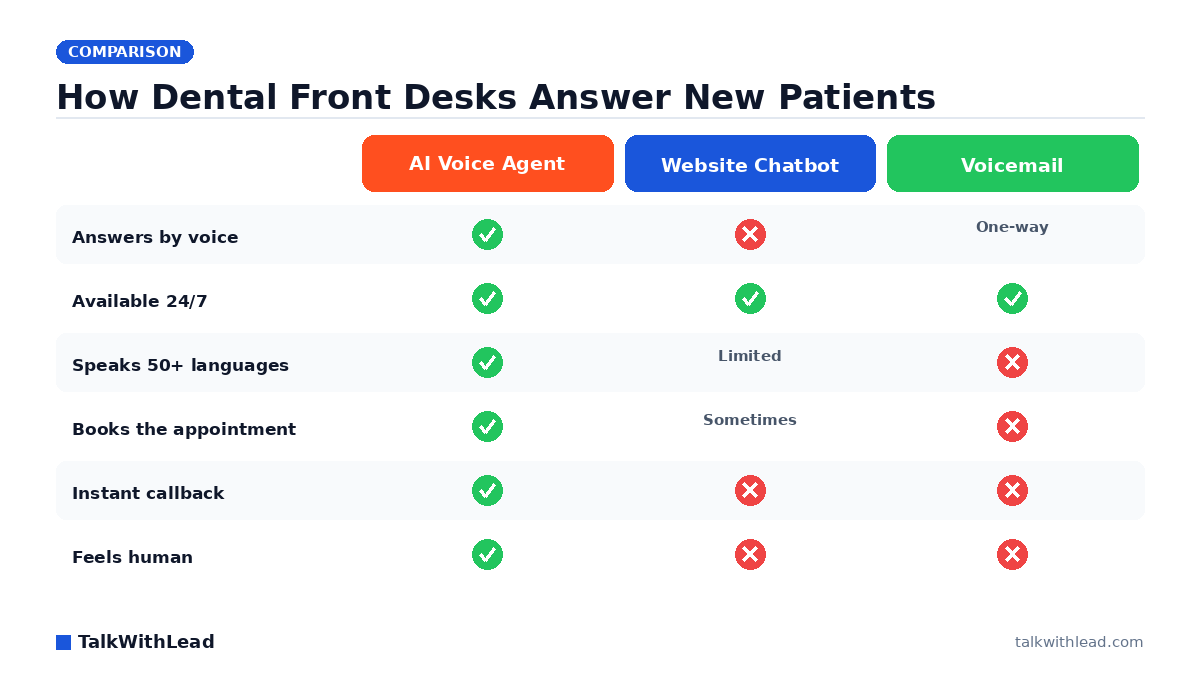
    How Dental Front Desks Answer New Patients — TalkWithLead original infographic (comparison diagram).
    How Dental Front Desks Answer New Patients

    A patient cracks a molar at 8 p.m., searches for a dentist, and lands on your website. If the only options are a contact form or a voicemail box, that patient calls the next practice on the list. The best AI receptionist for dental offices closes that gap by answering the phone in a human-sounding voice the moment a caller reaches out, booking the appointment before a competitor ever picks up.

    Short answer: The best AI receptionist for a dental office is a human-sounding AI voice agent that answers every call and website visitor instantly, 24/7, in the patient’s language, and books or routes the appointment without a form. Voice-first tools like TalkWithLead lead this category because dental patients in pain want to talk, not type into a chatbot.

    Why dental offices need an AI receptionist in the first place

    Dental front desks are busy in a very specific way. The receptionist is checking in one patient, taking payment from another, and answering the phone all at once. New-patient calls land in that chaos, and the ones that go to voicemail rarely call back. Every missed call is a booked cleaning, a crown consult, or an emergency visit walking straight to a competitor.

    An AI receptionist removes the tradeoff. It answers on the first ring during the lunch rush, after hours, and on weekends. It never puts a nervous patient on hold to “grab the schedule.” Picture a practice that fields 40 new-patient calls a week and misses even 8 of them because the desk was slammed. If just 3 of those callers were ready to book a $200 visit, that’s roughly $2,400 a month in production leaving the building unanswered. Run your own numbers with the free missed-call revenue calculator before you assume it’s a rounding error.

    What makes the best AI receptionist for dental offices?

    Not every tool labeled “AI receptionist” does the same job. Chatbots and web forms make the patient type and wait; a voice agent lets them talk. When someone has a throbbing tooth, the difference decides whether they book with you. An Ada study found 59% of consumers prefer instant, 24/7 AI customer service over waiting for a human – but only when the AI can actually resolve their issue. For a dental office, “resolve” means booking the appointment, not reading a script.

    Score any provider on your shortlist against these must-haves:

    • Human-sounding voice. A robotic IVR menu scares patients off. The agent should sound like a warm front-desk person.
    • Instant response, 24/7. After-hours and weekend emergencies are where practices win or lose new patients.
    • 50+ languages. A Spanish-speaking parent booking for a child should get the same smooth experience as an English speaker.
    • Instant callbacks. When a website visitor asks to talk, the agent should ring them in seconds, not “within one business day.”
    • Unlimited long-distance calling. Snowbird patients, referrals from out of state, and traveling families should always reach you.
    • Books, doesn’t just log. The point is a scheduled visit, not a message slip.

    The deeper argument for going voice-first is covered in AI Voice Agent vs Chatbot: Which One Books More Calls?, which walks through why voice converts website traffic that chatbots let leak away.

    The 2026 shortlist: types of AI receptionist to compare

    Rather than rank brand names that change quarterly, compare the four approaches a dental office actually chooses between. Match the type to how your patients contact you.

    ApproachHow patients reach itBest forWeak spot
    AI voice agent (TalkWithLead)Website + phone, live voiceConverting web visitors and after-hours callers into booked visitsComplex clinical questions still route to staff
    Website chatbotText box on the siteFAQ deflection during office hoursPatients in pain won’t type; drop-off is high
    Human answering serviceForwarded phone callsPractices that want live people onlyPer-minute costs climb; limited languages; hold times
    Voicemail / call-back formRecording or web formNothing, honestlyMost callers never leave a message or fill it out

    A voice agent stands out because it works on both the phone line and the website. A visitor reading your “emergency dentist” page can start a real conversation on the spot, and a caller who dials the main number hears the same warm agent. You can watch that flow yourself in a free live demo and hear how human the voice sounds before deciding.

    How much does an AI receptionist for a dental office cost?

    Pricing ranges widely. Human answering services often bill per minute, so a busy month gets expensive fast. AI voice agents usually run on a flat monthly plan, which makes budgeting predictable for a single-location practice. Plainly put: expect a fixed monthly software fee rather than a metered bill that punishes you for being busy.

    Here’s a labeled ROI example, with assumptions stated. Say your practice misses 8 new-patient calls a week, and assume just 1 in 4 of those callers would have booked an average first visit worth $250. That’s 2 booked visits a week recovered, roughly $2,000 a month, against a flat software fee that’s a fraction of that. Even if your recovery rate is lower, the math tilts fast when the tool answers calls you were losing entirely. Check current tiers on the pricing page, then pressure-test the assumptions with the missed-call revenue calculator.

    Best for: A single or multi-location dental practice that misses new-patient calls after hours, during the lunch rush, or in a language the front desk doesn’t speak.

    Not the right fit if: You have full front-desk coverage that already answers every call live on the first ring and never sends a new patient to voicemail.

    Voice-first beats forms and chatbots for patient booking

    The whole point of an AI receptionist is turning interest into a scheduled visit. A form makes the patient do work and wait. A chatbot makes them type symptoms into a box. A voice agent picks up, listens, and books. That difference matters most in dentistry, where urgency and anxiety drive the call.

    The conversational AI space is scaling because businesses see the same thing. Gartner research predicts agentic AI will autonomously resolve 80% of common customer service issues without human intervention by 2029, cutting operational costs by 30%. For a dental office, “common issues” means booking a cleaning, quoting hours, and routing an emergency, which is most of what the front desk phone rings for.

    TalkWithLead puts that human-sounding AI voice agent on your website and phone line, speaking 50+ languages, offering instant callbacks, and backing it with unlimited long-distance calling so a referral three states away gets through. It turns visitors into live phone conversations instead of abandoned forms. Ready to stop losing after-hours patients? Start free with TalkWithLead and put an AI receptionist on your site this week.

    If you want more context on how voice stacks up against the alternatives, see Live Chat vs Chatbot: Pros, Cons, and the AI Voice Upgrade and the vertical breakdown in AI Answering Service Cost for Med Spas, which mirrors the cost logic clinics face.

    FAQ

    What is the best AI receptionist for dental offices?

    The best fit is a human-sounding AI voice agent that answers calls and website visitors instantly, 24/7, in the patient’s language, and books the appointment without a form. TalkWithLead is built for this, converting web visitors and after-hours callers into live phone conversations rather than voicemails.

    Can an AI receptionist book dental appointments on its own?

    Yes. A capable voice agent handles the common requests, booking cleanings, quoting hours, and routing emergencies, while passing genuinely clinical questions to your staff. That covers most of what a dental front desk phone handles day to day.

    Is an AI receptionist better than a chatbot for a dental office?

    For dentistry, yes. Patients in pain want to talk, not type. A chatbot makes them describe symptoms in a text box and often loses them; a voice agent picks up and speaks. See AI Voice Agent vs Chatbot for the full comparison.

    How much does an AI receptionist cost for a dental practice?

    Most AI voice agents run on a flat monthly plan rather than per-minute billing, which keeps costs predictable during busy months. Check the pricing page for current tiers and estimate your return with the missed-call revenue calculator.

    Does an AI receptionist work after hours and on weekends?

    Yes, and that’s where practices gain the most. Emergency and new-patient calls often come in at night and on weekends when the front desk is closed. An AI voice agent answers those calls live so the patient books with you instead of the next practice.

    Can an AI receptionist speak languages other than English?

    A strong voice agent supports 50+ languages, so a Spanish-speaking parent or a multilingual household gets the same smooth booking experience. That widens the pool of new patients your practice can serve without hiring bilingual staff.

    How is a website AI voice agent different from a phone-only dental AI receptionist?

    A phone-only dental AI receptionist answers calls that already happened. A website voice agent like TalkWithLead engages patients while they are still browsing your site, speaks with a human-sounding voice in 50+ languages, and offers an instant callback — so it captures the patients who would otherwise never dial at all.

    Is an AI receptionist better than a traditional dental answering service?

    For most practices, yes on coverage and cost predictability: an answering service bills for human time and quality varies by operator, while an AI receptionist answers every call and web visitor instantly, 24/7, typically at a flat, predictable monthly cost. Practices that want a live human on every call can pair the two.

    What should a dental office compare when shortlisting AI receptionist vendors?

    Compare five things: whether it engages website visitors or only inbound calls, how human the voice sounds, language coverage, after-hours behavior, and whether it books or routes the appointment rather than just taking a message. Test each vendor’s live demo with a real scenario like a toothache call before committing.

  • Live Chat Alternative for Real Estate Agents

    Live Chat Alternative for Real Estate Agents

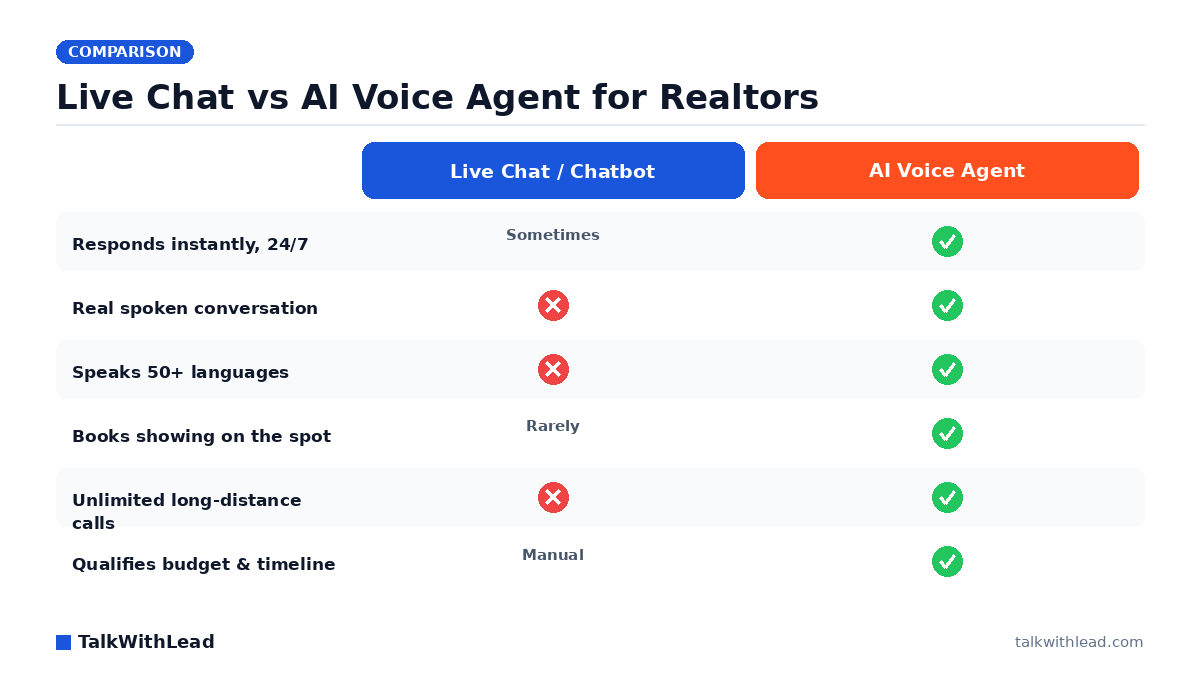
    Live Chat vs AI Voice Agent for Realtors — TalkWithLead original infographic (comparison diagram).
    Live Chat vs AI Voice Agent for Realtors

    A buyer lands on your listing at 9:47 p.m., loves the kitchen, and clicks your live chat. A box pops up: “We’re away right now, leave your email.” They don’t. They open the next agent’s site instead. That single silent moment is why so many real estate agents are hunting for an ai voice agent alternative to live chat for real estate agent websites — something that actually talks back the second interest is highest.

    TL;DR: The strongest live-chat alternative for real estate is a human-sounding AI voice agent that answers the instant a visitor asks to talk, holds a real spoken conversation in 50+ languages, qualifies budget and timeline, and books the showing on the call. Instead of collecting a typed email you may never follow up on, it turns the website visit into a live phone conversation while the buyer is still excited.

    Why live chat quietly loses real estate leads

    Live chat felt modern a decade ago, but for property buyers it introduces friction at the worst possible moment. A serious buyer researching a home doesn’t want to thumb-type questions about square footage, school districts, and closing timelines into a tiny widget. They want to ask and get an answer.

    Three things go wrong with chat on an agent site:

    • It’s usually unstaffed. Agents are at showings, in the car, or asleep. “Live” chat becomes a form that promises a human and delivers a delay.
    • It caps the emotion. Buying a home is a phone-call decision, not a text-thread decision. Typing strips out the tone and reassurance that move someone toward booking.
    • It stalls exactly when speed wins. According to Harvard Business Review research, companies that reach a web lead within an hour are nearly 7× more likely to qualify it than those that wait even an hour longer. A chat transcript sitting unread until morning burns that window.

    We break the chat-versus-bot tradeoff down further in Live Chat vs Chatbot: Pros, Cons, and the AI Voice Upgrade, but the short version is simple: both make the buyer wait or type. Voice does neither.

    What is an AI voice agent alternative to live chat for real estate agent websites?

    An AI voice agent is a widget you drop on your site that lets a visitor start talking — out loud — the moment they want to. Instead of a chat bubble, they get an extremely human-sounding voice that greets them, answers questions about the listing, and offers to set a showing. It runs on your site around the clock and never sends anyone to voicemail.

    Picture the same 9:47 p.m. visitor. They click “Talk now,” and within a second a warm voice says, “Hi, I can help with the Maple Street listing — are you looking to tour it this week?” It asks their timeline, whether they’re pre-approved, and which neighborhoods they’re considering, then books a showing straight into your calendar. That’s a booked appointment from a visit that live chat would have turned into an ignored transcript.

    Because it’s voice-first, it also does things chat structurally can’t:

    • 50+ languages. A relocating engineer or an overseas investor gets answered in their own language, instantly.
    • Unlimited long-distance calling. An out-of-state buyer relocating for work talks to “your office” with no toll barrier.
    • Instant callbacks. If a visitor would rather be called, the agent rings them in seconds while they’re still on the page.

    Want to hear it? Try a Live Demo and talk to the agent the way your buyers would.

    Live chat vs AI voice agent: how they compare

    Here’s the honest, side-by-side view for a real estate website, on the dimensions that decide whether a browsing visitor becomes a booked showing.

    CapabilityLive chat / chatbotAI voice agent
    Answers instantly, 24/7Only if staffedYes, always
    Real spoken conversationNo — typing onlyYes
    Speaks 50+ languagesRarelyYes
    Qualifies budget & timelineManual or scriptedYes, conversationally
    Books a showing on the spotSeldomYes
    Unlimited long-distance callingNoYes

    Best for: real estate agents and teams whose listing pages get after-hours or out-of-area traffic and who lose leads to slow follow-up.

    Not the right fit if: you only ever work referral clients you already know by name and your site isn’t meant to capture new buyer or seller inquiries.

    The same speed logic drives our piece on Speed to Lead Real Estate: Book More Showings — the agent who talks first usually books first.

    How much does an AI voice agent cost, and is it worth it?

    Cost anxiety is fair, so let’s make it concrete with clearly-labeled example math (your numbers will differ). Say your site gets 400 listing-page visitors a month and, like most agent sites relying on forms and chat, only a small slice ever contacts you.

    Illustration: imagine even 12 of those visitors would have talked if someone picked up, and your average commission on a closed buyer is a conservative figure you can plug in. If the voice agent books showings with just 3 of those 12 and one becomes a client, a single deal dwarfs a monthly software subscription. That’s the ROI shape for lead-conversion tools — one saved deal covers a year of the tool.

    To pressure-test your own numbers, run them through our free missed-call revenue calculator — it turns “how many leads am I leaving on the table” into a dollar figure. For plan-level pricing on the voice agent itself, see TalkWithLead pricing; a straightforward monthly subscription typically runs a small fraction of one real estate commission.

    If you’re weighing voice against a hiring an answering service or receptionist, the same tradeoffs we cover in AI Receptionist for Contractors: 2026 Cost & ROI apply to agents: an AI voice agent answers every visitor at once, never takes a lunch break, and doesn’t cost per-minute for long calls.

    Booking showings faster than the competition

    Real estate is a speed sport. When a buyer requests information, they usually reach out to several agents. Whoever converts that interest into a scheduled conversation first tends to win the relationship. A voice agent compresses that race to seconds.

    Here’s what changes on your site the day you replace chat with voice:

    • No dead ends after hours. Evening and weekend traffic — when most buyers browse — gets a real conversation instead of a “leave a message” box.
    • Qualified, not just captured. By the time you see the lead, budget, timeline, financing status, and target neighborhoods are already noted.
    • Fewer lost relocations. Long-distance and multilingual buyers, historically the hardest to convert through text, actually get served.

    You can layer it on the systems you already trust; the goal isn’t to replace your CRM, it’s to stop the leak between “visited your listing” and “talked to you.” See how the widget mechanics compare across formats in Callback Widget vs Click-to-Call vs Live Chat.

    The setup is quick and there’s no reason to keep bleeding after-hours leads. Start free with TalkWithLead and let a voice agent answer your next midnight listing visitor.

    FAQ

    What is the best live chat alternative for a real estate agent website?

    A human-sounding AI voice agent is the strongest alternative because it removes the two biggest weaknesses of chat: the wait and the typing. It answers instantly by voice, qualifies the buyer, and books a showing on the spot — even at night and even in 50+ languages.

    Can an AI voice agent actually book showings on its own?

    Yes. It holds a natural spoken conversation, asks the qualifying questions you’d ask, and schedules the appointment during the call, then hands you a qualified lead with the details already captured.

    Will it work for out-of-state or international buyers?

    That’s one of its biggest advantages. With 50+ languages and unlimited long-distance calling, relocating and overseas buyers get answered in their own language with no toll barrier — exactly the segment that typed chat tends to lose.

    Is an AI voice agent worth the cost for a solo agent?

    For most agents, one additional closed deal covers the tool for a long stretch, so it usually pays for itself quickly. Run your own traffic and commission numbers through a missed-lead calculator to see your specific payback before deciding.

    Does it replace live chat entirely or run alongside it?

    You can run either way. Many agents lead with the voice agent because it converts higher, while still offering a text option for visitors who prefer to type. The point is that no interested visitor hits a silent dead end.

    How fast can I get it live on my site?

    Setup is designed to take minutes, not a developer project — you add the widget, connect your calendar, and it starts answering visitors. You can try it first with a live demo to hear the voice quality before you commit.

  • AI Receptionist for Contractors: 2026 Cost & ROI

    AI Receptionist for Contractors: 2026 Cost & ROI

    AI Voice vs Human Front Desk vs Voicemail — TalkWithLead original infographic (comparison diagram).
    AI Voice vs Human Front Desk vs Voicemail

    A homeowner’s water heater just failed. They pull up three contractor websites, call the first, and get voicemail. They call the second and a human-sounding voice picks up on the first ring, asks two questions, and books the visit for tomorrow morning. Guess which contractor wins the job? The ai receptionist for contractors cost question matters, but it’s the wrong first question. The real one is: what are you losing every time a ready-to-hire caller hits your voicemail?

    TL;DR: An AI receptionist for a contracting business usually costs a flat monthly subscription — a fraction of a full-time front-desk salary — and replaces missed calls with instant, human-sounding voice conversations that book jobs 24/7. Whether it pays off comes down to your average job value and how many calls you currently miss: for most contractors, capturing even a couple of extra jobs a month covers the tool many times over.

    How much does an AI receptionist for contractors cost?

    Pricing for AI voice reception is almost always a predictable monthly subscription rather than a per-minute answering-service bill that spikes in your busy season. That flat structure is the point: you know your number before the phone rings. Compare that to the alternatives contractors usually weigh.

    • A full-time receptionist: a real salary plus benefits, plus they clock out at 5 p.m., take lunch, and can’t answer two calls at once during a storm-damage rush.
    • A traditional answering service: often billed per minute or per call, so your invoice climbs exactly when call volume spikes — and the operator reading from a script still can’t book the job in your calendar.
    • Voicemail: technically free, and quietly the most expensive option on this list, because it sends buyers straight to your competitor.

    An AI voice agent sits between those: one flat monthly cost, unlimited pickups, and unlimited long-distance calling so a lead three states away gets the same instant answer as one across town. Want to hear one handle a live call? Try the Live Demo and judge how human it sounds before you spend a dollar. You can see current plans on the pricing page.

    What are you really paying for when a call goes unanswered?

    Here’s the honest framing every contractor should run before comparing subscription tiers. The subscription is small and fixed. The missed-call cost is large and invisible — it never shows up on an invoice, so it’s easy to ignore.

    Picture a remodeler whose average job is worth $9,000. Say even 4 qualified callers a month hit voicemail and never call back because a competitor answered first. That’s not a $99 problem — that’s $36,000 in walked-away revenue in a single month, or over $400,000 a year. Against numbers like that, the question stops being “can I afford an AI receptionist?” and becomes “can I afford to keep missing these calls?”

    The pattern holds across trades. Roofers after a hailstorm, plumbers at 11 p.m., HVAC techs in a July heat wave — the calls you can’t physically answer are often the highest-intent buyers you’ll get all week. An AI voice agent answers all of them at once, in the caller’s language, and hands you a booked appointment instead of a red voicemail badge. To see how this plays out in real dollars for your business, run your own numbers through the free missed-call revenue calculator.

    Why AI voice beats chatbots and web forms for contractors

    Most “lead capture” tools bolted onto contractor websites are chatbots and contact forms. They ask a stressed homeowner to type out their emergency, then promise someone will “get back to you soon.” That’s a slow lane for a fast decision. A person whose basement is flooding doesn’t want to fill out a form — they want to talk to someone right now.

    That preference isn’t a hunch. An Ada study found 59% of consumers prefer instant, 24/7 AI customer service over waiting for a human — but only when the AI can actually resolve their issue. That’s the whole game: instant plus capable. A voice agent that greets the caller, understands the job, and books the slot clears that bar. A chatbot that collects a name and stalls does not.

    Voice also converts because it’s a conversation, not a maze. The AI can ask clarifying questions, quote availability, and offer an instant callback — turning an anonymous website visitor into a real phone conversation on the spot. If you’re weighing the two head-to-head, this breakdown of AI voice agent vs chatbot for booking calls lays out where each one wins, and this look at live chat vs chatbot and the AI voice upgrade shows why typing-based tools leak high-intent leads.

    Best for: contractors who get real inbound call and web volume, miss calls while on the job, and have jobs worth enough that one recovered lead pays for months of service.

    Not the right fit if: you’re fully booked months out, turn away work, and genuinely don’t want more leads — then instant response solves a problem you don’t have.

    An ROI example you can actually check

    Let’s make the math concrete and label it clearly as an illustration, not a customer result. Assume:

    • Average job value: $4,000 (mid-range for many trades)
    • Missed or after-hours calls per month that currently go nowhere: 20
    • Of those, assume a conservative 10% were ready buyers the agent books — that’s 2 jobs

    Two recovered jobs at $4,000 is $8,000 in monthly revenue that used to land in voicemail. Even after subtracting a flat monthly subscription, the return isn’t close — a single booked job typically covers the tool for the better part of a year. Speed is why it works: the faster you respond, the more of those callers you keep, a dynamic spelled out in why the first 60 seconds win most deals. Adjust the inputs to your own averages, because the honest answer is that ROI scales with your job value and your missed-call volume, nothing else.

    This is also where broader adoption context helps. According to Gartner research, agentic AI will autonomously resolve 80% of common customer service issues without human intervention by 2029, cutting operational costs by 30%. Front-desk call handling for contractors — answer, qualify, book — is exactly the kind of repeatable task that shift describes. Getting in now means your phone stops leaking leads while competitors are still deciding.

    What a good AI receptionist should do for a contracting business

    Not all AI voice tools are equal. Before you compare the ai receptionist for contractors cost across vendors, compare capabilities. A strong one for a trades business should:

    • Sound genuinely human — no robotic hold-music voice that makes callers hang up.
    • Answer instantly, 24/7 — nights, weekends, and holidays are when emergency jobs call.
    • Speak 50+ languages — so a Spanish-speaking homeowner gets served, not screened out.
    • Offer instant callbacks — a website visitor clicks, and the phone rings in seconds.
    • Book the job — capture the details and set the appointment, not just take a message.
    • Handle overflow — pick up call two and call three while you’re mid-conversation.

    If you’re vetting providers, it’s worth reading how one stacks up against a common competitor in this Smith.ai alternative breakdown, and if you also run intake-heavy work, the logic in whether an AI receptionist is worth it for a law firm maps closely to how contractors qualify leads. Ready to put one on your own site? You can start with a free signup and have the agent answering your calls fast.

    FAQ

    How much does an AI receptionist for contractors cost per month?

    Most AI voice receptionists charge a flat monthly subscription rather than per-minute answering-service rates, which keeps your cost predictable even during busy season. That’s typically far below a full-time front-desk salary. Check the pricing page for current plan levels.

    Is an AI receptionist worth it for a small contracting business?

    It usually is if you miss calls while on jobs and your average job is worth a few thousand dollars. Recovering even one or two otherwise-lost jobs a month tends to cover the subscription many times over. If you’re already turning work away, the value is smaller.

    Can an AI receptionist actually book appointments, not just take messages?

    A good one does. It qualifies the caller, checks availability, and books the appointment during the same conversation — the difference between capturing a job and leaving a voicemail slip that may never get returned.

    Will callers know they’re talking to AI?

    Modern AI voice agents sound remarkably human and handle natural back-and-forth, so the experience feels like a competent front-desk person. What callers notice most is that someone picked up instantly instead of sending them to voicemail.

    How is an AI voice agent better than a chatbot or contact form?

    Homeowners with an urgent job want to talk, not type. Voice answers instantly, asks clarifying questions, and books the work, while chatbots and forms ask people to describe their emergency and wait. See the full AI voice agent vs chatbot conversion comparison for the details.

    Can it handle Spanish-speaking or multilingual callers?

    Yes. A capable AI voice agent supports 50+ languages, so it can serve callers in their preferred language automatically instead of losing the lead to a language barrier — a real advantage in most local service markets.

  • Smith.ai Alternative for Website Lead Conversion

    Smith.ai Alternative for Website Lead Conversion

    Smith.ai vs AI Voice Agent for Lead Conversion — TalkWithLead original infographic (comparison diagram).
    Smith.ai vs AI Voice Agent for Lead Conversion

    Why business owners look for a Smith.ai alternative for website lead conversion

    You put a real phone number and a contact form on your site, signed up for Smith.ai to catch the calls, and the leads still trickle in slower than you want. The gap is rarely the agents themselves. It’s that a human-staffed answering service can only pick up so many calls at once, charges by the minute, and still leaves your website visitors waiting for someone to call them back. If you want a Smith.ai alternative for website lead conversion that talks to every visitor the instant they land, an AI voice-first platform answers that directly.

    TL;DR: Smith.ai is a human virtual receptionist and answering service billed per call or minute. The fastest-converting alternative is an AI voice agent that answers your website’s visitors instantly, holds a natural spoken conversation in 50+ languages, and triggers an immediate callback so a form-fill becomes a live phone call in seconds, all on a flat plan instead of per-minute fees.

    What does Smith.ai actually do, and where does it leave money on the table?

    Smith.ai connects your business to trained human receptionists who answer calls, qualify callers, and book appointments. For a firm that just needs missed phone calls covered, it works. The trouble starts when you measure it against the goal that matters: turning the traffic already hitting your website into booked conversations.

    Three structural limits show up fast:

    • It waits to be called. A receptionist answers an inbound ring. The visitor reading your pricing page right now has to decide to dial, then hope someone’s free. Most never do.
    • It bills by the minute. Every qualifying question, every hold, every transfer is metered. Busy months get expensive, so owners cap usage and miss calls anyway.
    • It throttles at peak. When five leads hit at once, humans queue them. The fourth and fifth caller hear hold music or get a callback later, which is exactly when buyers move on.

    Speed is the whole game here. According to Harvard Business Review research, companies that reach a web lead within an hour are nearly 7× more likely to qualify it than those that wait even an hour longer. A callback queue burns that hour. We dig deeper into this in Speed-to-Lead: Why the First 60 Seconds Win Most Deals.

    What is the best Smith.ai alternative for website lead conversion?

    The best alternative is the one that removes the wait entirely. Instead of routing a visitor toward a human who may or may not be available, TalkWithLead puts an extremely human-sounding AI voice agent directly on your website. A visitor clicks to talk, and within seconds they’re in a real spoken conversation, no form, no hold, no slow chatbot typing back one line at a time.

    That changes the math in four concrete ways:

    • Instant answer, every time. The AI voice agent never queues. Whether one visitor or fifty arrive at once, each gets a live conversation immediately.
    • 50+ languages, on the fly. A Spanish-speaking buyer and an English-speaking buyer both get answered in their own language without you staffing for either.
    • Unlimited long-distance calling. Prospects anywhere can reach you, and the agent can call them back, without per-minute long-distance charges eating the margin.
    • Instant callbacks. When a visitor leaves a number, the system rings them back in seconds while their interest is still hot, turning a passive form-fill into an active phone conversation.

    Want to hear it before you decide? Take the live demo and talk to the agent the way your own visitors would. For a side-by-side on conversion specifically, AI Voice Agent vs Chatbot: Which One Books More Calls? breaks down why voice beats typed chat for booking.

    Smith.ai vs an AI voice agent: a side-by-side comparison

    Here’s how the two stack up on the dimensions that decide whether a website visitor becomes a sales conversation.

    DimensionSmith.ai (human answering service)TalkWithLead (AI voice-first)
    Who answersHuman receptionistHuman-sounding AI voice agent
    Response to a website visitorInbound call or scheduled callbackInstant on-page conversation
    Concurrent conversationsLimited by staffingUnlimited, simultaneous
    LanguagesLimited set50+ languages
    Long-distance callingOften meteredUnlimited
    PricingPer call / per minuteFlat plan
    AvailabilityBusiness hours + plans24/7, no shift gaps

    Best for: a business with steady inbound website traffic that wants every visitor engaged in a real conversation the moment they arrive, in any language, without per-minute costs scaling against you.

    Not the right fit if: your lead flow is almost entirely complex calls that legally or practically require a licensed human (for example, certain regulated intake), and you specifically want a person, not an AI, on every first touch. In that case a human service like Smith.ai may suit you better, or you pair the two.

    How much does an AI voice agent cost versus a per-minute answering service?

    Per-minute pricing punishes exactly the months you grow. An AI voice-first platform flips that to a predictable flat plan, so a busy week costs the same as a slow one. You can see the public tiers on the pricing page.

    To make the ROI concrete, here’s an illustrative example (your numbers will differ). Say your site gets 1,000 visitors a month and, picture a setup where even 3 of every 100 visitors would talk to an instant voice agent. That’s roughly 30 live conversations a month you weren’t capturing before. If even a handful of those become customers at a few hundred dollars each, the flat plan pays for itself many times over, and every additional conversation after that is pure upside. Plug your own traffic and close rate into the free missed-call revenue calculator to see the gap for your business.

    There’s a trust angle too. According to a Five9 study of 4,000 US and UK consumers, 75% of people prefer talking to a real human over the phone for support. A natural-sounding voice conversation meets that preference far better than a typed chatbot does, which is the whole point of leading with voice instead of a chat widget. Ready to put it on your site? Start your free signup and have the agent live before your next traffic spike.

    Does this work for my industry?

    The pattern holds anywhere a fast phone conversation closes the deal. A law firm fielding consultation requests, a med spa booking appointments, a real estate team chasing showing requests, an insurance agency quoting policies, every one of them loses leads to slow follow-up. The AI voice agent answers the moment interest peaks instead of hours later.

    If you run a practice or agency, these breakdowns get specific: Smith.ai Alternative for Law Firms covers website intake, Is an AI Receptionist Worth It for a Law Firm? weighs the cost, and Speed to Lead Real Estate shows how instant callbacks book more showings. For the broader build-vs-buy view on people, AI Voice Agent vs Human Receptionist lays out the tradeoffs.

    FAQ

    What is the best Smith.ai alternative for converting website visitors?

    An AI voice-first platform like TalkWithLead is the strongest alternative when your goal is converting website traffic, because it answers every visitor instantly with a natural spoken conversation rather than routing them to a human queue or a callback. It handles unlimited simultaneous calls in 50+ languages on a flat plan.

    How is an AI voice agent different from Smith.ai?

    Smith.ai staffs human receptionists who answer inbound calls and bill per minute. An AI voice agent lives on your website, starts a live conversation the instant a visitor clicks, never queues at peak, supports 50+ languages, and runs on a predictable flat plan with unlimited long-distance calling.

    Is an AI voice agent cheaper than a per-minute answering service?

    For most websites with steady or growing traffic, yes, because a flat plan doesn’t scale costs against your busiest months the way per-minute billing does. Run your own traffic and close rate through the missed-call revenue calculator to compare against your current spend.

    Can an AI voice agent really handle leads in other languages?

    Yes. The TalkWithLead voice agent converses in 50+ languages automatically, so a visitor is answered in their own language without you hiring multilingual staff or buying separate plans per language.

    Will visitors know they’re talking to AI?

    The voice agent is built to sound natural and human, and it handles real back-and-forth conversation rather than scripted prompts. Many businesses pair it with instant callbacks so the visitor moves seamlessly into a phone conversation, which most people prefer over typing to a chatbot.

    Can I keep human receptionists and add an AI voice agent?

    Yes. Many businesses use the AI voice agent as the always-on first responder that engages every website visitor instantly, then route complex or high-value conversations to a human. That captures the leads a queue would have lost while keeping people on the calls that truly need them.

Your next lead is on your site right now — ready to talk.

TalkWithLead’s AI voice agent picks up in seconds, qualifies the lead in their language, and books the call before the prospect can open a competitor’s tab. Forms are slow. Chatbots make people type. Voice closes.

Just curious about plans? See pricing →
This is the TalkWithLead Widget. Click to see how it will work on your website!