TalkWithLead
AI Voice-First Lead Conversion

AI Voice Agents That Turn Website Visitors Into Real Conversations

TalkWithLead is the AI voice-first widget that picks up the phone the moment a visitor lands on your site. Multilingual, extremely human-sounding, with unlimited long-distance calling so prospects anywhere can call you back. More calls. More leads. More closed deals.

Extremely human-sounding voice 50+ languages out of the box Unlimited long-distance calling Instant callback widget

Tag: live chat

  • AI Voice Agent vs Live Chat for Contractors

    AI Voice Agent vs Live Chat for Contractors

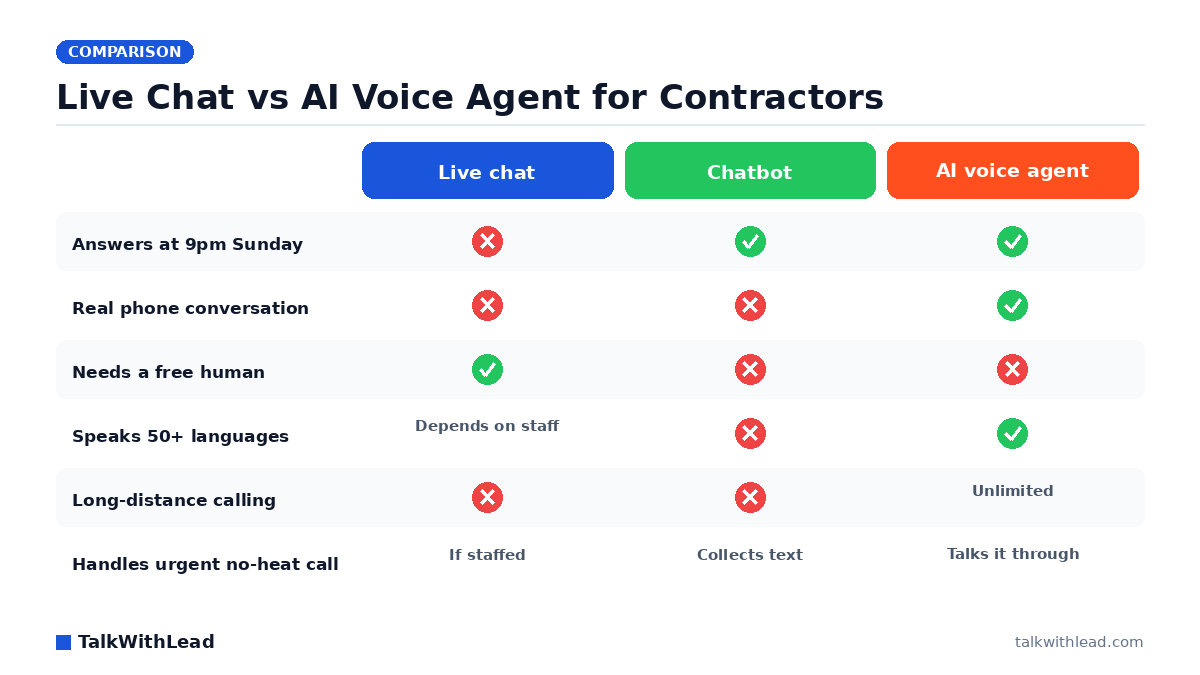
    Live Chat vs AI Voice Agent for Contractors — TalkWithLead original infographic (comparison diagram).
    Live Chat vs AI Voice Agent for Contractors

    Your site gets the visit at 8:47pm. The furnace is dead, the homeowner has three tabs open, and whoever answers first gets the job. That is the real question behind ai voice agent vs live chat for contractors — not which widget looks nicer, but which one is actually awake when the money shows up.

    TL;DR: For contractors, an AI voice agent beats live chat because it answers every visitor instantly, 24/7, and converts the visit into a real phone conversation instead of a typing session. Live chat only performs when a human is free to reply, which almost never describes a crew in the field. Keep live chat for quiet browsing questions; put voice in front of urgent, high-ticket work.

    Why live chat quietly underperforms for trades

    Live chat was built for teams that sit at desks. Contractors do not. The office manager is invoicing, the owner is on a ladder, and the phone is in a truck cup holder. When nobody picks up the chat within a minute, that window becomes a form — and a form is just a slower way of saying “we’ll call you back eventually.”

    The timing math is brutal, and it is well documented. According to Harvard Business Review research, companies that reach a web lead within an hour are nearly 7× more likely to qualify it than those that wait even an hour longer. A chat that goes unanswered until morning is not a slow lead. It is somebody else’s job.

    Then there is what typing does to a service inquiry. A homeowner describing a sewer smell, a soft spot in a subfloor, or a breaker that trips only when the dryer runs is not going to type it well. They will type six words, wait, and leave. Voice gets the whole story in twenty seconds.

    What an AI voice agent actually does on a contractor site

    TalkWithLead puts an extremely human-sounding AI voice agent on your website. A visitor clicks, and instead of a chat box, a conversation starts — out loud. The agent greets them, asks what is going on, captures the address and the trade, checks whether it is an emergency, and either books the slot or triggers an instant callback so a human closes it while the intent is still hot.

    Three things matter more for contractors than for almost any other vertical:

    • After-hours coverage. No-heat, no-water, and no-power calls arrive at night and on weekends. The voice agent never clocks out.
    • 50+ languages. Service areas are not monolingual. A crew that can only intake in English is turning away paying neighborhoods, which is exactly the problem we break down in our bilingual Spanish AI answering service for contractors guide.
    • Unlimited long-distance calling. Out-of-state landlords, relocating buyers, and property managers calling about a unit three time zones away all reach you without a toll worry.

    Want to hear the difference before you decide anything? Take the live demo and talk to the agent the way a homeowner would.

    Which is better for contractors: AI voice agent or live chat?

    Better depends on what the visitor came to do. Someone comparing tankless water heaters at lunch is happy to type. Someone standing in two inches of water is not. Contractors skew heavily toward the second group, and the second group is where the ticket size lives.

    DimensionLive chat (human)ChatbotAI voice agent
    Response speedFast when staffed, dead when notInstant but scriptedInstant, every hour
    CoverageBusiness hours24/724/7
    Detail capturedGood, if the visitor typesWhatever the form fields allowFull spoken description
    Emergency triagePossibleWeakStrong — asks and escalates
    LanguagesLimited to staffText translation50+ spoken languages
    Ends in a phone callRarelyAlmost neverBy design
    Staffing costPer seat, per shiftLowFlat subscription

    Best for: emergency and high-ticket trades — HVAC, plumbing, roofing, restoration, electrical — where the visitor wants to talk now and the first contractor to answer usually wins the job.

    Not the right fit if: your work is low-ticket, scheduled weeks out, and your buyers genuinely prefer async text — or if you already have a fully staffed intake desk answering chats in under a minute, every hour you advertise.

    The revenue you are already leaving on the table

    Run the arithmetic on your own numbers instead of trusting a vendor claim. Illustrative example, assumptions stated: say your site gets 600 visitors a month, and imagine only 4 of every 100 ever contact you — that is 24 inquiries. Now say half of those arrive outside office hours and go unanswered because live chat was offline. If your average job is worth $1,400 and you would have closed a third of the 12 you missed, that is roughly $5,600 a month walking to a competitor. Those are assumed rates, not measured results — plug in your real ticket and close rate with the missed-call revenue calculator and see what your own gap looks like.

    The pattern behind that math is not speculative. A 411 Locals study of 85 small businesses across 58 industries found that only 37.8% of incoming calls were answered by a live person — meaning roughly 6 out of 10 calls went unattended. Contractors are the archetype for that failure: the work itself makes answering impossible.

    Pricing on the voice side is a flat monthly subscription rather than a per-shift staffing line, which is what makes the comparison lopsided for small crews. See the pricing page for the current tiers, and our AI receptionist cost and ROI breakdown for contractors for the full accounting.

    How to run both without cannibalizing either

    You do not have to choose one and delete the other. The setup that works looks like this:

    1. Voice first on money pages. Emergency service, main service pages, and your city landing pages get the voice agent front and center.
    2. Chat on quiet pages. Blog posts, financing explainers, and “about us” can keep live chat or a simple text widget for low-urgency questions.
    3. Instant callback as the safety net. If a visitor will not talk right then, capture the number and fire a callback in minutes, not hours.
    4. Track which one books jobs. Tag the source on every booked call. Within a month you will know exactly which widget pays for itself.

    If you are still weighing widget types generally, the click-to-call vs callback widget vs AI voice agent comparison covers the mechanics of each. And if speed is the part you keep losing on, read how fast you should call a new lead before you change anything else.

    When you are ready to stop losing after-hours jobs, start free and put a voice on your site tonight — or try the live demo first and hear what your visitors would hear.

    FAQ

    Is an AI voice agent better than live chat for a contractor website?

    For most contractors, yes. Live chat depends on a human being free to type, which rarely happens when the crew is on site. An AI voice agent answers instantly at any hour and turns the visitor into a phone conversation, which is how service work actually gets booked.

    Can an AI voice agent handle emergency service calls?

    It can triage them. The agent asks what is wrong, how urgent it is, and where the property is, then either books the appointment or escalates to an on-call technician with the details already captured. That beats a chat transcript nobody reads until morning.

    Will homeowners actually talk to an AI voice agent?

    Many do, because it is faster than typing and faster than waiting on hold. The voice is extremely human-sounding, and for anyone in an urgent situation, speaking is the path of least resistance. Visitors who prefer not to talk can still request an instant callback.

    Do I need to drop live chat if I add an AI voice agent?

    No. Run voice on emergency and service pages where urgency is high, and keep chat on informational pages where visitors are browsing. Tag your booked jobs by source and let the data decide where each one belongs.

    What about customers who do not speak English?

    The voice agent handles conversations in 50+ languages, so your intake is not limited to whoever is staffing the phone that day. For crews serving mixed-language service areas, this is often the single biggest lift in captured leads.

    How much does an AI voice agent cost compared to staffing live chat?

    Live chat costs per seat and per shift, and covering nights and weekends means paying for coverage you may barely use. A voice agent is a flat monthly subscription with unlimited long-distance calling included. Current tiers are on the pricing page.
  • AI Voice Agent vs Callback Widget vs Live Chat: What Converts?

    AI Voice Agent vs Callback Widget vs Live Chat: What Converts?

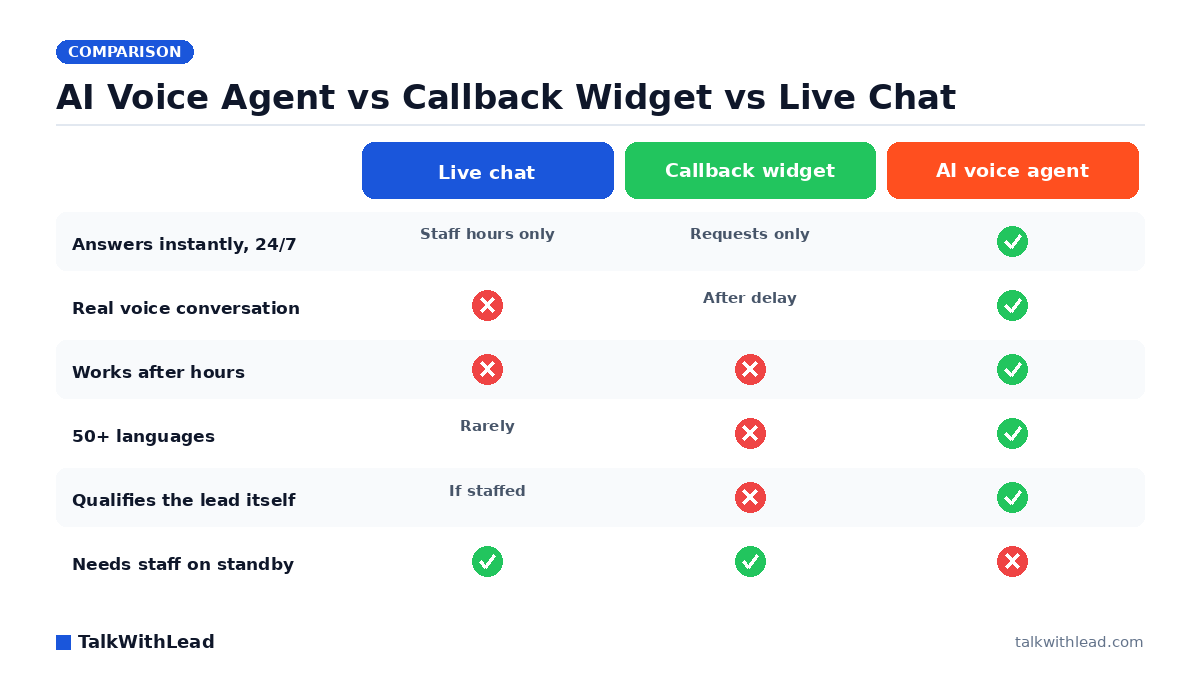
    AI Voice Agent vs Callback Widget vs Live Chat — TalkWithLead original infographic (comparison diagram).
    AI Voice Agent vs Callback Widget vs Live Chat

    The Real Question Behind This Comparison

    Every one of these widgets makes the same promise: turn an anonymous website visitor into a lead before they hit the back button. But the ai voice agent vs callback widget vs live chat decision is really a decision about who answers, and how fast. Pick wrong, and your best prospects click away to a competitor who picked right.

    TL;DR: Live chat converts only when a trained human is actually online. A callback widget captures phone numbers but inserts a delay between intent and conversation. An AI voice agent removes both weaknesses — it answers every visitor instantly with a human-sounding voice, in 50+ languages, at any hour — so for most businesses it converts more visitors into real sales conversations than either alternative.

    How Each Option Actually Works

    Live chat puts a text box in the corner of your site. When a visitor types, someone on your team is supposed to reply within seconds. In practice, chat sits unmanned during lunch, after 5 p.m., on weekends, and whenever the person covering it is on the phone. The visitor types a question, watches the cursor blink, and leaves. Even when it works, you get a typed exchange — not the phone call where deals actually close. We broke down that gap in Live Chat vs Chatbot: Pros, Cons, and the AI Voice Upgrade.

    A callback widget flips the interaction: the visitor enters their number, and your team calls them back. It respects a truth live chat ignores — serious buyers want to talk. But it still depends on a human dialing back quickly. If the callback lands in 30 seconds, it converts well. If it lands in an hour, the lead has often gone cold or gone shopping.

    An AI voice agent collapses the whole sequence. The visitor clicks, and an extremely human-sounding AI voice answers immediately — no number form, no queue, no waiting for a rep. It handles the conversation naturally, answers questions, qualifies the lead, books the demo or appointment, and offers an instant callback to the visitor’s phone if they prefer. Because it speaks 50+ languages and supports unlimited long-distance calling, a prospect in Madrid or Mumbai gets the same instant conversation as one down the street. You can hear it live in a two-minute demo — the fastest way to understand why voice beats a text box.

    Which Converts More Website Visitors: AI Voice Agent, Callback Widget, or Live Chat?

    Conversion in this category comes down to three variables: response speed, conversation quality, and coverage. Here is how the three options compare on the dimensions that decide whether a visitor becomes a booked call:

    DimensionLive chatCallback widgetAI voice agent
    Response speedSeconds — if staffedMinutes to hoursInstant, always
    After-hours coverageNone (or a bot)Captures number onlyFull conversations 24/7
    Conversation mediumTextVoice, delayedVoice, immediate
    LanguagesWhatever your team speaksWhatever your team speaks50+ languages
    Lead qualificationManual, if staffedManual, after callbackAutomatic, in the call
    Staffing requiredConstantOn-callNone
    Long-distance prospectsText onlyToll costs applyUnlimited long-distance included

    Why does speed dominate this table? Because the research on lead response is brutal. The MIT Lead Response Management study found you’re about 21× more likely to qualify a lead contacted within 5 minutes than one contacted at 30 minutes. Live chat can hit that window only during staffed hours. A callback widget hits it only when someone drops everything to dial. An AI voice agent hits it every single time, because “response time” is the time it takes the visitor to click. We go deeper on the speed math in Speed-to-Lead: Why the First 60 Seconds Win Most Deals.

    And the answer-rate problem is worse than most owners think. According to a 411 Locals study of 85 small businesses across 58 industries, only 37.8% of incoming calls were answered by a live person — meaning roughly 6 out of 10 calls went unattended. A callback widget that routes into that same overloaded team inherits that same failure rate.

    The ROI Math: What a Delay Actually Costs

    Here is an illustrative example — your numbers will differ, so plug in your own. Say your site gets 2,000 visitors a month, and imagine just 2% would talk to someone if a real conversation were one click away. That’s 40 potential conversations. Now assume a widget that depends on human availability catches only the ones arriving during staffed weekday hours — say half — and that delayed callbacks lose a further share to cooled-off interest. You could easily be having 15 conversations instead of 40. If even a modest fraction of those conversations become customers worth $1,000 each, the gap between the two setups is tens of thousands of dollars a year — from the same traffic you already paid to acquire.

    Don’t take the hypothetical on faith: run your own visitor count, close rate, and deal size through the free missed-call revenue calculator. It uses your inputs and labeled assumptions, and it takes about a minute.

    When Each Option Is the Right Choice

    Choose live chat if you have trained staff genuinely available during all your traffic hours and your buyers prefer typing — some support-heavy audiences do. Just be honest about coverage: an unmanned chat box converts worse than no widget at all, because it advertises a promise you’re breaking in real time.

    Choose a plain callback widget if your team reliably returns calls within a few minutes and your traffic is concentrated in business hours. It’s a real upgrade over a contact form. If you’re evaluating this route, our teardown of Callback Widget vs Click-to-Call vs Live Chat covers the implementation details.

    Choose an AI voice agent if you want every visitor — after-hours, weekend, overseas, or Spanish-speaking — to get an instant, human-sounding phone conversation without adding headcount. It’s the only option in this comparison where conversion doesn’t degrade when your team is busy, asleep, or on vacation. TalkWithLead’s agent also offers instant callbacks, so visitors who want the call on their own phone still skip the waiting.

    Best for: businesses whose leads arrive around the clock or from multiple countries, and any owner tired of paying for traffic that never becomes a conversation.
    Not the right fit if: your buyers must speak to a licensed or credentialed human on the first touch for regulatory reasons, and you already have that human answering within seconds during every hour your site gets traffic.

    How to Test This on Your Own Site This Week

    You don’t need a committee to settle the ai voice agent vs callback widget question — you need a week of your own data. First, try the live demo and judge the voice quality yourself; skepticism about “robotic AI” usually ends about ten seconds in. Second, check pricing against what one recovered deal is worth in your business — for most, a single saved lead covers months of the widget. Third, create a free account, drop the widget on your site, and count booked conversations after seven days. If you want the deeper comparison against text-based bots before you start, read AI Voice Agent vs Chatbot Conversion Rate.

    FAQ

    Is an AI voice agent better than a callback widget?

    For most businesses, yes — because it removes the delay a callback widget depends on. A callback widget captures a phone number and waits for a human; an AI voice agent starts the conversation the moment the visitor clicks, then can still place an instant callback to the visitor’s phone. You keep everything a callback widget offers and eliminate its weakest link.

    Does live chat or a voice conversation convert more website visitors?

    Voice tends to win for sales-intent visitors because phone conversations carry tone, urgency, and trust that typed chat can’t. Live chat also fails silently whenever no one is staffing it. A voice-first widget converts the same click into an actual sales conversation instead of a text thread that ends with “someone will follow up.”

    Do AI voice agents sound robotic to callers?

    Modern AI voice agents are strikingly human — natural pacing, interruptions handled gracefully, and conversational answers rather than scripted menus. The honest test is to listen for yourself: TalkWithLead’s live demo lets you have the exact conversation your visitors would.

    Can an AI voice agent handle visitors who don’t speak English?

    Yes. TalkWithLead’s agent conducts full conversations in 50+ languages, so a Spanish-, Hindi-, or French-speaking visitor gets the same instant experience as an English speaker — without you hiring multilingual staff. Combined with unlimited long-distance calling, international prospects can reach you as easily as local ones.

    What happens to leads that arrive after business hours?

    With live chat, they usually bounce. With a callback widget, they leave a number and wait until morning — often after contacting a competitor. An AI voice agent answers at 2 a.m. exactly as it does at 2 p.m.: it holds the conversation, qualifies the lead, and books the appointment so your team starts the day with warm leads instead of cold voicemails.

    How much does an AI voice agent cost compared to staffing live chat?

    Staffing live chat across real coverage hours means salaries; an AI voice agent is a flat software subscription that never sleeps. As a one-line framing: it typically costs a small fraction of one part-time employee. Check the current plans on the TalkWithLead pricing page and weigh it against the value of a single recovered deal.

  • Live Chat vs Chatbot: Pros, Cons, and the AI Voice Upgrade

    Live Chat vs Chatbot: Pros, Cons, and the AI Voice Upgrade

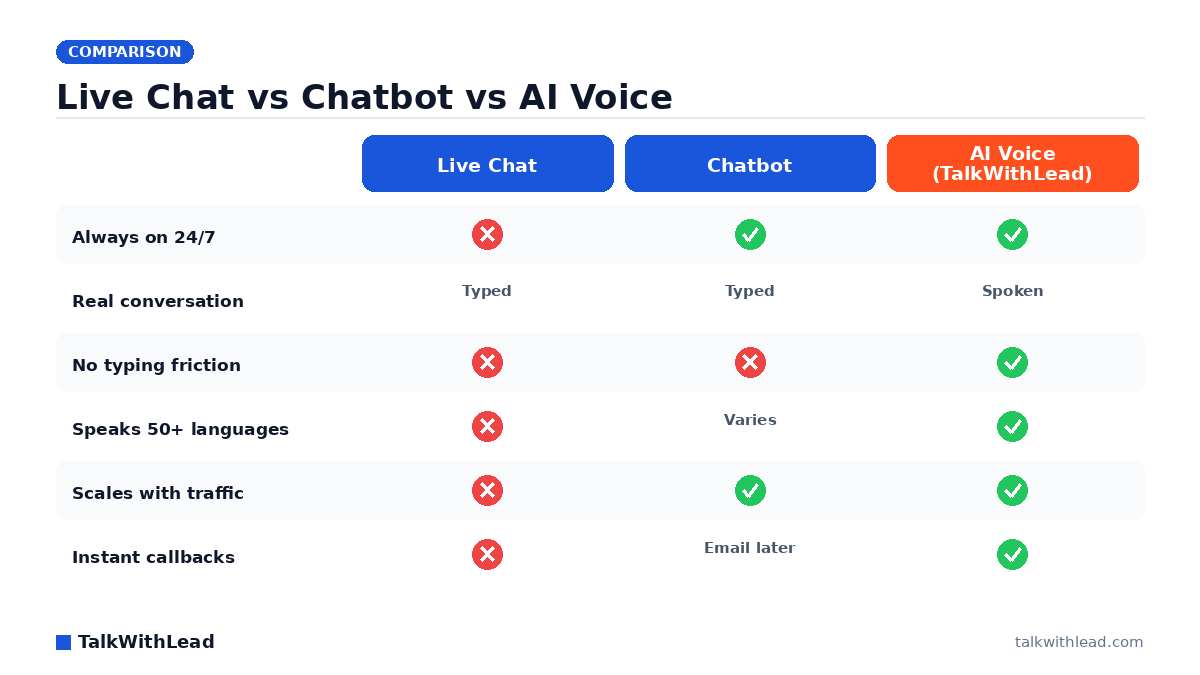
    Live Chat vs Chatbot vs AI Voice — TalkWithLead original infographic (comparison diagram).
    Live Chat vs Chatbot vs AI Voice

    Live chat vs chatbot: the wrong question most websites ask

    The debate over live chat vs chatbot usually comes down to one trade-off: pay humans to type with visitors all day, or install a bot that answers canned questions for free. Both choices leave your most interested prospects stuck typing into a small box, waiting on a reply — and a waiting visitor is a leaving visitor.

    There’s a third option that beats both: an AI voice agent that actually talks to people the moment they land on your site. Before you commit budget to either side of the live chat vs chatbot fight, it’s worth seeing where each one quietly leaks leads, and why a real voice conversation turns more of them into booked calls and sales conversations.

    Short answer

    Live chat means a human types replies in real time; a chatbot means software answers with automated text. Live chat gives better answers but only while someone is staffing the queue, so nights and weekends become dead zones; chatbots are always on but frustrate visitors when questions get nuanced. For converting high-intent visitors, the upgrade beyond both is an AI voice agent that talks instead of types — instant, 24/7, in 50+ languages.

    According to a Five9 study of 4,000 US and UK consumers, 75% of people prefer talking to a real human in person or over the phone for customer support.

    Live chat: pros and cons of human typing

    Live chat connects a visitor to a real teammate over text. Done well, it feels personal and handles oddball questions a script never anticipated. The catch is that it only works while a person is actually watching the queue — and most teams can’t watch it every hour of every day.

    Where live chat wins:

    • Human judgment. A trained rep reads nuance, calms a frustrated buyer, and improvises in a way no script can.
    • Trust. Visitors know they’re talking to a person, not a decision tree, so they open up.
    • Upsell instinct. Good reps spot buying signals and nudge toward a demo or a quote.

    Where live chat loses:

    • It’s only as fast as your staffing. Nights, weekends, and lunch breaks become dead zones — exactly when many buyers browse.
    • It doesn’t scale. One rep can juggle a few chats; a traffic spike means queues and abandoned conversations.
    • It’s still typing. Complex questions turn into slow back-and-forth, and the visitor is one tab away from a competitor.
    • Language limits. Your team speaks the languages it speaks, and not one word more.

    Chatbots: pros and cons of automated typing

    A chatbot swaps the human for a script or an AI model that replies instantly, around the clock, for a flat cost. That always-on speed is real — but speed to a generic answer isn’t the same as speed to a conversation, and buyers can tell the difference within seconds.

    Where chatbots win:

    • Always on. A 2 a.m. question gets an immediate reply instead of an empty queue.
    • Cheap at volume. One bot handles a thousand simultaneous chats without breaking a sweat.
    • Good at FAQs. Hours, pricing tiers, “do you serve my area” — bots handle these cleanly.

    Where chatbots lose:

    • Dead ends. Step outside the script and the visitor hits “let me connect you to a human” — who isn’t there.
    • Low trust. Buyers smell a bot fast and disengage when the stakes or the dollar amounts are high.
    • Still typing. The same friction as live chat: thumbs on a phone screen instead of a voice on a call.
    • Forms in disguise. Many “chatbots” just collect an email to follow up on later — long after the visitor’s interest has cooled.

    A Five9 survey of 4,000 consumers found that 56% are frequently frustrated by AI customer-service chatbots and 48% don’t trust the information those bots provide. That distrust is exactly why a typed bot struggles to close a high-intent buyer — and why a real conversation tends to win those moments.

    If you’re weighing these against other on-site tools, our breakdown of the callback widget vs click-to-call vs live chat shows how each one actually converts visitors.

    Live chat vs chatbot: a side-by-side look

    Strip away the marketing and the live chat vs chatbot comparison comes down to four things that decide whether a visitor becomes a lead:

    • Speed: Chatbots reply instantly; live chat replies when staffed. Both still make the buyer wait through typed turns.
    • Availability: Bots run 24/7; humans don’t. The gap is where after-hours leads vanish.
    • Depth: Humans handle complexity; bots stall on it and loop back to the same three buttons.
    • Cost: Bots are cheap to run but cheap-feeling; staffed chat is rich but expensive and hard to scale.

    Notice what’s missing from both columns: an actual conversation. Typing is the bottleneck on both sides. And the reason that matters is timing — as we explain in speed-to-lead: why the first 60 seconds win most deals, the lead you reach in the first minute is worth far more than the one you try to follow up with tomorrow.

    The AI voice upgrade: why talking beats typing

    Here’s the shift that ends the live chat vs chatbot debate. Instead of choosing between a human typist who clocks out and a bot that hits a wall, you put an AI voice agent on your site that actually speaks to visitors — and sounds startlingly human while doing it. The moment someone shows intent, they can be in a real phone conversation instead of a chat thread.

    That changes the math on every weakness above:

    • Always on, like a bot — but it talks, like your best rep. No staffing gaps, no dead 2 a.m. queue, no “we’ll get back to you.”
    • It speaks 50+ languages. A visitor in another country gets answered in their own language without you hiring a single multilingual rep.
    • Unlimited long-distance calling. Prospects anywhere can reach you, and you can call them back, with no per-minute anxiety.
    • Instant callbacks. If a visitor would rather be called, the agent triggers a callback in seconds — not “within 24 hours.”
    • No typing tax. People explain what they need far faster out loud than with their thumbs, and they trust a voice more than a text box.

    Want to hear how human it sounds before you decide anything? Take the live demo and talk to the agent yourself. For a closer look at the two automated approaches head-to-head, our AI voice agent vs chatbot breakdown goes deeper.

    Where typing still makes sense

    None of this means you should rip out live chat tomorrow. Some buyers genuinely prefer to type — they’re at work, on a quiet train, or just more comfortable in text. A quick FAQ bot still earns its keep for simple, repetitive questions, and a human chat rep is great for a long, detailed enterprise conversation.

    The smart move isn’t either/or. It’s making voice the default fast lane for high-intent visitors while keeping a text option for the people who want it. You stop forcing every motivated buyer through a typed bottleneck, and you stop losing the ones who would rather just talk.

    An illustrative ROI example

    The following is an illustrative example to show the mechanics, not a promise or a real customer result — your own numbers will differ.

    Imagine a service business with 1,000 website visitors a month, where 5% (50 people) show real buying intent. With a typed chatbot that mostly collects emails, say 20% book a call — 10 conversations. With staffed live chat that’s offline half the day, maybe 25% convert during business hours — but since much of the intent shows up after hours, call it 12 conversations. Now picture an AI voice agent that answers all 50 the instant they raise a hand, day or night, in their own language: even at a 40% talk-to-booking rate, that’s 20 conversations.

    In this illustration, the voice-first path roughly doubles booked conversations from the very same traffic — without buying a single extra click. If your average deal is worth a few hundred or a few thousand dollars, that gap compounds month after month. Missing the after-hours and other-language leads is the kind of quiet leak that caps growth without ever showing up in a report.

    Getting started without ripping out your stack

    You don’t have to fire your team or delete your chatbot to add voice. Most businesses keep live chat for the buyers who truly prefer to type and add an AI voice agent as the fast lane for everyone who’d rather just talk — which, in practice, is most high-intent buyers.

    You can compare plans and see what’s included on the pricing page, or skip straight to a free signup and have the voice agent live on your site today. Either way, the goal is the same: stop making your best leads type and wait, and start turning website visitors into real phone conversations.

    Live chat vs chatbot vs AI voice agent
    DimensionLive chatChatbotAI voice agent (TalkWithLead)
    Who answersA human typingAutomated text softwareA human-sounding AI voice agent
    AvailabilityOnly while staffed24/7 text24/7 voice and callbacks
    Answer quality on nuanceHigh (real person)Drops off on complex questionsConversational; routes to a human when needed
    Visitor effortType and waitType and waitJust talk
    Speed to a real conversationDepends on queue and staffingInstant text, but still typingSeconds to a live call or callback
    LanguagesWhoever is staffingVaries by setup50+ languages
    Best jobStaffed support and complex helpFAQ deflection / self-serveConverting high-intent visitors into calls

    Bottom line

    Best for: Use live chat when you can staff it for complex, human-touch support, and a chatbot for always-on FAQ deflection. To convert high-intent visitors into actual sales conversations — especially after hours, across languages, or for international leads — an AI voice agent is the best fit.

    Not the best fit for: An AI voice agent is more than you need for pure self-serve FAQ lookups; a chatbot handles those cheaply. Many sites keep chat/chatbot for support and add voice for the buying moment.

    In one line: Live chat for staffed support, chatbot for FAQ deflection, AI voice agent to convert high-intent visitors into calls. Start a free signup to add the voice agent today.

    FAQ

    What’s the difference between live chat and a chatbot?

    Live chat connects a visitor to a human teammate who types replies in real time, so it’s only available when someone is staffing it. A chatbot uses a script or AI model to reply automatically, 24/7, but it stalls on anything outside its programmed answers.

    The live chat vs chatbot trade-off is essentially human depth versus automated availability — and both keep the visitor typing instead of talking.

    Is a chatbot or live chat better for converting leads?

    Each wins in narrow cases: chatbots for instant, simple, after-hours answers; live chat for complex, high-trust conversations during business hours. But both lose the buyers who want a fast, real conversation rather than a typed exchange.

    An AI voice agent captures that middle ground by talking to visitors instantly, at any hour, which is why voice-first sites tend to book more calls from the same traffic.

    Can AI replace live chat and chatbots entirely?

    It can replace most of what they do and add what they can’t — a natural, human-sounding voice conversation in 50+ languages with instant callbacks. Many businesses keep a text option for visitors who prefer typing, while routing high-intent traffic to the voice agent because spoken conversations close faster.

    Does an AI voice agent work outside business hours?

    Yes. Like a chatbot, it’s always on, so a visitor at midnight or on a holiday gets a real spoken conversation or an instant callback instead of a “we’ll get back to you” form. That after-hours window is where staffed live chat quietly loses leads.

    How fast can I add an AI voice agent to my site?

    You can sign up and place the widget on your site the same day — no need to remove your existing live chat or chatbot first. Start with a live demo to hear the agent, then add it as the fast lane for your highest-intent visitors.

    Why do customers dislike chatbots?

    Mostly because bots stall on anything nuanced and feel impersonal. A Five9 survey of 4,000 consumers found that 56% are frequently frustrated by AI customer-service chatbots and 48% don’t trust the information those bots provide. So for high-intent moments, a real conversation converts better than a typed bot.

    Can an AI voice agent replace live chat and chatbots completely?

    Not always, and it doesn’t have to. An AI voice agent is the strongest tool for converting high-intent visitors into calls and for after-hours coverage, but live chat and chatbots still earn their place for staffed support and simple FAQ deflection. The honest answer is to layer them by page intent rather than rip anything out.

    Should I use live chat, a chatbot, or an AI voice agent?

    Match the tool to the job: live chat for staffed, complex support; a chatbot for always-on FAQ deflection; and an AI voice agent to convert high-intent visitors into real calls, especially after hours, across languages, or for international leads. Many sites run more than one — chat or a bot for support, and voice for the buying moment.

Your next lead is on your site right now — ready to talk.

TalkWithLead’s AI voice agent picks up in seconds, qualifies the lead in their language, and books the call before the prospect can open a competitor’s tab. Forms are slow. Chatbots make people type. Voice closes.

Just curious about plans? See pricing →
This is the TalkWithLead Widget. Click to see how it will work on your website!