TalkWithLead
AI Voice-First Lead Conversion

AI Voice Agents That Turn Website Visitors Into Real Conversations

TalkWithLead is the AI voice-first widget that picks up the phone the moment a visitor lands on your site. Multilingual, extremely human-sounding, with unlimited long-distance calling so prospects anywhere can call you back. More calls. More leads. More closed deals.

Extremely human-sounding voice 50+ languages out of the box Unlimited long-distance calling Instant callback widget

Blog

  • AI Voice Agent vs Human Receptionist: Best for Insurance?

    AI Voice Agent vs Human Receptionist: Best for Insurance?

    AI Voice Agent vs Human Receptionist — TalkWithLead original infographic (comparison diagram).
    AI Voice Agent vs Human Receptionist

    The real question insurance owners are asking

    An insurance shopper lands on your site at 9:14 p.m., scans your auto and home page, and wants a quote now. Your receptionist went home at five. That gap is the whole debate. The ai voice agent vs human receptionist question is not really about technology preference — it is about which option actually answers the visitor while they still care.

    A human receptionist is warm, judgment-driven, and great on the phone. But she works set hours, holds one line at a time, and speaks one or two languages. An AI voice agent answers every visitor instantly, around the clock, in 50+ languages, and never puts a quote-ready prospect on hold. For an insurance agency that lives and dies on first contact, that difference shows up directly in bound policies.

    Short answer: An AI voice agent answers every web visitor and caller 24/7 — including nights, weekends, and lunch breaks — while a human receptionist covers only set hours. For an insurance agency, the AI agent is best for never missing an after-hours quote request and handling many callers at once in 50+ languages; a human receptionist is best for warm relationship moments and complex judgment calls. Most agencies get the best of both by using the AI voice agent to catch every lead instantly and routing the ones that need a person to a human.

    This matters because so much insurance shopping happens off-hours. According to MediaAlpha, the insurance lead marketplace, about 45% of leads are generated during nights and weekends — outside standard agency hours, exactly when a human front desk is closed but an AI voice agent still answers.

    Where a human receptionist still wins

    Let’s be fair to the front desk. A skilled receptionist reads tone, calms an upset claimant, and knows when a commercial policy needs a senior agent rather than a script. For relationship-heavy moments — a customer disputing a renewal, a referral from a long-time client, a complex multi-property quote — a human is the right answer.

    The limits are structural, not personal:

    • Coverage windows. Even a great receptionist covers maybe 45 of the 168 hours in a week. The other 123 hours of website traffic hit a voicemail.
    • One call at a time. During an open-enrollment rush or a storm-claim spike, callers four through ten get a busy signal or a callback promise that comes too late.
    • Language reach. Insurance buyers are often shopping in a second language. If your front desk speaks only English, you lose the Spanish, Mandarin, or Portuguese speaker to whoever answers in their language.

    None of this means fire your receptionist. It means stop asking one person to be the entire first-response layer for a 24/7 website.

    Where an AI voice agent pulls ahead

    An AI voice agent sits on your website and talks — out loud, in a natural human-sounding voice — the moment a visitor wants to engage. It is not a chatbot making people type, and not a form dumping leads into an inbox. It starts a real phone conversation, qualifies the lead, and either books the call or hands off a hot prospect.

    For insurance specifically, the advantages stack up:

    • Always on. The 9:14 p.m. auto-quote shopper gets answered, not a voicemail. Speed-to-lead is the single biggest lever in insurance, and we cover why in Speed-to-Lead: Why the First 60 Seconds Win Most Deals.
    • Unlimited simultaneous calls. Ten storm claims at once? Every caller gets a live conversation, not a queue.
    • 50+ languages. The agent switches to the visitor’s language automatically, so you stop forfeiting non-English shoppers.
    • Unlimited long-distance calling and instant callbacks. A prospect anywhere can reach you, and a visitor who half-fills a quote form gets a callback in seconds instead of next business day.

    Here is an illustrative example of the math. Say your agency site gets 1,200 visitors a month and 6% are quote-ready — that’s 72 high-intent prospects. If a receptionist-only setup catches the third who call during business hours, you talk to roughly 24. An always-on AI voice agent that engages even half the rest could start conversations with 50+. Same traffic, same ad budget, and in this example, potentially close to double the quote conversations. (Illustrative numbers, not a guarantee.) You can try a live demo and hear how the voice agent handles an insurance inquiry yourself.

    Cost: salary vs flat plan

    A full-time receptionist in many markets runs well past $40,000 a year before benefits, and that buys you single-threaded coverage for about a quarter of the week. To cover nights and weekends you are hiring two or three people or paying an answering service per minute.

    An AI voice agent is a flat monthly cost that covers all 168 hours, every language, and unlimited concurrent calls without a new hire each time volume jumps. The point is not to replace your team’s salary line — it is to stop paying for missed leads. Every after-hours quote shopper who hits a voicemail is acquisition spend you already paid for, leaking out the back. Compare what coverage actually costs on the pricing page.

    You don’t have to choose just one

    The framing of one versus the other is a trap. The best insurance front office runs both in layers:

    1. AI voice agent answers first — every visitor, every hour, every language. It qualifies, captures contact details, and books the quote call.
    2. Humans take the handoff — your licensed agents get warm, pre-qualified prospects instead of cold voicemails, and your receptionist handles the relationship and judgment calls AI shouldn’t.

    That’s the same logic behind catching calls you’d otherwise lose, which we break down in Missed Call Automation for Websites. The AI doesn’t compete with your people; it feeds them.

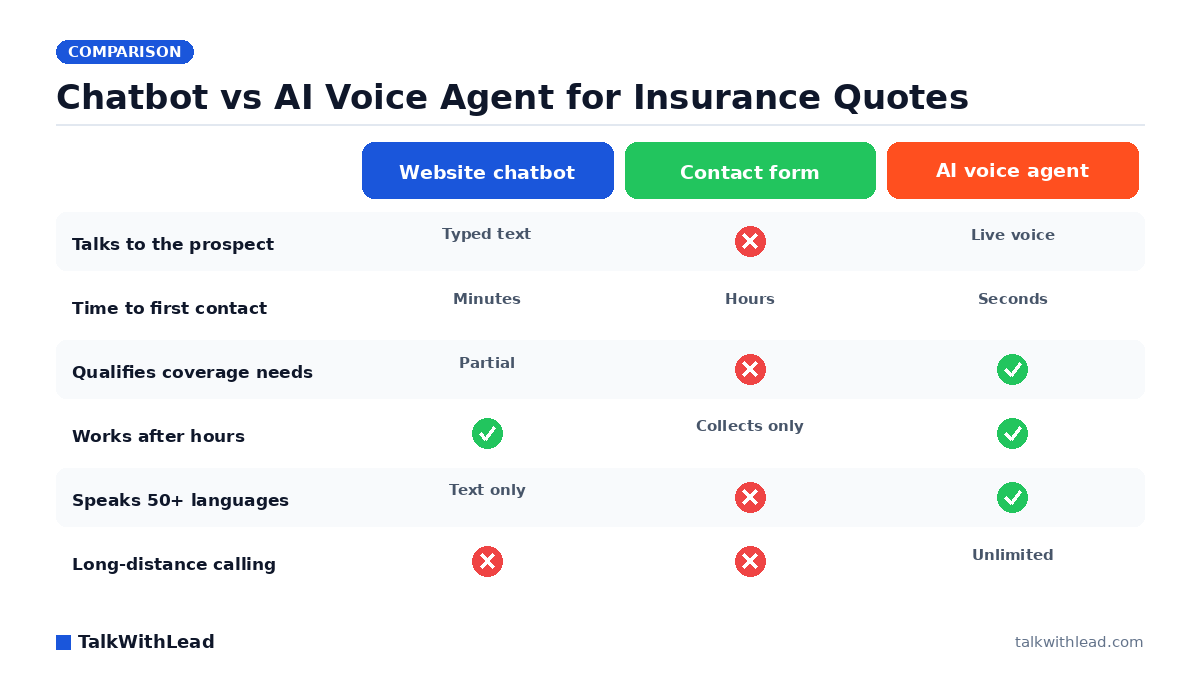
    What about chatbots and forms?

    Some agencies try to close the after-hours gap with a chatbot or a quote form. Both make the prospect do the work — typing, waiting, hoping someone follows up. A voice conversation is faster, warmer, and converts a hesitant shopper far better than a text box. We compared these head-to-head in Live Chat vs Chatbot: Pros, Cons, and the AI Voice Upgrade. The short version: voice beats typing when money and trust are on the line, and insurance is exactly that.

    If you want to put an always-on voice agent in front of your insurance traffic this week, you can start a free signup and have it talking to visitors fast.

    AI voice agent vs human receptionist: side-by-side

    AI voice agent vs human receptionist (insurance agency)
    FactorHuman receptionistAI voice agent (TalkWithLead)
    CoverageSet hours (~45 of 168 hours/week)24/7, including nights and weekends
    Simultaneous callersOne at a timeUnlimited simultaneous calls
    Speed to answer a web leadOnly when freeSeconds, every time
    LanguagesWhatever they speak50+ languages
    After-hours quote requestsGo to voicemailAnswered or called back instantly
    Relationship / judgment callsStrong — human nuanceRoutes complex cases to your team
    Cost shapeSalary + benefits (full-time)Flat plan; scales without new hires

    Bottom line.

    Best for: Insurance agencies that lose quote requests after hours, on weekends, or when the front desk is busy. An AI voice agent is the best fit for instant, always-on first contact and for handling many shoppers at once across languages — which matters because Harvard Business Review research found companies that reach a web lead within an hour are nearly 7× more likely to qualify it than those that wait even an hour longer, so a quote request sitting in voicemail until morning is usually a lost deal.

    Not the best fit for: It isn’t a full replacement for the human relationship side — complex judgment, sensitive claims conversations, and warm in-person service still belong with your team. The strongest setup pairs the AI agent for instant capture with humans for the high-touch moments.

    In one line: AI voice agent to catch every lead instantly and 24/7; humans for the relationship and judgment calls.

    FAQ

    Can an AI voice agent replace my insurance receptionist entirely?

    It can, but most agencies get better results keeping both. The AI voice agent handles instant first response, after-hours coverage, overflow, and non-English callers, while your receptionist and licensed agents handle complex underwriting, claims empathy, and relationship closing. Think layers, not a swap.

    Will insurance shoppers know they’re talking to an AI?

    The voice is designed to sound natural and human, and the conversation feels like a real phone call rather than a robotic menu. The goal is a smooth, helpful exchange that qualifies the lead and books the quote call — not to deceive anyone. Many agencies are upfront that callers are speaking with an AI assistant.

    How does an AI voice agent help with after-hours insurance leads?

    Most quote shopping happens evenings and weekends when your front desk is closed. The AI voice agent answers those visitors instantly, qualifies them, and either books a callback or hands a hot lead to your team for the morning — so traffic you already paid for doesn’t leak to a competitor who answered first.

    What languages can the AI voice agent handle for my agency?

    It speaks 50+ languages and switches automatically based on the visitor, so Spanish, Mandarin, Portuguese, and other shoppers get answered in their language. A single-language front desk simply can’t match that reach.

    Is an AI voice agent cheaper than hiring more receptionists?

    For most agencies, yes. One receptionist covers roughly a quarter of the week and one call at a time. An AI voice agent is a flat monthly cost covering all hours, unlimited concurrent calls, and every language — so you scale coverage without a new salary each time volume spikes. Check current plans on the pricing page.

    How many insurance leads come in after business hours?

    A large share. According to MediaAlpha, the insurance lead marketplace, about 45% of leads are generated during nights and weekends — outside standard agency hours. That’s exactly when a human receptionist isn’t there but an AI voice agent still answers, qualifies the shopper, and books the quote call.

    Can an AI voice agent handle multiple insurance callers at the same time?

    Yes. Unlike one receptionist who can take one call at a time, an AI voice agent handles unlimited simultaneous calls, so a rush of quote shoppers during a storm or a promotion never ends up in voicemail. Every caller gets a live conversation instead of a busy signal or a callback promise that arrives too late.

    What does an AI voice agent cost compared to hiring another receptionist?

    A full-time receptionist runs well past a salary plus benefits and still covers only set hours and one call at a time. An AI voice agent runs on a flat plan and scales to 24/7 coverage and unlimited simultaneous calls without a new hire each time volume spikes. (Treat any specific dollar figures as illustrative, not a quoted price — check current plans on the pricing page.)

  • Live Chat vs Chatbot: Pros, Cons, and the AI Voice Upgrade

    Live Chat vs Chatbot: Pros, Cons, and the AI Voice Upgrade

    Live Chat vs Chatbot vs AI Voice — TalkWithLead original infographic (comparison diagram).
    Live Chat vs Chatbot vs AI Voice

    Live chat vs chatbot: the wrong question most websites ask

    The debate over live chat vs chatbot usually comes down to one trade-off: pay humans to type with visitors all day, or install a bot that answers canned questions for free. Both choices leave your most interested prospects stuck typing into a small box, waiting on a reply — and a waiting visitor is a leaving visitor.

    There’s a third option that beats both: an AI voice agent that actually talks to people the moment they land on your site. Before you commit budget to either side of the live chat vs chatbot fight, it’s worth seeing where each one quietly leaks leads, and why a real voice conversation turns more of them into booked calls and sales conversations.

    Short answer

    Live chat means a human types replies in real time; a chatbot means software answers with automated text. Live chat gives better answers but only while someone is staffing the queue, so nights and weekends become dead zones; chatbots are always on but frustrate visitors when questions get nuanced. For converting high-intent visitors, the upgrade beyond both is an AI voice agent that talks instead of types — instant, 24/7, in 50+ languages.

    According to a Five9 study of 4,000 US and UK consumers, 75% of people prefer talking to a real human in person or over the phone for customer support.

    Live chat: pros and cons of human typing

    Live chat connects a visitor to a real teammate over text. Done well, it feels personal and handles oddball questions a script never anticipated. The catch is that it only works while a person is actually watching the queue — and most teams can’t watch it every hour of every day.

    Where live chat wins:

    • Human judgment. A trained rep reads nuance, calms a frustrated buyer, and improvises in a way no script can.
    • Trust. Visitors know they’re talking to a person, not a decision tree, so they open up.
    • Upsell instinct. Good reps spot buying signals and nudge toward a demo or a quote.

    Where live chat loses:

    • It’s only as fast as your staffing. Nights, weekends, and lunch breaks become dead zones — exactly when many buyers browse.
    • It doesn’t scale. One rep can juggle a few chats; a traffic spike means queues and abandoned conversations.
    • It’s still typing. Complex questions turn into slow back-and-forth, and the visitor is one tab away from a competitor.
    • Language limits. Your team speaks the languages it speaks, and not one word more.

    Chatbots: pros and cons of automated typing

    A chatbot swaps the human for a script or an AI model that replies instantly, around the clock, for a flat cost. That always-on speed is real — but speed to a generic answer isn’t the same as speed to a conversation, and buyers can tell the difference within seconds.

    Where chatbots win:

    • Always on. A 2 a.m. question gets an immediate reply instead of an empty queue.
    • Cheap at volume. One bot handles a thousand simultaneous chats without breaking a sweat.
    • Good at FAQs. Hours, pricing tiers, “do you serve my area” — bots handle these cleanly.

    Where chatbots lose:

    • Dead ends. Step outside the script and the visitor hits “let me connect you to a human” — who isn’t there.
    • Low trust. Buyers smell a bot fast and disengage when the stakes or the dollar amounts are high.
    • Still typing. The same friction as live chat: thumbs on a phone screen instead of a voice on a call.
    • Forms in disguise. Many “chatbots” just collect an email to follow up on later — long after the visitor’s interest has cooled.

    A Five9 survey of 4,000 consumers found that 56% are frequently frustrated by AI customer-service chatbots and 48% don’t trust the information those bots provide. That distrust is exactly why a typed bot struggles to close a high-intent buyer — and why a real conversation tends to win those moments.

    If you’re weighing these against other on-site tools, our breakdown of the callback widget vs click-to-call vs live chat shows how each one actually converts visitors.

    Live chat vs chatbot: a side-by-side look

    Strip away the marketing and the live chat vs chatbot comparison comes down to four things that decide whether a visitor becomes a lead:

    • Speed: Chatbots reply instantly; live chat replies when staffed. Both still make the buyer wait through typed turns.
    • Availability: Bots run 24/7; humans don’t. The gap is where after-hours leads vanish.
    • Depth: Humans handle complexity; bots stall on it and loop back to the same three buttons.
    • Cost: Bots are cheap to run but cheap-feeling; staffed chat is rich but expensive and hard to scale.

    Notice what’s missing from both columns: an actual conversation. Typing is the bottleneck on both sides. And the reason that matters is timing — as we explain in speed-to-lead: why the first 60 seconds win most deals, the lead you reach in the first minute is worth far more than the one you try to follow up with tomorrow.

    The AI voice upgrade: why talking beats typing

    Here’s the shift that ends the live chat vs chatbot debate. Instead of choosing between a human typist who clocks out and a bot that hits a wall, you put an AI voice agent on your site that actually speaks to visitors — and sounds startlingly human while doing it. The moment someone shows intent, they can be in a real phone conversation instead of a chat thread.

    That changes the math on every weakness above:

    • Always on, like a bot — but it talks, like your best rep. No staffing gaps, no dead 2 a.m. queue, no “we’ll get back to you.”
    • It speaks 50+ languages. A visitor in another country gets answered in their own language without you hiring a single multilingual rep.
    • Unlimited long-distance calling. Prospects anywhere can reach you, and you can call them back, with no per-minute anxiety.
    • Instant callbacks. If a visitor would rather be called, the agent triggers a callback in seconds — not “within 24 hours.”
    • No typing tax. People explain what they need far faster out loud than with their thumbs, and they trust a voice more than a text box.

    Want to hear how human it sounds before you decide anything? Take the live demo and talk to the agent yourself. For a closer look at the two automated approaches head-to-head, our AI voice agent vs chatbot breakdown goes deeper.

    Where typing still makes sense

    None of this means you should rip out live chat tomorrow. Some buyers genuinely prefer to type — they’re at work, on a quiet train, or just more comfortable in text. A quick FAQ bot still earns its keep for simple, repetitive questions, and a human chat rep is great for a long, detailed enterprise conversation.

    The smart move isn’t either/or. It’s making voice the default fast lane for high-intent visitors while keeping a text option for the people who want it. You stop forcing every motivated buyer through a typed bottleneck, and you stop losing the ones who would rather just talk.

    An illustrative ROI example

    The following is an illustrative example to show the mechanics, not a promise or a real customer result — your own numbers will differ.

    Imagine a service business with 1,000 website visitors a month, where 5% (50 people) show real buying intent. With a typed chatbot that mostly collects emails, say 20% book a call — 10 conversations. With staffed live chat that’s offline half the day, maybe 25% convert during business hours — but since much of the intent shows up after hours, call it 12 conversations. Now picture an AI voice agent that answers all 50 the instant they raise a hand, day or night, in their own language: even at a 40% talk-to-booking rate, that’s 20 conversations.

    In this illustration, the voice-first path roughly doubles booked conversations from the very same traffic — without buying a single extra click. If your average deal is worth a few hundred or a few thousand dollars, that gap compounds month after month. Missing the after-hours and other-language leads is the kind of quiet leak that caps growth without ever showing up in a report.

    Getting started without ripping out your stack

    You don’t have to fire your team or delete your chatbot to add voice. Most businesses keep live chat for the buyers who truly prefer to type and add an AI voice agent as the fast lane for everyone who’d rather just talk — which, in practice, is most high-intent buyers.

    You can compare plans and see what’s included on the pricing page, or skip straight to a free signup and have the voice agent live on your site today. Either way, the goal is the same: stop making your best leads type and wait, and start turning website visitors into real phone conversations.

    Live chat vs chatbot vs AI voice agent
    DimensionLive chatChatbotAI voice agent (TalkWithLead)
    Who answersA human typingAutomated text softwareA human-sounding AI voice agent
    AvailabilityOnly while staffed24/7 text24/7 voice and callbacks
    Answer quality on nuanceHigh (real person)Drops off on complex questionsConversational; routes to a human when needed
    Visitor effortType and waitType and waitJust talk
    Speed to a real conversationDepends on queue and staffingInstant text, but still typingSeconds to a live call or callback
    LanguagesWhoever is staffingVaries by setup50+ languages
    Best jobStaffed support and complex helpFAQ deflection / self-serveConverting high-intent visitors into calls

    Bottom line

    Best for: Use live chat when you can staff it for complex, human-touch support, and a chatbot for always-on FAQ deflection. To convert high-intent visitors into actual sales conversations — especially after hours, across languages, or for international leads — an AI voice agent is the best fit.

    Not the best fit for: An AI voice agent is more than you need for pure self-serve FAQ lookups; a chatbot handles those cheaply. Many sites keep chat/chatbot for support and add voice for the buying moment.

    In one line: Live chat for staffed support, chatbot for FAQ deflection, AI voice agent to convert high-intent visitors into calls. Start a free signup to add the voice agent today.

    FAQ

    What’s the difference between live chat and a chatbot?

    Live chat connects a visitor to a human teammate who types replies in real time, so it’s only available when someone is staffing it. A chatbot uses a script or AI model to reply automatically, 24/7, but it stalls on anything outside its programmed answers.

    The live chat vs chatbot trade-off is essentially human depth versus automated availability — and both keep the visitor typing instead of talking.

    Is a chatbot or live chat better for converting leads?

    Each wins in narrow cases: chatbots for instant, simple, after-hours answers; live chat for complex, high-trust conversations during business hours. But both lose the buyers who want a fast, real conversation rather than a typed exchange.

    An AI voice agent captures that middle ground by talking to visitors instantly, at any hour, which is why voice-first sites tend to book more calls from the same traffic.

    Can AI replace live chat and chatbots entirely?

    It can replace most of what they do and add what they can’t — a natural, human-sounding voice conversation in 50+ languages with instant callbacks. Many businesses keep a text option for visitors who prefer typing, while routing high-intent traffic to the voice agent because spoken conversations close faster.

    Does an AI voice agent work outside business hours?

    Yes. Like a chatbot, it’s always on, so a visitor at midnight or on a holiday gets a real spoken conversation or an instant callback instead of a “we’ll get back to you” form. That after-hours window is where staffed live chat quietly loses leads.

    How fast can I add an AI voice agent to my site?

    You can sign up and place the widget on your site the same day — no need to remove your existing live chat or chatbot first. Start with a live demo to hear the agent, then add it as the fast lane for your highest-intent visitors.

    Why do customers dislike chatbots?

    Mostly because bots stall on anything nuanced and feel impersonal. A Five9 survey of 4,000 consumers found that 56% are frequently frustrated by AI customer-service chatbots and 48% don’t trust the information those bots provide. So for high-intent moments, a real conversation converts better than a typed bot.

    Can an AI voice agent replace live chat and chatbots completely?

    Not always, and it doesn’t have to. An AI voice agent is the strongest tool for converting high-intent visitors into calls and for after-hours coverage, but live chat and chatbots still earn their place for staffed support and simple FAQ deflection. The honest answer is to layer them by page intent rather than rip anything out.

    Should I use live chat, a chatbot, or an AI voice agent?

    Match the tool to the job: live chat for staffed, complex support; a chatbot for always-on FAQ deflection; and an AI voice agent to convert high-intent visitors into real calls, especially after hours, across languages, or for international leads. Many sites run more than one — chat or a bot for support, and voice for the buying moment.

  • Missed Call Automation for Websites: How to Capture Leads Before They Call a Competitor

    Missed Call Automation for Websites: How to Capture Leads Before They Call a Competitor

    Every missed call on a small-business website has a dollar value, and most owners never put a number on it. Once you do, the math gets uncomfortable fast. This is a practical guide to missed call automation for websites in 2026: what the term actually means now, why the AI voice-first approach has overtaken the old “missed-call text-back” tools, and how to stop losing leads to whichever competitor’s phone rings first.

    Talk to TalkWithLead’s AI voice agent if you want to hear what an instantly answered call actually sounds like before you read on.

    The short answer: Missed call automation is a system that captures a caller or web visitor the moment your team can’t pick up, so the lead never goes to a competitor. The older approach is missed-call text-back, which sends an automatic SMS; the stronger approach is an AI voice-first agent that actually answers or calls the lead back in seconds, 24/7, in 50+ languages. Because a large share of calls to small businesses go unanswered, automating the recovery is often the single fastest way to stop losing booked revenue. According to a 411 Locals study of 85 small businesses across 58 industries, only 37.8% of incoming calls were answered by a live person — meaning roughly 6 out of 10 calls went unattended.

    The math of a missed call

    Numbers are illustrative — not a verified customer result. Picture a small home-services business: 250 inbound web/phone leads per month, 10% close rate, $1,400 average ticket. That’s 25 closed jobs and $35,000 in monthly revenue.

    Plenty of small businesses miss real inbound calls once after-hours, weekend, and overlap windows are counted — and every missed call can be real buying intent walking away. Even a conservative 20% miss rate on those 250 leads is 50 missed conversations a month. At a 10% close rate, that’s 5 jobs and $7,000 in monthly revenue — over $80,000 a year — quietly walking to whichever shop’s phone got answered.

    And the stakes aren’t small at the macro level either. According to BIA/Kelsey research, click-to-call and inbound phone calls influence more than $1 trillion in U.S. consumer spending each year — which is why every unanswered call is a slice of real, intent-rich revenue.

    You can’t promise that lift to any specific business and we won’t pretend to. But this is the shape of the cost. Now imagine an AI voice agent that picks up the moment a visitor clicks the widget on your site, in their language, with no toll cost — and you can see why “missed call automation” stopped being optional.

    Why your team misses calls

    After hours and weekends

    Inbound interest doesn’t clock out at 5 PM — plenty of it lands on evenings, weekends, and holidays. Most teams default to “we’ll see it Monday.” The lead is gone by Monday.

    Reps already on a call

    If your team has one or two people answering the phone, the second concurrent call is a missed call. Voicemail is a missed call. “I’ll call back in 20 minutes” is a missed call, because in 20 minutes the lead has already started a conversation with someone faster.

    Crews in the field

    If you have techs in the field — under a sink, on a roof, in a patient’s mouth, on a job site — they cannot answer. A missed call is the default.

    Language mismatch

    A prospect who speaks Spanish, Hindi, Mandarin, French, or Tagalog first will often hang up the moment the answer comes in a language they cannot work in. That call is missed even though somebody picked up.

    Long-distance fear

    Two leaks most teams never count: a prospect calling from a different country who worries about toll costs, and a prospect in a different region whose carrier may charge them a per-minute fee. They never dial. That’s a missed call you don’t even know you missed.

    How Missed-Call Automation Recaptures a Lead — TalkWithLead original infographic (missed call recovery diagram).
    How Missed-Call Automation Recaptures a Lead

    What “missed call automation” actually means today

    The 2018-era version was a text-back tool: if someone called your business and you didn’t pick up, an automated SMS would go out saying “sorry we missed you, leave a message.” Useful — but slow. The visitor still has to wait, type, hope.

    The 2026 version is an AI voice agent embedded directly in your website. The visitor never has to dial in the first place — they click the widget, and the AI voice agent picks up immediately. The conversation starts in the visitor’s language, in a voice that sounds human, with no toll cost to them. If a human on your team is free, the AI hands off cleanly. If not, the AI books the next step (a confirmed callback time, a calendar slot, a quote summary) and sends both you and the prospect a confirmation.

    That is what TalkWithLead does on day one. Start a free TalkWithLead trial if you want to run it on your own site this week.

    Why AI voice-first beats missed-call text-back tools

    • No call needed in the first place. The prospect clicks the widget and talks directly through the browser — no dialing, no toll, no IVR.
    • Instant pickup, not “we missed you.” In practice, response times under a minute outperform response times measured in hours by a margin that changes the unit economics of a business — every operator who watches their pipeline sees it. (See our deeper take on speed-to-lead.)
    • Multilingual. 50+ languages out of the box. A text-back tool defaults to whatever language your auto-template is written in.
    • Unlimited long-distance. The visitor never thinks about toll cost; TalkWithLead covers it.
    • Qualifies inline. The AI asks the right two or three questions during the conversation, so when a human gets the lead it’s already pre-qualified.
    • Sounds human. Modern AI voice handles interruptions, language switching, and clarification without sounding robotic. Try the Live Demo.

    How TalkWithLead handles a missed call

    The TalkWithLead widget sits on every page where conversions matter — your homepage, your pricing page, your demo-request page, your listing pages, your contact page. When a visitor clicks it, three things happen in parallel:

    1. The AI voice agent picks up immediately in the visitor’s language.
    2. The agent asks two or three qualifying questions tuned to your business (location, urgency, the specific service or product they need).
    3. The agent either books a callback into your real calendar, escalates to a human who is on shift, or completes the conversation on its own. The visitor gets a confirmation. Your team gets a clean lead summary.

    For visitors who prefer a phone call, the same widget can fall back to instant callback — your team’s phone rings, with the qualified context already attached.

    Before and after — same missed call, two outcomes

    Before

    • Tuesday 10:47 PM — a prospect on your service page tries to call. Voicemail.
    • 10:48 PM — they try the next two competitors in the search results. The second one answers.
    • Wednesday 8:35 AM — your office sees the missed call, dials back. The deal has been booked elsewhere.
    • Outcome: lead lost. Your team never knew the prospect existed until it was too late.

    After

    • Tuesday 10:47 PM — the prospect clicks the TalkWithLead widget. The AI voice agent picks up immediately in their language.
    • 10:48 PM — the agent asks two qualifying questions, confirms an 8:30 AM appointment, and texts the prospect the booking.
    • Wednesday 8:25 AM — your tech reviews the qualified intake on their phone and arrives at 8:30. The customer feels like the business genuinely picked up at 10:47 PM the night before.
    • Outcome: lead won, zero late-night work for the office team, no toll cost for the prospect even if they were dialing from another country.

    By industry — quick fits

    Home services

    An emergency caller on a Sunday picks whichever shop’s widget answers first. AI voice-first handles the call when your techs are mid-job and you can’t pick up.

    Real estate

    A listing-page form submission at 9 PM gets a live AI conversation in seconds. The buyer feels heard. The agent gets the qualified showing request the next morning. (We covered the Saturday-tour pattern in our speed-to-lead deep dive.)

    Mortgage and insurance

    Rate-shoppers compare three lenders or carriers in one sitting. The one whose phone (or AI voice agent) answers first usually closes. Recording-disclosure rules apply per jurisdiction; talk to your own compliance counsel.

    SaaS sales pages

    A Friday-afternoon “talk to sales” click becomes a Friday-afternoon real conversation instead of a Monday-morning SDR ping. Pipelines fill faster.

    How to roll this out in 48 hours

    1. Day 0: Sign up for a TalkWithLead trial and drop the widget on your three highest-conversion pages (homepage, demo or contact, pricing).
    2. Day 0 evening: Configure the qualifying questions you want the AI to ask. (For most businesses, 2 to 3 are enough — name, location, the single most important thing about the inquiry.)
    3. Day 1: Test with a friend who speaks a second language. Confirm the AI handles them in that language and that the callback fires correctly.
    4. Day 2: Watch the inbound volume. Compare your booked-call rate over the next two weeks against the prior two weeks. The honest math is whatever your numbers say.

    If the math is good, scale to every page that matters. See pricing if you want the cost side first.

    Missed-call text-back vs AI voice-first recovery

    Both approaches try to recover a lead you couldn’t answer live, but they recover very different things. Here’s the honest at-a-glance comparison.

    Missed-call text-back vs AI voice-first recovery
    CapabilityMissed-call text-back (SMS)AI voice-first (TalkWithLead)
    What the lead getsAn automated text messageA live voice conversation or instant callback
    Effort on the leadMust read and reply by textJust talks — closer to the call they wanted
    Qualifies the leadLimited; relies on back-and-forth textingYes — asks questions and routes in conversation
    After-hours / weekendsSends a text any timeAnswers and calls back 24/7
    LanguagesUsually English templates50+ languages
    International leadsSMS deliverability variesUnlimited long-distance calling included
    Best jobA holding message so the lead knows you saw themActually recovering and converting the missed lead

    Bottom line — which one to use

    Best for: Any business that takes inbound calls or web leads and can’t always answer live — home services, real estate, clinics, brokers, local businesses. An AI voice-first agent recovers missed calls into real conversations, which captures more booked jobs than a text-back alone.

    Not the best fit for: If you already answer essentially every call live and have full after-hours coverage, automation adds less. A text-back tool can be a lightweight first step, but it stops at a message rather than a conversation.

    In one line: Text-back tells the lead you saw them; an AI voice-first agent actually has the conversation and recovers the booking.

    More from the TalkWithLead Resources hub:

    FAQ

    What is missed call automation?

    Software that catches inbound calls or conversations your team would otherwise miss, and turns them into bookings, callbacks, or qualified leads automatically. In 2026, the strongest version is an AI voice agent on the website that picks up the conversation before the visitor ever needs to dial.

    Is missed-call text-back enough?

    For a tiny business with low volume, sometimes. For anyone serious about conversion, no — by the time the text arrives, the prospect is usually already in a conversation with a competitor.

    What happens after hours?

    TalkWithLead’s AI voice agent answers immediately, in the visitor’s language, and books a callback into your calendar for whenever you’ve said you’re available next morning.

    What about international leads?

    TalkWithLead covers unlimited long-distance, so a prospect anywhere in the world can talk to you without thinking about toll. Removing that friction removes the abandonment.

    Will customers know they’re talking to AI?

    The voice is extremely human-sounding, and the conversation feels natural. Many customers don’t realize for the first minute. If you’d prefer a human handoff after the qualifying questions, the AI can route the call through to your team.

    Does this replace my sales team?

    No. It removes the missed-conversation problem. Your team still owns closing, negotiation, and relationship work. The AI agent’s job is to make sure no real opportunity goes silent.

    How is this different from a callback widget?

    A callback widget still requires the visitor to wait for a human. The AI voice-first widget answers immediately. We compare the channels in detail in our callback widget vs. live chat buyer’s guide.

    How many calls do small businesses actually miss?

    More than owners expect. According to a 411 Locals study of 85 small businesses across 58 industries, only 37.8% of incoming calls were answered by a live person — meaning roughly 6 out of 10 calls went unattended. That gap is exactly the revenue missed-call automation recovers.

    Is missed-call text-back good enough on its own?

    It’s better than nothing, but a text only tells the lead you noticed them — it doesn’t have the conversation. An AI voice-first agent answers or calls back and actually qualifies and routes the lead in 50+ languages, which recovers more booked jobs than an SMS alone.

    Does missed call automation work after hours and on weekends?

    Yes. An AI voice-first agent answers and calls leads back 24/7, including nights and weekends, so the after-hours leads that normally leak to competitors get captured the moment they reach out.

    Where do I start?

    The Live Demo lets you talk to the agent yourself. Free signup is here. Pricing is here.


    Next step: Every quarter you spend without missed-call automation is a quarter of revenue walking to whoever picked up first. Talk to the Live AI Voice Demo. Start a free signup. See pricing.

  • Callback Widget vs Click-to-Call vs Live Chat: Which One Converts More Website Visitors?

    Callback Widget vs Click-to-Call vs Live Chat: Which One Converts More Website Visitors?

    If your website gets inbound interest, you have one job: turn that interest into a conversation before the visitor closes the tab. The tools that do that work fall into four camps: click-to-call, callback widget, live chat, and the newer AI voice-first widget. Same goal, very different conversion rates.

    Quick answer: Click-to-call, callback widgets, and live chat all try to convert website visitors, but they win in different situations. Click-to-call is best on mobile when the visitor is ready to dial now; a callback widget is best for capturing warm leads who can’t talk right that second; live chat is best for FAQ deflection and self-serve support. The highest-converting option for the buying moment is an AI voice-first widget, which combines instant calling, 24/7 callbacks, and 50+ languages so no high-intent visitor slips away. The reason speed matters this much: according to Harvard Business Review research, companies that reach a web lead within an hour are nearly 7× more likely to qualify it than those that wait even an hour longer.

    This is a buyer’s guide. No fluff, no unsupported numbers, no fake testimonials. Just where each tool wins, where each tool leaks leads, and how to pick. Talk to TalkWithLead’s AI voice agent yourself if you want to feel the difference before you read on.

    TL;DR — which one converts more, in 60 seconds

    • Click-to-call wins when the visitor is already on mobile and already ready to call. Loses everyone else.
    • Callback widget wins when the visitor will accept a phone call but not initiate one. Loses visitors who want answers now.
    • Live chat wins for self-serve product questions, FAQ deflection, and visitors who prefer typing. Loses high-intent buyers who want to talk.
    • AI voice-first widget (TalkWithLead) removes the “type into a box” or “wait for a callback” friction that stalls the other formats. The AI voice agent picks up immediately, in the visitor’s language, in a voice that actually sounds human. Hear it live.

    The four tools, plain English

    1. Click-to-call

    A button on your site that, when clicked from a mobile device, opens the phone dialer with your number. Cheap, simple. On desktop it does almost nothing — most desktops aren’t set up to make calls. And the visitor still has to do the call: dial, wait through your IVR, leave a voicemail if you’re busy.

    2. Callback widget

    A widget that asks the visitor for a phone number and triggers a callback in seconds. Better than click-to-call on desktop. Better than live chat for high-intent buyers. Still has one assumption: that a human on your team is free to take the call right now.

    3. Live chat

    A chat window that lets the visitor type questions and get typed answers. Excellent for self-service product questions, FAQ deflection, and account lookups. Terrible at high-intent service inquiries because the visitor has to read prompts, type, wait, read, type. Most chat funnels see the same drop-off pattern: the prospect starts typing, then realizes they’d rather just talk to someone, then closes the tab.

    4. AI voice-first widget (TalkWithLead)

    A widget that lets the visitor click once and immediately have a real spoken conversation with an AI voice agent — no form, no typing, no waiting. It sounds human. It handles 50+ languages out of the box. It qualifies the lead, books the next step, and also covers unlimited long-distance, so a prospect anywhere in the world can call you without thinking about the cost. If a human takes over, the AI hands off cleanly. If no human is available, the AI books the callback in a calendar slot the visitor confirms on the spot.

    That last difference is why the AI voice-first widget is the format that keeps high-intent visitors moving: it removes the “next step” friction that loses them in the other formats.

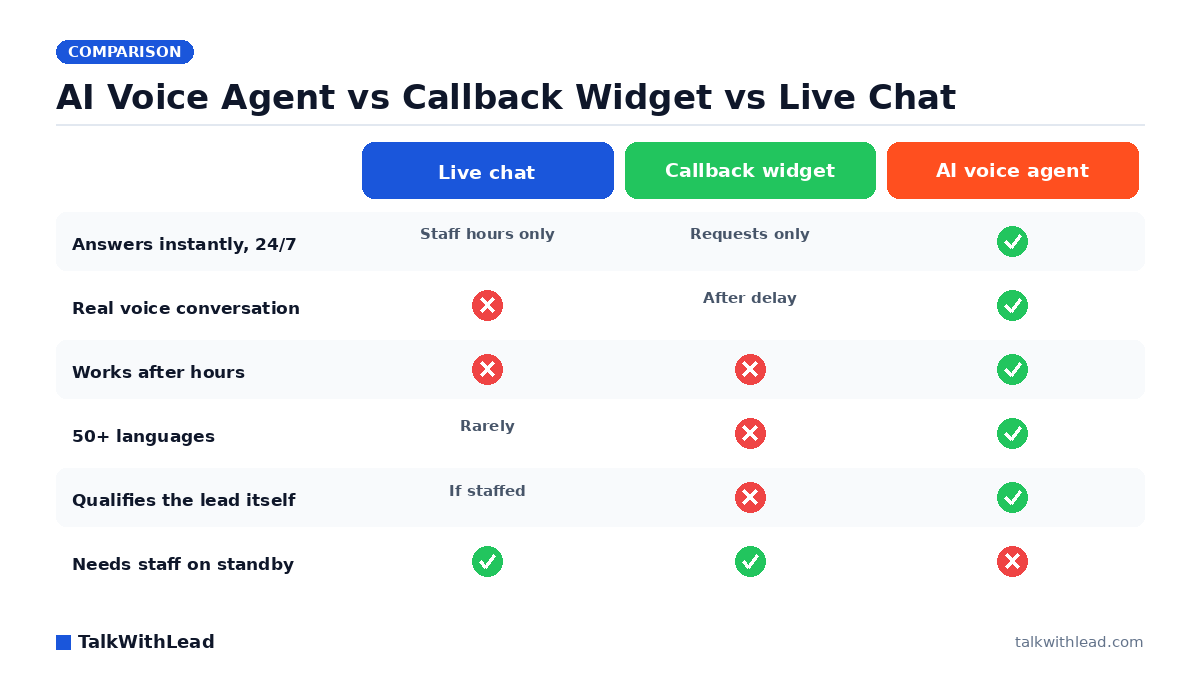
    Callback Widget vs Click-to-Call vs Live Chat — TalkWithLead original infographic (comparison diagram).
    Callback Widget vs Click-to-Call vs Live Chat

    Side-by-side comparison

    DimensionClick-to-callCallback widgetLive chatAI voice-first (TalkWithLead)
    Visitor effortClick + dial + listen to ringClick + type phone numberClick + read + type each turnClick + talk
    Works on desktopPoorYesYesYes
    First response timeDepends on you picking upSeconds to minutesSeconds (bot) or minutes (human)Instant — AI picks up immediately
    Works after hoursNo (your phone is closed)Only if you have on-call coverageOnly if staffed; otherwise a botYes — AI voice agent + scheduled callback
    MultilingualDepends on your teamDepends on your teamTranslation plugins; clunky50+ languages, native
    Long-distance cost to visitorVisitor paysYou pay (small)None (typed)None — unlimited long-distance covered
    Best forMobile + simple call routingVisitors who’ll accept a callbackFAQ deflection + self-serveHigh-intent conversion at the moment of interest
    Hands off to a humanIt IS the humanYes, when a human is freeYes, when a human is freeYes — AI qualifies first, then routes

    Once you see the table side by side, the question stops being “which legacy tool?” and starts being “do I want the upgrade or not?” If you’d like to compare the AI voice-first option against your current setup on your own pricing page, start a free TalkWithLead trial and run it in production.

    Where each one wins

    Click-to-call wins on a mobile checkout

    If your buyer is already on a phone and already decided they want to call, a tap-to-dial button on a “contact” page is the right answer. It’s a finisher, not a converter.

    Callback widget wins for warm leads who are at work

    A prospect researching at their desk who doesn’t want to make a call right now will happily request a callback for “in the next 15 minutes.” It’s faster than a form and friendlier than an inbound IVR. Speed still wins the race, though: Velocify research analyzing 3.5 million leads found that calling a lead within one minute makes them 391% more likely to convert — which is exactly why an instant, automated callback beats a human getting to it 15 minutes later.

    Live chat wins for SaaS support and FAQ deflection

    If your top use case is “does the product integrate with X?” or “where do I find my invoice?”, a chat box is great. A buyer in research mode with a typing-friendly question will take the chat. They’ll close the tab if they’re trying to book a tour or get an emergency tech out.

    AI voice-first widget wins the high-intent conversion moment

    This is the moment that decides quarterly numbers. A visitor on a real-estate listing page at 9 PM Saturday. A homeowner with a leaking water heater on a Sunday. A buyer on your pricing page who clicked “talk to sales” expecting an answer in the next 60 seconds. In every one of those cases, the AI voice-first widget converts more leads because it removes the part where the visitor has to wait or work for the conversation.

    Where each one loses leads

    • Click-to-call loses everyone on desktop, everyone with anxiety about phone IVRs, and every after-hours visitor.
    • Callback widget loses the visitor who wants an answer in the next minute, not in the next 15.
    • Live chat loses the visitor who came to talk, not to type. It also loses non-English speakers stuck with weak translation widgets and international visitors who would have been on the phone with a competitor before your live chat agent typed “Hi there, how can I help?”.
    • AI voice-first widget loses very little — it can still hand off to a human for nuanced sales conversations, and the AI agent answers the simple cases on its own.

    The AI-voice-first upgrade

    If you’ve been running click-to-call, a callback widget, or live chat on your site and you’ve watched the conversion rate plateau, the upgrade you’re looking for isn’t a new chat skin. It’s a different category. TalkWithLead’s widget answers the visitor’s first question in seconds, in their language, in a voice that doesn’t sound like a robot. A human-sounding voice keeps the conversation feeling natural — far less friction than typing into a bot.

    For the cases that need a human, the AI hands off cleanly with all the context already captured. For the cases that don’t, the AI books the next step and you don’t pay anybody to take a 30-second qualifying call.

    By industry — quick fits

    • Real estate: AI voice-first widget on every listing page. The Saturday-tour moment is the entire game. (See our deep dive on speed-to-lead.)
    • Home services: AI voice-first on the homepage and the booking page. Sunday emergency calls go to whichever shop’s widget picks up first.
    • Mortgage: AI voice-first on rate pages. Rate-shoppers compare three lenders in one sitting and close with whoever calls back fastest.
    • SaaS sales pages: live chat for self-serve product questions; AI voice-first on the demo-request and pricing pages.
    • Local businesses: AI voice-first widget — multilingual is a huge win in any city with a real immigrant population, and unlimited long-distance opens you up to traveling customers.
    • Lawyers, dentists, clinics: AI voice-first works here too, with extra care for compliance and recording disclosure. Talk to your own counsel before turning recording on; don’t let any AI conversation drift into giving legal, medical, or financial advice.

    For a primer on why one channel beats the other for serious buyers, see our companion piece AI Voice Agent vs Chatbot: Which One Books More Calls?

    Cost vs revenue (representative example)

    Numbers are illustrative — not a verified customer result. Picture a service business with 300 inbound web/phone leads per month and an 8% close rate at $1,500 average ticket. That’s about 24 closed jobs and $36,000 in revenue.

    Now imagine the AI voice-first widget catches even 25% more of the inbound moments — visitors who would have bounced from a chat box, abandoned a callback queue, or never tried calling from another country because of the toll. A 25% lift on those 24 closed jobs is 6 extra jobs at $1,500, or $9,000 a month — over $100,000 a year. We can’t promise that lift for any specific business and we won’t pretend to. But the framing is honest: an AI voice agent that catches conversations the legacy widgets miss almost always pays for itself before quarter-end.

    Want the cost side before the revenue side? See TalkWithLead pricing. Then run the math.

    How to decide in 10 minutes

    1. What is the highest-value conversion on your site — phone call, demo booked, or chat-resolved support ticket?
    2. Where does most of your inbound interest land — mobile, desktop, or both?
    3. What share of your prospects are international or speak a primary language other than English?
    4. What happens to your inbound inquiries between 5 PM and 9 AM, on weekends, and during peak call volume?
    5. Which feels more like a real conversation to your buyer — typing, leaving a number for a callback, dialing your IVR, or being answered by a voice in seconds?

    If your honest answers say “phone call / both / yes / it leaks / a voice in seconds,” the AI voice-first widget is the move.

    The bottom line: which tool to pick

    Best for: Use click-to-call for mobile “ready to dial” moments, a callback widget to capture warm leads who are busy, and live chat for support and FAQ deflection. For the highest-intent conversion moment — and to cover nights, weekends, languages, and international leads in one tool — an AI voice-first widget is the best fit.

    Not the best fit for: An AI voice-first widget is more than you need for a pure low-traffic FAQ page; plain live chat or click-to-call may suffice there. Most sites can run more than one of these together.

    One line: Click-to-call = mobile dial-now; callback widget = warm-lead capture; live chat = support; AI voice-first = win the high-intent conversion. Start a free TalkWithLead signup to test the voice-first option in your own pipeline.

    FAQ

    Is a callback widget better than live chat?

    For high-intent service buyers, yes — they prefer a phone call to typing. For self-serve product questions, live chat is fine. An AI voice-first widget covers both cases.

    Can I run more than one of these on my site?

    Yes. Many TalkWithLead customers keep a typed chat for product-page questions and use the AI voice-first widget on conversion pages (demo request, pricing, contact, key landing pages). The two are complementary.

    What if my prospect speaks a different language?

    The AI voice agent handles 50+ languages out of the box. It detects the prospect’s preferred language and answers in it — without you needing to staff a multilingual team.

    What about international leads and toll costs?

    TalkWithLead covers unlimited long-distance, so a prospect calling from anywhere in the world doesn’t worry about toll. Removing that “do I want to pay long-distance” moment removes the abandonment that legacy click-to-call setups suffer.

    Does the AI voice sound robotic?

    Modern AI voice is extremely human-sounding. TalkWithLead’s voice was tuned to feel like a person, handle interruptions, and switch languages cleanly. Try the Live Demo and judge for yourself.

    How fast can a callback actually happen?

    With TalkWithLead, typically within seconds of the visitor clicking the widget. If the AI voice option is enabled, the conversation starts immediately — no callback wait at all.

    What’s the simplest place to start?

    Install the AI voice-first widget on your two highest-conversion pages — usually your homepage and your demo/pricing page. Watch what happens to your booked-call rate over the next two weeks. Free signup is here.

    Which converts better, a callback widget or click-to-call?

    It depends on the visitor. Click-to-call wins when someone is on mobile and ready to dial immediately; a callback widget wins for desktop or busy visitors who want you to call them. An AI voice-first widget covers both moments plus after-hours, which is why it tends to capture more total leads.

    Do I have to choose just one of these tools?

    No. Many sites run more than one — for example click-to-call on mobile plus an AI voice-first widget for the high-intent buying moment. The goal is to never leave a ready-to-talk visitor without an instant path to a conversation.

    What happens to leads that come in after business hours?

    With staffed live chat or a manual callback, after-hours leads usually wait until morning — by which point many have contacted a competitor. An AI voice-first widget answers and calls back automatically 24/7, so nights and weekends stop being a dead zone.

    Where can I see TalkWithLead in action?

    The Live Demo page lets you talk to the AI voice agent right now. For a guided walkthrough, the same page books a 15-minute call. Pricing is here if you want the cost first.

    More from the TalkWithLead Resources hub:


    Next step: Stop comparing legacy widgets. Try the AI voice-first one against your current setup in your own pipeline. Talk to the Live AI Voice Demo, start your free signup, or see pricing first.

  • Speed-to-Lead: Why the First 60 Seconds Win Most Deals

    Speed-to-Lead: Why the First 60 Seconds Win Most Deals

    Speed-to-lead is the single biggest predictor of whether a website lead turns into a phone call, a booked job, or a closed deal. Not your offer. Not your pricing. Not your brand. How fast you respond.

    Under 60 seconds wins. Wait five minutes and, in a competitive search, the lead has often already pinged the next vendor on the list. After an hour, the lead is mostly gone. Forms are slow. Chatbots make people type. The win goes to whichever vendor’s phone — or AI voice agent — rings first. Talk to TalkWithLead’s AI voice agent yourself and feel what a sub-60-second response actually sounds like.

    Short answer: Speed-to-lead is how fast you respond to a new inbound lead, and it is one of the strongest predictors of whether you win the deal. A good lead response time is under five minutes — ideally under 60 seconds — because the longer you wait, the more likely the prospect has already started talking to a competitor. The fastest reliable way to hit that window is to answer or call back automatically, 24/7, instead of depending on a rep being free.

    Why speed-to-lead matters more than nearly any other sales metric

    Sales operators who have run inbound funnels for any length of time will recognize this pattern: the leads that closed are almost always the leads that got a fast first touch. Faster than the competition. Faster than the visitor’s attention span. Fast enough that the moment of intent — that small, fleeting “I’m ready” feeling — is still alive.

    That moment lasts seconds, not hours. A homeowner with a leaking water heater on a Sunday is not going to wait until Monday morning. A buyer comparing three mortgage brokers at 10 PM does not pause to remember which one had the prettier website. A traveler in Mexico City who clicks a U.S. contractor’s site does not want to think about long-distance call costs. They want someone — or something that sounds like someone — to pick up.

    This is not theoretical hand-waving — it is what operators who run inbound funnels see again and again, and the published research lines up. According to Harvard Business Review research, companies that reach a web lead within an hour are nearly 7× more likely to qualify it than those that wait even an hour longer. And the MIT Lead Response Management study found you’re about 21× more likely to qualify a lead contacted within 5 minutes than one contacted at 30 minutes. The exact numbers vary by industry and study, but the shape of the pattern is consistent: response times under a minute outperform response times measured in hours by enough to change the unit economics of a business. That is the whole case for taking speed-to-lead seriously.

    What “speed-to-lead” actually means

    The clock starts at the form submit, not the next morning

    Speed-to-lead is the elapsed time between when a prospect tells you they want to talk — they clicked “request a quote,” they filled the demo form, they clicked the callback widget — and when you actually reach them with a meaningful response.

    Most teams measure this incorrectly. They measure “the next time a human looked at the lead in the CRM.” The real metric is the time until the prospect actually hears from you in a way they care about — a phone call, an AI voice conversation, a meaningful text. An auto-acknowledgement email does not count.

    What counts as a “response,” ranked by what visitors actually feel

    Channels matter. From the prospect’s perspective, ordered by perceived urgency:

    • AI voice agent conversation — answers in seconds in the visitor’s language, sounds human, qualifies the lead, and books the next step before the prospect can open a competitor tab. This is what TalkWithLead leads with.
    • Phone call from a human — highest perceived urgency, but only if a human is actually available. Outside business hours or when reps are on other calls, this drops to “voicemail.”
    • SMS — fast and casual, great for confirmations and reminders, not great for the first real conversation.
    • Live chat staffed by a human — useful if a person is actually staffing it; useless if a bot just collects an email.
    • Typed chatbot loop — visitors who came to talk do not want to read four prompts and pick from buttons. This is where most chatbot funnels leak.
    • Email — slow, and most prospects assume the response window is “tomorrow.”

    Why the 60-second threshold matters more than the 5-minute or 1-hour rule

    The often-quoted “5-minute rule” is a useful floor. The “1-hour rule” is a useful warning sign. The cliff is steeper than either suggests. Within the first 60 seconds the prospect is still on your site, still in the buying mindset, and has not yet opened a competitor’s tab. Past that, you are competing with whatever distraction happened next in their life.

    The First 60 Seconds: Speed-to-Lead Timeline — TalkWithLead original infographic (timeline diagram).
    The First 60 Seconds: Speed-to-Lead Timeline

    A practical missed-lead math example

    Numbers tell this story better than adjectives. Below is a representative small home-services business — not a real customer, just an illustrative example you can run against your own data.

    • 200 inbound web/phone leads per month.
    • Current median response time: 2 hours (typical for shops without an after-hours plan).
    • Current close rate: 8%.
    • Average ticket: $1,200.

    That is about 16 closed jobs per month and roughly $19,200 in revenue. Now imagine adding an AI voice-first widget that picks up in seconds, handles the conversation in the prospect’s language, and books the next step before the prospect goes elsewhere. You don’t even need a huge swing — just a 30% lift in close rate (from 8% to about 10.4%). That is about 21 closed jobs and roughly $25,000 — an extra $5,760 per month or $69,000 per year.

    We can’t promise that lift for any specific business; every shop’s numbers are different, and we will not pretend otherwise. But the math is honest: even small wins on response time compound quickly, and the cost of an AI voice agent that catches every missed conversation is almost always less than the revenue from a single recovered job.

    If those numbers look conservative for your business, they probably are. Start a free TalkWithLead trial and run the same math against your own pipeline — or see pricing first if you want the cost side before the conversion side.

    Where teams lose minutes (and why hiring more staff isn’t the right first move)

    If response time is the problem, “hire more people” looks like the answer. It is almost always the wrong first move. Adding headcount adds payroll, training, and a hiring lag — and it does not help with the after-hours problem at all. Here is where the minutes actually leak:

    The 5 PM to 9 AM dead zone

    A large share of website traffic happens after the workday ends. A demo request at 7 PM, a quote inquiry at 10 PM, a contractor search at 1 AM — all default to the next-business-day queue. By the time someone answers, the prospect is in a meeting, a school run, a different mindset. An AI voice agent that answers in seconds covers this gap automatically.

    Weekend leakage

    Saturday and Sunday inbound is some of the highest-intent traffic of the week, especially in real estate, home services, and clinics. If Monday morning is your first response, weekend leads are gone before you start.

    Reps already on calls

    The team you have today is rarely sitting at zero call volume. When the new lead arrives, your reps are already on the phone with the previous one. Twenty minutes later — too late.

    Field crews with their hands full

    If your business has techs in the field, they cannot pick up the phone while they are under a sink, on a roof, or in a patient’s mouth. A missed call is the default — not the exception.

    Language and distance mismatches

    Two leaks most teams never even count. A prospect who speaks Spanish, Hindi, French, or Mandarin first will often hang up the moment the answer comes in a language they cannot work in. A prospect calling from a different country worries about the toll. TalkWithLead’s AI voice agent handles 50+ languages out of the box, and the platform covers unlimited long-distance calling — so the prospect’s first impression is “they speak my language and the call costs me nothing.” That is two friction points removed before the conversation even starts.

    Manual triage of “junk vs real”

    Even when leads land in the inbox, they get triaged before anyone calls. That triage step adds 10 to 30 minutes — minutes you don’t have. An AI voice agent qualifies inline as part of the conversation, so a real lead arrives already pre-screened.

    The four levers that actually move speed-to-lead

    1. An AI voice agent at the moment of intent. A voice agent that picks up immediately, speaks the visitor’s language, sounds human, and qualifies the lead while they are still on the page. This is what TalkWithLead’s widget is built around.
    2. Instant callback as a fallback. For visitors who prefer a callback, the widget triggers a real phone call in seconds — no form, no waiting for a sequence email.
    3. Unlimited long-distance, so international leads stop dropping off. Prospects from anywhere in the world can reach you without thinking about call costs. TalkWithLead absorbs the long-distance, so a buyer in Vancouver, Manila, or Madrid is one click away from a real conversation.
    4. Routing rules that match the qualified lead to the first available human. Round-robin, geo-based, or skill-based routing so the qualified lead never sits in a queue waiting for the “right” rep.

    TalkWithLead’s AI voice-first widget gives you the first three levers in one install. The fourth — routing rules — is configured in your team’s existing phone/CRM stack.

    Speed-to-lead by industry

    Real estate — the Saturday open-house example

    Picture a buyer who lands on a listing at 3 PM Saturday. They want a tour. The listing agent is in the middle of another open house. Without an instant callback option, the buyer fills the form, waits 10 minutes, then opens Zillow and checks the other three nearby listings. By 3:30 they are talking to a different agent. With an AI voice agent on the widget, the buyer answers two qualifying questions in their preferred language and gets a callback the moment the original agent is free.

    Home services — the Sunday emergency-call example

    A homeowner’s water heater is leaking at 9 PM. They search “plumber near me,” click the first three results, and try to call. Whichever shop’s phone is answered first — by a human or by an AI voice agent that sounds human — gets the job. The other two shops never hear about it. If the homeowner speaks Spanish or Mandarin and your competitors only answer in English, that is one more reason TalkWithLead’s multilingual voice wins the call.

    Mortgage — the Tuesday-night rate-shop example

    A rate-shopper compares three mortgage brokers’ websites at 10 PM. They fill the contact form on all three. The first broker to actually call them — typically by 7 AM the next day if a human team handles it — wins the conversation. An AI voice agent that calls back in 30 seconds compresses that overnight gap to nothing.

    Insurance — the quote-shop example

    Quote-shoppers compare two or three carriers in a single sitting. The carrier that gets on the phone first usually closes, even if the quote is slightly higher, because the prospect has already explained their situation once and does not want to do it again.

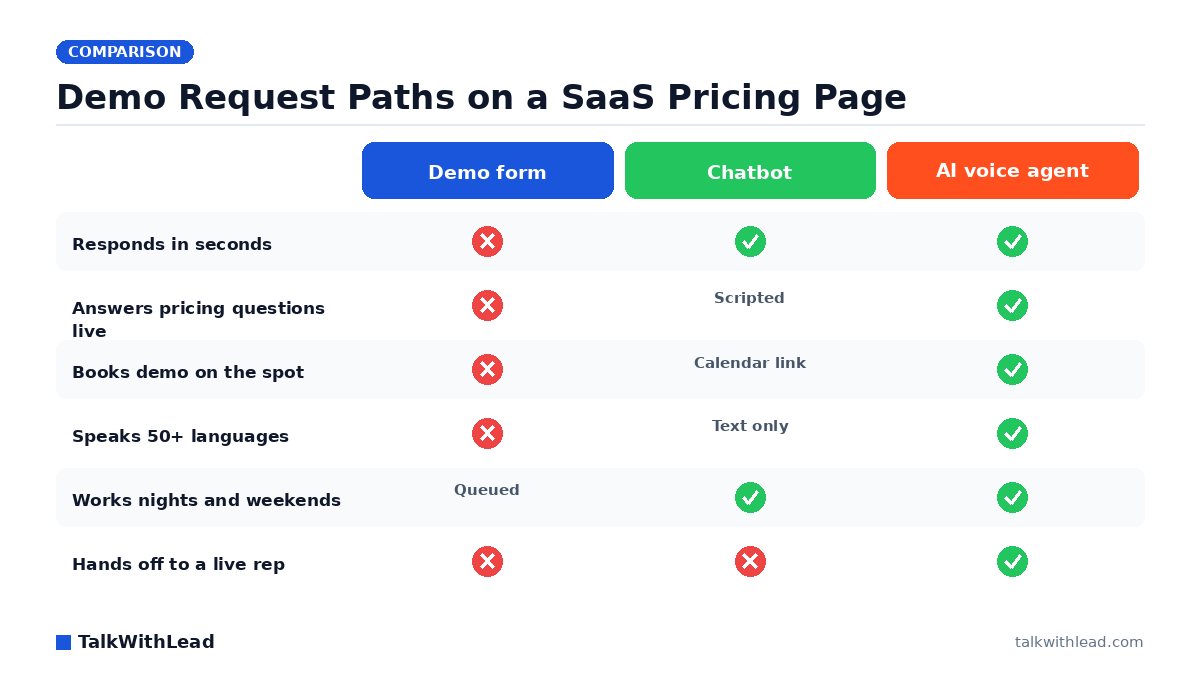
    SaaS — the pricing-page demo request example

    A buyer hits your pricing page on a Friday afternoon, clicks “request a demo,” then disappears for the weekend. If sales does not follow up until Monday, the prospect has already started a pilot with whichever vendor’s SDR reached out within the hour. An AI voice agent on the pricing page captures the demo intent in real time and books a calendar slot before the buyer closes the tab.

    Lawyers, dentists, and clinics

    Intake-driven practices win or lose on response speed too, with extra care needed for compliance and confidentiality. We will not give specific legal or clinical advice here — your own counsel or compliance officer should set the rules for what an AI conversation can collect or record in your jurisdiction. The framing principle is the same as every other vertical: an inbound inquiry that gets a fast first touch is dramatically more likely to convert than one that waits.

    Before and after with TalkWithLead

    Same fictional lead. Two timelines.

    Before

    • 9:12 PM Sunday — homeowner submits the “request a quote” form on a plumber’s website.
    • 9:13 PM — auto-acknowledgement email lands in their inbox.
    • 9:30 PM — homeowner has tried the next two plumbers in the search results; the second one answered the phone.
    • Monday 8:45 AM — the original plumber’s office sees the lead and calls. Voicemail.
    • Monday 10:00 AM — the original plumber leaves a second voicemail; the homeowner has already booked the other shop.
    • Outcome: lead lost.

    After

    • 9:12 PM Sunday — homeowner clicks the TalkWithLead widget on the plumber’s site.
    • 9:12 PM — TalkWithLead’s AI voice agent picks up immediately, in the homeowner’s language, in a voice that sounds human, and asks two qualifying questions (what is leaking; what is the address).
    • 9:13 PM — AI voice agent confirms a Monday 8 AM slot and texts the homeowner the appointment details.
    • Monday 7:55 AM — the on-call tech reviews the qualified intake, confirms the slot, arrives at 8.
    • Outcome: lead won, with zero late-night work from the office team and zero long-distance cost to the homeowner who happened to be calling from a different country.

    The difference between those two timelines is not intelligence, effort, or talent. It is a single tool that picks up the phone when the moment of intent is still live, in the language the prospect actually speaks. Book a 15-minute TalkWithLead demo if you want to see exactly how the AI voice agent handles that 9:12 PM inquiry on your site.

    How to measure speed-to-lead this week

    • Log the form-submit timestamp and the first-meaningful-response timestamp for every inbound lead.
    • Tag the channel (call, AI voice, SMS, chat, email) and the eventual outcome (booked, ghosted, lost-to-competitor).
    • Push these as GA4 events so you can see distribution by hour of day, day of week, and visitor language.
    • Build one dashboard with three numbers: median response time, % of leads reached within 60 seconds, and close rate by response-time bucket.

    Most teams discover after one week of logging that their reported response time is roughly half of their actual response time, because nobody was counting weekends, evenings, or non-English inquiries. That gap is exactly where TalkWithLead’s AI voice agent pays for itself. Talk to the live demo and see how it handles your worst-case lead in real time.

    More from the TalkWithLead Resources hub:

    Response time vs. outcome: what the research shows

    Every figure below comes from a published, named study — follow the linked source in the last column for the original research. None of these are TalkWithLead’s own numbers; they are the industry research on what happens when you respond faster.

    How response speed changes your odds (sourced research)
    Response windowWhat the research showsSource
    Within ~1 minuteAbout 391% more likely to convert than calling laterVelocify (3.5M leads)
    Within 5 vs. 30 minutesAbout 21× more likely to qualify the lead (and roughly 100× more likely to reach them at all)MIT Lead Response Management study
    Within 1 hour vs. longerNearly 7× more likely to have a meaningful conversation; more than 60× vs. waiting 24h+Harvard Business Review
    Industry realityAverage B2B company takes 47 hours; only 7% respond within 5 minutes; 27% never respondDrift study of 433 B2B companies
    First responderAn estimated 35–50% of sales go to whoever responds firstInsideSales / Dr. James Oldroyd

    The verdict: what a good response time is, and who needs to automate it

    Bottom line: Aim for under 5 minutes (ideally under 60 seconds), and automate it so speed never depends on who’s free.

    • Best for: Any business with inbound web or phone leads where a human could be slow to respond — service businesses, brokers, agencies, sales teams. Aim for a first response under 5 minutes, and automate the response so nights, weekends, and busy reps never create a dead zone.
    • Less essential for: If you have zero inbound lead flow, or a fully staffed instant-response desk already hitting sub-minute times, automation adds less. For everyone else, an automated instant call/callback is the most reliable way to win the speed race.

    Start a free TalkWithLead trial and put an instant AI voice response on your site, or talk to the live demo first to hear what a sub-60-second answer sounds like.

    FAQ

    What is a good lead response time?

    Under 60 seconds is the modern bar for inbound web leads in service businesses. Under five minutes is acceptable. After an hour, most leads have moved on or contacted a competitor.

    Is speed-to-lead really that important?

    For most service businesses that depend on inbound inquiries: yes. The conversion difference between a 30-second response and a one-hour response is usually larger than the difference between two competitive offers.

    How do I improve speed-to-lead without hiring more people?

    Add an AI voice agent at the moment of intent. TalkWithLead’s voice-first widget handles after-hours coverage, overflow when reps are on other calls, and the first qualifying conversation — in 50+ languages, with an extremely human-sounding voice, and unlimited long-distance calling so international prospects don’t drop off.

    Does an auto-acknowledgement email count as a response?

    From the prospect’s perspective, no. They want to talk to someone, not receive a receipt. An auto-acknowledgement is fine as a confirmation, but it does not reset the speed-to-lead clock.

    Will an AI voice agent annoy my prospects?

    Older robocall systems were annoying. Modern AI voice agents handle interruptions and speak naturally. TalkWithLead’s voice was tuned to sound extremely human, and it switches languages dynamically — so a prospect speaking Spanish or French gets answered in Spanish or French, not in stilted English with a robot accent. In inbound contexts where the prospect just asked to talk, the experience is usually well received because it is instant and it sounds like a person.

    How fast can a callback widget actually call?

    With TalkWithLead, typically within seconds of the visitor clicking. Exact timing depends on the platform and the visitor’s connectivity, but the live AI voice option answers immediately.

    What about international leads and long-distance costs?

    TalkWithLead covers unlimited long-distance, so a prospect from anywhere in the world can talk to your AI voice agent without thinking about toll costs. This matters more than people realize — international leads frequently abandon at the “do I want to pay long-distance for this?” mental moment. Removing that moment removes the abandonment.

    What if my industry is regulated?

    Lawyers, medical practices, mortgage brokers, and insurance agencies all have specific rules around what an AI conversation can collect, store, or record. Talk to your own compliance counsel before turning recording on, and disclose recording per the law where you operate.

    How do I see TalkWithLead in action?

    Talk to the live AI voice agent yourself — in any language — at the TalkWithLead Live Demo. If you want a walkthrough for your specific industry, book a 15-minute demo. Want the cost side first? See pricing.

    What is the average lead response time for most companies?

    Far slower than buyers expect. According to Drift’s lead-response study of 433 B2B companies, the average company takes 47 hours to respond to a new lead — and only 7% respond within five minutes, while over a quarter never respond at all. That gap is exactly why responding instantly is such an advantage: the bar is low, so being fast stands out.

    How can I respond to leads in under 5 minutes without hiring more staff?

    Automate the first response. An AI voice agent or instant callback widget answers or calls the lead back within seconds, 24/7, so coverage doesn’t depend on a rep being free during nights, weekends, or peak call volume. A human then takes over the qualified conversation. That is the whole idea behind TalkWithLead’s voice-first widget — it picks up the moment of intent so your team isn’t racing the clock.

    Does responding first actually win more deals?

    Yes — being first is a measurable edge. Research popularized by InsideSales / Dr. James Oldroyd found that roughly 35–50% of sales go to the company that responds first. That is why shaving minutes off your response time pays off directly: in a competitive search, the prospect often commits to whoever reaches them first.


    Next step: If one extra recovered lead per week would change the math for your business, the system that recovers it costs less than the lead it brings back. Talk to TalkWithLead’s live AI voice demo and feel the difference between a slow form and a sub-60-second conversation. Then start your free signup and run the missed-lead math against your own pipeline. Pricing here if you want it first.

  • AI Voice Agent vs Chatbot: Which One Books More Calls?

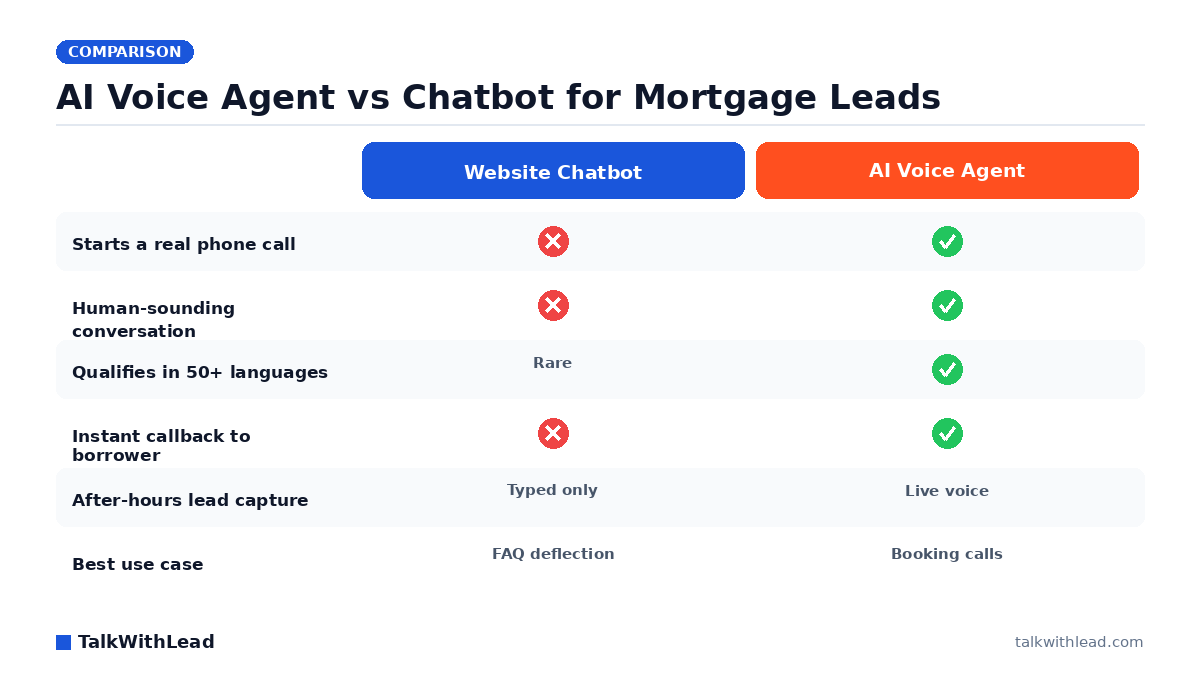
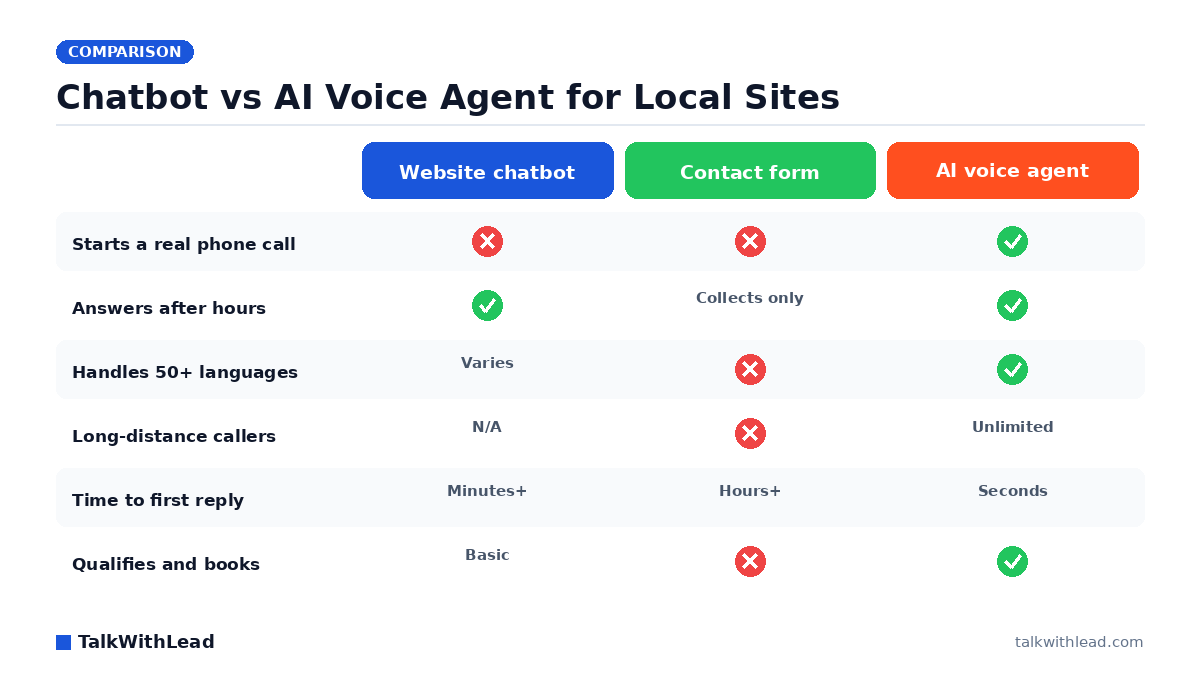
    AI Voice Agent vs Chatbot: Which One Books More Calls?

    Chatbots make visitors type. AI voice agents create real conversations. If you run a business where buyers want to talk to someone now — a plumber, a real-estate agent, a mortgage broker, a lawyer, a clinic, a SaaS sales team — that one difference shows up in your pipeline.

    Short answer: An AI voice agent turns a website visitor into a live phone conversation in seconds, while a chatbot makes that visitor type and wait. Chatbots are best for deflecting repetitive FAQs and self-serve support; an AI voice agent is best for converting high-intent visitors into qualified sales calls, because talking is faster and closer to how buying decisions actually happen. For most businesses chasing leads, the highest-converting setup is an AI voice agent for the buying moment, with a chatbot kept for low-stakes support questions. According to a Five9 study of 4,000 US and UK consumers, 75% of people prefer talking to a real human in person or over the phone for customer support — which is exactly the moment a human-sounding AI voice agent is built to win.

    This is a practical comparison: where chatbots still earn their keep, where AI voice agents quietly outperform them, and how to decide for your own site. No fluff and no invented stats — just the trade-offs that actually move the needle on booked calls. See TalkWithLead’s widget in action on talkwithlead.com if you want to feel the difference between typing and talking before you read on.

    AI voice agent vs chatbot in 60 seconds

    The short version, before the detail:

    • Chatbot: a typed conversation in a window on your site. Best for self-service questions, order/account lookups, and FAQ deflection.
    • AI voice agent: a spoken conversation, either by callback or directly through the widget. Best for high-intent inquiries, after-hours qualification, and any industry where the next step is “get on a call.”
    • The deciding factor: how ready is the visitor to take the next step? Browsing visitors will type. Decision-ready buyers want to talk.

    What is an AI voice agent? What is a chatbot?

    AI voice agent — how it works

    An AI voice agent is a system that holds a spoken conversation with a visitor. On a website, it usually lives behind a small widget. The visitor either clicks “talk now” and speaks through the browser, or asks for an instant callback and the AI agent dials them back within seconds.

    Under the hood, the agent transcribes what the visitor says, runs that through a language model to decide how to respond, then converts the response back to speech. Modern voice agents handle interruptions, recognize intent, and can hand off to a human when the conversation crosses a threshold — for example, “I want to schedule a tour this weekend” on a real-estate site, or “I have a burst pipe” on a plumber’s site.

    Chatbot — how it works

    A chatbot is a typed conversation in a chat window. Older chatbots followed a decision-tree (button-based) script. Modern AI chatbots use a language model to interpret typed messages and respond in natural language. Both still rely on the visitor reading and typing.

    Chatbots are excellent at structured tasks: looking up an order number, surfacing a help-center article, or qualifying a visitor with a short form-style flow. They are also genuinely useful when the visitor prefers asynchronous chat — for example, when they are at work and cannot take a call.

    The conversational gap that matters

    A typed chatbot turns every interaction into a series of small commitments. The visitor reads a prompt, decides what to type, types it, waits for a reply, reads the reply, decides what to type next. Every step is a moment the visitor can close the tab. Speaking removes most of those steps. A short phone-style exchange usually replaces three or four chat turns and feels closer to how a normal sales or service call would go.

    That gap matters most when the visitor is already in buying mode. They do not want to be educated. They want a person — or a system that sounds like one — to confirm a price, a slot, or a callback.

    AI Voice Agent vs Chatbot: What Actually Converts — TalkWithLead original infographic (comparison diagram).
    AI Voice Agent vs Chatbot: What Actually Converts

    Where chatbots actually shine

    It is unfair to call chatbots dead. They are a great default for several specific jobs:

    • Self-service product questions. If your site sells software with documented features, a chatbot can resolve “does it integrate with X?” without anyone picking up the phone.
    • Order tracking and account lookups. A chatbot that authenticates the visitor and surfaces order status is faster than calling support.
    • Documentation and FAQ deflection. Pointing visitors to the right help article is a chatbot’s natural strength.
    • Quiet hours when the visitor prefers chat. Some visitors really do prefer typing — they’re at work, the kids are asleep, they don’t want their voice picked up.
    • Triage to a live agent. Chatbots are good at collecting the basics (“name, email, the gist of the problem”) before a human jumps in.

    If your top KPI is “deflect support tickets” or “let visitors self-serve,” a chatbot is usually the right call. If your top KPI is “book more phone calls and demos,” keep reading.

    Where AI voice agents win

    AI voice agents earn their place when the next step in the funnel is a call. Several scenarios show this pattern clearly:

    • High-intent service inquiries. A homeowner with a leaking water heater on a Sunday is not going to type out their problem in a chat window. They want a voice on the other end. An AI voice agent that picks up immediately, qualifies the job, and books a tech is the difference between winning and losing the work.
    • High-ticket purchases. A buyer evaluating a multi-thousand-dollar service expects a conversation, not a form. Voice agents handle the discovery questions that build trust.
    • Industries where phone is still the dominant channel. Real estate, mortgage, insurance, law, healthcare, and home services lean phone-heavy. Buyers in those verticals interpret “call me” as serious and “chat with us” as casual.
    • After-hours qualification. Most chatbots can take a name and email after hours. Voice agents can actually answer questions, qualify the lead, and book a callback during business hours, all without a human.
    • Recovering missed calls. When a missed call lands on your number, an AI voice agent can call back within seconds, ask the visitor what they need, and book a real follow-up. A chatbot cannot recover a missed phone call at all.

    Side-by-side comparison

    DimensionChatbotAI voice agent
    ChannelTyped text in a chat windowSpoken conversation in-browser or by callback
    Visitor effortRead + type each turnTalk naturally; no typing
    Best forSelf-service, FAQ deflection, account lookupsHigh-intent inquiries, after-hours qualification, callbacks
    Speed to first responseInstantInstant (in-browser) or seconds (callback)
    Speed to qualified leadMinutes to hours (typed back-and-forth)Often under 60 seconds
    Handoff to humanLive chat agentLive phone agent or scheduled callback
    Tone signal to buyerCasualSerious; “we will actually call you”
    RecordsChat transcriptCall recording + transcript
    AccessibilityExcellent for typed-channel preferenceExcellent for visually impaired or mobile-on-the-go users
    Compliance considerationsStandard web/cookie/privacy practicesPlus call-recording disclosure where applicable; check local laws

    Both channels can coexist on the same site. The mistake most teams make is forcing one channel to do both jobs. A chatbot pretending to handle high-intent service calls feels slow. A voice agent answering “what time do you close?” feels like overkill.

    The deciding factor: speed-to-lead

    For most service businesses, the single biggest predictor of whether a lead converts is how fast you respond. Sales operators who have run inbound for years have all watched the same thing happen: response times under a minute dramatically outperform response times measured in hours. We won’t quote specific numbers without a citation, but if you have ever lost a lead to a competitor who called first, you already know the shape of the data.

    Speed-to-lead is where AI voice agents pull ahead. A chatbot can collect a name and an email in 30 seconds. A voice agent can have already qualified the job, scheduled a follow-up, and texted a calendar invite by the time a competitor’s human picks up the phone.

    Want to compare both on your own site? Start a free TalkWithLead trial — both callback and AI voice are included by default. You can A/B them on different pages and watch what your real visitors choose.

    Which to choose by industry

    Real estate

    Buyers explore listings late at night and on weekends. A chatbot can grab a name; an AI voice agent can actually ask whether they want a Saturday or Sunday showing and reach out to the listing agent in parallel. For listing pages and “request a tour” flows, voice wins on intent.

    Home services contractors (plumbing, HVAC, electrical, roofing)

    Jobs go to whoever picks up first. Techs are on roofs, in crawl spaces, or under sinks. An AI voice agent fills the “we can’t pick up right now” gap without losing the job. Chatbots underperform here — homeowners in distress do not type.

    Lawyers and law firms

    Intake speed wins high-value cases. The caveat: confidentiality matters. Use a voice agent that records and stores only what your intake policy allows, and disclose recording per the law where you practice. Frame any AI conversation as preliminary qualification, not legal advice. Readers should consult their own counsel on what they can disclose to an AI intake step.

    Dentists and clinics

    Front desks are busy and new-patient calls leak after hours. A voice agent can take basic information and book a callback for the next business day. Anything beyond scheduling should defer to a clinician; this is not the place for diagnostic chat. Always check the privacy rules that apply to your patient communications in your jurisdiction.

    Mortgage brokers

    Rate-shoppers close with whoever calls first. Voice agents shave minutes off the response window. Avoid quoting specific rates or terms in the AI conversation; that is what your licensed advisors are for.

    Insurance brokers and agencies

    Quote-seekers want a human voice fast. AI voice handles first-touch qualification, then hands off to a licensed agent who can quote properly.

    SaaS sales teams

    Demo requests on pricing pages decay fast. A chatbot is fine for self-serve docs; an AI voice agent on the demo-request page can convert intent into a live or scheduled call within minutes. Use both: chatbot for product-led-growth questions, voice for “talk to sales.”

    Local businesses (auto, beauty, fitness, etc.)

    Owners cannot answer every call. After-hours calls are pure lost revenue. A voice agent that books appointments and answers “are you open?” turns that lost revenue back into bookings.

    How TalkWithLead fits

    TalkWithLead is a small widget for your website that lets visitors do one of two things: request an instant callback, or talk to an AI voice agent right now. That second option is the differentiator — the visitor does not have to wait, and you do not have to hire a 24/7 phone team.

    We chose to offer both because the right channel depends on the visitor. A casual browser does not need a callback in 30 seconds — they will accept a typed exchange or no exchange at all. A serious buyer comparing three plumbers at 10 PM wants a voice. Forcing every visitor into the same channel costs conversions; meeting them where they are lifts them.

    If you already have a chatbot, you do not need to rip it out. Many TalkWithLead customers run both: chat for product questions, voice for sales and service inquiries.

    A practical evaluation checklist

    Before you choose, ask:

    1. What is the most valuable conversion on my site? (Demo? Phone call? Booking?)
    2. How quickly does my industry expect a response?
    3. Do my visitors typically type or call to engage a competitor?
    4. What happens to inquiries that arrive after hours today?
    5. What is the cost of a missed lead vs. the cost of a tool that catches one?
    6. If I added a voice option above the fold tomorrow, would anything in my compliance or recording-disclosure policy need to change?

    Walking these questions for ten minutes usually tells you whether you need a chatbot, a voice agent, or both.

    Five mistakes buyers make when picking between the two

    Most teams don’t pick the wrong tool because they misunderstand the technology. They pick wrong because they evaluate it against the wrong question. After watching how businesses shop for this category, the same avoidable errors come up again and again.

    Mistake one: judging a chatbot demo by how smart its answers sound, instead of by how many real visitors finish the flow without bailing. Mistake two: assuming a voice agent will feel robotic, then never actually listening to one talk. Mistake three: optimizing for deflection (fewer human conversations) when your real goal is more booked calls. Mistake four: ignoring after-hours and weekend traffic, which is often when your highest-intent visitors arrive and your team is offline. Mistake five: treating language and long-distance reach as a nice-to-have, when a prospect who can’t be understood or can’t get a call back is simply a lost lead.

    Composite example: a remodeling company compared a typed chatbot and an AI voice agent by reading transcripts side by side. The chatbot looked impressive on FAQs. But when they filtered for visitors who clearly wanted to hire, the voice agent had turned far more of those into actual phone conversations — because high-intent people want to talk, not type. The lesson: pick the tool that converts your ready-to-buy traffic, and let it handle the moment a visitor is most likely to become a real sales conversation.

    AI voice agent vs chatbot, at a glance

    AI voice agent vs chatbot, at a glance
    DimensionChatbotAI voice agent (TalkWithLead)
    Primary interactionVisitor types textVisitor speaks; instant live call or callback
    Best jobFAQ deflection / self-serve supportConverting high-intent visitors into sales calls
    Speed to a real conversationVisitor must type, read, and wait between repliesSeconds to a live voice conversation or callback
    After-hours coverage24/7 text replies24/7 voice answering and callbacks
    LanguagesVaries by setup50+ languages
    Long-distance / international leadsText only; no calling cost handledUnlimited long-distance calling included
    Concurrent visitorsMany at onceUnlimited simultaneous calls
    Signal sent to a buyerAutomated, low-touchHuman-sounding, high-touch conversation
    Where it can fall shortStalls on nuanced or high-intent questionsOverkill for pure self-serve FAQ lookups

    Bottom line. Chatbot for support deflection; AI voice agent for turning visitors into sales calls.

    Best for: Businesses that want to convert website visitors into phone conversations and qualified leads — service businesses, brokers, agencies, and any team where a fast call wins the deal. Choose the AI voice agent here.

    Not the best fit for: Pure self-serve support or simple FAQ deflection on a low-intent help page — a chatbot is cheaper and sufficient. Many sites run both: voice for the buying moment, chat for routine support.

    It’s worth knowing where chatbots lose people: a Five9 survey of 4,000 consumers found that 56% are frequently frustrated by AI customer-service chatbots and 48% don’t trust the information those bots provide — which is exactly why a real conversation tends to win the high-intent moment.

    FAQ

    Is an AI voice agent better than a chatbot?

    For high-intent inquiries and businesses where the next step is a phone call, yes. For self-service product questions and FAQ deflection, a chatbot is usually a better fit. Many sites benefit from both.

    Will an AI voice agent replace my sales team?

    No. It handles first-touch qualification, after-hours coverage, and missed-call recovery. Your human team still owns closing, negotiation, and relationships. The voice agent’s job is to make sure no real opportunity goes silent.

    Do visitors find AI voice agents annoying?

    Older robocall-style systems were annoying. Modern AI voice agents handle interruptions, speak naturally, and escalate to a human when the conversation calls for it. They are not perfect, but the bar to a useful experience is much lower than it was three years ago.

    How fast can an AI voice agent call a lead back?

    With a callback widget like TalkWithLead’s, typically within seconds of the visitor clicking. The exact timing depends on the platform and the visitor’s connectivity.

    What about compliance and call recording?

    Call recording is regulated and varies by jurisdiction (one-party vs. two-party consent, sector-specific rules, and so on). If you record AI-handled calls, disclose the recording in your widget copy and follow the law where you operate. Consult counsel where the rules are not obvious.

    Can I keep my existing chatbot and add a voice agent?

    Yes. The two channels complement each other. Use the chatbot for self-service and FAQs, and the voice agent for “talk to a person” or “book a callback” flows.

    How do I measure whether voice is working better than chat?

    Track both: chatbot conversation starts vs. voice conversation starts, and then the downstream conversion rate of each — usually booked calls, qualified leads, or completed signups. The channel with the higher downstream conversion rate wins for your audience.

    How does TalkWithLead handle both?

    One widget on your site offers two actions: request an instant callback, or speak with an AI voice agent right now. You can see both options on talkwithlead.com, and you can book a TalkWithLead demo to walk through how to tune the flows for your industry.

    Can an AI voice agent and a chatbot run on the same website?

    Yes. The common setup is an AI voice agent on high-intent pages — pricing, demo, contact — to capture buying-moment visitors as calls, plus a chatbot on support and help pages for routine self-serve questions. They serve different jobs and don’t conflict, so you keep FAQ deflection while gaining live-call conversion.

    Which converts more website visitors into leads, a chatbot or an AI voice agent?

    For high-intent visitors, voice typically converts better, because it starts a real conversation in seconds instead of a typing exchange the visitor often abandons. Chatbots convert well for capturing low-friction support questions. The honest answer is to match the tool to the intent of the page it sits on.

    Do I have to replace my chatbot to add an AI voice agent?

    No. You can keep your existing chatbot and add a voice-first widget alongside it. TalkWithLead adds the voice layer without ripping out your current stack, so you keep FAQ deflection and gain live-call conversion for the buying moment.

    Does an AI voice agent slow down my website?

    No. TalkWithLead loads as a lightweight widget and the voice conversation runs in the cloud, so your page speed and Core Web Vitals stay intact while visitors still get an instant voice response.

    What happens if the AI voice agent can’t answer a question?

    It captures the visitor’s details and intent and routes the conversation to your team for a fast human follow-up, so a lead is never dropped just because a question is out of scope.

    Is an AI voice agent worth it for a small business?

    Often yes. A small team can’t answer every visitor in seconds, but an AI voice agent can, turning after-hours and overflow traffic into booked calls without adding headcount.


    This article is part of a series on converting website visitors into phone calls. More from the TalkWithLead Resources hub:

    Next step: If you want to test voice and callback side by side on your own site, start a free TalkWithLead trial. Both are included — no separate plans, no upgrade required. Want a walkthrough first? Book a TalkWithLead demo and we’ll show you how teams in your industry are combining the two. See pricing if you want the cost side first.

Your next lead is on your site right now — ready to talk.

TalkWithLead’s AI voice agent picks up in seconds, qualifies the lead in their language, and books the call before the prospect can open a competitor’s tab. Forms are slow. Chatbots make people type. Voice closes.

Just curious about plans? See pricing →
This is the TalkWithLead Widget. Click to see how it will work on your website!