
Your best case this month probably called at 9:41 on a Tuesday night, heard voicemail, and dialed the next firm on the results page. That is the real intake problem at most practices, and law firm intake automation is how you close it without hiring a night shift or risking an ethics complaint.
TL;DR: Law firm intake automation uses an AI voice agent to answer every website visitor and after-hours caller within seconds, collect structured intake facts, and book the consultation on your calendar. It stays compliant by gathering information only, never giving legal advice, quoting fees, or forming an attorney-client relationship. A licensed attorney reviews the transcript before any advice is given.
Why after-hours legal intake leaks so much money
Legal buyers are in distress. Someone was rear-ended, served, fired, or arrested, and the search happens at night or on a weekend. That caller is not comparison shopping over three days. They call two or three firms in ten minutes and retain whoever picks up and sounds capable.
A 411 Locals study of 85 small businesses across 58 industries found that only 37.8% of incoming calls were answered by a live person. Law firms are not exempt from that math. Every unanswered ring at a firm with a five-figure average case value is a different order of loss than a missed haircut appointment.
Speed is the whole game. The MIT Lead Response Management study found you are about 21× more likely to qualify a lead contacted within 5 minutes than one contacted at 30 minutes. Your answering service that takes a message and emails it to the office at 8am is competing against a firm that answered on ring two.
What does law firm intake automation actually do?
Automation here does not mean a robot practicing law. It means the mechanical half of intake runs itself, and the judgment half stays with your attorneys.
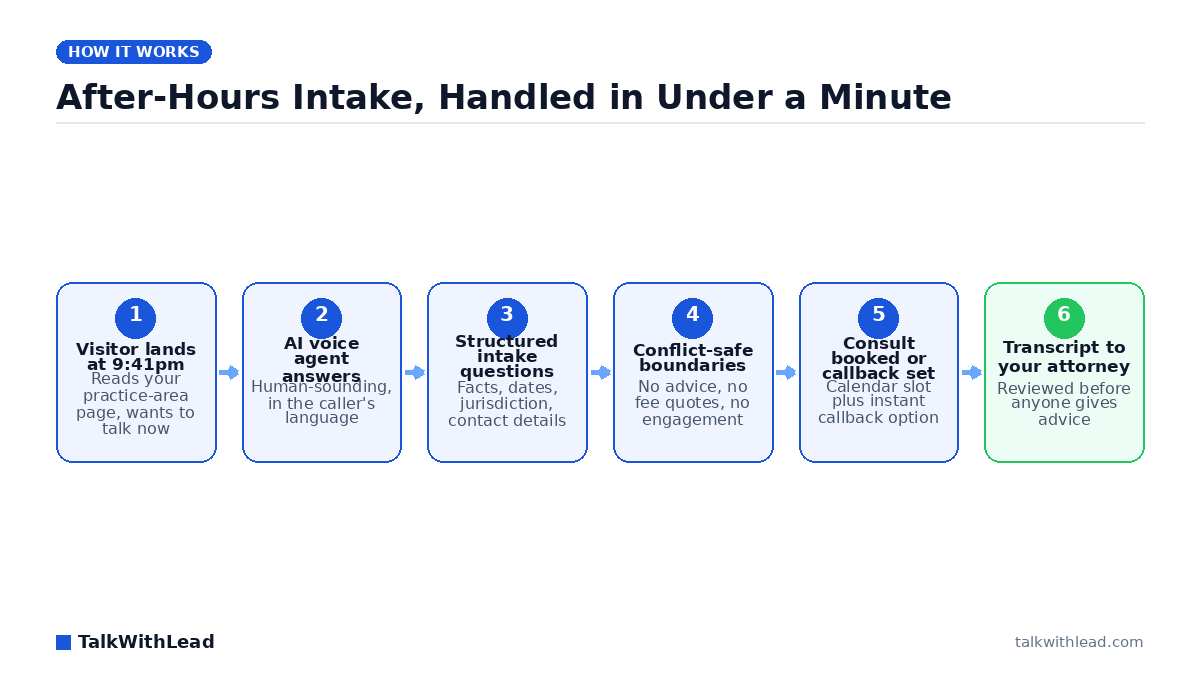
A voice agent on your website and phone line handles the mechanical half:
- Answers instantly, day or night, on the first ring, with a human-sounding voice rather than a menu tree.
- Runs your intake script: incident date, jurisdiction, opposing party, injuries or damages, prior counsel, contact details.
- Screens for the obvious disqualifiers your firm already defined, such as practice area, venue, or a statute date that has clearly passed.
- Books the consult directly into the calendar or triggers an instant callback from the on-call attorney.
- Delivers a clean transcript and summary so the attorney reads a structured file, not a sticky note.
Everything requiring legal judgment stays out of scope by design. See how the same pattern works in adjacent trades in our guides to AI voice answering for dental clinics and virtual receptionists for solo attorneys.
How do you automate intake without compromising compliance?
This is the question that stops most managing partners, and it deserves a direct answer. The compliance risk in automated intake comes from four specific behaviors, and you configure the agent to refuse all four.
Do not let the agent give legal advice. It collects facts and repeats your firm’s published information. If the caller asks “do I have a case,” the correct scripted response is that an attorney will review the details and follow up. That is a boundary you can hear on every recording.
Do not let the agent form a relationship or quote fees. The agent states plainly that speaking with intake does not create an attorney-client relationship and that fee arrangements are set by the attorney in writing. No outcome predictions, no “cases like yours usually settle for” language, ever.
Run conflicts before substance. The agent captures names of all parties early and flags the file. A human runs the conflicts check before an attorney engages on the merits, exactly as with a walk-in.
Handle confidentiality deliberately. Callers volunteer sensitive facts, so treat every transcript as protected material: restricted access, retention limits, and a disclosure at the top of the call that the conversation is recorded and transcribed for intake purposes. Your state bar rules and advertising regulations govern what the agent may say about results and specialization, so the script gets reviewed by your ethics-responsible attorney before it goes live. Watch a boundary-scripted agent handle a live conversation on the TalkWithLead live demo.
Voice, forms, or chatbot: which converts legal traffic?
Practice-area pages usually offer a contact form and sometimes a chat bubble. Both ask a distressed person to type their worst week into a text box and wait.
| Intake dimension | Contact form | Website chatbot | AI voice agent |
|---|---|---|---|
| Response time | Hours to next day | Instant, but text only | Instant, live conversation |
| Works after hours | Collects only | Yes | Yes, with booking |
| Distressed caller experience | Poor | Fair | Strong |
| Follow-up detail captured | Whatever fits the fields | Short typed replies | Full narrative plus transcript |
| Non-English callers | Rarely supported | Sometimes | 50+ languages |
| Books the consult itself | No | Sometimes | Yes, or instant callback |
Voice wins for legal because talking is how people explain a mess. TalkWithLead’s agent picks up the conversation on the page, speaks in 50+ languages, and includes unlimited long-distance calling, so a family calling about a cross-border matter reaches you the same way a local does. Our breakdown of AI voice agents versus chatbots covers the conversion mechanics in detail.
Illustrative ROI math for a small firm
These numbers are an illustration, not a customer result. Adjust them to your own case economics.
Picture a four-attorney firm that gets 120 inbound inquiries a month, with 45 of them arriving outside staffed hours. Say even 1 in 5 of those after-hours inquiries would have signed if someone had answered live: that is 9 signed matters a month lost to voicemail. At an assumed average fee of $4,000 per signed matter, the annual gap is roughly $432,000. You do not need the assumption to be right; you need it to be closer to right than zero, which is what voicemail delivers. Run your own version with the free missed-call revenue calculator.
Cost framing, plainly: after-hours legal answering services are typically priced per minute or per call and climb fast in a busy month, while an AI voice agent is priced as a flat monthly subscription regardless of call volume. Compare plans on the TalkWithLead pricing page, and see our analysis of whether an AI receptionist is worth it for a law firm.
Best for, and not the right fit if
Best for: consumer-facing practices with volume and urgency — personal injury, family, criminal defense, immigration, employment, and estate planning firms whose website traffic peaks at night and whose staff does not.
Not the right fit if: your matters arrive entirely through referral relationships, your practice is transactional corporate work with no inbound web volume, or your state bar interpretation prohibits recorded automated intake without a specific consent process you are unwilling to implement.
How to roll it out in two weeks
- Write the intake script by practice area. Pull the questions your best paralegal already asks. Mark the hard stops: no advice, no fees, no outcomes.
- Get ethics sign-off. One attorney reviews the script and the recording disclosure against your state rules before launch.
- Install the widget and route the phone line. Put the voice agent on every practice-area page, not just the contact page.
- Set escalation rules. Define which calls trigger an instant callback to the on-call attorney versus a next-morning consult slot.
- Review the first 50 transcripts. Tighten questions, fix pronunciation of local venue names, and cut anything that reads like advice.
- Measure one number. Signed consults per 100 after-hours inquiries, before and after. Everything else is vanity.
The firms that win the 9:41pm call are not the ones with the best brochure. They are the ones that answered. Start free with TalkWithLead and let your next after-hours caller reach a voice instead of a beep. If you want to see the speed argument in numbers first, read our piece on how fast you should call a new lead.
FAQ
Is AI intake allowed under legal ethics rules?
Bar rules generally permit non-lawyer staff and technology to gather information, so long as the system does not give legal advice, set fees, or hold itself out as a lawyer. The obligations that matter are supervision, confidentiality, conflicts screening, and truthful advertising. Configure the agent to collect facts and schedule only, disclose recording, and have an attorney review your script against your state’s rules before launch.
Can an AI voice agent give legal advice to callers?
No, and it should be configured to refuse. When a caller asks whether they have a case or what it is worth, the scripted answer is that an attorney will review the details and respond. That boundary is auditable on every transcript, which is easier to defend than an undertrained human receptionist improvising at midnight.
How much does law firm intake automation cost?
Legal answering services usually bill per minute or per call, so a heavy month costs more than a slow one. AI voice agents are generally sold as a flat monthly subscription that does not move with call volume, which makes budgeting predictable during ad campaigns. Compare current plans on the pricing page.
Will clients be annoyed talking to an AI?
Callers react to being helped, not to the technology label. A voice that answers on ring one, asks sensible questions, and books a real appointment beats a voicemail box or a hold queue. Disclose that it is an automated intake assistant, keep the handoff to a human fast, and the objection mostly disappears.
Does it handle Spanish and other languages?
TalkWithLead’s agent speaks 50+ languages and includes unlimited long-distance calling, so a Spanish-speaking caller or a family member calling from abroad gets the same intake quality as an English-speaking local. For firms in immigration or personal injury, that is often where the unclaimed case volume is sitting.
What happens to the information the agent collects?
It becomes a structured intake record: transcript, summary, contact details, and the calendar booking, delivered to your team for conflicts screening and attorney review. Treat it as confidential client material with restricted access and a retention policy, the same as any intake file. You can watch the full flow on the live demo.