Every visitor who leaves your site without talking to a human is a lead your competitor gets to call first. The click-to-call vs callback widget vs AI voice agent decision is really one question: how long does a ready buyer have to wait before a voice answers? Three seconds, three hours, or never.
TL;DR: Click-to-call only helps visitors already willing to dial and wait on hold. A callback widget captures more intent but still queues the lead behind a human’s availability. An AI voice agent answers the moment a visitor taps — 24/7, in 50+ languages, with unlimited long-distance calling — so the conversation happens while interest is at its peak. For most websites, the AI voice agent converts the most because it removes the wait entirely.
What each option actually does
These three tools look similar on a page — a button, a bubble, a phone icon — but they behave completely differently once a visitor engages.
- Click-to-call is a
tel:link. The visitor taps, their phone dials your number, and everything after that depends on whether someone picks up. On desktop it often does nothing useful at all. - Callback widget collects a phone number and promises a call back — sometimes in 28 seconds, sometimes whenever your team gets to it. It converts the visitor into a task in someone’s queue.
- AI voice agent starts a real, spoken conversation right there in the browser. A human-sounding voice greets the visitor, answers questions, qualifies them, and books the next step or connects them to a person.
Only one of those three guarantees a voice on the other end. That distinction decides the conversion rate.
Which one converts more website visitors?
Conversion follows response speed, and the evidence on that is unusually blunt. The MIT Lead Response Management study found you’re about 21× more likely to qualify a lead contacted within 5 minutes than one contacted at 30 minutes. Every minute a lead spends waiting is conversion you already lost.
Now map that to the three tools. Click-to-call is instant only if your line is answered instantly — and answering is the weak link. According to a 411 Locals study of 85 small businesses across 58 industries, only 37.8% of incoming calls were answered by a live person. A callback widget shifts the wait to your team’s response time, which on a busy Tuesday afternoon is rarely five minutes. An AI voice agent has no queue and no lunch break.
Want to hear what that sounds like before you decide? Take the Live Demo and talk to the agent yourself.
Side-by-side comparison
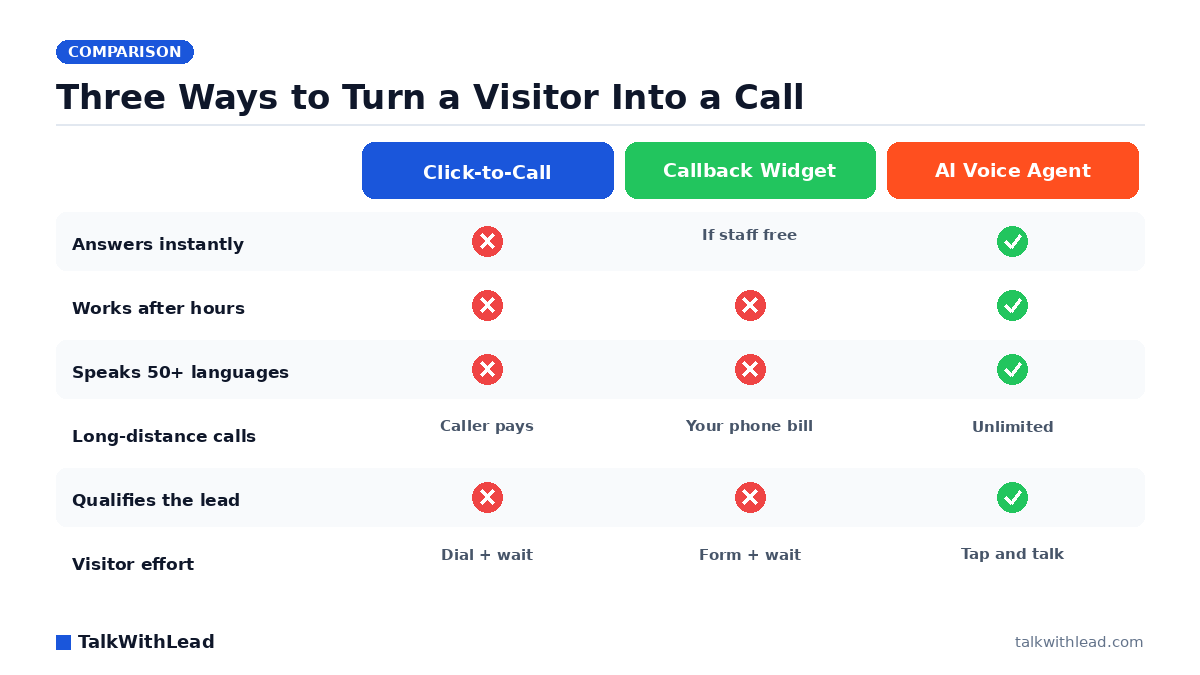
| Dimension | Click-to-Call | Callback Widget | AI Voice Agent |
|---|---|---|---|
| Time to first voice | However long the phone rings | Minutes to hours | Seconds |
| Works after hours | No | Request logged only | Yes, fully |
| Desktop visitors | Poor (no dialer) | Good | Good |
| Languages | Whoever answers | Whoever calls back | 50+ languages |
| Long-distance leads | Caller pays, many won’t | Your phone bill | Unlimited long-distance |
| Lead qualification | Manual | Manual | Automatic, during the call |
| Staffing needed | Full coverage | Full coverage | None for first contact |
| Best use | Mobile, ready buyers | Teams with fast callers | Any site, any hour |
Read the rows top to bottom and a pattern shows up: the first two options are fine when a person is sitting there ready to answer. The third one is the only one designed for the hours and languages when nobody is.
The math on the leads you never hear from
Here’s an illustrative example, not a customer result. Say your site gets 4,000 visitors a month and, imagine, even 3 in 100 of them would happily talk to someone about buying. That’s 120 conversations available. If click-to-call captures the handful already dialing and your callback queue reaches half the rest within an hour, you might touch 60 — leaving 60 conversations on the table each month.
Apply your own average deal value to those 60 and the number gets uncomfortable fast. You can run your own version of this math with the free missed-call revenue calculator — put in your real traffic and close rate rather than trusting anyone’s blog arithmetic.
The point isn’t the exact figure. It’s that both click-to-call and callback widgets quietly depend on a human being available, and human availability is the single most expensive thing on this list. Pricing for an always-on AI voice agent sits well below the cost of staffing evenings, weekends, and second languages.
When a click-to-call button is still the right call
Click-to-call earns its place on mobile-heavy sites where visitors arrive already decided — an emergency plumber, a locksmith, a walk-in clinic. If someone’s basement is flooding, they don’t want a conversation. They want your number dialing.
The trap is treating it as your whole strategy. On desktop it’s inert, after hours it’s a voicemail box, and for a visitor who speaks Spanish or French it’s a gamble on who happens to answer. Compare the mechanics in detail in our breakdown of callback widget vs click-to-call vs live chat.
When a callback widget beats both
A callback widget shines for teams with disciplined sales floors and genuine coverage — a mortgage team with licensed loan officers on rotation, an inside-sales group with a five-minute SLA they actually hit. In those setups the widget is a clean intent capture and the human closes it.
It falls apart the moment the callback becomes a to-do item. A lead who filled the form at 7:40 p.m. and gets called at 10:15 a.m. the next day has already spoken to two competitors. If your team can’t promise minutes, an AI voice agent should answer first and hand off warm leads to your people. That handoff pattern is exactly what we cover in AI voice agent vs callback widget vs live chat.
Why the AI voice agent wins most sites
Voice does something no form or chatbot can: it lets a stranger explain their situation in their own words and get an answer in the same breath. A human-sounding AI voice agent picks up in seconds, asks the qualifying questions your best rep would ask, handles the accent and the language, and books the appointment or transfers the call.
Three capabilities carry most of the lift:
- Instant answer. No hold music, no “we’ll get back to you.” The conversation happens at peak intent.
- 50+ languages. A visitor who’d have hung up on an English-only line stays on the phone and converts.
- Unlimited long-distance calling. Out-of-state and international prospects reach you without anyone weighing the cost of the call.
Chatbots were supposed to solve this and mostly taught buyers to close the widget — we broke that down in AI voice agent vs chatbot. Typing is slower than talking, and slower loses.
Honest verdict
Best for: Any business whose website gets leads outside staffed hours, in more than one language, or faster than the team can call back — service businesses, clinics, law firms, real estate, contractors, and SaaS teams with global traffic.
Not the right fit if: You’re a single-person shop with very low traffic who genuinely answers every call within a ring or two, or your sale legally requires a licensed human on first contact. In that case a plain click-to-call button is honest and sufficient.
If you fall in the first group, the fastest way to find out is to run it on your own site. Start free, drop the widget on your highest-traffic page, and count how many conversations happen this week that would otherwise have been silence.
FAQ
What is the difference between click-to-call and a callback widget?
Click-to-call opens the visitor’s phone dialer so they call you and wait for someone to answer. A callback widget collects their number and puts a task in your team’s queue to call them back. The first depends on you answering; the second depends on you calling promptly.
Does an AI voice agent replace my callback widget?
It usually replaces the waiting part of it. The agent answers the visitor immediately, qualifies them, and either books the next step or routes a warm lead to a human. You can still offer a scheduled callback for people who prefer one — it just stops being the only option.
Will visitors know they’re talking to an AI?
The voice is designed to sound natural rather than robotic, and the agent identifies itself honestly. In practice most visitors care far more that someone answered in seconds than about who is on the line.
Which converts better on mobile, click-to-call or an AI voice agent?
Click-to-call converts the small group already committed to dialing. An AI voice agent also captures the much larger group who have a question first and won’t sit through a phone tree to ask it. On mobile, running both is reasonable — the tap-to-talk option catches everyone the dialer loses.
How fast should I respond to a website lead?
Minutes, not hours. Harvard Business Review research found companies that reach a web lead within an hour are nearly 7× more likely to qualify it than those that wait even an hour longer. That’s the entire argument for answering the moment the visitor is on your page.
Do I need to change my phone system to use an AI voice agent?
No. It runs as a widget on your website and handles the call in the browser, then transfers to your existing number when a human is needed. You can try it on the Live Demo before touching anything in your phone setup.